My Account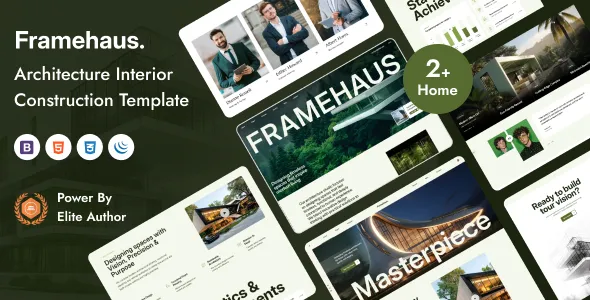
Framehaus – Architecture Construction HTML Template
Framehaus – Architecture Construction HTML Template is a professional website template designed for architecture studios, construction companies, interior design firms, building contractors, engineering consultants, and property development businesses that want to establish a strong online presence. With a design direction focused on architecture, construction, and the built environment, Framehaus provides a foundation for presenting company services, showcasing completed projects, introducing professional teams, and communicating a brand’s approach to design and construction. Whether you operate a boutique architecture practice, a residential construction company, a commercial building firm, or an interior design studio, this HTML template can serve as a starting point for creating a visually appealing and informative business website.
A successful architecture or construction website should communicate more than a list of services. It should demonstrate the quality of the company’s work, explain its professional capabilities, and help potential clients understand the process of working with the business. Framehaus can be adapted to organize project photography, service descriptions, company information, and contact details into a structured online experience. By combining clear messaging with relevant visuals and straightforward navigation, businesses can present their expertise and make it easier for visitors to explore their services.
As an HTML template, Framehaus provides a front-end website foundation that developers can customize according to a company’s branding, content, and technical requirements. The exact page layouts, components, included assets, and dependencies should be confirmed through the current template demo and documentation before implementation.
Professional Website Design for Architecture and Construction
Architecture and construction businesses rely heavily on visual communication. Prospective clients often want to see examples of previous projects, understand the company’s design philosophy, and evaluate whether its experience aligns with their requirements. A professional website can bring these elements together while establishing a recognizable brand identity.
Framehaus – Architecture Construction HTML Template offers a starting point for presenting architectural projects and construction services through a dedicated business website. Its intended industry focus makes it relevant to companies that need to communicate building expertise, design capabilities, project experience, and professional services.
A well-planned website should introduce the business immediately, explain its core offerings, and guide visitors toward useful information. A prominent introduction can communicate the company’s approach, while project galleries and service sections can provide additional detail. Supporting pages can explain the business background, describe its working process, and provide convenient contact options.
The most effective design combines visual appeal with usability. Clear headings, balanced spacing, readable typography, and consistent navigation help visitors understand the website without unnecessary effort. When customizing Framehaus, prioritize the information that prospective clients need before making an inquiry.
Designed for Architecture Studios and Design Practices
Architecture studios need websites that express their creative approach while demonstrating practical expertise. Their projects may include residential buildings, commercial spaces, hospitality environments, offices, public buildings, and renovation work.
Framehaus can provide a foundation for architecture firms that want to organize their work into an accessible digital portfolio. Depending on the available page layouts, developers can adapt the template to present featured projects, architectural services, company information, and contact details.
An architecture studio website should communicate both visual identity and professional capability. High-quality photographs can illustrate completed work, while concise project descriptions can explain the client’s objectives, design considerations, and final outcome.
Consider grouping projects by building type, design approach, location, or project stage when the portfolio contains enough work to support meaningful categories. Each project page should provide useful context rather than relying entirely on photographs.
For the strongest presentation, use authentic images of completed or approved projects and obtain the necessary permissions before publishing them. Accurate project information helps prospective clients understand the firm’s experience and approach.
Construction Company Website Development
Construction businesses need websites that explain their services, demonstrate reliability, and communicate the types of projects they undertake. Residential contractors, commercial builders, renovation specialists, and general construction companies may all benefit from a clear online presentation.
Framehaus – Architecture Construction HTML Template can be adapted as a starting point for presenting construction services and company information. A construction-focused website may include sections describing building services, project management, renovation work, construction methods, completed projects, and inquiry options.
Potential clients often want to know whether a company handles the type and scale of work they have in mind. Use the website to clarify the services offered, the markets served, and the typical project requirements. Where relevant, explain whether the business focuses on residential properties, commercial developments, industrial buildings, or specialized construction work.
Avoid vague descriptions that make every company sound identical. Specific and accurate service information helps visitors understand what the business actually provides and whether it is a suitable partner for their project.
Architectural Portfolio and Project Presentation
A project portfolio is one of the most valuable sections of an architecture or construction website. It gives visitors an opportunity to evaluate the company’s work through real examples rather than general claims.
Framehaus can serve as a starting point for creating a portfolio that presents architectural designs, completed buildings, construction projects, renovations, and interior spaces. The exact gallery and portfolio layouts available depend on the template package.
Each project should have a clear title and relevant supporting information. Depending on the nature of the work, include the project category, location, completion date, approximate scale, materials, design objectives, and a short explanation of the result.
Use high-quality images that demonstrate the project from meaningful angles. Exterior views can communicate the overall structure, while interior photographs may reveal spatial planning, finishes, lighting, and material choices. Construction projects may also benefit from progress photographs when the company has permission to share them.
Keep the presentation consistent across the portfolio. Similar image proportions, concise descriptions, and predictable navigation make it easier for visitors to compare projects and explore the company’s work.
High-Impact Hero Sections
The hero section is usually the first major visual area visitors encounter. For architecture and construction businesses, this section can introduce the company’s identity through a strong headline, a concise description, and a relevant architectural or construction image.
When customizing Framehaus, use the hero section to explain what the business does and identify its main area of expertise. A residential architecture studio might emphasize thoughtful home design, while a commercial construction firm could focus on delivering spaces for business operations.
The supporting text should provide context without overwhelming the visitor. Use a clear call to action that leads to a relevant destination, such as the project portfolio, services page, or contact section.
Select images that reflect the company’s actual work or accurately represent its design focus. Avoid using unrelated stock photography that creates a misleading impression of the business’s experience.
A well-designed hero section should establish the visual tone of the website while making its purpose immediately understandable.
Interior Design and Space Planning Services
Interior design firms often need to communicate their approach to space planning, materials, lighting, furniture selection, and the overall atmosphere of a room. A visual website can help these businesses show how they approach different types of interior environments.
Framehaus may be adapted for interior designers who want to showcase residential interiors, office environments, hospitality spaces, retail interiors, or renovation projects. Its suitability depends on the layouts and visual components available in the template.
Use portfolio images to demonstrate the relationship between space, materials, lighting, and functionality. Descriptions can explain the client’s objectives and the design decisions that shaped the result.
A service section might distinguish between full interior design, consultation, space planning, material selection, styling, and renovation coordination, where those services are genuinely offered.
Keep project information accurate and ensure that images are used with appropriate permission. When presenting conceptual designs or renderings, label them clearly so visitors can distinguish proposed work from completed projects.
Responsive Website Layout for Multiple Devices
Prospective clients may explore an architecture or construction website from desktop computers, tablets, and smartphones. A website that remains easy to navigate across these devices helps visitors review projects and contact the company conveniently.
When working with Framehaus, test the website at different screen sizes. Review navigation menus, image galleries, project grids, service sections, headings, buttons, and contact forms. Pay particular attention to large architectural photographs, which may require different cropping or positioning on smaller screens.
Responsive design involves more than fitting content into a narrower layout. Text must remain readable, interactive elements should be easy to tap, and visitors should be able to move between pages without excessive scrolling or horizontal movement.
A responsive HTML template may provide a useful starting point, but custom changes can affect the final result. Additional scripts, custom CSS, embedded maps, and third-party components should be tested on actual devices or reliable browser emulators.
Construction and Renovation Services
Many construction businesses offer several related services, from new building projects to renovation, remodeling, and property improvements. A website should organize these services so prospective customers can quickly identify the help they need.
Framehaus can be used as a starting point for presenting service categories such as residential construction, commercial building, home extensions, property renovations, interior remodeling, structural work, and project coordination when these offerings match the business.
Each service description should explain the scope of the work and the type of customer it serves. For example, a renovation service may cover updating existing spaces, while a new construction service may focus on coordinating the development of a building from initial planning through completion.
If the business provides estimates or consultations, make the process clear. Explain how prospective clients can submit project information and what details they should prepare before contacting the company.
Avoid implying that the company offers specialist engineering, planning approval, structural certification, or other regulated services unless those services are genuinely available through appropriately qualified professionals.
Services Pages That Explain Business Capabilities
A dedicated services page gives potential clients a structured overview of what the business does. It can also help visitors determine which service is most relevant to their project.
When adapting Framehaus, consider separating major services into clear sections or individual pages. An architecture firm might distinguish concept design, architectural planning, and design development, while a construction company could organize its offerings around new builds, renovations, and commercial projects.
Each section should explain the service, its practical value, and the situations in which a client might need it. Where appropriate, link the service to relevant portfolio examples so visitors can see how the company applies its expertise.
Use clear language and avoid unnecessary technical terminology. If specialized terms are important, explain them in accessible language so clients without a construction or architecture background can understand the offering.
The exact service-page structure should reflect the company’s real capabilities and the layouts supported by the HTML template.
About Us and Company Profile Sections
The About Us page provides an opportunity to explain the company’s background, professional values, experience, and approach to projects. For architecture and construction businesses, this information can help visitors understand the people and working principles behind the portfolio.
A Framehaus-based website can include a company profile that explains the firm’s history, areas of expertise, design philosophy, and approach to collaboration. Depending on the business, it may also introduce key team members and describe how projects are managed.
Use specific and verifiable information. If the company has completed a range of projects, explain the relevant experience without exaggerating its scale or claiming achievements that cannot be supported.
A genuine company story can help differentiate the business from competitors. Explain what the company prioritizes, how it works with clients, and what customers can expect during the engagement.
Keep the writing concise and focused on information that matters to prospective clients rather than filling the page with generic corporate statements.
Team Profiles and Professional Expertise
Architecture and construction projects often involve collaboration between designers, engineers, project managers, contractors, and other specialists. A team section can introduce the people responsible for delivering the company’s services.
If Framehaus includes suitable team layouts, they can be customized to present staff photographs, names, roles, professional biographies, and relevant areas of expertise.
Keep team information current and accurate. Qualifications, registrations, memberships, and professional designations should only be displayed when they genuinely apply to the individual.
Short biographies are usually more useful than long, repetitive descriptions. Focus on relevant experience, project responsibilities, specialist knowledge, and the person’s contribution to the business.
If the company works with external consultants or subcontractors, represent those relationships accurately. Avoid presenting independent professionals as permanent employees when that is not the case.
Contact Pages and Project Inquiry Forms
A construction or architecture website should make it easy for prospective clients to ask questions or discuss a potential project. A clear contact page can reduce uncertainty and provide a straightforward route to the business.
When customizing Framehaus, consider including the company’s contact details, business address where appropriate, operating hours, and a project inquiry form. If the business serves a specific region, explain its service area clearly.
A useful project inquiry form might request a name, email address, project type, location, approximate timeline, and a short description of the requirements. Collect only the information needed for the intended purpose.
Remember that an HTML form does not necessarily process or deliver submissions on its own. Depending on the template, you may need to configure a server-side handler, email service, or compatible form-processing integration.
Test the form before publishing the website. Confirm that submissions reach the correct destination, required fields are validated, errors are communicated clearly, and users receive an appropriate confirmation.
Project Timelines and Construction Process
Construction and architectural projects involve multiple stages, and prospective clients may want to understand how the company approaches planning and delivery. A process section can explain these stages in an accessible way.
Depending on the services provided, a business may describe initial consultation, project requirements, concept development, planning coordination, detailed design, construction preparation, implementation, and final handover.
Framehaus can be adapted to present this information through a structured sequence, timeline, or set of explanatory sections if the required layout can be created with the included files.
The process description should reflect the company’s actual workflow. Not every project follows the same sequence, and some stages may depend on local approvals, specialist consultants, client decisions, or site conditions.
Clear explanations can help customers understand what to expect and identify the information they need to prepare before beginning a project.
Visual Storytelling for Architectural Brands
Architecture is a visual discipline, and carefully selected imagery can communicate the character of a project more effectively than a long paragraph alone. Photographs, drawings, and renderings can help visitors understand spatial relationships, materials, design concepts, and finished results.
When using Framehaus, select images that reinforce the message of each page. A residential portfolio might focus on exterior views, interior spaces, and details, while a construction company could show completed buildings, project stages, and examples of workmanship.
Image quality and consistency matter. Use appropriately sized photographs, maintain a balanced visual rhythm, and avoid mixing unrelated image styles throughout the website.
Add descriptive alternative text to informative images where appropriate. This supports accessibility and helps explain image content when images cannot be viewed.
Visual storytelling should remain truthful. Clearly identify conceptual renderings, proposed designs, and completed projects so visitors understand the status and nature of the work being presented.
Customizing the Template to Match Your Brand
Every architecture or construction business has a distinctive identity. Some firms prefer a minimal aesthetic with generous whitespace and restrained typography, while others use stronger colors and more prominent visual elements to communicate energy and scale.
Framehaus provides a starting point that developers can customize to align with the brand’s goals and target audience. Depending on the template structure, changes may involve the color palette, typography, logos, images, navigation, page content, and layout styling.
Start by defining the company’s visual direction. Choose colors that support readability and reflect the brand, select suitable fonts, and establish consistent styles for headings, buttons, links, and section backgrounds.
Replace demo text and images with content relevant to the actual business. Review the website as a complete experience so that the homepage, portfolio, service pages, and contact page feel consistent.
Keep a copy of the original template files before making extensive changes. This provides a reference point for troubleshooting and helps prevent accidental loss of the original structure.
HTML Template Structure and Developer Customization
HTML templates provide a foundation for structuring web content using standard front-end technologies. Framehaus is intended as an HTML website template, making it relevant to developers who want to work with the supplied markup and associated assets.
Depending on the package, the source files may include HTML pages, CSS stylesheets, JavaScript files, images, icons, fonts, and third-party libraries. Review the directory structure and documentation to understand how the template is organized before modifying it.
Developers can adapt page content, navigation links, images, visual styles, and supported interactive elements to suit the project. Additional backend functionality may require separate development or integration with an appropriate service.
An HTML template is not automatically a complete content management system. If the business needs an administrative interface for editing projects, managing inquiries, or publishing articles, those capabilities may need to be implemented separately or provided through a CMS.
Likewise, dynamic project databases, customer portals, quotation systems, and other server-side features should be treated as additional development requirements unless the template documentation explicitly includes them.
Search Engine Optimization for Architecture Websites
Search engine optimization can help potential clients discover architecture and construction businesses when searching for relevant services. A well-organized website makes it easier for visitors to understand the company’s expertise and for search engines to interpret the content.
Framehaus can be part of an SEO-oriented website when combined with useful content, clear page structure, and appropriate technical configuration. However, using a specific HTML template does not guarantee search rankings, indexing, or website traffic.
Create unique page titles and meta descriptions for the homepage, service pages, and portfolio projects. Describe each page accurately and use relevant industry terms naturally.
Organize headings logically and write descriptive link text that helps visitors understand where each link leads. Use meaningful image filenames and suitable alternative text where appropriate.
For businesses serving particular regions, explain the service area accurately and include relevant location information when it is useful to prospective clients. Avoid creating low-value pages that repeat the same text with only a city name changed.
Project pages can provide valuable search content when they include original descriptions, genuine photographs, and relevant information about the work. Keep project details accurate and avoid publishing confidential client information without permission.
Local SEO for Construction Companies and Architects
Many architecture and construction businesses work within specific geographic areas. Local search visibility can help potential clients identify firms that serve their region or specialize in projects within a particular market.
When adapting Framehaus for a local business, make the service area clear on relevant pages. Include accurate business contact information and ensure that the same details are used consistently across the website and legitimate business listings.
Service pages can explain the company’s work in its actual operating regions. Project case studies may also mention relevant locations when disclosure is permitted and the information helps visitors understand the company’s experience.
Avoid adding city names unnaturally throughout every paragraph. Local content should be useful and specific, such as explaining the types of projects undertaken in a region or the company’s familiarity with local construction requirements.
If the business maintains a verified local business profile, keep its website link, contact details, and operating information accurate. Local SEO results depend on multiple factors beyond the template itself.
Website Performance and Image Optimization
Architecture websites often use large photographs and visual galleries to showcase projects. Although these images can improve presentation, unoptimized files may increase loading times and make the website less comfortable to use.
The performance of a Framehaus website depends on image sizes, code quality, hosting, fonts, scripts, external resources, and the changes made during customization.
Resize images to dimensions appropriate for their display areas and compress them while preserving enough detail to communicate the project accurately. Use suitable modern image formats where supported, and avoid loading unnecessarily large files for small thumbnails.
Review JavaScript and CSS resources to identify assets that are not needed. If the template includes animation libraries or other optional dependencies, determine whether they contribute meaningfully to the website.
Test key pages after implementation, including the homepage, portfolio, service pages, and contact page. Check both mobile and desktop performance, because image-heavy layouts may behave differently across devices.
A template does not guarantee a specific performance score. Optimization requires attention to the entire website and the hosting environment.
Accessibility and User-Friendly Navigation
An accessible website helps more visitors navigate content, understand services, and contact the business. Architecture and construction websites should be designed so that essential information is not available only through visual presentation.
When customizing Framehaus, use readable typography, sufficient color contrast, descriptive navigation labels, and a logical heading hierarchy. Ensure that informative images have suitable alternative text and that form fields have clear labels.
Buttons and links should communicate their purpose. Avoid vague labels when a more descriptive option would help visitors understand the destination.
Check whether interactive menus, galleries, and other controls can be used with a keyboard where appropriate. Avoid relying on color alone to communicate important status information.
Accessibility depends on the underlying template, custom code, content, and any additional components. Test the finished website and correct issues identified through practical evaluation.
Browser Compatibility and Quality Testing
A professional business website should display and function reliably in the browsers commonly used by its audience. Differences in rendering and browser support can affect typography, image layouts, navigation, and interactive components.
After customizing Framehaus, test the website in current versions of major browsers and at several screen sizes. Check whether menus open correctly, portfolio links work, images load, and forms behave as intended.
Review every navigation link and call-to-action button. Remove placeholder destinations and ensure that visitors are not sent to unfinished pages.
If the template relies on third-party JavaScript libraries, verify that they load correctly and remain compatible with the selected browser environment. Check the browser console for errors that could interfere with the user experience.
Repeat quality testing after substantial design changes or dependency updates. A final review before publication can help identify issues that are easy to overlook during development.
Security and Website Maintenance
Although a static HTML template may have fewer server-side responsibilities than a complex web application, the website still requires appropriate maintenance. Security considerations become particularly important when the site includes forms, third-party integrations, or custom backend functionality.
Use reliable hosting, enable HTTPS, keep server software and any dependencies updated, and restrict access to administrative resources where applicable. If custom form processing or database functionality is added, implement suitable input validation and secure handling of submitted data.
Review third-party scripts and libraries before including them. Remove unused dependencies and monitor relevant updates when those components are part of the website.
Create backups before significant changes and maintain a copy of the working source files. If the website supports contact submissions or stores personal information, establish appropriate access controls, privacy practices, and data retention procedures.
The exact security requirements depend on the features implemented, the hosting environment, and the information handled by the website.
Who Should Consider Framehaus?
Architecture studios: Firms that want to showcase building designs, explain architectural services, and present selected projects to prospective clients.
Construction companies: Businesses seeking a dedicated website for building services, renovation work, project information, and customer inquiries.
Interior design practices: Designers who need a visual portfolio for residential, commercial, hospitality, or retail interiors.
Engineering and building consultants: Professional firms that want to describe their expertise, explain their services, and provide contact information.
Property development businesses: Developers who need a website to introduce projects, present development concepts, and communicate with interested parties.
Renovation specialists: Companies that focus on property upgrades, remodeling, extensions, and related construction services.
Web developers and agencies: Professionals who want an HTML starting point for client websites in the architecture and construction industries.
Suitability depends on the template’s actual page layouts, supported technologies, licensing terms, and the specific requirements of the project.
Benefits of Using an Architecture Construction HTML Template
Starting with an industry-focused template can help organize the design and content of a professional business website. Instead of creating every page structure from the beginning, developers can adapt an existing foundation to the company’s requirements.
Framehaus may help streamline the initial website design process by providing a starting point for presenting architectural projects, construction services, and company information.
Potential advantages include:
- A website foundation tailored to architecture and construction businesses.
- A structured approach to presenting services and project portfolios.
- Opportunities to create a consistent brand identity.
- Editable front-end files for developers working with HTML, CSS, and JavaScript.
- A starting point for responsive page layouts, subject to verification and testing.
- Flexibility to adapt content to different business specialties.
- A framework for connecting visitors with project inquiries and contact information.
- Opportunities to improve content organization and search visibility through thoughtful implementation.
These benefits depend on the included files, template quality, customization, and technical setup. Review the current package details before making assumptions about specific features or components.
Best Practices for Launching a Framehaus Website
Before publishing a website built with Framehaus, establish the main objective of the project. Decide whether the primary goal is to showcase completed work, attract new construction clients, promote architectural services, or generate project inquiries.
Prepare genuine project photographs and accurate company information. Write clear service descriptions and ensure that the portfolio reflects the work the business is authorized to display.
Replace demo content throughout the website, including headings, image captions, contact details, page titles, and footer links. Check that every navigation item leads to the correct destination.
Test the layout on mobile and desktop devices. Review image loading, text readability, menu behavior, and the functionality of all forms and buttons.
Configure relevant SEO metadata and verify that important pages can be accessed by search engines. Optimize large images and remove unnecessary resources where appropriate.
Finally, complete a quality review of the entire customer journey. Visitors should be able to understand the business, evaluate its services, explore relevant projects, and contact the company without encountering broken links or confusing instructions.
Why Choose Framehaus – Architecture Construction HTML Template?
Choosing an appropriate website template can simplify the early stages of building a digital presence for an architecture or construction business. Framehaus – Architecture Construction HTML Template is an option to evaluate when looking for a front-end foundation focused on the built environment.
Its industry-specific positioning makes it relevant to businesses that need to present architectural work, explain construction services, and communicate their professional identity. With thoughtful customization, the website can be organized around the company’s portfolio, expertise, service offerings, and client inquiry process.
Before implementation, review the current demo and documentation to confirm the included pages, source files, dependencies, responsive behavior, licensing conditions, and browser requirements. Determine whether the template provides the layouts needed for your project or whether additional development will be necessary.
The quality of the final website depends on the accuracy of its content, the relevance of its imagery, the usability of its navigation, and the reliability of its technical implementation. A suitable template combined with careful customization and testing can help create a more professional online experience for prospective clients.
Final Thoughts
Framehaus – Architecture Construction HTML Template provides a potential starting point for architecture studios, construction companies, interior designers, renovation specialists, and related professional businesses seeking a dedicated website.
By adapting its available design structure to the company’s identity and services, developers can create a website that presents project portfolios, explains professional capabilities, and provides clear routes for customer inquiries.
A successful architecture or construction website should combine strong visual presentation with useful information, responsive behavior, accessible navigation, and reliable performance. Accurate project descriptions, optimized photographs, thoughtful SEO, and thorough quality testing all contribute to a stronger result.
Review the actual template features before implementation, customize the content to reflect the business accurately, and focus on helping visitors understand the company’s work and take the next step with confidence.