My Account
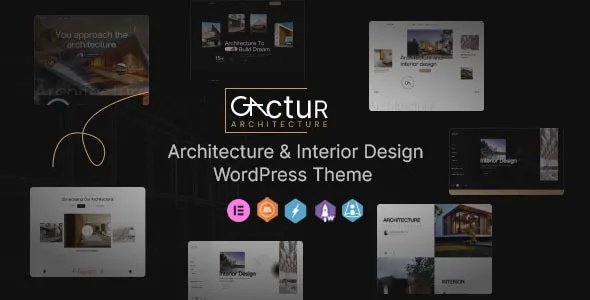
Gactur – Architecture & Interior Design WordPress Theme
Gactur – Architecture & Interior Design WordPress Theme is a website design solution for architecture firms, interior designers, architectural studios, design consultants, construction professionals, and creative agencies looking to establish a professional online presence. A well-designed architecture website helps businesses showcase completed projects, communicate their design philosophy, introduce their team, and present their services to potential clients. Gactur offers a starting point for building a portfolio-focused WordPress website that highlights creative work while organizing essential business information into a clear and consistent digital experience.
In the architecture and interior design industry, visual presentation plays an important role in communicating expertise. Prospective clients often want to explore project photographs, review design styles, understand the services offered, and learn about the process before contacting a studio. A professional website can bring these elements together, helping visitors understand the firm’s capabilities and determine whether its approach matches their requirements.
Whether you specialize in residential architecture, commercial interiors, contemporary homes, office planning, renovation projects, landscape concepts, or bespoke interior styling, Gactur can be evaluated as a foundation for presenting your work online. WordPress provides content management tools for maintaining pages, publishing articles, organizing images, and updating business information. The final layouts, customization options, and additional capabilities available with Gactur depend on the installed theme version and its documented compatibility with WordPress tools.
What Is Gactur – Architecture & Interior Design WordPress Theme?
Gactur is an architecture and interior design WordPress theme intended for businesses and professionals who want to present their creative projects through a dedicated website. An industry-focused theme provides a visual foundation for organizing portfolios, describing services, introducing design professionals, and communicating a firm’s approach to architecture or interior spaces.
Architecture firms may need to display residential buildings, commercial developments, renovation projects, and conceptual designs. Interior design studios often require dedicated project galleries that highlight materials, lighting, furniture arrangements, color palettes, and spatial planning.
Gactur can be considered for these types of projects, depending on the layouts and customization controls provided by the current version. A studio may use its website to introduce its philosophy, explain its design process, and present selected case studies that demonstrate its expertise.
WordPress makes it possible to manage project descriptions, upload photographs, publish articles, and maintain navigation through an administrative interface. Before installing Gactur, review the current theme demo and documentation to verify which portfolio layouts, editing tools, and integrations are available.
Modern Website Design for Architecture and Interior Studios
A professional architecture website should reflect the quality, creativity, and attention to detail associated with the firm’s work. Its design needs to complement the projects rather than compete with them for attention.
Gactur is positioned for architecture and interior design websites, making a carefully organized visual presentation an important consideration. A clean layout, consistent typography, balanced spacing, and high-quality project imagery can help visitors explore the studio’s work in a structured manner.
An architecture firm might prefer a refined, minimalist design that emphasizes building photography and technical expertise. An interior design studio may use a more expressive visual identity to communicate its approach to materials, furnishings, colors, and spatial experiences.
The homepage can introduce the business, highlight selected projects, summarize its services, and guide visitors toward detailed portfolio pages. Additional sections may introduce the team, explain the design process, and provide convenient contact options.
Visual consistency is essential across the website. Use a defined color palette, readable typography, and an appropriate image style to create a recognizable brand identity. The final design should communicate professionalism while keeping project information accessible.
Showcase Architectural Projects and Building Designs
A strong architecture portfolio demonstrates how a firm approaches different building types, site conditions, functional requirements, and design objectives. Project pages allow prospective clients to explore completed work and understand the thinking behind each design.
Gactur can be evaluated for a website that presents architectural projects through organized portfolio sections, depending on the available theme layouts. Projects may include residential homes, commercial buildings, office developments, hospitality properties, renovations, or conceptual architecture.
Each project description should explain the essential details, including the project type, objectives, design approach, and completed work. Where appropriate, include information about the location, project scale, materials, or the firm’s specific responsibilities.
For example, a residential architecture case study might explain how the design responds to natural light, circulation, privacy, and the surrounding environment. A commercial project could focus on functionality, spatial organization, accessibility, and the client’s operational requirements.
Use clear photographs, architectural drawings, and renderings where you have permission to publish them. Ensure that the images represent the actual project accurately and that any conceptual visuals are identified appropriately.
A carefully curated portfolio can help visitors evaluate the firm’s design approach without overwhelming them with too many unrelated examples.
Interior Design Portfolio for Residential and Commercial Spaces
Interior designers need a website that communicates their ability to transform spaces through thoughtful planning, material selection, lighting, furniture, and visual coordination. A portfolio provides an opportunity to demonstrate how these elements work together in completed projects.
Gactur can serve as a starting point for presenting residential and commercial interior design work, subject to the theme’s available layouts and customization options.
Residential projects may include apartments, villas, kitchens, bedrooms, living rooms, bathrooms, and customized storage solutions. Commercial interiors may cover offices, restaurants, retail spaces, hotels, studios, and other business environments.
Each project page can include a concise introduction, photographs of the finished space, and an explanation of the client’s objectives. Where relevant, describe the design choices that shaped the outcome, such as the use of natural light, material combinations, furniture arrangements, or space-saving solutions.
Before-and-after photographs can be useful for renovation projects when both sets of images are available and approved for publication. Consistent photography and image proportions can make the portfolio easier to browse.
Rather than displaying images without context, explain the purpose of each project and the design decisions that make it distinctive. This approach helps potential clients understand the value of the studio’s work.
Architecture and Interior Design Services
A services section helps visitors understand the professional support a studio provides. Architecture and interior design firms may offer several services, so clear descriptions can help prospective clients identify the right starting point.
A Gactur-based website can be organized around dedicated service pages, depending on the theme’s available layouts. The exact service categories should reflect the firm’s real capabilities and professional scope.
Potential service categories include:
- Residential architecture and custom home design
- Commercial architecture and building planning
- Interior design and space planning
- Kitchen and bathroom design
- Office and workplace interiors
- Renovation and remodeling consultation
- Furniture, lighting, and material selection
- Architectural visualization and design presentations
- Design consultation and project coordination
Each service page should explain what the service involves, who it is intended for, and what clients can expect from the process. If certain services are available only in specific locations or project types, communicate those limitations clearly.
Avoid listing services that the firm does not provide. Accurate descriptions help potential clients assess whether their requirements match the studio’s expertise before submitting an inquiry.
Responsive Design for Desktop, Tablet, and Mobile
Potential clients may explore an architecture portfolio on a desktop computer, review project photographs on a tablet, or open a shared link on a smartphone. A responsive website helps make project information accessible across different devices.
When evaluating Gactur, review the current demo on different screen sizes and test the installed theme before launch. The actual responsive behavior may depend on the theme version, custom styling, image galleries, and additional WordPress plugins.
On mobile devices, navigation should be straightforward, text should remain readable, and project photographs should fit the available screen space. Buttons and contact links should be convenient to select, while long case studies should be divided into manageable sections.
Desktop layouts can accommodate larger project galleries, detailed descriptions, and additional portfolio content. However, a wider screen should not result in excessive spacing or confusing page structures.
Pay special attention to image-heavy portfolio pages, embedded videos, interactive galleries, and contact forms. These components may behave differently across browsers and devices.
Testing the homepage, service pages, portfolio galleries, project details, and contact page helps ensure that visitors can navigate the website comfortably regardless of the device they use.
Homepage Layout and Project Highlights
The homepage introduces the design studio and helps visitors discover the information most relevant to their needs. It should communicate the firm’s professional focus, present selected work, and provide a clear path toward services or contact details.
Gactur can be considered for a homepage structure that combines a strong introduction with project highlights, service summaries, studio information, and contact opportunities, depending on the available layouts.
An introductory headline should explain the firm’s main focus in straightforward language. Supporting text can describe the type of projects the studio undertakes and the clients it serves.
Featured projects should represent the quality and range of the firm’s work. Choose a small number of strong examples and link them to detailed case studies where visitors can explore the design process and completed results.
A services overview can help visitors identify relevant offerings, while an About section introduces the team’s experience and working philosophy. A clear contact link makes it easier for interested clients to start a conversation.
Not every homepage requires every possible section. A small interior design studio may prioritize residential projects, while a larger architecture firm may need to highlight several service categories and project types.
The most effective homepage structure is one that supports the visitor’s needs while maintaining a consistent visual identity.
Project Case Studies and Design Process
Project case studies help architecture and interior design professionals explain the work behind the final photographs. They demonstrate how the firm interprets client requirements, evaluates constraints, and develops practical design solutions.
Gactur can be evaluated for presenting individual projects through dedicated portfolio pages, depending on its available templates and customization options.
A useful case study may include the client’s objectives, project background, design challenges, proposed approach, selected materials, and completed deliverables. If the project involved collaboration with contractors, consultants, or other professionals, describe the studio’s contribution accurately.
For an interior renovation, the case study might explain how the layout was reorganized to improve circulation or how material choices support the intended atmosphere. An architectural project may discuss the relationship between the building, its site, its function, and its environmental context.
Use photographs, plans, sketches, or renderings where they help explain the process. Include captions when additional context is necessary, and ensure that all published materials are authorized for use.
Detailed case studies can help prospective clients understand not only what the studio creates, but also how it approaches real-world design challenges.
Customization and Professional Brand Identity
A website should reflect the identity of the architecture firm or interior design studio rather than appear like an unchanged demonstration template. Consistent branding helps visitors recognize the business and understand its professional positioning.
Depending on the available settings and compatible editing tools, Gactur may allow customization of elements such as colors, typography, layouts, spacing, images, and other presentation details. The specific options should be confirmed through the current documentation.
An architecture studio may choose a restrained palette, strong typography, and structured project layouts. An interior design business may prefer warmer colors, editorial styling, and image-focused pages that communicate its design personality.
Consistency should extend across the logo, headings, buttons, project captions, and other interface elements. Use imagery that represents the firm’s actual work and supports its intended audience.
If you use a page builder or custom CSS, confirm compatibility with the installed theme version and test the resulting layouts on different devices. Keep a backup before making major changes so the website can be restored if an adjustment causes unexpected problems.
SEO-Friendly Website Structure for Architecture Firms
Search engine optimization can help potential clients discover architecture and interior design services through relevant searches. A clear website structure provides a foundation for organizing project information and making the firm’s expertise easier to understand.
Each important page should have a descriptive title, logical headings, and original content that serves a specific purpose. Separate service pages can explain different offerings, while individual case studies can provide detailed information about completed projects.
Where appropriate, location information can help communicate the areas in which the firm operates. Accurate business details and useful service-area information can be valuable for studios serving specific cities or regions.
Use descriptive URLs and internal links to connect related content. For example, a residential architecture case study can link to the firm’s residential design services, while an article about material selection can connect to relevant interior projects.
Optimize image dimensions and use meaningful alternative text for images that convey important information. Compatible SEO plugins may assist with metadata, XML sitemaps, canonical settings, and other technical tasks.
Write naturally for prospective clients rather than repeating keywords excessively. Search visibility depends on content quality, competition, technical performance, and other factors. A theme can provide a useful structural foundation but cannot guarantee specific search rankings or client inquiries.
Blogging and Architecture Design Resources
A blog can help architecture and interior design professionals share knowledge, explain design decisions, and provide useful information to potential clients. WordPress provides publishing tools that allow articles to be maintained alongside service pages and portfolio projects.
Gactur can be considered for websites that combine portfolio content with educational articles, industry updates, project insights, or design inspiration, depending on the available blog layouts.
Potential topics include residential planning, interior color schemes, lighting design, sustainable materials, workspace organization, renovation preparation, and architectural trends. Articles should be practical and relevant to the firm’s expertise.
For example, an interior designer could publish an article explaining how lighting influences the appearance of a room. An architecture firm might discuss common considerations when planning a new home or renovating an existing building.
Use clear headings, concise paragraphs, and relevant visuals to make articles easy to read. Internal links can direct readers toward related case studies or service pages, helping them explore the firm’s work in greater depth.
A sustainable publishing schedule is more useful than producing large amounts of generic content. Prioritize accuracy, originality, and information that answers genuine questions from prospective clients.
Contact Forms and Project Inquiry Management
A portfolio website should make it easy for potential clients to discuss a project or request additional information. A convenient inquiry process helps visitors take the next step after exploring the studio’s services and work.
A Gactur-based website can be planned with contact details, inquiry forms, email links, or compatible form plugins, depending on the features available in the selected setup.
A project inquiry form may collect a name, email address, project type, approximate location, and a short description of the client’s requirements. Optional information about project scope or expected timelines may also be useful, provided the form remains simple to complete.
Explain what happens after an inquiry is submitted, where appropriate. If the studio typically begins with an introductory consultation, the website can describe that process and provide information about the next steps.
Contact forms should use clear labels and understandable validation messages. Avoid requesting unnecessary sensitive information or making visitors complete lengthy forms before they can make an initial inquiry.
Before launch, test form submission, email delivery, spam protection, and confirmation messages. Regular testing helps ensure that potential project opportunities are not lost because of technical problems.
Website Performance and Image Optimization
Architecture and interior design websites often rely on large photographs, architectural renderings, floor plans, and other visual assets. These files help communicate design quality, but they can also affect website loading speed if they are not optimized.
The actual performance of a Gactur website depends on the theme implementation, hosting environment, image sizes, fonts, scripts, plugins, and external integrations. A responsive layout alone does not guarantee fast performance.
Start by resizing images to suit their intended display areas and compressing them while retaining sufficient detail. Avoid uploading oversized files when a smaller version can communicate the same information effectively.
Review image galleries, animations, embedded videos, and third-party widgets to determine whether each component adds value. Use suitable hosting and consider compatible caching or optimization tools where appropriate.
Test the homepage, project galleries, individual case studies, service pages, and contact forms. Different templates may perform differently, particularly when they contain numerous high-resolution images.
Regular performance checks help maintain a smooth browsing experience as the portfolio grows. A well-optimized website allows visitors to explore creative work without unnecessary delays.
Accessibility and User-Friendly Navigation
An effective architecture website should make information easy to locate and understand. Clear navigation, readable content, and accessible interactive elements help visitors explore projects and services comfortably.
When configuring Gactur, use descriptive menu labels, logical heading levels, sufficient color contrast, and readable font sizes. Links and buttons should be recognizable, and interactive elements should support appropriate keyboard navigation.
Portfolio images should have meaningful alternative text when they communicate important information. Project captions can provide additional context, while decorative images should not introduce unnecessary distractions.
Contact forms should include clear labels and understandable instructions. Avoid relying solely on color to communicate errors or required fields.
Navigation should prioritize the pages visitors need most, such as Home, Projects, Services, About, Blog, and Contact. The exact structure should reflect the size and purpose of the firm.
Accessibility depends on the theme, content, and implementation. Automated checks can identify some issues, but manual keyboard testing and practical usability reviews are also important.
Integrations and Supporting WordPress Plugins
A professional architecture website may require additional tools for contact forms, SEO, analytics, image optimization, security, backups, or multilingual content. The appropriate combination depends on the business’s requirements and the functionality already provided by the theme.
Before installing a plugin alongside Gactur, review its compatibility with the current WordPress version and the theme’s documented requirements. Check update history, licensing, support arrangements, and privacy considerations.
A contact form plugin can help manage project inquiries, while an SEO plugin may assist with metadata and sitemap settings. Analytics tools can provide information about website visits and visitor behavior, subject to applicable privacy requirements.
Backup and security tools can support routine maintenance, while image optimization or caching tools may improve performance when correctly configured.
Avoid installing several plugins that perform the same function without a clear reason. Overlapping tools can increase maintenance complexity, introduce compatibility issues, and affect performance.
After adding or updating an integration, test the relevant pages and user journeys. This is especially important for navigation, project galleries, inquiry forms, responsive layouts, and any external services.
Security and Ongoing Website Maintenance
A professional architecture website requires ongoing maintenance to remain reliable and secure. Even a well-designed website can develop problems if software, plugins, and published content are not reviewed regularly.
Use reputable hosting, enable HTTPS, choose strong administrator credentials, and assign access permissions according to each person’s responsibilities. Keep WordPress, the theme, and compatible plugins updated after checking compatibility.
Create regular backups and ensure that the restoration process is understood and tested. For substantial design changes, consider working in a staging environment before updating the live website.
Obtain themes and plugins from trustworthy sources, and remove unused components when appropriate. Review contact forms, external links, and any connected services periodically.
Content maintenance is equally important. Update project descriptions, replace outdated photographs, correct broken links, and ensure that the firm’s service offerings and contact information remain accurate.
A consistent maintenance routine helps preserve the quality of the website and supports a dependable experience for potential clients.
Who Should Use Gactur – Architecture & Interior Design WordPress Theme?
Gactur may be suitable for a variety of architecture, interior design, and creative professional websites, depending on the layouts and features available in the current version.
- Architecture firms: Present residential, commercial, and other architectural projects through an organized portfolio.
- Interior design studios: Showcase room designs, material selections, styling projects, and completed interiors.
- Residential architects: Explain custom home design services and highlight selected residential projects.
- Commercial design consultants: Present workplace, retail, hospitality, and other commercial environments.
- Renovation professionals: Share remodeling projects and explain the services offered to property owners.
- Design consultants: Introduce consultation services, design expertise, and professional experience.
- Creative studios: Combine visual project presentations with business information and contact opportunities.
- Freelance architects and designers: Build a personal portfolio that highlights selected projects, skills, and services.
- Construction and property professionals: Present relevant design projects and explain their involvement in the planning process.
Before choosing the theme, review the current demo, documentation, responsive behavior, and customization options. If you require specialized functions beyond portfolio presentation, confirm whether they are included or need compatible plugins.
Tips for Building a Successful Website with Gactur
Begin by defining the main purpose of the website. Decide whether the primary goal is to attract architecture projects, promote interior design services, present a professional portfolio, or communicate several related offerings.
Prepare project descriptions and visual assets before customizing the design. Select projects that represent the studio’s strengths and explain the objectives, design process, and completed results where appropriate.
Organize services into clear categories and make contact information easy to locate. Use consistent branding, readable typography, and relevant imagery that reflects the firm’s professional identity.
Keep project pages informative rather than relying entirely on photographs. Explain important design decisions, describe the studio’s contribution, and provide enough context for prospective clients to understand the work.
Test the website across desktop, tablet, and mobile devices. Review image loading, navigation, accessibility, contact forms, and external links before publishing.
Finally, establish a maintenance routine that includes backups, software updates, performance checks, security reviews, and periodic content updates. A well-maintained website can continue supporting the studio as its portfolio and business needs evolve.
Final Thoughts on Gactur – Architecture & Interior Design WordPress Theme
Gactur – Architecture & Interior Design WordPress Theme is a potential option for architecture firms, interior designers, creative studios, and independent professionals looking to establish a portfolio-focused website with WordPress. Its industry-specific positioning makes it relevant to projects that need to present design work, explain professional services, introduce a studio, and provide convenient contact opportunities.
A successful architecture website combines strong project imagery with useful case studies, clear service descriptions, responsive layouts, and consistent branding. Search optimization, accessible navigation, performance management, and regular maintenance also contribute to a professional online experience.
The final capabilities of a Gactur website depend on the installed theme version, its documented features, and compatible WordPress tools. Review the current demo and documentation before installation, particularly if specific portfolio layouts, editing tools, or integrations are essential to your project.
A theme alone cannot guarantee search rankings, client inquiries, or business growth. However, when combined with original project content, accurate service information, thoughtful customization, and consistent maintenance, Gactur can provide a useful foundation for presenting architectural and interior design expertise to a wider audience.