My Account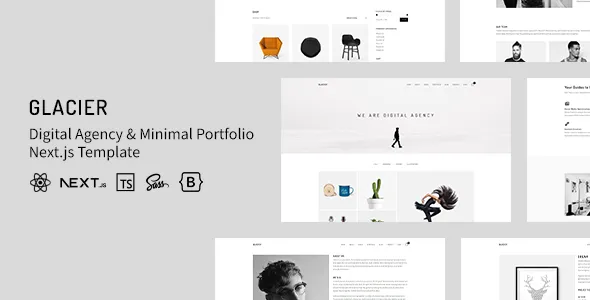
Glacier – Digital Agency & Minimal Portfolio NextJS Template
Glacier – Digital Agency & Minimal Portfolio NextJS Template is a modern website template designed for digital agencies, creative studios, freelancers, designers, developers, and professionals who want to present their work through a clean and visually focused online experience. Combining a digital agency concept with a minimal portfolio approach, Glacier provides a starting point for building a professional website that highlights creative services, showcases completed projects, communicates brand identity, and encourages potential clients to make contact. Built around Next.js, the template is suitable for developers seeking a React-based foundation for creating a contemporary digital presence.
A professional agency website needs to do more than display attractive visuals. It should explain what the business offers, demonstrate relevant experience, communicate its working approach, and help visitors understand why its services may suit their needs. A minimal portfolio layout can support these goals by reducing unnecessary distractions and giving important content, project images, and service information room to stand out. With appropriate customization, Glacier can be adapted for branding agencies, web design studios, marketing companies, creative professionals, technology startups, and independent consultants.
Next.js provides a development framework built around React that supports modern website development and flexible rendering approaches. This makes it a useful foundation for developers creating websites that require structured pages, reusable components, and room for future customization. The actual features available in Glacier depend on the supplied version, included components, configuration, and project documentation. By combining the template with original content, relevant portfolio examples, and a consistent visual identity, businesses can create a website that communicates their expertise and supports their long-term digital goals.
What Is Glacier Digital Agency & Minimal Portfolio NextJS Template?
Glacier is a digital agency and portfolio website template intended for projects that prioritize professional presentation, creative work, and clear communication. It provides a starting point for building a website that introduces an agency or individual professional, presents services, highlights selected projects, and guides visitors toward inquiries or further engagement.
A digital agency website often needs to communicate several related areas of expertise, including website design, development, branding, digital marketing, creative direction, content production, and online strategy. A portfolio website, meanwhile, focuses on demonstrating the quality and relevance of completed work. Glacier brings these purposes together in a design concept that can be customized according to a project’s requirements.
The minimal design approach is particularly useful when the quality of the work should remain the central focus. Instead of filling every section with decorative elements, a well-planned portfolio can use strong typography, thoughtful spacing, carefully selected imagery, and clear page structures to help visitors explore the content.
Because Glacier is based on Next.js, developers can work within a React-oriented environment and adapt the interface to different website requirements. Before implementation, it is important to inspect the supplied files and documentation to confirm the available page layouts, styling approach, dependencies, routing structure, and supported features.
Modern Website Design for Digital Agencies
Digital agencies need websites that reflect their creative capabilities while explaining their services in a straightforward way. Prospective clients often evaluate an agency by reviewing its portfolio, understanding its process, and determining whether its experience matches their project requirements.
Glacier can serve as a foundation for a digital agency website that combines an introduction, service information, project highlights, company details, and contact opportunities. The finished website can be tailored to the agency’s target audience, specialization, and preferred visual identity.
A strong agency homepage should communicate the agency’s positioning quickly. A concise headline can describe the primary service or value proposition, while supporting text explains the kinds of clients the agency works with and the problems it helps solve.
Service sections can introduce offerings such as website design, custom development, branding, user experience design, search engine optimization, content strategy, and digital campaigns. These sections should focus on services the agency genuinely provides rather than listing every possible capability.
Featured projects can demonstrate how the agency applies its expertise. Each example should help visitors understand the project’s purpose, the work completed, and the value delivered. A clear contact pathway then gives interested visitors a convenient way to discuss a potential collaboration.
Minimal Portfolio Layout for Creative Professionals
A portfolio is an important resource for professionals who need to demonstrate their skills and experience. Designers, developers, photographers, illustrators, brand strategists, and creative consultants can use a portfolio website to organize their work and provide potential clients with a clear view of their capabilities.
Glacier’s minimal portfolio concept can be adapted to highlight selected projects without overwhelming visitors with unnecessary interface elements. A structured gallery or project listing can help people identify work that matches their interests and explore individual examples in more detail.
For designers, a portfolio may feature brand identities, digital interfaces, visual campaigns, or editorial layouts. Developers may showcase websites, applications, technical projects, and implementation examples. Photographers and visual artists may place greater emphasis on imagery, while consultants may focus on case studies and documented outcomes.
The strongest portfolio is not necessarily the one with the largest number of projects. Selecting relevant work and presenting it with useful context often provides a better experience than displaying every completed task without explanation.
Each project page can describe the original challenge, the professional’s role, the approach taken, and the final deliverables. Where reliable performance metrics or other measurable results exist, they can be included with sufficient context to help visitors understand the project’s impact.
Next.js Foundation for Modern Web Development
Next.js is a React framework used to build websites and web applications. It provides development capabilities that can support structured routing, different rendering strategies, reusable interface components, and integration with external data sources, depending on the implementation.
For a digital agency or portfolio website, a Next.js foundation can help developers organize multiple pages and maintain consistent interface elements. Shared components may be used for navigation, footers, project cards, service summaries, and other recurring sections.
The framework also provides options for handling how pages are rendered and delivered. The most appropriate approach depends on the website’s content, technical requirements, hosting environment, and the Next.js version used by the project.
Glacier should be evaluated according to the actual version and configuration supplied with the template. Developers should check its package configuration, dependencies, supported Node.js version, routing approach, and installation instructions before starting customization.
It is also important to distinguish between features provided by the template and capabilities that require additional development. A frontend layout does not automatically provide a content management system, working contact form, customer database, authentication system, or project administration interface unless these functions are explicitly included.
Professional Homepage Structure
The homepage is often the first major interaction visitors have with an agency or portfolio website. It should communicate the site’s purpose clearly and help users reach the information they need without unnecessary effort.
A Glacier-based homepage can be organized around a concise introduction, selected services, featured projects, an agency or professional overview, client feedback where available, and contact information. The final structure should depend on the available components and the goals of the website.
The introductory section should explain what the agency does or what the professional specializes in. Supporting text can describe the intended audience, key capabilities, or the type of work the visitor can explore.
A featured portfolio section can display a small selection of representative projects. Rather than including every available example, prioritize projects that demonstrate the agency’s strongest skills and align with its target clients.
A services section can provide a quick overview of the agency’s main offerings and link to more detailed explanations. An About section can introduce the team, working philosophy, and professional background.
The homepage should finish with a logical next step, such as viewing the full portfolio, exploring services, or contacting the agency. Clear navigation and purposeful content help visitors move naturally through the website.
Creative Agency Services and Capabilities
A digital agency website should explain its services in terms that prospective clients can understand. Visitors need to know what the agency does, which challenges it addresses, and how its expertise may relate to their goals.
Glacier can be customized to present a variety of professional services, depending on the agency’s actual capabilities and target market.
Web design: Introduce website design services that focus on page structure, visual identity, usability, and the needs of the intended audience.
Web development: Explain development capabilities for business websites, portfolio platforms, landing pages, and other suitable digital experiences.
Brand identity: Present services such as visual identity development, logo design, brand guidelines, and consistent digital presentation.
Digital marketing: Describe relevant services such as campaign planning, content strategy, audience research, and online promotion.
User experience design: Explain how research, information architecture, and interface design can help create more understandable digital products.
Creative direction: Showcase the agency’s approach to visual storytelling, art direction, campaign concepts, and coordinated brand communication.
Consulting and strategy: Introduce services that help clients plan website improvements, evaluate digital opportunities, or organize their online presence.
Each service should have a clear description and, where appropriate, a link to relevant portfolio examples. This connects what the agency offers with evidence of its practical experience.
Portfolio Projects and Case Studies
Project presentation is one of the most important aspects of a creative agency website. Visitors often want to see examples of previous work before deciding whether to contact a service provider.
Glacier can be used as a starting point for organizing project previews and detailed case studies. Depending on the included layouts, developers may be able to create a consistent visual structure for presenting project images, descriptions, categories, and supporting information.
A useful case study should explain the project’s context. Start by describing the client’s goal or the challenge that needed to be addressed. Then explain the agency’s contribution, the decisions made during the process, and the final deliverables.
For a web design project, this might include information architecture, interface design, responsive layouts, and implementation. A branding project could describe research, visual exploration, identity development, and brand guidelines. A marketing case study may explain campaign objectives, the channels used, and verified results.
Use accurate descriptions and obtain permission before publishing client names, proprietary information, or confidential project materials. Where client identities cannot be disclosed, anonymized case studies may still explain the work without revealing sensitive details.
Consistent project presentation helps visitors compare examples and understand the agency’s strengths.
Responsive Design for Desktop and Mobile Devices
Visitors may explore an agency website on desktop computers, laptops, tablets, or smartphones. Responsive design helps the interface adapt to available screen space so content remains readable and navigation stays convenient.
Glacier’s responsive behavior should be verified in the supplied implementation. Developers should test the actual pages rather than assuming that every component automatically adapts to all screen sizes.
On mobile devices, navigation should be straightforward, text should remain readable, and buttons should be easy to select. Portfolio images should fit the viewport without unwanted cropping, while multi-column layouts should reorganize appropriately for narrower screens.
A minimal design can be especially effective on mobile when it preserves the hierarchy of the content and avoids unnecessary visual clutter. However, large typography, animated sections, complex galleries, and custom effects may require careful adjustments.
Responsive testing should include the homepage, project listings, individual case studies, service pages, and contact forms. External embeds, custom scripts, and third-party components should also be tested after integration.
The objective is to provide a consistent and practical experience across devices while ensuring that important content and actions remain accessible.
Minimalist Visual Identity and Typography
Visual consistency helps an agency website appear professional and recognizable. A minimal design can support this goal by using a limited set of colors, a clear typography hierarchy, balanced spacing, and carefully selected imagery.
Glacier can be customized to reflect different brand identities, depending on its styling system and available components. A creative studio may choose expressive typography and bold project imagery, while a technology consultancy may prefer a restrained palette and a more structured presentation.
Typography plays a central role in minimal website design. Headings should establish a clear hierarchy, body text should remain comfortable to read, and navigation labels should be concise. Excessively small text or decorative typefaces can make important information harder to understand.
Spacing is equally important. Consistent margins, padding, and section gaps help visitors distinguish between content areas without relying on heavy borders or unnecessary decoration.
Images should support the agency’s message. Use authentic project screenshots, professional photographs, and relevant visuals rather than unrelated stock imagery. Optimize images for the intended display size so the website maintains a polished appearance without downloading unnecessarily large files.
Before applying extensive changes, review the template’s styling conventions and test them across multiple pages.
Customization and Reusable Components
Customization allows developers to transform a starting template into a website that matches the client’s requirements. A digital agency may need to change the content hierarchy, colors, project categories, service descriptions, imagery, and contact pathways.
With a React-based implementation, reusable components can help maintain consistent design patterns across the website. Common elements may include buttons, navigation menus, project cards, section headings, service blocks, and footer content.
If a component appears across multiple pages, a shared implementation can reduce duplication and simplify future updates. However, developers should follow the architecture provided with Glacier rather than restructuring the project unnecessarily.
Customization may involve editing component files, styling rules, page content, route definitions, and configuration settings. The precise process depends on the supplied project structure and any additional tools included in the package.
Replace demonstration content with original text, authentic portfolio images, accurate service information, and verified contact details. Remove sections that do not support the website’s purpose rather than keeping every sample component.
After making changes, review the website for inconsistent typography, broken links, missing assets, layout problems, and unnecessary dependencies.
SEO-Friendly Website Structure
Search engine optimization helps search engines understand website content and may improve the likelihood that relevant pages appear for appropriate searches. A template can provide a useful design foundation, but search visibility also depends on technical configuration, content quality, competition, and other factors.
Glacier can be developed with an organized page structure that supports relevant content for the agency’s services and portfolio. Each page should have a clear purpose, a descriptive title, an appropriate heading hierarchy, and useful information written for its intended audience.
For example, a web design agency could create dedicated pages for website design, development, branding, and related services. Portfolio case studies can target specific project types when the content genuinely supports those topics.
Use descriptive URLs and connect related pages with internal links. A service page can link to relevant projects, while a case study can link back to the services involved in the work.
Images should have suitable alternative text when they communicate meaningful information. Image filenames and surrounding descriptions can also help provide context, but they should remain natural and accurate.
Because Glacier uses Next.js, developers should review the project’s metadata handling and rendering configuration. Important page titles, descriptions, canonical URLs, social sharing metadata, and indexing directives should be configured appropriately for the implementation.
The actual search engine visibility of the website depends on the completed site and its ongoing maintenance. No template can guarantee rankings, traffic, or a specific position in search results.
Website Performance and Loading Speed
Website performance affects how quickly visitors can explore services and view portfolio projects. A fast experience is particularly important for image-heavy creative websites, where large visual assets can increase page weight.
The performance of a Glacier website depends on its source code, hosting environment, image assets, fonts, JavaScript bundles, animation effects, and third-party integrations.
Begin by optimizing portfolio images. Use appropriate dimensions, compress files, and select modern formats where suitable. Avoid serving oversized images when a smaller version can provide the necessary visual quality.
Review external fonts, scripts, analytics tools, and embedded media. Each additional resource may affect loading performance, so integrations should be selected according to their practical value.
Next.js provides several capabilities that can support performance optimization, but the results depend on how the project uses them. Developers should review image handling, rendering strategies, caching behavior, and JavaScript delivery according to the supplied version.
Measure performance on important pages instead of relying only on the homepage. Project galleries, animated sections, and embedded content may behave differently from simpler service pages.
Use testing tools to identify the main performance bottlenecks before adding optimization plugins or services. Regular monitoring can help maintain a smooth experience as the website grows.
Contact Forms and Lead Generation
For many digital agencies, the website’s primary objective is to generate relevant inquiries. Visitors should be able to understand the services offered and find an easy way to discuss a project.
Glacier can be customized with contact sections, calls to action, and inquiry forms according to the available components. A fully functional form may require a backend endpoint or compatible third-party service if submission handling is not included in the template.
A useful inquiry form should request only the information needed for an initial conversation. Fields might include a name, email address, company name, project category, budget range where appropriate, and a short description of the project.
The form should provide clear labels, useful validation messages, and confirmation after successful submission. Developers should also test error handling, spam prevention, and email delivery.
Calls to action should match the page’s purpose. A portfolio case study may invite visitors to discuss a similar project, while a service page could encourage them to request an estimate or arrange a consultation.
Alternative contact options, such as a business email address or professional contact link, can help visitors reach the agency if the form is temporarily unavailable.
Lead generation works best when the website clearly communicates the agency’s expertise and provides a straightforward next step.
Content Strategy for Digital Agencies
A website becomes more useful when its content addresses the questions and priorities of prospective clients. Clear service descriptions, relevant case studies, and practical articles can help establish the agency’s expertise.
Glacier can be adapted to support a content strategy that combines service pages, project examples, company information, and educational articles. The exact content publishing workflow depends on the project’s available features and any connected content-management system.
An agency might publish articles about website planning, branding, user experience, digital marketing, performance optimization, or other topics related to its services. These articles can answer common questions and provide context for prospective clients.
Content should be based on genuine expertise rather than generic statements designed only to include keywords. Practical guidance, documented examples, and clear explanations are more useful than repetitive promotional text.
A sustainable publishing schedule can help an agency maintain quality without creating unnecessary workload. Review existing content periodically to correct outdated information, update examples, and improve pages that no longer match the agency’s services.
Internal links can connect educational articles with related service pages and case studies, helping visitors discover relevant information naturally.
Integrations and Additional Functionality
A digital agency website may require tools for contact forms, analytics, newsletter subscriptions, scheduling, content publishing, or project administration. The appropriate integrations depend on the website’s purpose and the functionality included in the supplied Glacier package.
A contact form may need a submission service, while a newsletter signup may require a connection to an email marketing platform. Analytics tools can help measure visitor behavior, subject to applicable privacy requirements.
If the agency wants to publish new projects without editing source files, it may benefit from a compatible content management system or structured content source. That capability should be planned and implemented separately unless the template explicitly includes it.
Developers should verify compatibility before introducing new packages or external services. Review documentation, supported versions, security practices, and ongoing maintenance requirements.
Avoid installing or integrating multiple tools that perform the same function without a clear reason. Unnecessary dependencies can increase complexity and make future updates more difficult.
After implementing an integration, test the complete user journey. Confirm that forms submit correctly, links open the intended destination, analytics record the expected events, and any external content behaves properly across devices.
Accessibility and User Experience
A professional portfolio website should make information easy to locate and understand. Accessible design can improve usability for a broad range of visitors, including people who rely on keyboards, assistive technologies, or alternative display settings.
When customizing Glacier, use logical heading structures, readable typography, sufficient color contrast, and descriptive link text. Interactive elements should communicate their purpose clearly and remain usable with appropriate input methods.
Portfolio images that convey information should have meaningful alternative text. Decorative visuals should be handled appropriately so they do not create unnecessary distractions for assistive technology users.
Navigation should use familiar labels and a predictable structure. Visitors should be able to identify the agency’s services, explore its work, learn about the team, and locate contact information without unnecessary effort.
Animations and visual effects should not interfere with reading or navigation. Where motion is used, consider the needs of visitors who prefer reduced motion and ensure that essential information remains available without relying on animation.
Accessibility depends on the finished implementation, not just the original template. Test pages using keyboard navigation, different screen sizes, and suitable accessibility evaluation tools.
Security and Ongoing Maintenance
A Next.js website needs ongoing maintenance to remain dependable as dependencies, hosting environments, and business requirements change. A template provides a starting point, but its long-term reliability depends on how the completed website is managed.
Developers should review dependency updates and security advisories, follow the project’s documented build and deployment process, and test significant changes before releasing them to production.
Sensitive credentials, private API keys, and server secrets should not be placed in publicly accessible frontend code. If the website connects to external services or a backend, use appropriate server-side configuration and access controls.
Contact forms should include appropriate validation and spam protection. Any service that collects personal information should be reviewed for privacy, data-retention, and security requirements.
Maintain backups of important source files, configuration, and connected content data where applicable. Confirm that the recovery process works rather than assuming that backup files alone are sufficient.
Regular maintenance should also include content reviews. Keep service descriptions, team information, project details, contact information, and links accurate. Remove outdated announcements and replace obsolete portfolio examples when they no longer represent the agency’s current capabilities.
Who Should Use Glacier Digital Agency & Minimal Portfolio NextJS Template?
Glacier may be suitable for a range of creative and professional website projects, depending on its actual features and the level of customization required.
Digital agencies: Build a professional website that introduces services, showcases selected projects, and encourages potential clients to make contact.
Creative studios: Present creative direction, design work, branding projects, and visual campaigns in a consistent portfolio.
Web design agencies: Highlight website interfaces, user experience work, development projects, and relevant service offerings.
Freelance designers: Create a portfolio that demonstrates skills, selected projects, professional experience, and contact information.
Web developers: Showcase websites, applications, technical capabilities, and development case studies.
Branding consultants: Present identity projects, brand strategy, visual systems, and examples of professional work.
Marketing professionals: Introduce relevant services, campaign examples, content strategy, and documented client outcomes.
Personal brands: Create a focused online presence that combines professional background, project examples, services, and contact opportunities.
Technology startups: Develop a clean digital presentation for a new product, creative service, or technology-focused business.
Before choosing the template for a production project, review the live demo where available, included pages, source code, dependencies, documentation, and customization requirements.
Tips for Building a Successful Website with Glacier
Start by defining the website’s main objective. Decide whether it should primarily generate client inquiries, showcase creative work, explain agency services, support a personal brand, or achieve a combination of these goals.
Identify the audience and select content that addresses its priorities. A branding agency may need detailed identity case studies, while a development studio may benefit from technical project examples and clear service descriptions.
Prepare original content before finalizing every page. Write a concise introduction, explain the core services, select representative projects, and prepare accurate contact information.
Establish a consistent visual system for colors, typography, spacing, buttons, and image presentation. A minimal design works best when the layout is intentional and each section has a clear purpose.
Replace all sample content with authentic material. Obtain permission before publishing client logos, testimonials, project screenshots, or confidential information.
Test the website across desktop and mobile devices. Review navigation, image loading, contact forms, keyboard accessibility, page metadata, and all interactive elements.
Finally, create a maintenance plan that covers dependency updates, security reviews, backups, performance monitoring, and content improvements. A professional website should continue to reflect the agency’s capabilities as its services and portfolio evolve.
Final Thoughts on Glacier Digital Agency & Minimal Portfolio NextJS Template
Glacier – Digital Agency & Minimal Portfolio NextJS Template is a potential option for agencies, creative studios, freelancers, and professionals seeking a clean, modern foundation for their online presence. Its combination of a digital agency concept and a minimal portfolio approach makes it relevant to projects that need to present services, demonstrate creative work, communicate professional experience, and encourage client inquiries.
The Next.js foundation provides a React-oriented environment for developers who want to customize the website according to their design and technical requirements. With suitable implementation, the completed site can bring together project showcases, service information, company details, and clear contact opportunities in a cohesive experience.
The actual capabilities of Glacier depend on the supplied version, included components, configuration, and any additional integrations. Developers should review the source code and documentation before relying on particular features or compatibility claims.
A successful agency website also requires original content, responsive testing, accessible navigation, thoughtful SEO, optimized media, and regular maintenance. The template itself cannot guarantee search rankings, traffic, or client conversions, but it can provide a useful starting point for a well-planned digital presence.
For businesses and professionals who want to present their work with clarity, Glacier can be evaluated as part of a broader website development strategy. Through careful customization and ongoing improvement, a minimal portfolio website can help communicate expertise, strengthen brand presentation, and make it easier for prospective clients to explore services and begin a conversation.