My Account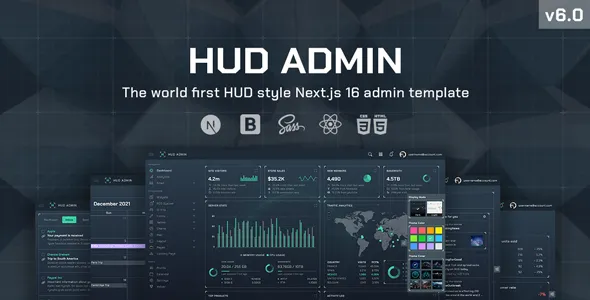
HUD – Bootstrap 5 Admin Templat
HUD – Bootstrap 5 Admin Templat is a modern, flexible, and professionally structured admin dashboard template designed for developers, businesses, agencies, startups, SaaS companies, application owners, and organizations that need a reliable interface for managing web applications and digital platforms. Built around the Bootstrap 5 framework, HUD provides a strong foundation for creating responsive administration panels, backend dashboards, analytics interfaces, CRM systems, project management platforms, eCommerce administration panels, SaaS control panels, customer portals, and many other web-based management applications.
Product Overview
HUD – Bootstrap 5 Admin Templat is created for modern web projects where administrators and users need an organized environment for viewing information, managing records, monitoring performance, and controlling application functionality. An effective admin dashboard should make complex information easier to understand while providing quick access to important tools and workflows.
HUD offers a structured visual foundation that developers can adapt to different project requirements. Instead of designing every dashboard screen from the beginning, developers can use an established interface structure and customize it around their application’s functionality, branding, content, and business logic.
The Bootstrap 5 foundation makes HUD particularly useful for developers who want to build responsive web interfaces using a widely adopted front-end framework. Bootstrap’s grid and component-based approach can make it easier to organize dashboard layouts and adapt pages for different screen sizes.
Bootstrap 5 Admin Dashboard
Bootstrap 5 is a popular front-end framework used for developing responsive websites and web applications. HUD takes advantage of this modern framework foundation to provide an admin interface that can be adapted for a wide variety of applications.
A Bootstrap admin template can help developers maintain a consistent visual structure across dashboards, forms, tables, cards, navigation elements, authentication screens, and application management pages.
HUD can therefore be used as a starting point for projects where consistency, responsiveness, and efficient interface development are important.
Modern Admin Interface
An administration panel should prioritize usability. Users who work inside dashboards often need to access information quickly, review data, perform actions, and move between different sections of an application.
HUD is designed around an organized dashboard experience that can be customized according to different application requirements. Developers can adapt the interface for administrators, managers, employees, customers, analysts, support teams, and other user groups.
Responsive Dashboard Design
Modern applications need to work across desktop computers, laptops, tablets, and mobile devices. HUD is designed around responsive principles so developers can create interfaces that adapt to different viewport sizes.
Responsive dashboard layouts can be especially useful for applications where users need to monitor information while away from a desktop environment.
A responsive administration interface can make it easier to review notifications, check statistics, manage records, and perform important tasks from smaller screens.
Bootstrap Admin Template for Web Applications
HUD can serve as a foundation for many types of web applications. Developers can customize the template for business software, internal management systems, customer portals, SaaS applications, analytics platforms, eCommerce dashboards, project management systems, and more.
The template provides the visual structure, while developers can connect it to their preferred backend, database, APIs, authentication system, and application logic.
SaaS Admin Dashboard
Software as a Service platforms frequently require dashboards where users can manage accounts, subscriptions, projects, reports, settings, team members, and other resources.
HUD can be adapted to create a professional SaaS dashboard experience. Developers can customize the navigation, cards, tables, charts, forms, settings pages, and other interface elements around their SaaS product.
A SaaS dashboard can also use role-based navigation so administrators and regular users see the functions relevant to their responsibilities.
CRM Dashboard
Customer Relationship Management systems depend heavily on structured dashboards. Sales teams and administrators need to manage customers, leads, contacts, communication records, opportunities, tasks, and reports.
HUD can provide the visual foundation for a CRM interface.
Developers can create sections for customer management, lead tracking, sales pipelines, contact records, activity logs, reports, and user settings.
Project Management Dashboard
Project management platforms require interfaces for tracking projects, tasks, deadlines, team members, milestones, progress, and performance.
HUD can be customized into a project management dashboard where users can review project status, manage tasks, monitor deadlines, and access project-related information.
eCommerce Admin Dashboard
Online stores require powerful administration panels for managing products, orders, customers, payments, inventory, promotions, reports, and settings.
HUD can provide a professional interface for eCommerce administration. Developers can build screens for product management, order processing, customer records, inventory tracking, sales analytics, and store configuration.
Analytics Dashboard
Data visualization is an important part of modern admin interfaces. Businesses often need dashboards that present statistics, trends, performance indicators, and reports.
HUD can be customized with charts, graphs, cards, tables, and other visualization components to create analytics-focused dashboards.
A well-organized analytics dashboard allows users to identify important information without navigating through multiple disconnected pages.
Business Intelligence Interface
Business intelligence applications often contain large amounts of information. A dashboard provides a centralized environment where users can monitor key metrics and analyze business performance.
HUD can serve as a front-end foundation for BI-style interfaces where developers can connect real data sources and visualization libraries.
Admin Panel for Startups
Startups often need to develop products quickly while maintaining a professional user interface. HUD can help reduce the time required to create an administration interface from scratch.
A startup can use the template as a foundation and focus development resources on core application functionality rather than repeatedly creating basic dashboard layouts.
Admin Template for Agencies
Web development agencies can use HUD for client projects requiring backend interfaces, management panels, internal tools, and application dashboards.
Agencies can customize the design to match a client’s branding and application requirements.
Internal Business Dashboard
Companies can use dashboard applications for internal operations such as employee management, inventory, project tracking, reporting, customer support, financial monitoring, and workflow management.
HUD can provide the front-end interface for these internal systems.
User Management Dashboard
Many web applications require user management functionality. An admin dashboard can provide pages for viewing users, creating accounts, editing profiles, assigning roles, managing permissions, and monitoring account status.
HUD can be customized to support these workflows through appropriate forms, tables, filters, and action controls.
Role-Based Administration
Different users often require different levels of access. A system may include administrators, managers, employees, editors, support staff, and customers.
HUD can serve as the interface foundation for role-based applications where developers implement permissions through their backend logic.
The visual navigation can be adapted to show relevant sections for each user type.
Dashboard Navigation
Navigation is one of the most important elements of an admin panel. Users should be able to identify where they are and quickly reach the tools they need.
HUD can provide a structured navigation system that developers can customize with application-specific categories.
Possible sections might include:
- Dashboard
- Users
- Customers
- Products
- Orders
- Projects
- Reports
- Analytics
- Messages
- Notifications
- Settings
- Profile
- Support
The exact navigation depends on the application.
Dashboard Cards
Dashboard cards provide quick summaries of important information. They can display metrics such as revenue, customers, orders, active users, pending tasks, support tickets, projects, or system activity.
HUD can be adapted to present these metrics in a visually organized format.
Statistics and Metrics
A dashboard should make important metrics easy to identify. Developers can connect dashboard components to real application data and display relevant statistics.
Examples include:
- Total Users
- Active Users
- New Customers
- Total Revenue
- Monthly Sales
- Open Tickets
- Completed Projects
- Pending Orders
- Conversion Rate
- Website Traffic
The metrics can be customized according to the project.
Data Visualization
Visual representations can make complex datasets easier to understand. Charts and graphs can be incorporated into dashboard pages to display trends and comparisons.
HUD can be used with suitable charting solutions to create visual analytics experiences.
Sales Dashboard
Sales-focused applications can display revenue, sales volume, orders, customers, conversion rates, and product performance.
A sales dashboard can help teams understand performance at a glance.
Marketing Dashboard
Marketing platforms can use dashboards to display campaign results, traffic, leads, conversions, engagement, and other performance indicators.
HUD can provide the interface structure for marketing analytics applications.
Finance Dashboard
Financial applications often require clear presentation of income, expenses, transactions, invoices, payments, and reports.
HUD can be customized for financial management interfaces where appropriate security and backend functionality are implemented.
HR Management Dashboard
Human resource systems can use admin dashboards to manage employees, attendance, leave requests, departments, payroll-related information, recruitment records, and internal documents.
HUD can provide a responsive front-end foundation for such applications.
Inventory Management Dashboard
Inventory systems need interfaces for tracking products, stock levels, suppliers, warehouses, purchases, and inventory movements.
HUD can be adapted to create structured inventory management screens.
Customer Support Dashboard
Support systems can use dashboards to manage tickets, conversations, customers, agents, categories, priorities, and response status.
HUD can provide the visual structure for support management software.
Help Desk Interface
A help desk application benefits from clear navigation and easy access to customer requests. Developers can customize HUD with ticket lists, filters, ticket details, status indicators, and support analytics.
Project Tracking Interface
Project teams need quick access to tasks, deadlines, milestones, team members, and project status.
HUD can be customized to create project tracking interfaces that provide this information through dashboards and management screens.
Task Management
Task management applications can use cards, tables, lists, status indicators, and forms to manage tasks.
Developers can create task creation, assignment, filtering, prioritization, and completion workflows around the template.
Calendar Applications
Administrative applications often require calendars for meetings, appointments, schedules, deadlines, and events.
HUD can provide a visual foundation for integrating suitable calendar functionality.
Form-Based Applications
Forms are essential in admin panels. Users may need to create records, edit information, submit requests, configure settings, or manage account details.
HUD can provide a consistent visual environment for forms.
Advanced Form Interfaces
Applications may require different types of form controls, including:
- Text fields
- Select menus
- Checkboxes
- Radio buttons
- Toggles
- Date fields
- File uploads
- Search fields
- Text areas
- Validation messages
Developers can adapt these elements to match application workflows.
Form Validation
Good forms should provide clear feedback when users submit incomplete or invalid information. HUD can be integrated with the validation system chosen by the development team.
Validation logic should be implemented according to the application’s backend and security requirements.
Tables and Data Management
Admin systems frequently use tables to display structured records. User lists, order records, transactions, products, support tickets, and reports can all benefit from tabular presentation.
HUD can provide a professional environment for building data management screens.
Search and Filtering
Large datasets require effective search and filtering. Developers can connect dashboard interfaces to backend search functionality and create filters appropriate to their data.
Examples include filtering customers by status, orders by date, products by category, or tickets by priority.
Pagination
Large datasets should be displayed efficiently. Pagination can help users navigate records without loading excessive amounts of data at once.
HUD can be used as the interface layer for pagination controls connected to application logic.
User Profile Pages
Many admin applications require user profile screens where account information can be viewed and edited.
A profile page can include personal information, contact details, account preferences, security settings, activity history, and other relevant information.
Account Settings
Settings pages allow users or administrators to configure application behavior. Depending on the application, settings can include profile preferences, notifications, security, billing, integrations, appearance, and account configuration.
HUD can provide a structured layout for these settings interfaces.
Authentication Interface
Web applications typically need login and account access screens. HUD can be adapted for authentication-related pages such as login, registration, password recovery, account verification, and related workflows.
The actual authentication functionality should be implemented securely by the development team.
Login Page
A professional login page provides users with a clear entry point into the application.
Developers can customize the branding, form fields, messaging, and authentication workflow according to their application.
Registration Page
Applications that allow users to create accounts can use a structured registration interface. Registration forms can collect the information required by the application’s business logic.
Password Recovery
Password reset pages are important components of user authentication. HUD can provide the visual interface while the backend handles secure recovery procedures.
Error Pages
Admin applications should handle situations such as missing pages, access restrictions, or server errors.
HUD can be adapted to create branded error screens that maintain visual consistency across the application.
Notifications
Notifications provide users with updates about application events. Examples include new orders, messages, task assignments, support responses, security alerts, and system updates.
HUD can support notification interfaces that can be connected to real application data.
Messaging Interface
Applications with internal communication features can use dashboard layouts for messages and conversations.
Developers can customize the interface for team communication, customer messaging, support conversations, or system notifications.
Activity Timeline
An activity timeline can show recent actions performed within an application. This may include account changes, orders, tasks, system events, or administrative actions.
HUD can provide a structured interface for activity feeds.
Audit Logs
Administrative systems often need activity logs for security and accountability. Developers can use dashboard layouts to display actions, timestamps, users, affected records, and event information.
Reports Dashboard
Reporting systems require clear ways to present information. HUD can be customized for reports containing tables, charts, summaries, filters, and export actions.
Data Export Interfaces
Business applications often allow users to export data. HUD can provide buttons, filters, and interfaces for initiating export operations.
The actual export processing should be handled by the application backend.
File Management Interface
Applications that handle documents and files can use dashboard layouts for file browsing, uploads, downloads, folders, and document management.
Document Management
Businesses can build document management interfaces around HUD where users can organize files, review metadata, manage permissions, and access documents.
Media Management
Content platforms may require image, video, audio, and media management screens. HUD can provide a structured environment for such administration interfaces.
Content Management System Dashboard
CMS platforms need interfaces for managing pages, posts, media, users, categories, menus, and settings.
HUD can be adapted as a CMS administration interface.
Blog Administration
Blog management systems can use dashboard pages for posts, categories, tags, authors, comments, media, and publishing workflows.
Website Management Dashboard
Businesses can use HUD to create internal interfaces for managing website content, settings, forms, users, and other website functionality.
API Management Dashboard
API-based applications may require dashboards for API keys, usage statistics, endpoints, subscriptions, access levels, and logs.
HUD can provide a suitable visual foundation for API management interfaces.
Developer Portal
Developer platforms can use HUD to create portals where developers manage API credentials, projects, usage, documentation links, billing information, and account settings.
Subscription Management
SaaS platforms often require subscription management interfaces. Users may need to view their current plan, billing cycle, available upgrades, and account status.
HUD can provide the front-end structure for such pages.
Billing Dashboard
Subscription applications can include billing dashboards with invoices, payment information, subscription status, and billing history.
Actual payment processing should be implemented through a secure payment system.
Invoice Management
Business applications can provide invoice tables and invoice detail pages. HUD can help present these records in a structured format.
E-commerce Order Management
Store administrators can manage order status, customer information, payment information, fulfillment status, and order details through dashboard interfaces.
HUD can provide the front-end structure for these workflows.
Product Management
ECommerce administrators can manage product names, descriptions, pricing, images, categories, inventory, and other product information.
Forms and tables can be combined to create a complete product administration experience.
Customer Management
CRM and eCommerce applications often need customer records. Developers can create customer lists, customer profiles, activity histories, and related management interfaces.
Inventory Tracking
Inventory dashboards can display current stock, low-stock items, warehouse information, and product movements.
Analytics Reports
Analytics dashboards can combine summary cards, charts, tables, and filters to provide a complete reporting experience.
Performance Monitoring
Technology applications may require monitoring screens for system status, resource utilization, uptime, requests, errors, or application performance.
HUD can serve as the interface foundation for these monitoring systems.
Server Monitoring Dashboard
Hosting and infrastructure companies can customize the template to create dashboards displaying server information, resource usage, alerts, and service status.
Application Monitoring
SaaS applications can provide internal monitoring dashboards for application health, errors, performance metrics, and service activity.
Notification Center
A centralized notification center can provide users with a complete list of alerts and system messages.
Search Interface
Applications with large amounts of information can benefit from global search. HUD can be adapted to include search interfaces that connect to the application’s search engine or backend.
Responsive Tables
Tables can be challenging on mobile devices because of limited screen width. Developers can implement responsive table approaches that keep important information accessible across devices.
Mobile Admin Experience
Managers and administrators increasingly expect to monitor business information from mobile devices. A responsive dashboard can provide access to important information while traveling or working away from a desktop.
Tablet Dashboard
Tablets provide a middle ground between desktop and mobile. HUD’s responsive structure can be adapted to maintain a usable interface on tablet-sized screens.
Desktop Dashboard
Desktop environments provide more space for complex administration interfaces. HUD can take advantage of larger screens to present navigation, data tables, charts, and multiple information panels.
Consistent Visual Language
A dashboard becomes easier to use when buttons, forms, cards, tables, navigation, and other components follow a consistent visual language.
HUD provides a structured foundation that developers can customize while maintaining visual consistency.
Reusable Components
Reusable interface components can improve development efficiency. Developers can use common dashboard patterns across different pages rather than creating every element independently.
Modular Dashboard Structure
Applications often grow over time. A modular interface allows new sections to be added as functionality expands.
HUD can serve as the starting point for a dashboard that evolves alongside the application.
Custom Branding
Businesses can adapt the dashboard to match their visual identity. Branding can include logos, typography, colors, icons, imagery, button styles, navigation elements, and other design details.
White-Label Applications
Agencies and software providers can customize HUD for branded applications where the original template appearance is replaced with the customer’s identity.
Client Portals
Businesses can create client portals where customers log in to view projects, invoices, support requests, reports, subscriptions, or other information.
HUD can provide the visual structure for these portals.
Customer Dashboard
A customer-facing dashboard can provide users with quick access to account information, services, orders, subscriptions, messages, support, and settings.
Employee Dashboard
Internal employee portals can provide staff with access to tasks, schedules, documents, communication, and company resources.
Manager Dashboard
Managers may need a higher-level overview of team performance, projects, sales, customers, and operational metrics.
HUD can support management-focused dashboard structures.
Administrator Dashboard
System administrators require access to configuration, users, permissions, logs, reports, and application settings. HUD can be adapted to provide these controls through organized navigation.
Multi-Role Applications
Applications with multiple user types can implement different dashboard views and permissions using their backend authorization system.
Bootstrap Grid System
The Bootstrap grid provides a useful foundation for arranging dashboard content. Developers can create columns, rows, cards, panels, and responsive layouts based on project requirements.
Front-End Development Foundation
HUD can reduce repetitive front-end development work by providing pre-designed interface structures.
Developers can focus more heavily on backend logic, APIs, data architecture, business rules, and application functionality.
Faster Project Development
Starting with a complete admin template can accelerate interface development compared with creating every dashboard screen from a blank project.
HUD provides a visual starting point that can be customized to suit the project.
Consistent Development Workflow
A predefined design system can help development teams maintain consistency across multiple application screens.
Prototype Development
HUD can also be useful for prototyping. Developers can quickly create dashboard concepts before implementing the complete application backend.
MVP Development
Startups building Minimum Viable Products can use HUD to create a professional interface while focusing development efforts on validating their core product idea.
Business Application Development
Business applications often require multiple administrative screens. HUD can provide the foundation for those screens.
Web Application Backend Interface
Developers can use HUD for the front-end portion of custom web application backends.
Database Management Interface
Applications that interact with databases can present records through tables, forms, search tools, filters, and management pages.
Custom Dashboard Development
The template can be customized to build dashboards around unique business requirements rather than being limited to a single application type.
Framework-Based Development
Because HUD is based on Bootstrap 5, developers familiar with the framework can work with its responsive layout concepts and front-end components.
Responsive Components
Dashboard elements should remain usable across screen sizes. Responsive components can improve accessibility and usability for users on different devices.
User Experience
Good dashboard UX reduces unnecessary navigation and makes important tasks easy to discover.
HUD can be customized around user workflows so frequently used actions remain accessible.
Information Hierarchy
Dashboards can contain large amounts of information. Strong hierarchy helps users distinguish between primary metrics, secondary information, detailed records, and optional controls.
Visual Organization
Cards, tables, navigation, charts, and panels can be organized to create clear visual groupings.
Action-Oriented Interface
Administrative applications frequently involve actions such as creating, editing, deleting, approving, exporting, assigning, and filtering records.
HUD can provide consistent UI patterns for these actions.
Search Engine Considerations
Admin dashboards are generally not designed primarily for public search traffic. However, if HUD is used to create public-facing application pages, developers should apply appropriate SEO practices to those pages.
For private dashboards, authentication and access controls should prevent sensitive application content from being publicly indexed.
Security Considerations
A template provides the interface layer and should not be treated as a complete security solution.
Developers should implement secure authentication, authorization, input validation, output encoding, CSRF protection where appropriate, secure sessions, access controls, secure API communication, and other application-level protections.
Authentication Security
Login and registration interfaces should be connected to a secure authentication system. Passwords and credentials should never be handled insecurely.
Permission Management
Role and permission systems should be implemented in the backend. The interface can display appropriate options based on the user’s permissions, but authorization must ultimately be enforced server-side.
Data Protection
Applications handling customer, financial, employee, or business information should implement appropriate data protection practices.
API Security
Applications connected to APIs should use appropriate authentication, authorization, rate limiting, validation, and secure communication practices.
Performance Optimization
After customizing HUD, developers should optimize assets, scripts, images, third-party libraries, and API requests according to project needs.
Performance can depend heavily on the final application’s architecture rather than the template alone.
Code Customization
Developers can modify the interface according to application requirements. Custom components, pages, forms, data tables, and workflows can be introduced as the application develops.
Backend Integration
HUD is a front-end interface foundation. Developers can connect it to backend technologies, databases, APIs, authentication systems, and application services according to their project’s architecture.
REST API Applications
Applications using REST APIs can use HUD as the interface where API responses are presented to users.
Database-Driven Applications
HUD can be connected to database-backed applications where dynamic data is loaded into dashboard components.
AJAX-Based Interfaces
Developers can implement asynchronous data loading and interactions where appropriate to create smoother application experiences.
Single Page Application Concepts
Depending on the project architecture and implementation, developers can use HUD-style components within modern application structures and connect them to dynamic data sources.
Developer Customization
Developers can customize the interface to match specific project requirements rather than being restricted to the original content structure.
Agency Client Projects
Agencies can save development time by starting with an established admin interface and focusing customization on the client’s unique requirements.
Startup Product Development
Startups can use HUD to build the administrative side of a product while concentrating engineering resources on product functionality.
Enterprise Application Development
Larger organizations can use the template as a front-end starting point for internal tools and business applications, subject to their development and security requirements.
Educational Platforms
Learning management systems can use dashboards to manage students, instructors, courses, lessons, assignments, grades, and reports.
School Management Systems
Educational organizations can adapt HUD for administration systems covering students, teachers, classes, attendance, fees, and academic records.
Healthcare Management Interfaces
Appropriate healthcare software can use dashboard structures for administrative workflows. Any implementation handling sensitive health information must follow applicable security, privacy, and regulatory requirements.
Real Estate Dashboard
Real estate platforms can use HUD to manage properties, listings, customers, agents, inquiries, and reports.
Booking Management
Reservation platforms can use dashboards to manage bookings, customers, availability, payments, and schedules.
Restaurant Management
Restaurant software can use dashboards for orders, menus, reservations, customers, staff, and reporting.
Logistics Dashboard
Logistics platforms can use dashboards to track shipments, orders, vehicles, drivers, customers, and operational metrics.
Fleet Management
Fleet management systems can use dashboard interfaces for vehicle records, maintenance, drivers, routes, and monitoring.
Manufacturing Dashboard
Manufacturing software can use dashboards for production metrics, inventory, machinery, orders, and operational reports.
Subscription Management Platforms
Subscription businesses can use dashboards for customers, plans, billing, subscriptions, invoices, and usage information.
Membership Websites
Membership platforms can use HUD for member management, subscriptions, content access, support, and account administration.
Community Platforms
Online communities can use admin dashboards to manage members, moderation, content, reports, and settings.
Social Application Administration
Social platforms can use dashboard interfaces for users, content, reports, moderation, analytics, and system configuration.
Marketplace Administration
Marketplace platforms can use dashboards for vendors, products, customers, transactions, commissions, orders, and reports.
Multi-Vendor Platforms
Multi-vendor systems require interfaces for managing sellers, products, orders, customers, and marketplace settings.
Payment Management Interface
Financial transaction dashboards can provide views for payment records, statuses, refunds, invoices, and reports. Payment processing itself should be implemented through secure payment infrastructure.
Notification Management
Administrators may need to create and manage system notifications, announcements, alerts, and messages.
System Settings
System administrators can manage application-wide settings through organized settings interfaces.
Theme Customization
Businesses can customize the visual style of the dashboard to match their product identity.
Branding for SaaS Products
A SaaS company can turn the template into a branded product dashboard by replacing generic visual elements with its own logo, colors, terminology, and product-specific navigation.
Professional Product Experience
A polished dashboard can improve the perceived quality of a software product. Customers interact with the application regularly, so consistency and usability matter.
Product Differentiation
A customized interface can help a SaaS product distinguish itself from competitors by providing a recognizable visual identity.
Admin Dashboard as Product Interface
For software products, the dashboard is often the main environment where customers experience the product. HUD can provide the initial structure for that experience.
Scalability
As application functionality grows, developers can add additional modules, screens, reports, settings, and integrations.
Maintainable Interface
A consistent component approach can make it easier for development teams to maintain a growing application.
Documentation and Developer Workflow
Developers should maintain project documentation describing customized components, application logic, API connections, and deployment procedures so future team members can work efficiently.
Browser Testing
After customization, the final application should be tested across the browsers and devices relevant to the target audience.
Accessibility Testing
Developers should evaluate keyboard navigation, focus states, labels, contrast, screen reader behavior, and other accessibility considerations in the final implementation.
Mobile Testing
Responsive interfaces should be tested on real or simulated mobile devices to identify navigation, table, form, and layout issues.
Cross-Device Experience
Consistent behavior across desktop, tablet, and mobile environments can create a stronger user experience.
Final Product Benefits
HUD – Bootstrap 5 Admin Templat offers developers a versatile foundation for creating modern administrative dashboards and web application interfaces. Its Bootstrap 5 foundation, responsive design approach, organized dashboard structure, and broad application potential make it suitable for a wide variety of digital products.
Instead of spending extensive development time creating navigation systems, dashboard layouts, cards, tables, forms, profile screens, authentication pages, and other common interface patterns from scratch, developers can begin with a structured template and focus on their application’s unique functionality.
Frequently Asked Questions
What is HUD – Bootstrap 5 Admin Templat?
HUD – Bootstrap 5 Admin Templat is a professional admin dashboard template based on Bootstrap 5. It provides a front-end foundation for building administration panels, web applications, SaaS dashboards, CRM systems, analytics platforms, eCommerce dashboards, and other management interfaces.
Who can use HUD?
HUD can be used by web developers, software developers, startups, agencies, SaaS companies, businesses, enterprise development teams, and organizations building web-based applications.
Is HUD based on Bootstrap 5?
Yes. HUD is positioned as a Bootstrap 5 admin template, making it suitable for developers who work with the Bootstrap framework.
Is HUD responsive?
HUD is designed around responsive web development principles, allowing developers to create dashboard interfaces that work across desktop, tablet, and mobile screen sizes.
Can I use HUD for a SaaS application?
Yes. HUD can be adapted for SaaS dashboards where customers manage accounts, subscriptions, projects, reports, settings, or other application resources.
Can I use HUD for CRM software?
Yes. Developers can customize the dashboard for customer relationship management systems with customer records, leads, contacts, sales pipelines, reports, and related features.
Can I use HUD for an eCommerce admin panel?
Yes. HUD can be adapted for eCommerce administration, including products, orders, customers, inventory, sales analytics, and store settings.
Can I build an analytics dashboard with HUD?
Yes. Developers can integrate appropriate charting and data visualization solutions to create analytics dashboards.
Can I use HUD for a project management system?
Yes. The template can be customized for projects, tasks, teams, milestones, deadlines, reports, and other project management functionality.
Can I use HUD for an internal business application?
Yes. Businesses can adapt the template for internal systems such as employee management, inventory, reporting, operations, customer support, and workflow management.
Can I customize the dashboard?
Yes. Developers can customize the navigation, branding, layouts, content, components, pages, forms, and other interface elements according to project requirements.
Can I change the colors and branding?
The interface can be customized to match a company’s brand identity, including visual styling, logos, typography, colors, and other design elements.
Can I add my own pages?
Yes. Developers can add new pages and modules according to the application’s functionality.
Can I connect HUD to a backend?
Yes. HUD provides a front-end interface that can be connected to a suitable backend, database, API, authentication system, and application architecture.
Can HUD work with APIs?
Yes. Developers can connect dashboard components to APIs and display dynamic data within the interface.
Can I use HUD with a database?
Yes. HUD can be used as the front-end interface for database-driven applications. The backend determines how data is stored, retrieved, updated, and secured.
Does HUD include backend functionality?
An admin template primarily provides the front-end interface. Backend functionality, databases, authentication, business logic, and server-side operations depend on the implementation used by the developer.
Does HUD provide authentication?
Authentication pages can provide the interface for login, registration, and password recovery, but secure authentication functionality must be implemented using an appropriate backend system.
Can I create user management pages?
Yes. Developers can create user lists, profiles, roles, permissions, and account management interfaces.
Can I create role-based dashboards?
Yes. The template can support different dashboard interfaces for administrators, managers, employees, customers, and other roles when appropriate backend authorization is implemented.
Can I create tables?
Yes. Tables are commonly used in admin dashboards for displaying users, orders, products, transactions, reports, and other structured data.
Can I add search and filters?
Yes. Search and filtering interfaces can be implemented according to the application’s data and backend functionality.
Can I add charts?
Yes. Developers can integrate compatible charting libraries or visualization solutions to display analytics and reporting data.
Can I create a CRM dashboard?
Yes. HUD can be customized for CRM applications with customer management, lead tracking, sales information, tasks, reports, and other CRM features.
Can I create a help desk system?
Yes. Developers can adapt the template for support tickets, customer conversations, agents, priorities, statuses, and support reports.
Can I create a project management dashboard?
Yes. The template can be customized for project management applications containing projects, tasks, teams, milestones, deadlines, and reports.
Can I use HUD for a client portal?
Yes. Agencies and businesses can adapt it for client portals where customers access projects, invoices, support requests, reports, or account information.
Can I use HUD for an employee portal?
Yes. Businesses can customize it for employee information, tasks, schedules, documents, internal communication, and other workflows.
Can I create a financial dashboard?
Yes. HUD can provide the interface structure for financial management applications, subject to appropriate security and compliance requirements for the specific project.
Can I use it for an inventory system?
Yes. Inventory applications can use the template for products, stock levels, warehouses, suppliers, purchases, and inventory reports.
Can I use HUD for a booking system?
Yes. Booking applications can use dashboard interfaces for reservations, customers, availability, payments, and scheduling.
Can I use HUD for a real estate application?
Yes. Developers can adapt it for property management, listings, agents, customers, inquiries, and reports.
Can I use it for a learning management system?
Yes. HUD can be adapted for educational administration interfaces involving courses, students, instructors, assignments, and reports.
Is HUD suitable for startups?
Yes. Startups can use it to accelerate the development of MVP dashboards and SaaS product interfaces.
Is HUD suitable for agencies?
Yes. Agencies can customize it for client projects and internal application development.
Can I use HUD for enterprise applications?
Yes. Enterprise development teams can use an admin template as a front-end starting point for suitable internal or customer-facing applications.
Is HUD suitable for mobile applications?
HUD is primarily a web dashboard template. Its responsive design can support web interfaces accessed from mobile devices, while native mobile application development would require a different implementation approach.
Can I create a mobile-friendly admin panel?
Yes. The responsive structure can be adapted for mobile-friendly web administration interfaces.
Is HUD SEO-friendly?
Admin dashboards are generally private application interfaces rather than public SEO pages. If you use HUD for public-facing pages, standard SEO practices should be applied to those pages.
Does an admin template provide security?
No template should be considered a complete security solution. Developers must implement authentication, authorization, secure sessions, validation, access control, secure API communication, and other necessary security measures.
Can I customize the navigation menu?
Yes. Navigation can be modified to reflect the application’s modules and user roles.
Can I add notifications?
Yes. Notification components can be connected to the application’s notification system.
Can I add messages?
Yes. Messaging interfaces can be customized for internal communication, customer support, or other application-specific use cases.
Can I add reports?
Yes. Developers can create report pages containing tables, charts, filters, summaries, and other relevant information.
Can I create an API management dashboard?
Yes. API-focused businesses can adapt HUD for API keys, usage statistics, projects, subscriptions, logs, and other management features.
Can I create a developer portal?
Yes. Developers can customize HUD for developer accounts, API access, projects, credentials, usage data, documentation links, and other developer-focused features.
Can I create a subscription dashboard?
Yes. SaaS platforms can use HUD for subscription status, plans, billing information, invoices, and account management.
Can I create an invoice management system?
Yes. Invoice lists and invoice detail pages can be implemented using the dashboard structure.
Can I build a product management interface?
Yes. eCommerce and SaaS applications can use the template for product creation, editing, categorization, pricing, and related management functionality.
Can I create a customer management interface?
Yes. Customer records, profiles, activity history, account status, and related information can be displayed through customized dashboard pages.
Can I create a content management system?
Yes. HUD can serve as the front-end foundation for CMS administration screens such as pages, posts, categories, media, users, and settings.
Can I create a blog administration dashboard?
Yes. Developers can build blog management interfaces for posts, categories, tags, comments, authors, and publishing workflows.
Can I use HUD for a marketplace?
Yes. A marketplace can use dashboard interfaces for sellers, products, customers, orders, transactions, commissions, and reports.
Can I create a multi-vendor dashboard?
Yes. Developers can customize the template for vendor management and seller-specific dashboard interfaces.
Can I integrate payment systems?
Payment integration depends on the application’s backend and payment provider. HUD can provide the interface elements for billing and payment-related screens.
Can I customize HUD for my business application?
Yes. Its purpose as an admin template is to provide a customizable foundation for different business and application requirements.
Is HUD useful for rapid development?
Yes. Starting from an existing admin interface can reduce the amount of repetitive front-end design work required when building a web application.
Can developers extend the template?
Yes. Developers can add custom pages, components, functionality, integrations, and application-specific workflows.
Can I use it as an MVP dashboard?
Yes. HUD can provide a professional front-end starting point for Minimum Viable Product development.
Can I use it for a prototype?
Yes. Developers can use the template to quickly demonstrate dashboard concepts and application workflows.
Does HUD replace backend development?
No. It provides the front-end template structure. Backend architecture, databases, APIs, business logic, security, and deployment remain part of the application development process.
Why should I choose a Bootstrap admin template?
A Bootstrap-based admin template can provide a familiar responsive front-end foundation, helping developers accelerate dashboard development and maintain consistent interface patterns.
Final Thoughts
HUD – Bootstrap 5 Admin Templat is a flexible solution for developers and businesses looking to create modern, responsive, and professional web application dashboards. Its Bootstrap 5 foundation makes it suitable for a broad range of digital projects, from SaaS platforms and CRM systems to eCommerce administration, analytics dashboards, project management software, internal business applications, customer portals, and custom management systems.
The value of an admin template comes from providing a strong interface foundation that developers can build upon. Instead of spending significant time creating basic dashboard layouts, navigation systems, tables, forms, cards, authentication screens, profile interfaces, and management pages from scratch, developers can begin with a structured design and dedicate more time to application-specific functionality.
With appropriate customization, secure backend implementation, responsive testing, performance optimization, accessibility improvements, and consistent branding, HUD can become the visual foundation for a professional web application that serves administrators, employees, managers, customers, or other users.
For startups, agencies, SaaS businesses, enterprise development teams, freelancers, and independent developers, HUD – Bootstrap 5 Admin Templat offers a practical starting point for turning application concepts into organized and visually consistent dashboard experiences.