
 My Account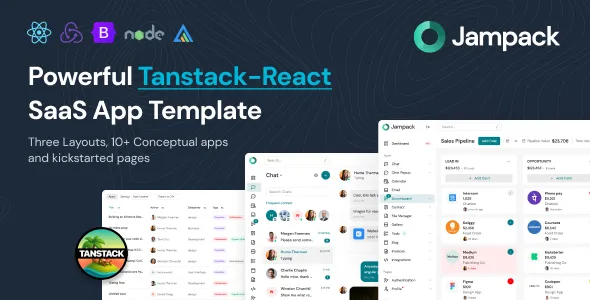
Jampack – Powerful TanStack-React SaaS App Template
Jampack – Powerful TanStack-React SaaS App Template is a modern frontend template designed for developers, software startups, technology companies, and digital product teams looking to build professional SaaS applications and web-based business platforms. Combining a React-oriented development approach with TanStack technologies, Jampack provides a foundation for creating structured, interactive, and customizable user interfaces for modern software products. Whether you are developing a business application, introducing a subscription-based platform, building a productivity tool, or creating a web interface for a digital service, this template can help establish a consistent starting point for your project.
Modern SaaS applications require more than an attractive interface. They need organized layouts, intuitive navigation, consistent components, and a user experience that helps people complete tasks efficiently. Jampack is intended to support this type of development by giving developers a frontend foundation that can be adapted to different product requirements. Its React-based approach is relevant to teams that prefer reusable components and a structured interface architecture, while TanStack technologies can support specific application needs depending on the packages and implementation included in the template.
Jampack can be considered for a range of software projects, including business management platforms, productivity applications, team collaboration tools, customer-facing SaaS products, and internal company systems. Developers can customize the available interface, branding, content, and functionality to align with the goals of their application. Before implementation, review the actual product files and documentation to confirm which pages, components, libraries, and integrations are included in the supplied version.
Modern SaaS Application Development
Software as a Service has become an important model for delivering applications through the web. Businesses use SaaS platforms to manage workflows, organize information, collaborate with teams, analyze performance, and access digital tools from different devices. As these products become more capable, their interfaces must remain clear, responsive, and easy to navigate.
Jampack provides a starting point for creating a modern SaaS frontend with a focus on structured application development. Rather than designing every interface element from scratch, developers can begin with the supplied template and adapt its available layouts to match their product requirements.
A SaaS interface may include navigation menus, content areas, data presentations, settings pages, user account sections, and other elements that support everyday tasks. The specific components available in Jampack depend on the included implementation, but its intended application category makes it relevant to teams planning a professional software interface.
By customizing the layout and content, developers can shape the user experience around the tasks their application needs to support. A project management platform may prioritize project navigation and task organization, while a customer relationship management system may focus on customer records, sales workflows, and reporting. The design should always reflect the real purpose of the product rather than forcing every application into the same structure.
React-Based Frontend Architecture
React is a widely used JavaScript library for building interactive user interfaces. Its component-based approach allows developers to divide an interface into smaller, reusable elements that can be developed, tested, and maintained independently.
Jampack’s React-oriented foundation can be useful for developers who want to create an application interface using reusable components. Common interface elements, such as navigation items, buttons, content panels, forms, and repeated information blocks, can be organized into components where the implementation supports this approach.
Component reuse can improve consistency across an application. When a shared element needs a design adjustment, developers may be able to update the relevant component instead of making separate changes throughout the project. A well-organized component structure can also make it easier for teams to divide development work and maintain a consistent design system.
React is suitable for a variety of application interfaces, from relatively simple SaaS landing experiences to more complex interactive dashboards. The amount of application logic required depends on the product being developed.
Jampack should be evaluated according to its actual source code, dependencies, and component organization. Developers should review how the supplied project handles rendering, state, routing, and data before deciding how to extend it for a production application.
TanStack Technologies for Modern Web Applications
TanStack is an ecosystem of tools designed to address different challenges in modern web development. Depending on the packages used, TanStack technologies can support areas such as routing, data management, asynchronous server-state handling, and full-stack application development.
The Jampack template name indicates a TanStack and React-oriented development approach. The exact TanStack libraries included should be confirmed from the product documentation and dependency configuration rather than assumed from the name alone.
For developers working with compatible TanStack tools, these technologies can help organize particular parts of an application. Routing tools can support navigation between application views, while data-related libraries may help manage the process of retrieving, caching, updating, or synchronizing information from a server.
The value of these tools depends on how they are used within the project. A consistent architecture can make an application easier to extend, but it does not remove the need for sound data modeling, error handling, testing, and performance optimization.
Before adding new dependencies or upgrading existing packages, check the versions supported by the supplied template. Compatibility between React, TanStack packages, build tools, and other dependencies should be verified in a development environment.
Flexible Interface Customization
A SaaS product needs a visual identity that reflects its audience, market, and purpose. Jampack can be customized to align the interface with a company’s brand and product strategy.
Developers can adapt available colors, typography, spacing, logos, icons, imagery, and page content according to the supplied source code. These changes help transform a starting template into a more distinctive application interface.
A business-focused platform may benefit from a restrained visual style that emphasizes readability and efficient navigation. A creative productivity product may use more expressive colors and visual elements, while an analytics application may prioritize the clear presentation of information.
Customization should maintain consistency across the application. Shared styles, reusable components, and standardized interface patterns can help prevent individual pages from looking unrelated.
Developers should also consider how the interface will evolve as the product grows. A consistent design system can make it easier to introduce new pages, adjust existing components, and maintain a recognizable experience across the application.
Suitable for SaaS Dashboards and Business Platforms
Many SaaS products rely on a central interface where users can access information, manage settings, and complete recurring tasks. Jampack can serve as a frontend starting point for projects that require this kind of structured web experience.
Potential applications include business management software, team productivity platforms, project tracking tools, customer management systems, online service portals, workflow applications, and other web-based business products.
A project management platform might organize information around projects, tasks, deadlines, and team members. A customer management system could focus on customer details, activity records, and communication workflows. An online business service might need account settings, usage information, subscription details, and support links.
These are potential use cases rather than guaranteed ready-made modules. Developers should confirm which screens and components are included in Jampack and determine how much additional work is required to support the intended application.
A clear dashboard should help users identify the information they need without unnecessary complexity. Good information hierarchy, meaningful labels, and consistent navigation are important when designing interfaces that people use regularly.
Structured Application Layouts
A well-organized application layout helps users understand where they are and how to reach important sections. In a SaaS product, the layout may include a navigation region, a header, a main content area, contextual actions, and other interface elements.
Jampack can be customized to establish a consistent layout for the application. Depending on the included design, developers may adapt the arrangement of navigation menus, page headings, content sections, buttons, and other recurring elements.
Consistency is especially useful when an application contains multiple views. Users should be able to recognize shared navigation patterns and understand how to move between related tasks without learning an entirely different interface on each page.
The layout should also support the application’s actual content. Information-dense pages may require more room for tables or reports, while settings screens may benefit from smaller groups of clearly labeled controls.
Before expanding the layout, review the template’s existing components and routing approach. Adding new sections should preserve the established design conventions while providing enough flexibility for different types of content.
Data-Driven User Interfaces
Many SaaS applications display information that changes over time. Examples include customer records, project details, order information, activity feeds, account usage, and business performance metrics.
A data-driven interface separates the presentation of information from the source of that information. Developers can use React components to render interface elements based on application data, while appropriate data-handling tools can support communication with APIs or other services.
Jampack may serve as a starting point for this type of frontend development. The exact data-related functionality depends on the supplied source code and the libraries included with the product.
When developing a data-driven application, developers should plan how information is loaded, validated, displayed, and updated. Interfaces should account for loading states, empty results, failed requests, and situations where users do not have permission to access particular information.
A professional data presentation should also make important values easy to understand. Clear labels, suitable formatting, meaningful status indicators, and logical grouping can help users interpret the information presented by the application.
The template’s visual interface does not automatically provide a database or live business data. A production application typically requires a backend, API, or another appropriate data source.
Navigation and Application Routing
Routing determines how users move between different pages or views within a web application. A SaaS product may need routes for the main dashboard, individual records, settings, reports, account information, and other areas.
TanStack offers routing-related technologies, but the specific routing package used by Jampack must be verified in the supplied dependency files. If a compatible routing library is included, developers can examine its existing route definitions and adapt them to the application’s information architecture.
A clear routing structure can improve maintainability as the application expands. Developers should group related views logically and ensure that route names and navigation labels make sense to users.
Routing should also be tested for direct navigation, refresh behavior, unknown paths, and appropriate access restrictions. If the application contains private user areas, authorization must be enforced through secure application logic and backend controls rather than relying only on whether a link appears in the interface.
The final implementation should make navigation predictable and ensure that each route displays the correct content.
Reusable Components and Consistent UI Patterns
Reusable components are an important part of efficient React development. They allow developers to build recurring interface elements once and apply them across multiple pages.
Depending on the supplied structure, Jampack may provide a starting point for organizing common interface patterns such as buttons, input fields, navigation elements, content panels, cards, and other reusable sections. Developers should inspect the actual component library to understand what is available.
Consistent components can improve the experience for end users. When buttons behave predictably, form fields follow familiar patterns, and page headings use a consistent hierarchy, users can focus on their tasks rather than interpreting a different interface on every screen.
A shared component approach can also support future design changes. Developers may be able to adjust a common element in one place and reuse that improvement throughout the application.
When extending the template, avoid creating unnecessary variations of the same component. Establishing shared conventions for component naming, styling, and behavior can help maintain a cleaner codebase.
Responsive Design Across Devices
Modern web applications may be accessed from desktop monitors, laptops, tablets, and smartphones. Responsive design helps the interface adapt to different screen sizes and input methods.
Jampack can be evaluated and customized for the devices used by the target audience. Developers should review the behavior of navigation menus, content panels, forms, data tables, and other interface elements at common screen widths.
A desktop dashboard may have room for multiple navigation areas and information panels, while a mobile layout may need a simplified menu and vertically arranged content. Important actions should remain discoverable, and users should not have to scroll horizontally through ordinary page content unnecessarily.
Responsive behavior should be tested with realistic application data. Long labels, large numbers, empty states, validation messages, and other unexpected content can reveal layout problems that are not obvious in a simple preview.
Testing across different browsers and devices can help identify inconsistencies before the application is released. The final experience depends on the actual template implementation and any customizations added during development.
Forms and User Input
Forms are essential in many SaaS applications. Users may need to update account details, create projects, add records, change settings, submit requests, or configure product preferences.
Jampack can be used as a frontend starting point for form-based workflows where the supplied components and application structure support them. Developers can adapt available controls and create additional fields according to the requirements of their application.
Well-designed forms should use clear labels, helpful instructions, and sensible groupings. Required fields should be identified, and validation messages should explain how users can correct mistakes.
Developers should consider different form states, including initial entry, submission, success, validation errors, and network failures. These states help make the interface more understandable and reduce uncertainty when an operation takes time.
A frontend form alone does not store information or perform secure business operations. Form submissions must be connected to an appropriate API or backend service when persistent data handling is required. Sensitive information should be processed according to suitable security and privacy practices.
Analytics and Reporting Interfaces
Business applications often present information through reports, summaries, tables, and charts. These interfaces help users understand trends, compare values, monitor activity, and make informed decisions.
Jampack can provide a foundation for developing reporting-oriented screens if its layout and components are suitable for the intended project. Developers may customize the interface to display relevant performance indicators, historical values, category summaries, or other business information.
Effective reporting begins with clear data definitions. Users should understand what each value represents, which period it covers, and how it relates to their work. Labels, units, dates, and comparison periods should be displayed consistently.
Charts and visual summaries should support the underlying information rather than decorate the page. When presenting complex data, developers should consider whether a chart, table, or combination of both provides the clearest explanation.
Actual reporting functionality requires a reliable data source and appropriate calculation logic. A template should not be assumed to include live analytics or a connected reporting backend unless the product documentation confirms those capabilities.
SaaS Account and Subscription Experiences
Subscription-based software frequently needs account pages where users can review their profile, preferences, plan details, and billing information. These areas should make important account actions easy to understand.
Jampack may serve as a frontend foundation for account-related pages, depending on its supplied components and page structure. Developers can customize the interface to reflect the application’s account model and subscription options.
A complete subscription experience involves more than displaying plan names and prices. Features such as payment processing, recurring billing, cancellations, invoices, subscription changes, and access to paid functionality require suitable backend logic and payment-provider integration.
Account-related actions should be validated and authorized on the server. A user interface must not be treated as the sole security mechanism for restricting access to paid features or private information.
Before using the template for a commercial SaaS product, confirm whether account and subscription interfaces are already included or need to be developed. This distinction is important for estimating project time and technical requirements.
Integration with APIs and External Services
Many web applications rely on external services to provide authentication, business data, communication, payments, analytics, or other capabilities.
Jampack can be considered as a frontend starting point for integrating these services where its architecture supports the required implementation. Developers should first identify how the template organizes network requests, application state, and configuration.
An API integration may require request handling, response validation, authentication, error reporting, and appropriate loading states. External services may also impose rate limits, permissions, version requirements, and specific data formats.
Sensitive credentials should not be embedded in publicly accessible client-side code. Private keys and privileged operations should be handled through a secure server-side environment or the recommended integration method provided by the service.
Integration testing should cover both successful and unsuccessful responses. Users should receive understandable feedback when an external service is unavailable or a request cannot be completed.
Compatibility with a specific API or third-party platform should be confirmed separately rather than assumed from the template’s name.
Performance and Frontend Optimization
Performance is an important consideration for SaaS applications because users may interact with the interface throughout the working day. A slow application can interrupt tasks and make routine workflows frustrating.
The actual performance of Jampack depends on its source code, dependency choices, data volume, deployment configuration, and the additional features added during customization. Developers should test the production build and identify areas that may need improvement.
Potential optimization measures include reducing unnecessary JavaScript, optimizing images and fonts, managing dependencies carefully, and avoiding excessive re-rendering in data-heavy views. If the application loads large datasets, developers may need pagination, filtering, or other strategies to keep the interface responsive.
Loading indicators and progressive content presentation can help users understand when information is being retrieved. Clear error handling is equally important when requests fail or network conditions are unreliable.
Performance testing should include realistic data, representative devices, and typical user workflows. No specific speed score or performance guarantee should be assumed without measuring the completed application.
SEO Considerations for SaaS Websites
Some SaaS projects need public marketing pages to attract potential customers through search engines. These pages may explain product benefits, introduce features, compare plans, and provide information about the company.
Jampack can be evaluated for use in public-facing SaaS website experiences, but search engine optimization depends on how the application is rendered and deployed. Developers should check whether the supplied setup uses client-side rendering, server-side rendering, static generation, or another approach.
Public pages should use meaningful page titles, descriptive meta descriptions, clear headings, original content, and useful internal links. Images should include appropriate alternative text when they convey important information.
If the project uses client-side rendering, developers should verify that search engines and other consumers can access the intended content. Depending on the application’s requirements, server-side rendering or static generation may be appropriate.
Private dashboard pages generally have different search requirements from public marketing pages and may need to be excluded from indexing. Developers should configure access controls and indexing directives appropriately.
A frontend template cannot guarantee search rankings or organic traffic. Results depend on content quality, technical implementation, relevance, competition, and ongoing SEO work.
Accessibility and Inclusive Interface Design
A professional SaaS interface should support users with different abilities, devices, and interaction preferences. Accessibility improvements can also make the application easier to use for people working in challenging environments or with limited screen space.
When customizing Jampack, developers should use semantic HTML, logical heading structures, accessible form labels, and descriptive link text. Interactive elements should support keyboard navigation, and visible focus indicators should help users understand which control is currently selected.
Color contrast should make text and controls readable. Status messages should not rely exclusively on color, and forms should provide understandable instructions when validation fails.
Dynamic interfaces require additional attention because updates may occur without a full page reload. Important state changes should be communicated in an appropriate way so users can understand whether an action has completed or requires attention.
Accessibility testing should include keyboard-only use, automated evaluation tools, and manual checks of important user journeys. The final level of accessibility depends on the actual implementation, not simply on the use of React or TanStack technologies.
Developer Workflow and Project Maintainability
A well-organized frontend project can make it easier to build, test, and maintain a SaaS application. Jampack offers a starting point that developers can evaluate before extending it to support their product requirements.
Begin by reviewing the project documentation, package configuration, source directories, build commands, and environment settings. Understanding these details helps avoid unnecessary changes and makes it easier to identify the correct location for custom code.
Developers should keep components organized, maintain consistent naming conventions, and document important implementation decisions. Repeated interface patterns should be reused where practical, while complex functionality should be separated into manageable units.
Version control can help teams track modifications, review code changes, and recover from mistakes. Automated checks and tests can further support reliability as the application grows.
Before upgrading dependencies, confirm compatibility with the existing project. Framework and library updates should be tested in a development environment before being deployed to production.
Security and Production Readiness
A frontend template provides only part of the foundation required for a production SaaS application. Real software products may need authentication, authorization, database access, audit records, data validation, and other security controls that must be implemented separately unless they are explicitly included.
Developers should review dependencies, remove unused packages, protect private credentials, and follow secure coding practices. Input validation should occur on the server where appropriate, and permissions must be enforced independently of the visual interface.
Applications that handle personal or business information should collect only the data they need and protect it throughout its lifecycle. Logging and error reporting should also avoid unnecessarily exposing sensitive information.
Before launch, test authentication flows, permission boundaries, form submissions, API errors, and important user workflows. Review deployment configuration and confirm that production secrets are stored securely.
Security and compliance requirements vary according to the application’s purpose, users, and operating region. Organizations should identify the standards that apply to their specific project rather than assuming that a template provides compliance automatically.
Who Should Choose Jampack?
Jampack may be suitable for developers and businesses that want a React-oriented frontend foundation for a modern SaaS or web application.
SaaS founders can evaluate the template as a starting point for presenting a software product and developing its user-facing experience.
Frontend developers can use the source code to explore component structures and customize interface elements for a specific application.
Development agencies can assess its suitability for client projects that require a modern web application interface, subject to the template’s licensing terms.
Technology startups can adapt the available design to match a new product’s brand, audience, and workflows.
Product teams can consider the template when planning an interface for a business tool, productivity platform, or online service.
Experienced developers can investigate how the supplied project uses React and any included TanStack packages before extending the application architecture.
The template’s suitability depends on the actual source code, required functionality, developer experience, and the amount of customization needed.
Important Things to Check Before Purchase
Before selecting Jampack for a project, review the live preview, included files, and official product documentation. Confirm the page layouts, reusable components, dependency versions, installation requirements, and supported development workflow.
Check which TanStack packages are actually included and whether the supplied implementation matches your preferred routing and data-management approach. Review any additional dependencies and determine whether they are compatible with the project’s technical requirements.
It is also important to distinguish frontend interface components from complete application features. Authentication, persistent data storage, payments, subscription management, real-time communication, and administrative workflows may require additional services or development.
Verify the license terms for commercial use and client projects. Review update information and compatibility notes so you can plan maintenance appropriately.
These checks can help you determine whether Jampack is suitable for your intended SaaS application and estimate the work required to turn the template into a complete product.
Why Choose Jampack – Powerful TanStack-React SaaS App Template?
Jampack is positioned for developers who need a modern frontend foundation for SaaS applications and other web-based business products. Its React-oriented approach supports component-based interface development, while the TanStack ecosystem can provide useful tools for particular routing and data-related requirements when those packages are included and configured appropriately.
For teams building a software product, starting with an existing template can help organize the initial design and provide a base for further customization. Developers can adapt the visual identity, organize application views, refine the navigation, and extend the interface according to the project’s needs.
The strongest results come from combining the template’s available components with clear product planning, reliable data handling, accessible interface design, and thorough testing. By reviewing the supplied source code and adding only the functionality required by the application, developers can build a frontend that supports both present needs and future improvements.
Build Your Next SaaS Application with Jampack
Choosing a suitable frontend template is an important step in planning a modern software product. Jampack – Powerful TanStack-React SaaS App Template provides a starting point for developers, startups, and technology teams looking to create a professional interface for a SaaS platform or web-based business application.
Its React and TanStack-oriented positioning makes it relevant to projects that value reusable components, structured application development, and flexible frontend customization. The supplied source code can be reviewed and adapted to match the application’s branding, navigation, data presentation, and user workflows.
Whether you are developing a productivity tool, launching a new digital service, or building a business-focused web application, evaluate Jampack against your technical requirements and the features included in the actual package. With appropriate customization, secure integrations, responsive design, and careful testing, it can serve as a foundation for a polished and maintainable SaaS frontend.


