My Account
Jetton – Minimal Portfolio & Studio HTML Template
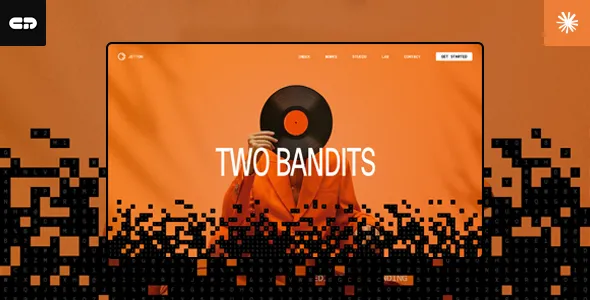
Jetton – Minimal Portfolio & Studio HTML Template is a modern website design solution for creative professionals, freelancers, designers, photographers, developers, branding specialists, and digital studios looking to establish a distinctive online presence. Built as an HTML website template, Jetton provides a visual foundation for presenting creative work, introducing professional services, sharing project details, and communicating a recognizable brand identity. Its minimal portfolio direction is suited to websites where visual content, thoughtful layouts, and clear messaging play an important role in attracting potential clients and presenting professional capabilities.
A portfolio website is more than a collection of images or project links. It gives visitors an opportunity to understand a creative professional’s approach, explore previous work, learn about available services, and decide whether the person or studio is suitable for a project. A minimal design can help keep attention on the work itself by reducing unnecessary visual distractions and organizing information into clear sections. Jetton can be considered for creative portfolios, independent designer websites, photography presentations, design agencies, branding studios, and other projects that benefit from a focused visual experience.
As an HTML template, Jetton offers a frontend starting point that developers can customize using HTML, CSS, JavaScript, and the technologies included in the supplied package. The final website can be adapted with original content, project images, brand colors, typography, navigation, and other design elements. Its suitability for a particular project should be assessed by reviewing the available layouts, included components, responsive behavior, source files, and documentation supplied with the current version.
What Is Jetton Minimal Portfolio & Studio HTML Template?
Jetton is a minimal portfolio and studio website template intended for presenting creative work and professional services through a structured online experience. It is designed for individuals and businesses that want a website centered on their identity, selected projects, and creative capabilities rather than an overly complicated interface.
A portfolio template provides a useful starting point for organizing professional information. Visitors can explore an introduction, review featured work, learn about the services offered, and find contact information. For a design studio, the website can introduce the team’s creative direction and present selected client projects. For an independent designer, it can highlight personal skills, experience, and completed assignments.
The HTML foundation gives developers direct access to the website’s frontend structure. They can modify page content, adjust styling, replace visual assets, and customize the layout according to the project’s requirements. Additional functionality can be introduced through JavaScript or suitable third-party services where needed.
The exact page designs, sections, interactions, and included assets depend on the version of Jetton supplied. Before beginning development, users should review the live preview and documentation to understand the available pages, required dependencies, and recommended setup process.
Minimal Design for Creative Presentations
Minimal design can be particularly effective for portfolio websites because it allows the presented work to remain the main focus. Instead of filling every section with decorative elements, a carefully organized layout gives images, project titles, descriptions, and other important information enough space to be understood.
Jetton’s minimal portfolio direction makes it relevant to creative professionals who want a clean and organized presentation. A designer can use a focused layout to showcase branding projects, website interfaces, graphic design, or visual identities. A photographer can prioritize selected images, while a creative studio can organize its work into projects that demonstrate different areas of expertise.
A minimal interface should still provide enough information for visitors to understand the website. Clear headings, readable descriptions, consistent spacing, and recognizable navigation help create an experience that is simple without becoming incomplete.
The visual identity can be developed further through appropriate typography, imagery, colors, and content hierarchy. A studio may choose a restrained appearance to communicate professionalism, while an independent creative professional may introduce a more expressive visual style through selected project images and supporting graphics.
Portfolio Website for Designers and Creative Professionals
Designers need a convenient way to demonstrate their skills and communicate the quality of their work. A professional portfolio can help potential clients understand the designer’s visual approach, technical capabilities, and experience across different projects.
Jetton can serve as a starting point for a designer portfolio featuring selected work, an introduction, service information, and contact details. Depending on the supplied layouts, the website may be organized around a featured project section, portfolio gallery, project descriptions, and other professional information.
Graphic designers can present branding concepts, promotional graphics, packaging designs, and visual communication projects. UI and UX designers can showcase interface designs, prototypes, user journeys, and product experiences. Web designers can highlight website layouts, landing pages, and digital projects.
A useful portfolio should explain the context behind selected work. Rather than displaying images without information, designers can describe the client’s objective, the challenge involved, their contribution, and the final outcome. This gives visitors a clearer understanding of the skills demonstrated by each project.
A Professional Website for Creative Studios
Creative studios often work across multiple disciplines, including branding, graphic design, digital experiences, advertising, photography, and content production. Their websites need to communicate the studio’s identity while presenting a selection of work that reflects its capabilities.
Jetton can be evaluated for a creative studio website that introduces the business, explains its services, and highlights selected projects. A homepage can communicate the studio’s creative direction, while dedicated sections can provide additional information about its work and professional approach.
A branding studio might organize its portfolio around visual identity projects, logo systems, packaging, and brand guidelines. A digital studio could focus on websites, user interfaces, and interactive experiences. A multidisciplinary agency may present a varied collection of projects supported by clear categories and descriptions.
A well-organized studio website should make it easy for prospective clients to understand what the business offers. Service information should be specific, portfolio examples should be relevant, and contact details should be accessible.
Portfolio Presentation and Project Showcases
The portfolio is one of the most important parts of a creative website. It gives visitors direct evidence of the work produced by an individual or studio and helps them evaluate whether the creative approach matches their requirements.
Jetton can provide a frontend foundation for organizing project presentations, subject to the portfolio layouts available in the supplied template. Developers can replace demonstration images and text with original project information, arrange featured work, and adjust the presentation to suit the website’s purpose.
Each project can include a descriptive title, relevant images, a short overview, and information about the services involved. More detailed case studies may explain the original brief, design decisions, development process, and final deliverables.
For example, a web design project might include interface screenshots, responsive layouts, and an explanation of the website’s objectives. A branding project could present the logo, color palette, typography, and examples of how the identity is applied. A photography portfolio may organize selected photographs into collections based on subject or creative direction.
Strong project presentation depends on the quality and relevance of the content. Selecting fewer meaningful projects with useful descriptions can be more effective than displaying a large collection without context.
Suitable for Freelancers and Independent Professionals
Freelancers often need a website that introduces their expertise, presents previous work, and creates opportunities to connect with potential clients. A personal portfolio provides a central destination for professional information and can be shared through email, social profiles, proposals, and business communications.
Jetton can be considered for independent professionals such as graphic designers, web developers, photographers, illustrators, digital artists, copywriters, and creative consultants. The website can be customized to reflect the individual’s services, professional background, and preferred visual identity.
A freelancer can use an introduction section to explain their work, followed by selected projects that demonstrate relevant experience. A services section can describe the types of assignments they accept, while a contact section provides a convenient way for visitors to make inquiries.
Professional portfolios should prioritize accuracy. Skills, project responsibilities, client names, and results should be presented honestly. If a project was completed as part of a team, the individual’s contribution should be described clearly.
By combining a focused presentation with useful project information, freelancers can create a professional website that supports their efforts to attract suitable opportunities.
Website for Photographers and Visual Artists
Photographers and visual artists often depend on strong visual presentation to communicate their creative style. A portfolio website gives them control over how their work is organized and presented to visitors.
Jetton’s portfolio-oriented approach can be evaluated for photography and visual art websites, depending on the included gallery and image layouts. Photographers may organize work into collections such as portraits, weddings, fashion, architecture, products, landscapes, or commercial photography.
Visual artists can use portfolio sections to present illustrations, digital artwork, creative experiments, and selected commissioned projects. Each collection can be supported by short descriptions that explain the subject or creative direction.
Image quality and optimization are important considerations for these websites. Large photographs can affect loading performance, especially on mobile connections. Images should be exported at appropriate dimensions and compressed carefully while retaining sufficient visual detail.
A useful photography website should also provide practical information about services, availability, location where relevant, and contact methods. This helps visitors move from exploring the portfolio to making a professional inquiry.
Responsive Layout for Different Devices
Visitors may explore a portfolio using a desktop computer, laptop, tablet, or smartphone. A responsive website helps ensure that important content remains accessible across different screen sizes.
Jetton is positioned as an HTML portfolio template for modern website projects, making responsive presentation an important consideration during customization. Developers should test how the supplied layouts behave at different viewport widths and confirm that navigation, images, text, and interactive elements remain usable.
On smaller screens, project images should fit the available space without unwanted cropping, headings should remain readable, and navigation should be straightforward. Buttons and links should also have enough space to be selected comfortably.
Responsive testing should cover the entire website rather than only the homepage. Portfolio galleries, project details, service sections, and contact areas may require different adjustments.
Custom CSS, third-party scripts, embedded media, and additional components can affect responsive behavior. Developers should test the finished implementation after making substantial changes to the original template.
Customization and Brand Identity
A portfolio website should reflect the identity of the person or studio it represents. Customization allows developers to replace the original demonstration content and create a website that communicates the correct brand personality.
With access to the supplied HTML, CSS, and JavaScript files, developers can adapt the frontend according to the project’s requirements. Common customization tasks include changing text, replacing images, adjusting colors, updating typography, modifying spacing, and reorganizing page sections.
A creative studio may prefer a restrained visual identity with carefully selected typography and neutral colors. A photographer may use larger images and minimal supporting text, while a digital agency may emphasize project categories and service descriptions.
Brand consistency should be maintained across the complete website. Headings, body text, buttons, navigation, image treatments, and other interface elements should follow a recognizable visual system.
Before making extensive changes, developers should review the template’s file structure and documentation. This helps identify which styles and scripts control individual components and reduces the risk of introducing unnecessary conflicts.
HTML, CSS, and JavaScript Development Foundation
Jetton is an HTML template rather than a complete content management system. Its frontend source files provide a foundation that developers can inspect and customize to create the required website experience.
HTML defines the structure and content of the pages. CSS controls presentation, including typography, colors, spacing, and responsive layouts. JavaScript can be used for supported interactive elements and additional frontend behavior.
This structure can be useful for developers who prefer direct control over their website code. They can integrate the template into a broader development workflow, connect it with a backend, or adapt selected components for a custom project.
The precise technologies, libraries, plugins, and dependencies included with Jetton should be checked in the supplied package. Developers should also review the documentation for setup instructions, asset references, browser requirements, and any recommended build tools.
An HTML template does not automatically provide database storage, user authentication, content management, or server-side processing. These capabilities require suitable backend development or third-party integrations unless they are explicitly included in the product package.
Contact Sections and Client Inquiries
For a freelancer or creative studio, a portfolio website should provide a clear way for interested visitors to make contact. A visitor who likes the presented work may want to request a quotation, discuss a project, or ask about available services.
Jetton can be customized to include contact information and inquiry pathways according to the available page structure. A contact section may display an email address, telephone number, social profile links, or a contact form where supported by the supplied design.
A useful inquiry form should request only the information needed to begin a conversation. Common fields may include a visitor’s name, email address, project category, and a short description of the requirement.
However, an HTML contact form does not automatically send or store messages. Form submission requires a configured backend, server-side script, or compatible third-party form service. Developers should also test validation, successful submission messages, email delivery, and spam protection before publishing the website.
Clear contact pathways make the portfolio more practical by connecting the presentation of creative work with the next step in the client journey.
SEO-Friendly Structure for Portfolio Websites
Search engine optimization can help a portfolio website become more discoverable when potential clients search for relevant creative services. A clean frontend structure can support SEO implementation, but search visibility also depends on content quality, technical configuration, competition, and other factors.
Each page should have a descriptive title, a clear purpose, and a logical heading structure. A designer’s portfolio might include separate information about branding, web design, and visual identity services rather than placing every service into one general paragraph.
Project pages can provide additional opportunities to describe completed work. Useful case studies should explain the project context, services provided, and relevant deliverables. This creates meaningful content for visitors rather than relying only on image galleries.
Image optimization is particularly important for portfolio websites. Descriptive file names and suitable alternative text can help explain the purpose of images. Images should also be compressed and sized appropriately to avoid unnecessary loading delays.
Developers can configure metadata, canonical URLs, XML sitemaps, structured data where appropriate, and other SEO elements as part of the final website implementation. These features may require additional code or compatible tools.
No HTML template can guarantee a particular search ranking. Consistent content quality, technical maintenance, useful information, and a positive user experience contribute to a stronger SEO foundation.
Website Performance and Image Optimization
Website performance affects how quickly visitors can access portfolio content. A slow website may discourage users from exploring projects, especially when browsing on mobile devices or slower internet connections.
Image-heavy websites require particular attention because large files can increase page loading time. Developers should optimize photographs, project previews, and other visual assets before adding them to the website.
Appropriate image dimensions help prevent unnecessarily large files from being downloaded. Modern image formats may also be useful when supported by the target browsers and implementation. Lazy loading can be considered for suitable images that appear further down a page.
Other performance considerations include reducing unnecessary scripts, reviewing third-party integrations, minimizing unused CSS, and using reliable hosting. The actual results depend on the final implementation and the resources used by the website.
Performance should be tested after customization. The homepage, project pages, gallery sections, and contact pages may have different loading characteristics. Regular reviews can help identify oversized assets and unnecessary frontend components.
Accessibility and User-Friendly Navigation
A professional portfolio should make information easy to understand and navigate. Clear menus, readable typography, suitable color contrast, and descriptive links help visitors explore the website more comfortably.
When customizing Jetton, developers should use a logical heading hierarchy and provide meaningful alternative text for informative images. Decorative images can be handled appropriately so that they do not create unnecessary interruptions for assistive technologies.
Navigation labels should clearly describe their destinations. A portfolio website may include sections such as Home, Work, About, Services, and Contact. The exact structure should reflect the needs of the individual or studio.
Interactive elements should be distinguishable and usable with a keyboard where applicable. Contact forms should include clear labels and understandable validation messages.
Accessibility should be checked across the complete website. Automated testing can identify some common issues, while manual keyboard testing and practical usability reviews can reveal problems that automated tools may miss.
Who Should Use Jetton Minimal Portfolio & Studio HTML Template?
Jetton may be suitable for several types of creative and professional website projects.
Graphic designers: Present branding, visual identity, packaging, advertising graphics, and selected design assignments.
Web designers: Showcase website layouts, landing pages, interface concepts, and digital experiences.
Creative agencies: Introduce studio services, present client projects, and communicate a distinct creative direction.
Photographers: Organize photography collections and highlight selected commercial or personal work.
Freelancers: Build a professional online portfolio featuring skills, experience, services, and contact information.
Digital artists: Display illustrations, digital compositions, visual experiments, and commissioned artwork.
Branding studios: Present identity systems, logo projects, brand guidelines, and creative strategy work.
UI and UX professionals: Showcase interface designs, product experiences, prototypes, and selected case studies.
Creative consultants: Explain professional services, demonstrate relevant projects, and provide a convenient way to request consultations.
The suitability of the template depends on the project’s requirements and the features available in the supplied version. Reviewing the live preview, documentation, included pages, and source files before purchase or installation can help determine whether it is the right starting point.
Tips for Building a Successful Website with Jetton
A successful portfolio website requires more than an attractive layout. It should communicate a clear professional identity and help visitors understand the value of the work being presented.
Start by defining the website’s main purpose. Decide whether it should primarily attract freelance clients, introduce a creative studio, present photography, or showcase a particular design discipline.
Choose portfolio projects carefully. Include examples that reflect the type of work you want to receive in the future. Each project should have a clear title and enough supporting information to explain its purpose and your contribution.
Replace all demonstration text and images with accurate original content. Use a consistent visual identity across the website, including typography, colors, image treatments, and navigation.
Keep service descriptions specific. Explain what you offer, who the service is intended for, and how prospective clients can begin a conversation. Avoid vague statements that do not help visitors understand your capabilities.
Test the website on different screen sizes and browsers. Review navigation, images, links, contact forms, loading performance, and accessibility before launch.
Finally, maintain the website regularly. Update portfolio projects, review service information, check contact details, optimize new images, and test important links. A current portfolio provides a more accurate picture of professional capabilities.
Final Thoughts on Jetton Minimal Portfolio & Studio HTML Template
Jetton – Minimal Portfolio & Studio HTML Template is a potential starting point for designers, freelancers, photographers, digital artists, and creative studios looking to present their work through a focused website. Its minimal portfolio direction makes it relevant to projects where visual presentation, organized content, and a clear professional identity are important.
The HTML foundation gives developers access to the frontend structure for customization. Website owners can adapt the presentation with original project images, service descriptions, brand elements, and contact information according to their requirements and the supplied template features.
As a frontend template, Jetton should be understood as a development starting point rather than a complete backend-powered website or content management system. Features such as dynamic project management, database storage, user accounts, and form processing require additional development or suitable integrations unless explicitly included.
Before using the template, review its current demo, documentation, included source files, dependencies, responsive behavior, and licensing terms. With relevant content, thoughtful customization, responsive testing, SEO implementation, and ongoing maintenance, Jetton can help create a professional portfolio website that communicates creative capabilities and supports meaningful client connections.