My Account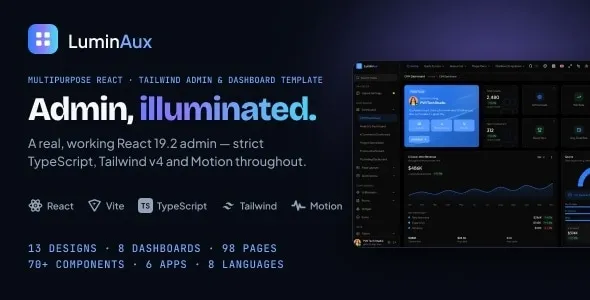
Luminaux – Multipurpose React Tailwind Admin & Dashboard Template
Luminaux – Multipurpose React Tailwind Admin & Dashboard Template is a modern dashboard template designed for developers, startups, businesses, agencies, and product teams that need a professional interface for managing data, monitoring performance, and organizing application workflows. Combining the flexibility of React with the utility-first styling approach of Tailwind CSS, Luminaux provides a foundation for building administrative panels, analytics dashboards, SaaS management interfaces, internal business tools, and web application control centers. Its multipurpose approach makes it suitable for a variety of digital projects where a consistent, organized, and responsive user interface is essential.
An effective admin dashboard helps users understand important information quickly and complete routine tasks with less friction. Whether a business is monitoring operational activity, reviewing performance indicators, managing records, or organizing information across multiple departments, a well-structured interface can make complex workflows easier to navigate. Luminaux is intended to help developers establish that interface without needing to create every visual component from scratch.
React provides a component-based development approach that supports reusable interface elements and maintainable application structures. Tailwind CSS offers utility classes for styling layouts, spacing, typography, colors, and other design properties. Together, these technologies create a flexible foundation for developers who want to customize the appearance and behavior of a dashboard according to their project requirements.
Luminaux can be adapted for business administration, customer management, project tracking, reporting interfaces, analytics applications, and other dashboard-driven products. Its final suitability depends on the components, layouts, and functionality included in the supplied package, as well as the development work required to connect the interface to real data and application services.
Modern Design for Administrative Interfaces
An admin dashboard should make information accessible without overwhelming users. A crowded layout, inconsistent spacing, or unclear navigation can make everyday tasks difficult, especially when an application contains many records, reports, and management tools.
Luminaux provides a starting point for creating a structured administrative interface with a modern visual direction. Developers can customize its presentation to suit the intended audience, brand identity, and complexity of the application. A carefully organized dashboard can help users distinguish primary information from secondary details and move between different sections with confidence.
Administrative interfaces often combine navigation, summary information, data displays, filters, forms, and account-related controls. These elements should work together to support a clear user journey. For example, a business manager may need to review important indicators, open a detailed report, filter a list of records, and update an individual entry. A well-planned layout can make these actions easier to understand.
With appropriate customization, Luminaux can serve as a visual foundation for both straightforward management panels and more extensive business applications. Developers can adapt its colors, typography, spacing, and component arrangements to create an interface that reflects the product’s identity while maintaining a consistent design language.
Built with React for Component-Based Development
React is widely used for developing interactive user interfaces through reusable components. Instead of maintaining an entire interface as one large block of code, developers can divide it into smaller elements that are easier to understand, customize, and reuse.
Luminaux is built around React, making it relevant to developers who work within a React-based frontend environment. A component-oriented structure can support the creation of repeated interface patterns, such as navigation items, dashboard cards, buttons, input fields, and data presentation sections, where those components are included or implemented in the project.
Reusable components can reduce duplicated markup and help maintain visual consistency throughout an application. If a shared interface element needs a design adjustment, a well-organized component structure can make that change easier to manage.
React is also suitable for interfaces that change in response to user actions or incoming data. A dashboard may need to update visible records after a filter is applied, refresh a summary after a new transaction is entered, or display validation messages when a form is submitted. These interactions can be implemented using React state, event handlers, and suitable data-management patterns.
The template provides a starting point for this type of development, but complete application behavior depends on the supplied implementation and the additional code added for the project.
Tailwind CSS for Flexible Styling
Tailwind CSS uses utility classes to style elements directly within the markup or component structure. This approach gives developers a practical way to adjust spacing, layout, typography, colors, borders, and responsive behavior without writing separate custom CSS rules for every small design change.
For an admin dashboard, flexible styling is valuable because different applications have different visual requirements. A finance platform may need a restrained and data-focused interface, while a creative agency dashboard may benefit from more expressive colors and prominent visual elements. A project management application may prioritize compact tables and clearly differentiated status indicators.
Luminaux’s React and Tailwind CSS foundation can help developers adapt the interface to these different needs. Styling adjustments may include changing the brand palette, refining component spacing, modifying text hierarchy, adjusting card layouts, and creating a consistent appearance across application pages.
Tailwind CSS can also support responsive layout development through its utility-based breakpoint system. Developers can use responsive styling techniques to adapt navigation, grids, tables, and forms to different screen sizes, depending on the existing implementation.
Before customizing the template, review the included Tailwind configuration, installed version, and build setup. These details can affect how utility classes are generated and how project-specific design tokens should be managed.
Multipurpose Admin Dashboard for Different Projects
The multipurpose nature of Luminaux makes it a potential starting point for several categories of dashboard-driven applications. Rather than being limited to a single business sector, an adaptable admin interface can be reshaped around different workflows and user requirements.
Developers can consider using the template as a foundation for internal business software, SaaS administration, customer management tools, reporting platforms, inventory interfaces, project tracking systems, or content administration panels.
For a SaaS application, the dashboard might display account activity, subscription-related information, usage summaries, and administrative settings. A business management interface might focus on records, tasks, reports, and team activity. A reporting application could prioritize charts, filters, date ranges, and downloadable summaries.
Each use case requires different data structures and interactions. The template’s role is to provide a suitable frontend starting point, while developers implement the application-specific logic and connect the interface to the appropriate services.
This flexibility can be useful for freelancers, agencies, and software teams that need to develop multiple dashboard experiences while maintaining a consistent frontend technology stack.
Business Analytics and Data Visualization
Businesses often need to convert large amounts of information into summaries that support everyday decisions. An analytics dashboard can help users identify changes, compare performance, and investigate specific metrics without navigating through multiple disconnected systems.
Luminaux can be adapted for analytics-oriented interfaces that present relevant information through summary cards, tables, charts, and other data visualization elements when supported by the chosen components and implementation.
A sales dashboard might display revenue trends, order counts, conversion figures, and comparisons across selected periods. A marketing dashboard could organize campaign performance, traffic sources, engagement metrics, and lead-generation results. An operations dashboard might focus on service activity, processing times, workload distribution, or resource utilization.
Useful data visualization begins with selecting the right information. Each chart or metric should have a clear purpose and include appropriate labels, units, and time ranges. Users should be able to understand what the data represents and what conclusions can reasonably be drawn from it.
Charting libraries may be integrated when more advanced visualizations are required. The appropriate library depends on the application’s needs, including chart types, interactivity, accessibility, performance, and licensing.
Any displayed metrics must be connected to reliable data sources or clearly identified as demonstration values. A dashboard template alone does not guarantee real-time analytics, automatic reporting, or data synchronization.
Organized Navigation and Application Structure
Navigation plays a central role in the usability of an administrative interface. When users need to move between reports, records, account settings, and management tools, the navigation system should make the available sections easy to identify.
Luminaux can serve as a foundation for organizing application pages into logical groups. Developers may structure the interface around categories such as overview, analytics, users, projects, reports, settings, and other modules relevant to the product.
A clear hierarchy helps users understand where they are and how to reach related information. Descriptive labels, consistent icon usage, and a predictable page structure can make the interface easier to learn.
For applications with many modules, navigation may include nested categories, active-page indicators, or collapsible sections, depending on the included implementation and customization. Route management should be configured to ensure that each navigation item leads to the correct page.
As the application grows, developers should review the navigation structure periodically. Removing unnecessary items, grouping related functions, and keeping frequently used destinations easy to access can help preserve usability as new features are introduced.
Dashboard Cards and Summary Metrics
Summary cards are a common element of administrative dashboards because they provide a quick overview of important information. A well-designed card can communicate a key metric, its current value, and additional context without requiring the user to open a detailed report.
Luminaux can be customized to present different categories of summary information according to the needs of the application. Possible examples include total users, completed tasks, monthly revenue, active projects, pending requests, order counts, or system activity.
The metrics displayed should reflect the application’s actual business logic. A card showing the number of active users, for example, should use a clearly defined rule for what counts as active. A revenue summary should explain the relevant period and currency when those details could otherwise be ambiguous.
Where appropriate, summary cards may be paired with trend indicators or comparisons against previous periods. These elements should be calculated from consistent data and should not suggest improvement or decline without a valid basis.
Developers can also adjust card layouts, spacing, and visual hierarchy to ensure that the most important metrics are easy to identify. The final card designs should be tested with realistic values, including long numbers, missing data, and loading states.
Tables for Managing Records and Business Information
Tables are useful for presenting structured information that users need to review, compare, sort, or update. Admin dashboards commonly use them for user directories, transaction histories, order management, task lists, inventory records, and other business data.
Luminaux can be adapted to support table-based interfaces according to the components included in the package and the functionality implemented during development.
An effective data table should present meaningful column headings, maintain readable spacing, and make important values easy to scan. Developers may add sorting, filtering, pagination, row selection, or action menus when the application requires those capabilities.
Search and filtering can become particularly valuable when datasets contain many records. A customer management dashboard, for example, may allow users to find a record by name, filter by status, or sort entries by creation date.
For mobile interfaces, wide tables need careful handling. Responsive alternatives may include horizontal scrolling, reduced column visibility, or a compact record-card layout. The best approach depends on the type of information users need to access on smaller screens.
Table functionality should also account for empty results, loading states, failed requests, and situations in which the user does not have permission to view or edit a record.
Forms and Data Entry Workflows
Administrative applications often require users to create, edit, or review information. Forms provide the interface for these activities and should make the process clear, efficient, and reliable.
Luminaux can provide a foundation for form-driven pages where the relevant input components are available or can be implemented using React and Tailwind CSS.
Typical dashboard forms may collect account information, project details, customer records, product data, settings, or internal requests. A clear form layout uses descriptive labels, appropriate input types, and helpful instructions to explain what information is required.
Validation is an important part of the experience. Required fields should be identified, invalid values should produce understandable messages, and users should be able to correct errors without losing unrelated information.
For more complex forms, developers may divide fields into logical sections or use a step-by-step workflow. The best structure depends on the amount of information collected and the decisions users must make.
Form submission must also be implemented correctly. A visually complete form does not automatically save data to a database or send information to an external service. These behaviors require application logic, suitable APIs, and appropriate backend integration.
Responsive Dashboard Development
Modern applications are accessed from a variety of devices, including desktop computers, laptops, tablets, and smartphones. A responsive dashboard helps users access important information across these environments.
Luminaux’s React and Tailwind CSS approach is relevant to developers building responsive interfaces. Tailwind CSS provides responsive styling utilities that can be used to adjust layout behavior at different breakpoints, while React supports reusable components that can adapt to different presentation requirements.
A desktop dashboard might display a navigation sidebar, several metric cards, and a wide data table. On a smaller screen, the layout may need to stack cards vertically, simplify navigation, reduce nonessential content, or provide a compact way to browse records.
Responsive testing should cover more than overall page width. Developers should check whether buttons are easy to tap, forms remain readable, navigation is accessible, and important information is not hidden behind unexpected overflow.
Tables, charts, dialogs, and dropdown menus deserve particular attention because their content can become difficult to use on narrow screens. Testing with realistic data and different browser sizes helps identify these issues before launch.
The actual responsive behavior depends on the supplied code and the changes made during customization.
Custom Branding and Visual Consistency
A dashboard should reflect the identity of the product or organization that uses it. Consistent colors, typography, spacing, icons, and component styles help create a recognizable interface and reduce visual confusion.
Luminaux can be customized to match an existing brand system or establish a new one for a digital product. Developers can adjust the primary and secondary colors, page backgrounds, typography, button styles, borders, and other visual details according to the design requirements.
A reusable design system can make these changes easier to maintain. Shared design tokens, reusable components, and consistent utility patterns help prevent different pages from developing unrelated styles.
Branding should not come at the expense of usability. Text needs sufficient contrast, interactive elements should be recognizable, and important status information should not rely on color alone. For example, a status label can combine color with descriptive text or an icon to communicate its meaning more clearly.
The result should be a dashboard that feels distinctive while remaining readable and practical for everyday work.
SaaS Application and Subscription Management Interfaces
Software-as-a-Service products frequently require administrative interfaces for managing accounts, monitoring usage, reviewing activity, and configuring product settings. Luminaux can be adapted as a frontend foundation for these dashboard experiences.
A SaaS administration area may include account summaries, workspace settings, user management, usage reports, service configuration, and subscription-related information. The specific pages depend on the application’s business model and operational requirements.
Developers may connect the interface to authentication services, account databases, billing systems, or other APIs as needed. Subscription changes, payment processing, and access restrictions must be implemented securely and tested independently of the visual design.
For multi-tenant applications, access controls should ensure that users can only view and modify information belonging to the accounts or organizations they are authorized to access. Hiding a navigation item in the frontend is not a substitute for enforcing permissions on the server.
Luminaux can provide the presentation layer for these workflows, while application developers remain responsible for secure authentication, authorization, billing integration, and data handling.
User Management and Administrative Controls
Many web applications need an interface for managing user accounts, roles, profiles, and access permissions. A well-organized administrative panel can help authorized staff review account information and perform routine management tasks.
Luminaux may be customized to present user records, account details, status indicators, and administrative actions, depending on the components and pages included in the supplied package.
A user management screen might include a searchable directory, profile details, role labels, and filters for different account states. Additional workflows could allow authorized administrators to update user information, manage invitations, or review account activity.
These functions should be designed around the application’s actual permission model. Sensitive actions, such as changing access rights or disabling an account, should require appropriate authorization and clear confirmation where needed.
Audit logging may also be important for applications in which administrative actions need to be reviewed later. Such logging is a backend or service-level responsibility and should not be assumed to exist merely because a dashboard interface includes management controls.
Project Management and Task Tracking Dashboards
Project management tools help teams organize tasks, review progress, monitor deadlines, and coordinate work. An administrative template can be adapted to present these activities in a clear, centralized interface.
Luminaux may serve as a starting point for a project dashboard that displays active projects, assigned tasks, due dates, progress indicators, and recent activity, where the relevant interface elements are included or implemented.
A project overview can summarize the current workload, while detailed pages can provide task information, project descriptions, and team-related records. Filters may help users focus on particular projects, statuses, owners, or deadlines.
The design should distinguish between different task states and communicate important dates clearly. Status labels should use consistent definitions, and progress indicators should reflect meaningful measurements rather than arbitrary percentages.
A functional project management system also needs reliable data storage, task assignment rules, update permissions, and possibly notifications or collaboration features. These capabilities must be implemented separately if they are not part of the provided template.
Integration with APIs and Backend Services
A production dashboard usually needs to display information from a database, an API, or an external service. The frontend is responsible for presenting the information and responding to user actions, while backend services handle many of the underlying business operations.
Luminaux’s React foundation can be used to build interfaces that communicate with APIs through suitable request methods and data-handling patterns. Depending on the project, these connections may provide account information, report data, records, configuration values, or other application content.
Developers should plan for loading indicators, error messages, empty results, expired sessions, and unexpected responses. These states help the interface remain understandable when the network or service does not behave as expected.
API requests should be implemented with appropriate security practices. Private credentials and secret keys must not be embedded in client-side code. Sensitive operations should be validated and authorized by the backend.
The exact integration approach depends on the API design, authentication method, application architecture, and technical requirements of the project. The template should be reviewed to determine what is already implemented and what must be added.
Performance and Frontend Optimization
Dashboard performance matters because users may interact with the interface repeatedly throughout the day. Slow page transitions, excessive rendering, and oversized assets can reduce productivity and create a frustrating experience.
React applications can be optimized through appropriate component design, efficient state updates, careful handling of large datasets, and selective loading of code where useful. Tailwind CSS can support a consistent styling approach, but the finished application’s performance still depends on its build configuration and overall implementation.
Developers should pay attention to the size of charts, tables, third-party libraries, and other dependencies. Applications that display many records may benefit from pagination, server-side filtering, or virtualization where appropriate.
Performance should be measured using realistic workloads rather than judged only by the initial appearance of the dashboard. Test important pages, inspect browser performance tools, and review the impact of external services.
The hosting environment, network conditions, API response times, and amount of data displayed can all affect the final experience. A template provides a starting point, not a guarantee of a specific performance score.
Accessibility and Usability Best Practices
Accessibility helps ensure that people with different abilities and interaction preferences can use the dashboard. It also encourages clearer structure and more predictable interactions for all users.
When customizing Luminaux, use semantic HTML elements, descriptive labels, visible focus indicators, and appropriate keyboard interactions. Forms should communicate errors clearly, while dialogs and dropdown menus should behave predictably for keyboard and assistive technology users.
Color contrast is especially important for dashboards because they often display small labels, muted text, status indicators, and dense data. Ensure that important information remains legible against its background.
Charts and other visualizations should include suitable labels or alternative ways to access the underlying information. Status indicators should communicate meaning through text or another accessible signal rather than relying on color alone.
Accessibility needs to be reviewed throughout development. The final result depends on the components used, their implementation, the content provided, and the testing process.
Developer-Friendly Customization and Maintenance
A maintainable dashboard is easier to expand as application requirements change. Reusable components, clear naming, logical file organization, and consistent styling conventions can help developers work efficiently.
Luminaux provides a React and Tailwind CSS foundation that developers can review and adapt to their preferred project structure, subject to the conventions and dependencies included in the package.
Before making substantial changes, examine the project entry points, component directories, routing setup, styling configuration, package scripts, and dependency versions. Understanding the existing structure helps prevent avoidable compatibility problems.
Custom features should be implemented in a way that fits the established architecture. Shared components should be reused where practical, and complex application logic should be kept separate from purely presentational elements when appropriate.
Keep project dependencies under review and test the application after upgrades or significant modifications. A clear maintenance process can reduce the risk of regressions and make it easier to introduce new pages, reports, and workflows over time.
Who Can Benefit from Luminaux?
Luminaux is relevant to a broad range of people and organizations developing React-based administrative interfaces.
Web developers: Developers who need a dashboard-oriented starting point for a new web application or an existing React project.
Freelancers: Independent professionals building administrative panels, business tools, and custom dashboards for clients.
Development agencies: Teams that create digital products for multiple customers and want a reusable frontend foundation for suitable projects.
SaaS startups: Companies developing software products that require account management, usage summaries, settings pages, or internal administration.
Business teams: Organizations creating internal tools for tracking operations, reviewing reports, and managing structured information.
Data-focused applications: Teams building interfaces for presenting metrics, reports, tables, and analytical summaries.
Project management products: Developers creating task dashboards, project overviews, and team administration screens.
Technology companies: Businesses that need a modern frontend for product administration and application configuration.
Suitability depends on the template’s actual components, licensing, technical requirements, and the amount of custom development needed to complete the intended application.
Benefits of Choosing a React and Tailwind Admin Template
Using an existing admin template can reduce the amount of initial interface design and implementation required for a project. It gives developers a starting point for arranging common dashboard elements and establishing a consistent visual direction.
Luminaux combines React with Tailwind CSS, making it relevant to teams that prefer component-based frontend development and utility-first styling. This combination can support reusable interface patterns and flexible visual customization.
A dashboard-oriented starting point can also help teams focus more attention on application-specific functionality, such as data integration, business rules, access control, and reporting workflows.
However, the benefits depend on the quality of the supplied code and how closely its structure matches the intended application. Developers should evaluate the included layouts, component organization, dependency requirements, and documentation before integrating the template into a production project.
The goal is not simply to make an application look polished. It is to create an interface that supports the real tasks users need to perform.
Installation and Project Setup Considerations
Before installing Luminaux, review the product documentation and verify the required software versions. A React and Tailwind CSS project may rely on a specific Node.js version, package manager, build tool, or configuration format.
Begin by reviewing the supplied files and installation instructions. Install the dependencies using the package manager supported by the project, configure the necessary environment variables, and run the available development command.
Once the application starts, review the existing routes, pages, reusable components, styling setup, and available example data. This provides a clearer understanding of the template before custom development begins.
Next, replace demonstration content with the information relevant to your application. Configure branding, adjust navigation, connect the required data sources, and implement any additional functionality.
Before deployment, run the project’s available build and validation commands, test the main user journeys, and review the console for errors. Also verify production environment settings, API endpoints, authentication behavior, and hosting requirements.
Because package structures and setup procedures can differ between releases, use the current documentation accompanying the product rather than assuming a particular installation command or configuration.
Important Considerations Before Purchase
Before choosing Luminaux – Multipurpose React Tailwind Admin & Dashboard Template, confirm that the supplied package meets your project’s technical and functional requirements.
Review the included page layouts, components, responsive behavior, supported software versions, package dependencies, documentation, and license terms. If your project requires a specific chart library, authentication flow, advanced data table, dark mode, or other specialized capability, confirm whether that functionality is included or needs additional development.
It is also important to distinguish between a frontend dashboard template and a complete application. A dashboard interface may display sample records and interactive-looking controls, but production functionality generally requires data storage, API integration, authentication, permissions, validation, and error handling.
Check compatibility with your existing React project before integration, particularly if your application uses different dependency versions or a different build setup. Test major customizations in a development environment before deploying them to a live application.
These checks help you choose a template that aligns with your technical workflow and reduces unexpected development work.
Conclusion: Develop Modern Dashboards with Luminaux
Luminaux – Multipurpose React Tailwind Admin & Dashboard Template offers a foundation for developers and businesses creating modern administrative interfaces, analytics dashboards, SaaS management panels, and data-driven web applications. Its React and Tailwind CSS approach supports a flexible frontend workflow that can be adapted to different product requirements and brand identities.
From business reporting and customer management to project tracking and internal administration, a well-customized dashboard can make complex information easier to navigate and everyday tasks more efficient. Luminaux can help establish the visual and structural starting point for these experiences while leaving room for application-specific development.
By reviewing the supplied components, configuring the project correctly, connecting reliable data sources, and following responsive design, accessibility, security, and performance best practices, developers can turn the template into a dashboard suited to their intended audience.
Whether you are a freelancer building a client project, an agency developing business software, or a startup creating a SaaS platform, Luminaux provides a starting point for shaping a professional React admin interface around your goals. Verify the included functionality and technical requirements, then customize the experience to build a consistent, useful, and maintainable dashboard for your application.