My Account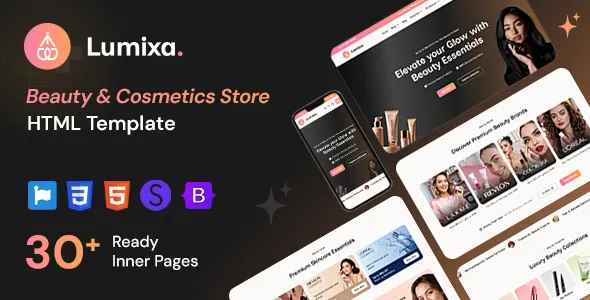
Lumixa – Beauty & Cosmetics Store HTML Template
Lumixa – Beauty & Cosmetics Store HTML Template is a modern website template designed for beauty brands, cosmetics retailers, skincare businesses, makeup stores, and personal care companies looking to establish a professional online presence. A well-designed beauty website helps businesses showcase their products, communicate their brand identity, present product information, and create a visually appealing browsing experience for customers. Lumixa provides a potential starting point for creating a beauty-focused website with a design tailored to the cosmetics and personal care industry.
The beauty industry depends heavily on presentation, visual identity, and customer confidence. Visitors often want to explore product collections, understand ingredients, compare skincare options, discover makeup trends, and learn about a brand before making a purchasing decision. A carefully organized cosmetics website can help communicate these details through product imagery, clear descriptions, category navigation, promotional sections, and informative content. Lumixa can be evaluated for projects that need a dedicated beauty and cosmetics website design rather than a generic business layout.
Built around the HTML template approach, Lumixa is intended for developers and businesses that want a customizable front-end foundation for a beauty store. HTML templates can provide the structural markup, styling, and interface elements used to create website pages. Depending on the included package, the template may also use CSS, JavaScript, responsive layout techniques, and other front-end resources. The exact pages, interactive elements, and supported features should be confirmed through the current product demo and documentation.
Whether you are planning a skincare website, a makeup collection showcase, a cosmetics retail platform, or a personal care brand website, Lumixa can be considered as a foundation for creating a consistent and attractive digital storefront. With appropriate customization, original product content, and suitable e-commerce integration where needed, the finished website can reflect the brand’s identity and support its online business goals.
What Is Lumixa – Beauty & Cosmetics Store HTML Template?
Lumixa is a beauty and cosmetics HTML website template intended for businesses that want to present beauty-related products and services through a dedicated online interface. Its industry-focused positioning makes it relevant to projects involving skincare, makeup, beauty accessories, personal care products, and cosmetic retail.
An HTML template provides a starting structure for a website. Developers can customize the page markup, styling, images, typography, and scripts to create an experience that aligns with a business’s requirements. Unlike a complete hosted store platform, a static HTML template does not automatically provide all the backend services required to manage products, process payments, track inventory, or handle customer accounts.
Lumixa can be evaluated for a variety of website projects, including independent cosmetics brands, beauty product retailers, skincare businesses, makeup collections, and personal care companies. Its final suitability depends on the layouts and components included in the current release.
A business can adapt the design to highlight product collections, communicate brand values, introduce featured items, present special offers, and direct visitors toward relevant product pages. Developers can also integrate the front end with an appropriate e-commerce platform or custom backend when transactional functionality is required.
Before choosing the template, review its available layouts, responsive behavior, source files, browser compatibility, technical requirements, and licensing conditions.
Designed for Beauty and Cosmetics Brands
Beauty and cosmetics brands need websites that communicate product quality, brand personality, and customer value. The design should support the products being presented while keeping the browsing experience clear and convenient.
Lumixa can be considered for beauty businesses that want to establish a dedicated visual identity online. A skincare brand might focus on product ingredients, skin concerns, and daily routines, while a makeup retailer could emphasize color collections, product finishes, and seasonal looks. A personal care company may prefer a more minimal presentation that highlights product benefits and practical usage information.
A beauty website should use consistent visual elements throughout its pages. Typography, colors, imagery, spacing, and product presentation should work together to establish a recognizable brand experience.
Product photographs play a particularly important role. Clear images can help customers understand packaging, color variations, textures, and product sizes. When suitable, additional photographs can show the product in use or provide close-up views of important details.
The final design should be adapted to the intended audience. A premium cosmetics brand may use an elegant and restrained presentation, while a youthful makeup collection may prefer expressive colors and more energetic imagery. Lumixa’s customization possibilities should be checked against the actual template files and documentation.
Modern Storefront and Homepage Presentation
The homepage is often the first point of contact between a beauty brand and a potential customer. It should communicate the business’s identity, introduce its most relevant offerings, and help visitors discover products without unnecessary effort.
A cosmetics storefront can benefit from a clear introductory section, featured product collections, category links, promotional content, brand information, and customer-support links. The exact homepage sections available with Lumixa depend on its current layout options.
A prominent banner can introduce a new collection, seasonal campaign, or brand message. Supporting text should explain the offer or collection clearly, while a relevant call to action can direct visitors to a product category or dedicated landing page.
Featured product sections can help bring attention to selected items. For example, a skincare business may highlight its daily essentials, while a makeup retailer might showcase new shades or a collection organized around a particular look.
The homepage should not attempt to communicate everything at once. Prioritize the information that matters most to customers and guide them toward the next useful step.
When customizing Lumixa, use original images, accurate product details, and a consistent brand message. Remove any placeholder content that does not reflect the business before publishing the website.
Skincare Product Website Design
Skincare brands often need to explain product purpose, ingredients, usage instructions, and suitability for different routines. A well-organized website can make this information easier for customers to discover and understand.
Lumixa may be adapted for skincare businesses offering cleansers, moisturizers, serums, facial oils, toners, masks, sunscreens, and other personal care products. The final presentation should be organized around the products actually sold by the business.
Product categories can help visitors browse by product type or routine. A skincare retailer might organize its catalog into cleansing, hydration, targeted treatments, sun protection, and body care. The precise category structure should reflect the store’s inventory and customer needs.
Individual product pages should provide useful details, including product size, ingredient information, instructions, warnings where applicable, and relevant usage guidance. Claims about results should be accurate, appropriately supported, and compliant with applicable regulations.
Clear product imagery can complement these details by showing packaging and relevant product features. If a product is available in different sizes or formulations, the page should explain those options clearly.
A template can provide the visual foundation for presenting skincare products, but product data, inventory, search functionality, and purchasing workflows require suitable implementation.
Makeup and Cosmetics Collection Showcase
Makeup websites often rely on visual presentation to help customers discover products and understand available shades, finishes, and styles. An effective layout should make collections easy to browse while providing the information needed to evaluate individual products.
Lumixa can be considered for makeup retailers featuring foundation, concealer, lipstick, mascara, eyeliner, eyeshadow, blush, highlighter, brushes, and other cosmetic accessories.
Product categories can help organize the catalog into familiar groups. A makeup store might separate face products, eye makeup, lip products, tools, and complete collections. Featured sections can introduce new releases or highlight selected products.
Where products are offered in multiple shades, the website should communicate the available options accurately. Color swatches and additional product photographs may be useful if supported by the implementation. Customers should also have access to relevant information about finishes, sizes, ingredients, and usage.
Images should represent products as accurately as possible. Cosmetic shades can appear different across screens, so businesses should avoid suggesting that on-screen color reproduction is perfectly reliable.
A carefully designed makeup website can help customers explore products, compare options, and understand the brand’s collection before moving to a purchase or inquiry.
Responsive Design for Mobile and Desktop
Customers may discover a cosmetics brand through a mobile search, browse product collections on a tablet, or complete a purchase on a desktop computer. A responsive website helps ensure that the experience remains usable across different screen sizes.
Lumixa is presented as an HTML website template for beauty and cosmetics stores, making responsive behavior an important consideration when evaluating the design. Developers should test the actual template on common screen widths and devices rather than relying exclusively on a desktop preview.
On mobile screens, navigation should be straightforward, text should remain readable, and product images should fit the available space. Buttons, category links, and form controls should be easy to use with touch input.
Product grids may need to adjust the number of columns according to the available width. Large promotional banners should preserve their important content without creating awkward cropping or excessive scrolling.
Responsive behavior should also be reviewed on individual product pages, category listings, search results, and contact forms. Custom styles, third-party scripts, and added functionality can affect the original layout.
A responsive design is only one part of mobile usability. Performance, content clarity, image optimization, and accessible interaction controls also influence the overall experience.
Product Listings and Category Pages
Product listing pages help customers browse a store’s catalog and discover items that match their interests. Clear category pages are especially valuable for beauty retailers that offer multiple product types, brands, collections, or formulations.
Lumixa can be assessed for use in catalog layouts that present product images, names, short descriptions, and other relevant information, depending on the available components. Developers should confirm whether the current release includes specific listing layouts, filtering controls, sorting options, or pagination.
A well-organized category page should make the relationship between products and categories easy to understand. For example, a customer browsing facial moisturizers should be able to distinguish the available products without navigating through unrelated items.
If the store includes many products, category filters may help customers narrow their choices by product type, brand, size, price, or other relevant attributes. Such functionality may require JavaScript or backend integration and should not be assumed to be included automatically.
Product cards should prioritize useful information and avoid excessive visual clutter. Consistent image sizes, readable product names, and clearly positioned links can make a catalog easier to scan.
When connecting the template to a store platform, ensure that category data, product availability, pricing, and product links remain accurate.
Product Detail Pages and Customer Information
A product detail page gives customers the information they need to evaluate an individual item. For beauty and cosmetics products, this may include product photographs, descriptions, ingredients, sizes, shade options, usage instructions, and important warnings.
Lumixa can be considered as a front-end foundation for presenting product information in a structured and visually consistent way. The specific product page layout and supported interface elements depend on the current template package.
A useful product description explains what the item is, what it is designed for, and how it should be used. Avoid vague promotional language when practical details would help customers make an informed decision.
For cosmetics, relevant information may include shade names, product finishes, formulation details, packaging size, and ingredients. For skincare products, customers may also need directions for use and any relevant precautions.
Product pages should display prices and availability accurately when connected to a functioning store. Any add-to-cart, checkout, review, or wishlist functionality must be implemented through supported scripts, a commerce platform, or a suitable backend.
Providing complete and accurate product information can improve the shopping experience while helping customers choose products that suit their needs.
Beauty Brand Identity and Visual Customization
A beauty website should reflect the brand’s personality rather than look like an unmodified template. Consistent visual styling helps customers recognize the business and understand its positioning.
Depending on the source files and implementation, developers may be able to customize Lumixa’s colors, typography, spacing, imagery, page structure, and interface elements. The exact customization methods should be verified in the current documentation.
A premium skincare brand may choose neutral colors, restrained typography, and generous whitespace. A colorful makeup company may prefer stronger contrasts and more expressive campaign imagery. A natural personal care brand may use earthy tones and photography that reflects its product positioning.
Consistency matters across the entire website. Headings, body text, buttons, links, product cards, and promotional sections should follow a coherent visual system.
Product photography should also align with the brand. Use high-quality images that accurately represent the products, and avoid mixing unrelated image styles that make the storefront appear inconsistent.
Before making substantial modifications, review the structure of the HTML, CSS, and JavaScript files. Keep customizations organized so that the website remains easier to maintain as the brand grows.
Promotional Banners and Featured Collections
Promotional sections can help beauty businesses introduce new products, communicate seasonal campaigns, and direct attention to selected collections.
A cosmetics storefront may use banners for new skincare launches, makeup collections, gift sets, limited-time promotions, or product bundles. Lumixa can be evaluated for these use cases according to the sections and layouts included in the template.
Promotional content should communicate a clear message. A banner might introduce a new collection, explain a genuine offer, or direct customers toward a relevant category. Calls to action should lead to the correct destination and should be easy to identify.
Campaign imagery should be relevant to the products being promoted. Avoid placing too many banners on the same page, since competing messages can make the website difficult to navigate.
If promotional prices or discounts are displayed, ensure that the information is accurate and that the associated terms are clear. Time-sensitive offers should be updated or removed when they expire.
A carefully organized promotional area can help customers discover featured products without distracting them from the main shopping experience.
E-Commerce Integration and Online Selling
An HTML template can provide the front-end presentation for an online store, but a complete e-commerce operation requires additional functionality. Businesses planning to sell products directly through Lumixa should determine how the template will connect to a suitable commerce system.
Depending on the chosen implementation, an online store may need product management, shopping cart functionality, checkout, payment processing, inventory updates, order management, shipping configuration, and customer account features.
These capabilities are not automatically guaranteed by the use of an HTML template. They may require integration with an existing e-commerce platform, a custom backend, or another supported solution.
When planning integration, consider how product data will be stored and displayed. Product names, descriptions, prices, stock status, variants, and images should come from reliable sources so that the storefront stays consistent with the actual catalog.
The checkout process should be secure, understandable, and tested thoroughly. Payment information should be handled through appropriate payment providers and secure integrations rather than stored or processed using improvised front-end code.
Before selecting Lumixa for a transactional website, review the current demo and source files to determine how much of the storefront is already implemented and what additional development work will be required.
SEO-Friendly Structure for Beauty Websites
Search engine optimization can help beauty businesses make their products and informational content easier to discover through relevant searches. A well-structured template provides a foundation, but search performance depends on content quality, technical implementation, competition, and other factors.
When customizing Lumixa, create descriptive page titles, meaningful headings, readable URLs, and useful content for each important page. Product categories should have clear names, while individual product pages should explain the item accurately.
A skincare retailer may publish educational content about product routines, while a cosmetics brand could create guides explaining different makeup products or finishes. Such content should answer real customer questions rather than repeat keywords without adding value.
Image optimization is important for visually oriented websites. Use descriptive file names where appropriate, provide meaningful alternative text for informative images, and compress image files without unnecessarily reducing their quality.
Developers should also review internal links, canonical URLs, sitemap configuration, mobile usability, and indexability as part of the complete website implementation. These features may require configuration or additional tools beyond the template itself.
Avoid promising specific search rankings. SEO is an ongoing process that requires useful content, sound technical practices, and regular evaluation.
Website Speed and Image Optimization
Beauty websites often use high-resolution product photography and large promotional banners. While attractive visuals are important, oversized images and unnecessary scripts can slow down page loading.
The performance of a Lumixa-based website depends on the supplied assets, page structure, hosting environment, external resources, and any additional scripts or integrations.
Start by resizing images to suit their intended display dimensions. Compress photographs using suitable formats and quality settings, and avoid loading unnecessarily large files on mobile devices.
Where appropriate, use responsive images and lazy loading for images that appear below the initial viewport. Ensure that important above-the-fold content remains accessible and does not depend on excessive loading delays.
Review CSS and JavaScript files for unnecessary resources and avoid adding multiple libraries that duplicate existing functionality. If the template relies on external fonts, icons, or other services, consider their impact on performance and availability.
Test the homepage, category pages, and product detail pages separately. Different layouts may have different performance characteristics, particularly when they contain many product images or interactive elements.
Regular performance testing helps identify opportunities to improve loading speed and maintain a smoother browsing experience.
User-Friendly Navigation and Shopping Experience
Clear navigation helps customers find relevant products without becoming overwhelmed by the number of choices available. A cosmetics website should organize its information according to the way customers naturally explore the catalog.
A beauty store may use categories such as skincare, makeup, body care, hair care, accessories, and featured collections, depending on its inventory. A smaller brand may need only a few categories, while a larger retailer may benefit from a more detailed structure.
Lumixa can be customized to reflect the store’s actual catalog and customer journey, subject to the navigation components provided by the template.
Use clear labels instead of ambiguous menu names. Keep important links visible and ensure that users can return to the homepage or move between categories easily.
Product cards should make it clear where customers can find additional details. On product pages, related items or complementary collections may help visitors explore further when these features are supported by the implementation.
Navigation should also work with keyboard input and assistive technologies. Focus indicators, descriptive link text, and understandable menu behavior contribute to a more accessible experience.
Accessibility and Inclusive Website Design
Accessibility helps make a beauty website usable by people with different abilities, devices, and browsing preferences. It also encourages a more consistent and understandable interface for all visitors.
When customizing Lumixa, use appropriate heading levels, descriptive alternative text, readable font sizes, and sufficient color contrast. Forms should include clear labels, and interactive controls should be distinguishable from ordinary text.
Do not rely on color alone to communicate important product information. For example, shade selection controls should include understandable labels in addition to visual color indicators.
Navigation menus, dialogs, dropdowns, and other interactive components should be usable with a keyboard where applicable. Error messages should explain what needs to be corrected rather than displaying only a generic warning.
Accessibility should be reviewed across the entire website, including the homepage, category listings, product pages, contact forms, and checkout interface where implemented.
Automated accessibility tools can help identify some issues, but manual testing is also useful for checking keyboard navigation, focus order, and the clarity of important content.
Browser Compatibility and Front-End Development
An HTML template should be tested in the browsers and environments used by its intended audience. Differences in browser behavior, screen dimensions, and device capabilities can affect the presentation of a website.
Before deploying Lumixa, review the current documentation for supported browsers and any required libraries. Test the supplied pages in common modern browsers and check that typography, images, navigation, and interactive components work as expected.
Developers should inspect the HTML structure, CSS rules, JavaScript behavior, and external dependencies before making major changes. This helps identify how the template is organized and which components can be safely customized.
If the website requires additional features, introduce them in a controlled manner. Test each integration with the existing layout to ensure that added scripts do not cause errors or interfere with navigation.
Use version control to track changes and keep a clean separation between the original template files and project-specific modifications wherever practical. This makes future updates and troubleshooting easier.
The exact development workflow depends on the supplied package and the tools used by the project team.
Who Should Use Lumixa – Beauty & Cosmetics Store HTML Template?
Lumixa may be suitable for a range of beauty-related website projects.
Beauty brands: Businesses launching or expanding a cosmetics brand can evaluate the template as a starting point for presenting their identity and product range.
Skincare companies: Retailers offering cleansers, serums, moisturizers, masks, and other skincare products can adapt the design to organize their collections.
Makeup stores: Cosmetics retailers can use a beauty-focused layout to showcase makeup categories, product photography, and collection information.
Personal care businesses: Companies selling body care, hair care, and everyday personal care products can assess the template for their catalog presentation needs.
Independent cosmetic retailers: Small businesses can customize the front end to reflect their branding and create a dedicated product showcase.
Beauty entrepreneurs: Founders testing a new product concept can evaluate the template as a foundation for an initial brand website, subject to their technical and commerce requirements.
Web design agencies: Agencies developing websites for beauty clients may consider the template when its licensing, included layouts, and customization options match the project.
Freelance developers: Developers can assess the source files as a starting point for creating customized front-end experiences for cosmetics and personal care clients.
The most appropriate use depends on the product’s actual capabilities, the intended website structure, and whether additional e-commerce or backend functionality is needed.
Tips for Creating a Successful Website with Lumixa
A strong beauty website begins with a clear understanding of the brand and its customers. Before customizing the template, define the main goal of the website and identify the information visitors need to make decisions.
Prepare accurate product descriptions, high-quality images, category information, brand details, and customer support content. Using real content during customization makes it easier to assess whether the page layouts support the intended customer experience.
Establish a consistent visual identity through colors, typography, imagery, and spacing. Ensure that promotional banners and product photography support the brand rather than competing with one another.
Keep product information complete and accurate. Customers should be able to understand the product’s purpose, available options, size, ingredients where relevant, and usage instructions.
Test all navigation links, forms, buttons, and interactive elements. If the site includes shopping cart or checkout functionality through an external integration, test the entire purchasing process before launch.
Review mobile usability and loading performance, particularly on pages with large product images. Check accessibility, browser compatibility, and the accuracy of all published information.
Finally, plan for ongoing maintenance. Update products, review promotional content, monitor website performance, and check integrations periodically to keep the website reliable as the business develops.
Final Thoughts on Lumixa – Beauty & Cosmetics Store HTML Template
Lumixa – Beauty & Cosmetics Store HTML Template is a potential front-end solution for businesses looking to create a dedicated website for beauty products, skincare collections, makeup, cosmetics, and personal care items. Its beauty-focused positioning makes it worth evaluating for brands that need a visually consistent way to present products and communicate their identity online.
A successful cosmetics website combines attractive imagery with clear product information, convenient navigation, responsive layouts, and a consistent brand presentation. Developers can adapt a suitable HTML template to create category pages, product showcases, promotional sections, and other elements that support the customer’s browsing experience.
The final capabilities of Lumixa depend on the current template version, included page layouts, source files, and supported integrations. Review the official demo and documentation to verify its exact features, responsive behavior, browser support, dependencies, and licensing conditions before implementation.
If the project requires online transactions, inventory management, customer accounts, or order processing, plan for the appropriate e-commerce platform or backend integration. An HTML template provides a front-end foundation, but a complete online store requires additional functionality and careful testing.
With original content, thoughtful customization, optimized imagery, accessible navigation, and regular maintenance, Lumixa can be evaluated as part of a broader strategy for building a professional beauty and cosmetics website.