My Account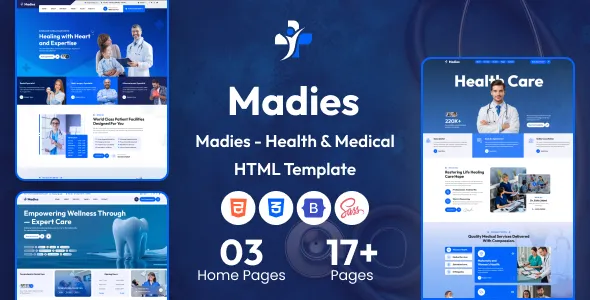
Madies – Health & Medical HTML Template
Madies – Health & Medical HTML Template is a professional and versatile website template designed for healthcare providers, medical clinics, hospitals, doctors, diagnostic centers, wellness professionals, and other health-related organizations. With a healthcare-focused design direction and an HTML-based structure, Madies provides a starting point for creating an informative, accessible, and visually consistent medical website. Whether you are building an online presence for a private medical practice, introducing a specialized healthcare service, promoting a diagnostic facility, or updating an existing clinic website, this template can help you present important information in an organized and professional manner.
A well-designed medical website plays an important role in helping patients understand available services, learn about healthcare professionals, find contact details, and discover how to arrange an appointment. Madies can be customized to support these goals through relevant content, service presentations, doctor profiles, contact information, and other healthcare-related website sections, depending on the layouts included in the supplied template. Its HTML foundation makes it a practical option for developers who want direct control over page markup, styling, and frontend customization. By adapting the available design to your organization’s identity and requirements, you can establish a consistent online presence that communicates professionalism and helps visitors navigate essential healthcare information.
Modern Design for Healthcare Websites
Healthcare websites need to balance a professional appearance with clarity, usability, and trust. Patients may visit a medical website to investigate a symptom-related service, learn about a specialist, find a clinic’s location, or understand the services available before making contact. A clear layout helps visitors locate this information without unnecessary effort.
Madies is positioned for medical and health-related website projects that require a contemporary presentation. Developers can adapt the design to suit the visual identity of a hospital, private clinic, family medical practice, specialist center, or healthcare organization. Appropriate typography, carefully selected imagery, consistent spacing, and well-organized content can help create a welcoming online experience.
The template can serve as a starting point for different types of healthcare websites. A general medical clinic may emphasize its departments and consultation services, while a diagnostic center may prioritize available tests and laboratory information. A specialist practice may focus on professional credentials, treatment areas, and appointment enquiries.
The final website should reflect the actual services offered by the organization. Using accurate information, genuine professional details, and relevant imagery helps visitors understand the practice and make informed decisions about contacting the provider.
HTML-Based Website Development
Madies uses HTML as its website development foundation, making it suitable for developers who want to work directly with the structure of web pages. HTML defines the content and organization of a website, including headings, paragraphs, navigation links, images, lists, and form elements.
An HTML template can be a useful starting point for developers who prefer direct control over page structure rather than relying entirely on a content management system. Depending on the supplied files, developers can modify existing pages, update text and images, refine layouts, and create additional sections to match the healthcare organization’s needs.
The source code can be reviewed to understand how the available pages and interface elements are organized. Developers can then customize the website’s presentation using the included stylesheets and any supported JavaScript functionality.
HTML templates may also be integrated into a broader website project when appropriate. For example, a development team could use the frontend as the presentation layer while connecting it to a separate backend or content management system. Such integration requires additional implementation and should not be assumed to be included with the original template.
Suitable for Hospitals and Medical Clinics
Hospitals and clinics need websites that make services, departments, contact information, and patient guidance easy to find. Madies can provide a starting point for organizing this information into a professional website tailored to the needs of a healthcare facility.
A hospital website may include an overview of the institution, medical departments, available specialties, healthcare professionals, visiting information, and contact details. A smaller clinic may require a more focused structure that highlights consultation services, opening hours, the practitioner’s background, and appointment enquiries.
By customizing the available page layouts, healthcare providers can develop a website that reflects their size, service range, and patient audience. The content should prioritize the information visitors are most likely to need.
Organizations should verify that every listed department, treatment, practitioner, and service is genuinely available. Accurate details are especially important in healthcare because visitors may use the website to decide where and how to seek care.
Medical Services and Specialties Presentation
A medical website should explain its services in straightforward language. Visitors may not be familiar with clinical terminology, so service descriptions should communicate what a department does, which patients it serves, and how people can contact the provider for further information.
Madies can be adapted to present medical services through organized sections or individual service pages, depending on the supplied layouts and customization requirements. Possible topics include general healthcare, preventive health consultations, cardiology, dermatology, pediatrics, orthopedics, dental care, women’s health, physiotherapy, and diagnostic services.
These examples represent potential applications rather than a guarantee that every specialty has a dedicated ready-made page in the template. Healthcare providers should select only the services that match their actual expertise and facilities.
Each service description should focus on clear, factual information. Explain the purpose of the service, provide relevant preparation guidance where appropriate, and direct patients to the correct contact channel for individual questions. Medical content should be reviewed by qualified professionals before publication to ensure that it is accurate, current, and suitable for the intended audience.
Doctor Profiles and Healthcare Professionals
Introducing healthcare professionals is an important part of a medical website. Patients often want to understand a doctor’s qualifications, areas of expertise, professional experience, and clinical role before contacting a practice.
Madies can be customized to display professional profiles where the included design supports this type of content. A profile might include the practitioner’s name, professional photograph, qualifications, recognized specialties, relevant experience, and consultation information.
Clear profiles help visitors understand who provides a service and where to direct their enquiries. For larger organizations, consistent profile formatting can also make it easier to browse multiple practitioners or departments.
All professional information should be accurate and verifiable. Use authorized photographs, correct qualifications, current affiliations, and appropriate descriptions of professional expertise. Avoid claims about treatment outcomes or credentials that cannot be substantiated.
If the organization adds appointment links or booking forms to individual profiles, each interaction should direct visitors to the correct provider or booking process.
Patient-Friendly Website Navigation
Navigation is particularly important for healthcare websites because visitors may be searching for time-sensitive contact information or specific medical services. A clear menu helps users move between the main areas of the website without confusion.
Madies can be customized with navigation labels and page groupings that reflect the organization’s priorities. Common destinations may include Home, About Us, Services, Doctors, Departments, Patient Information, Contact, and Appointments, depending on the website’s actual structure.
A useful navigation system should prioritize essential information rather than placing every possible link in the main menu. Important contact details and appointment options should be easy to locate across desktop and mobile screens.
Developers should test all menu items, internal links, buttons, and dropdown interactions before publishing the website. Any pages that are not included in the original template may need to be created and connected separately.
Appointment Enquiry and Contact Options
Patients often visit a healthcare website because they want to contact a clinic, ask about available consultations, or request an appointment. Clear contact options can help reduce uncertainty and make the next step easier.
Madies can serve as a frontend starting point for presenting telephone numbers, email addresses, clinic locations, opening hours, and appointment enquiry links. Depending on the available components, developers may also adapt a form for collecting basic appointment requests.
A typical enquiry form may ask for a patient’s name, preferred contact method, requested service, and preferred appointment time. Healthcare organizations should collect only the information they genuinely need and explain how submissions will be handled.
An HTML form does not automatically provide a complete booking system. For appointment requests to reach staff, the form must be connected to an appropriate email service, server-side endpoint, scheduling platform, or other supported system. Confirmation messages, validation, spam protection, and error handling should be implemented and tested.
If the organization requires live appointment availability, practitioner schedules, reminders, or patient account management, additional software or backend development will generally be necessary unless explicitly included in the product.
Responsive Design for Desktop and Mobile
Patients use different devices when looking for healthcare information. Some may browse a hospital website on a desktop computer, while others may search for clinic contact details from a smartphone while traveling.
Madies can be adapted and tested for responsive presentation so that content remains readable across a range of screen sizes. Responsive adjustments may involve navigation, image sizing, text widths, spacing, service cards, and form controls.
Mobile usability is particularly important for essential actions such as calling a clinic, checking its location, or opening an appointment enquiry form. Buttons should be easy to identify and use, and important information should not be hidden behind confusing interface elements.
Developers should verify the delivered template at common desktop, tablet, and mobile widths. Testing should include landscape and portrait orientations where relevant, as well as checking text wrapping, touch targets, image cropping, and navigation behavior.
Responsive quality should be confirmed through testing of the actual files rather than assumed from the product category alone.
Healthcare Website Branding and Customization
Every healthcare organization has its own identity, audience, and communication style. A private specialist clinic may require a more personalized presentation, while a hospital or diagnostic network may need to communicate a broader range of services.
Madies can be customized to match an organization’s logo, colors, typography, imagery, written content, and preferred visual style. Developers can use the available source code to adapt page sections and styling to the project’s requirements.
Healthcare branding should prioritize clarity and credibility. Colors should remain comfortable to view, headings should be easy to scan, and photographs should be relevant to the services offered. A consistent visual system across pages helps the website feel organized and professional.
Content customization is just as important as visual changes. Replace placeholder text with accurate information about the organization, its staff, its facilities, and its services. Ensure that contact details, operating hours, and appointment instructions are consistent across the website.
Diagnostic Centers and Laboratory Websites
Diagnostic centers and medical laboratories often need to explain their available services, operating procedures, locations, and patient preparation requirements. A well-structured website can help people understand where to obtain further information before visiting a facility.
Madies can be adapted for a diagnostic service provider that wants to introduce its facilities, describe available testing categories, and present contact information. Depending on the organization’s needs and the template’s available structure, additional pages may be created for laboratory services, imaging, sample collection, or patient instructions.
Diagnostic service information should be carefully reviewed before publication. Preparation requirements, operating hours, reporting times, and service availability can vary by test and facility. The website should not imply that a service is offered at every location unless this has been confirmed.
Online report access and secure delivery of diagnostic results require particular care. A static HTML website does not inherently provide a secure patient portal, report database, or identity verification system. These functions require appropriate systems and security controls.
Dental Clinics and Specialized Medical Practices
Specialized practices often benefit from a website that explains their services and helps patients identify the right point of contact. Madies can be considered for dental clinics, physiotherapy centers, dermatology practices, pediatric clinics, and other healthcare providers seeking a customized online presentation.
A dental clinic might use the website to describe preventive care, examinations, and restorative services. A physiotherapy practice might emphasize rehabilitation services and practitioner qualifications. A dermatology clinic could introduce its consultation process and the conditions or services covered by its professionals.
These are potential customization scenarios. The exact layout and functionality available will depend on the included template files.
Specialist websites should communicate services responsibly and avoid exaggerated claims. Treatment descriptions should be reviewed by qualified professionals, and any information that could be interpreted as medical advice should be presented with appropriate care.
Wellness and Preventive Healthcare Websites
Wellness organizations and preventive healthcare providers need websites that explain their approach, introduce their services, and help visitors understand how to obtain further information.
Madies may be adapted for selected wellness-related projects, such as preventive health centers, health education services, or professional wellness practices. The suitability of the template depends on the intended audience and the type of content required.
A wellness website can provide information about available consultations, professional backgrounds, service locations, and general educational resources. Clear content organization helps visitors distinguish between general health information and individualized clinical guidance.
Any health-related claims should be evidence-based and appropriately reviewed. Avoid presenting unsupported promises about cures, guaranteed outcomes, or the effectiveness of a service.
HTML, CSS, and JavaScript Customization
An HTML template typically combines page markup with styling and, where required, JavaScript for interactive behavior. This makes the codebase relevant to developers who want to modify the website using familiar frontend technologies.
With Madies, developers should first review the actual project structure, included stylesheets, scripts, image assets, and page files. Understanding these elements makes it easier to identify where changes should be made and how shared design elements are managed.
CSS customization can help refine typography, colors, spacing, layouts, and responsive behavior. JavaScript may be used for supported interactions such as menus, sliders, tabs, or other interface features if those components are included in the supplied version.
The availability of particular plugins or scripts should be confirmed by inspecting the delivered files. Developers should also check for dependency requirements and avoid adding unnecessary libraries that could increase complexity or affect performance.
For larger projects, maintaining a clear distinction between shared styles, page-specific styles, and reusable interface components can help keep the code easier to manage over time.
SEO-Friendly Structure for Medical Websites
Search engine optimization can help patients discover a healthcare provider when searching for relevant services, specialties, or locations. A clear website structure supports both visitors and search engines by organizing content around meaningful topics.
Madies can be customized with descriptive page titles, meta descriptions, logical headings, useful internal links, and original service information. Each page should focus on a clear purpose, such as introducing a clinic, describing a specialty, presenting a practitioner, or explaining how to contact the organization.
Local search visibility can be particularly relevant for medical practices. Accurate business details, consistent contact information, location-specific content, and a properly maintained business profile can help people find the correct facility.
Healthcare content requires a higher standard of accuracy and trustworthiness. Medical information should be written or reviewed by qualified professionals, sources should be selected carefully, and claims should be supported by reliable evidence.
Technical SEO also needs to be addressed during implementation. Developers should review indexing directives, canonical URLs, image alternative text, mobile usability, page performance, structured data where appropriate, and sitemap configuration.
Using an HTML template does not guarantee search rankings or indexing. Search visibility depends on the quality of the content, technical setup, relevance, competition, reputation, and ongoing website maintenance.
Accessibility and Inclusive User Experience
Healthcare websites serve people with different ages, abilities, levels of technical confidence, and information needs. Accessibility should therefore be considered throughout the website design and development process.
Madies can be reviewed and improved using semantic HTML, logical heading structures, descriptive links, keyboard-accessible navigation, and clear form labels. Informative images should have meaningful alternative text, while decorative images should not create unnecessary distractions for screen-reader users.
Text should remain readable at different sizes, and color contrast should support visitors with visual impairments. Interactive controls should be easy to identify, and forms should provide understandable instructions and error messages.
Avoid communicating essential information through color alone. For example, a form error should include a clear written explanation instead of relying only on a red border.
Accessibility testing should include keyboard navigation, browser-based accessibility tools, and manual checks of important user journeys. Improving accessibility can make the website easier to use for a broader audience and support a more inclusive healthcare experience.
Performance and Loading Optimization
A medical website should make essential information available efficiently. Slow pages can frustrate visitors who are trying to find contact details, explore services, or understand how to reach a healthcare facility.
The final performance of Madies will depend on the supplied assets, implementation choices, hosting environment, and any additional scripts or integrations. Developers can improve performance by optimizing images, using appropriate image dimensions, minimizing unnecessary dependencies, and configuring caching and compression where supported.
Large photographs should be prepared for their intended display sizes, and unnecessary animations or third-party scripts should be evaluated carefully. Fonts should be loaded efficiently, and page layouts should avoid unexpected movement as content appears.
Performance should be tested using appropriate tools on both mobile and desktop devices. Review loading speed, responsiveness, visual stability, and the effect of external services before launch.
No particular performance score should be assumed without testing the customized website in its actual production environment.
Security and Patient Privacy Considerations
Medical websites may handle sensitive information, so privacy and security must be considered carefully. A public-facing HTML template is not, by itself, a complete secure healthcare application.
If Madies is used for a basic informational website, the main priorities include maintaining secure hosting, updating dependencies, protecting administrative access where applicable, and ensuring that contact mechanisms operate correctly.
If the website collects patient information, additional safeguards may be required. These can include encrypted transmission, secure server-side processing, access controls, data minimization, retention policies, and compliance with applicable privacy and healthcare regulations.
Avoid collecting detailed medical histories or other sensitive patient information through a basic form unless the collection process has been appropriately designed and secured. Consider whether an established patient management or booking platform is more suitable for these requirements.
Patient portals, electronic medical records, online prescriptions, secure diagnostic reports, and other clinical functions require dedicated implementation and should not be assumed to be included in the template.
Easy Content Updates and Website Maintenance
Healthcare information changes over time. Clinics may update their hours, add practitioners, revise service descriptions, change telephone numbers, or introduce new facilities.
Madies can be maintained by updating the relevant HTML content and associated assets. Developers should keep a record of important modifications and organize files consistently so that future changes remain manageable.
Before editing the production website, maintain backups and test significant changes in a safe development environment. Check links, forms, navigation, and responsive layouts after updating shared components or styles.
Regular reviews should confirm that staff profiles, service information, contact details, and patient instructions remain accurate. Outdated medical information can confuse visitors and reduce confidence in the organization.
For organizations that require frequent updates by nontechnical staff, a content management system or connected content service may be worth considering. Integrating such a system would require additional development if it is not included in the original template.
Who Can Benefit from Madies?
Madies may be suitable for a variety of professionals and organizations seeking a healthcare-focused website foundation.
- Hospitals and healthcare facilities: Present departments, services, facilities, and visitor information in a structured format.
- Private medical clinics: Introduce consultation services, practitioners, opening hours, and contact details.
- Doctors and specialists: Create a professional online presence with accurate credentials and specialty information.
- Diagnostic centers: Explain available testing services, locations, and patient preparation information.
- Dental practices: Present dental services, professional profiles, and appointment enquiry options.
- Physiotherapy centers: Introduce rehabilitation services, practitioners, and relevant patient guidance.
- Wellness organizations: Communicate their services and general health education resources.
- Healthcare website developers: Use the HTML foundation as a starting point for customized client projects.
- Digital agencies: Evaluate the template for suitable medical and health-related website assignments, subject to licensing terms.
The template’s suitability for a specific project depends on its actual page layouts, included assets, technical requirements, and the functionality that needs to be developed.
Important Things to Check Before Purchase
Before choosing Madies for a website project, review the live preview and the exact package contents. Confirm which pages are included, how the assets are organized, what JavaScript components are supplied, and whether installation or customization instructions are available.
Check the stated browser support, responsive behavior, third-party dependencies, and any framework or library requirements. If your project needs appointment scheduling, online payments, patient accounts, secure report access, or other advanced features, determine whether these are included or will require separate development.
Review the licensing terms for your intended use, particularly if you are developing websites for multiple clients or using the template in a commercial project. Verify that photographs, icons, fonts, and other included assets can be used according to their respective licenses.
Planning these details in advance helps you estimate the development effort and determine whether the template aligns with your project requirements.
Why Choose Madies – Health & Medical HTML Template?
Madies offers a healthcare-focused starting point for developers and organizations looking to create a professional medical website using HTML. Its intended use makes it relevant to hospitals, clinics, specialist practices, diagnostic centers, and other health-related organizations that need a clear online presentation.
The HTML-based structure gives developers a foundation they can inspect and customize, while the healthcare-oriented design direction helps guide the presentation of services, professional information, and patient contact details. With accurate content, appropriate visual assets, responsive adjustments, and carefully implemented interactions, the template can be adapted to a range of medical website requirements.
For healthcare providers, a website should do more than look professional. It should make useful information easy to find, represent the organization accurately, and provide clear routes for visitors to obtain assistance. Thoughtful customization can help Madies support these objectives while maintaining a consistent visual identity.
Create a Professional Medical Website with Madies
Choosing the right template is an important step in developing a healthcare website that communicates information clearly and presents an organization professionally. Madies – Health & Medical HTML Template provides a starting point for creating a customized online presence for medical clinics, hospitals, doctors, diagnostic facilities, and other health-related services.
Its HTML foundation supports direct frontend customization, allowing developers to adapt the available structure, styling, and content to the needs of a particular healthcare organization. From introducing medical services and professional profiles to displaying contact details and appointment enquiry options, the finished website can be shaped around the information patients need most.
For the best results, review the included files and documentation, replace demonstration content with verified information, test the website across devices, and implement any required integrations separately. With careful planning and responsible content development, Madies can help establish a clear, accessible, and professional web presence for a healthcare-focused project.