My Account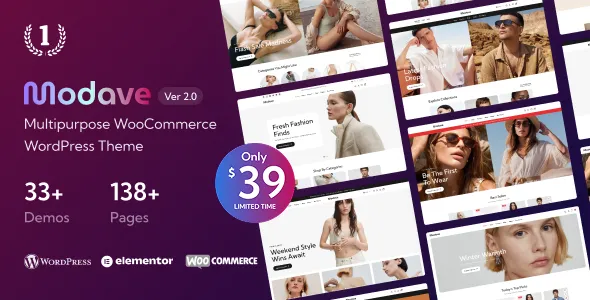
Modave – Multipurpose WooCommerce WordPress Theme
Modave – Multipurpose WooCommerce WordPress Theme is a versatile website design solution for entrepreneurs, retailers, online sellers, and businesses looking to build a professional eCommerce store with WordPress and WooCommerce. Created for multipurpose online shopping experiences, Modave can serve as a starting point for presenting products, organizing categories, showcasing collections, and guiding customers through an online shopping journey. Whether you are launching a fashion boutique, developing a lifestyle store, selling accessories, or building a general online marketplace, this theme is worth considering for creating a branded storefront that brings product presentation and shopping functionality together.
A successful eCommerce website needs more than attractive visuals. Customers expect intuitive navigation, informative product pages, clear pricing, a convenient shopping cart, and a checkout process they can understand. The Modave WooCommerce WordPress Theme is designed for the online retail environment, where product discovery, brand identity, and purchasing convenience are central to the customer experience. By combining the theme with a properly configured WooCommerce installation, suitable hosting, secure payment options, and a thoughtful store structure, website owners can establish a flexible foundation for selling products online.
Modave is particularly relevant to businesses that want to manage their products through WordPress while building a storefront that reflects their brand. From organizing product categories to preparing promotional content and maintaining a consistent visual identity, a well-configured WooCommerce website can support both day-to-day store operations and long-term business growth. The exact layouts, customization options, and integrations available should be verified in the current theme documentation before installation.
Discover the Modave Multipurpose WooCommerce Theme
Modave is positioned as a multipurpose WooCommerce WordPress theme for online retail websites. A multipurpose approach can be useful for businesses that want to create a storefront around a particular niche without being restricted to a single type of product. Depending on the available layouts and customization settings, store owners can adapt the website’s visual presentation to suit their catalog, target audience, and brand personality.
An online fashion shop may prioritize clothing collections, seasonal promotions, and product photography. An accessories store may focus on smaller product cards, detailed product descriptions, and category-based browsing. A lifestyle retailer may need to present several product groups while maintaining a consistent design throughout the store.
The Modave WordPress theme can be evaluated as a starting point for these kinds of projects. Its WooCommerce orientation makes it relevant to businesses that want to use the WordPress ecosystem for catalog management and online sales. Rather than building a store from scratch, retailers can work within a familiar content management environment and configure the available storefront elements to match their goals.
Before choosing the theme, review its live demo, included page layouts, required plugins, and available customization features. These details will help you determine whether Modave matches your planned store structure and the shopping experience you want to provide.
WooCommerce Integration for Online Selling
WooCommerce is an eCommerce platform for WordPress that provides core tools for managing products, orders, customer information, and store settings. A WooCommerce-compatible theme supplies the storefront presentation, helping the store display its catalog and connect visitors with the platform’s shopping functionality.
With Modave, store owners can build a website around the WooCommerce ecosystem, subject to the theme’s current compatibility requirements. Products can be organized into categories, described through product pages, and presented with pricing and relevant purchasing information. WooCommerce can also support shopping cart and checkout workflows when properly configured.
A typical online store may include:
- Product listings with images, names, prices, and relevant details.
- Category pages that help customers browse related items.
- Individual product pages with descriptions and purchasing options.
- Shopping cart functionality for reviewing selected products.
- Checkout pages for collecting delivery and order information.
- Payment integrations supported by the store’s configuration.
- Order management tools within the WordPress administration area.
- Inventory and stock settings appropriate to the business.
The availability and presentation of specific storefront features depend on WooCommerce, the installed theme version, selected extensions, and configuration. Confirm the current Modave documentation for theme-specific features rather than assuming that every possible eCommerce function is included by default.
Create a Professional Online Storefront
The storefront is often the first substantial interaction a potential customer has with an online business. A clear, professional homepage can communicate the store’s identity, highlight important product categories, and direct visitors toward relevant collections.
Modave can be considered for creating a retail homepage that introduces the brand and makes product discovery straightforward. Depending on the layouts and customization options provided, the homepage may be arranged around promotional banners, featured products, new arrivals, popular categories, seasonal collections, or selected offers.
For a fashion retailer, a large collection banner can introduce a new season, while category links can help shoppers move directly to clothing, footwear, bags, or accessories. A technology store may benefit from product categories organized around devices and accessories. A home and lifestyle shop might emphasize collections, room inspiration, or practical product groupings.
The most effective homepage is not necessarily the one with the greatest number of sections. Too many competing promotions can overwhelm visitors and make the store harder to navigate. Instead, prioritize the information customers need first, use a consistent visual hierarchy, and make important shopping paths easy to identify.
When configuring Modave, preview the actual homepage on desktop and mobile devices to ensure that images, text, navigation, and product sections work together effectively.
Multipurpose Design for Different Product Niches
One of the main reasons to consider a multipurpose WooCommerce theme is the flexibility to build different types of retail websites within the same general platform. Businesses often need a storefront that supports their own product categories, branding, and merchandising strategy.
Modave may be evaluated for a range of eCommerce projects, depending on its supplied demos and supported configuration options.
Potential store applications include:
- Fashion and clothing stores: Present shirts, dresses, jeans, outerwear, and seasonal collections.
- Shoes and footwear shops: Organize footwear by style, category, size, or intended use.
- Bags and accessories stores: Showcase handbags, wallets, belts, jewelry, and other fashion accessories.
- Beauty and personal care stores: Organize cosmetics, skincare products, and beauty accessories.
- Electronics retailers: Present devices, peripherals, and compatible accessories in clear product categories.
- Home and lifestyle shops: Sell home accessories, decorative items, and everyday household products.
- Sports and fitness stores: Organize apparel, training equipment, and activity-related accessories.
- General retail websites: Build a broader catalog featuring several related or complementary product types.
The suitability of Modave for a particular niche depends on the actual design options and any additional functionality the business requires. Specialized inventory systems, subscriptions, bookings, product configurators, or marketplace capabilities may need separate extensions or custom development.
Responsive Shopping Across Devices
Customers browse and purchase products using smartphones, tablets, laptops, and desktop computers. A modern online store must provide a consistent experience across these different screen sizes.
Responsive design helps storefront layouts adapt to the available display area. Product grids can rearrange, navigation may change for smaller screens, and product images should remain appropriately sized. Product information, prices, selection controls, and purchase buttons should remain easy to find and use.
The Modave WooCommerce WordPress Theme is intended for contemporary online retail, where mobile shopping is an important consideration. Before publishing your store, test the actual installation on multiple screen sizes rather than relying only on a desktop preview.
Check that the mobile menu opens and closes correctly, product images fit within the screen, category links are easy to select, and product options can be chosen without difficulty. Also verify that the cart and checkout work properly on mobile devices.
A responsive storefront is not only about fitting content onto a smaller screen. It is about making the shopping process understandable and convenient for people using different devices and input methods.
Product Pages That Help Customers Make Decisions
Product pages are among the most important parts of an eCommerce website. They provide the information shoppers need to understand an item, compare alternatives, select available options, and decide whether to make a purchase.
When building product pages with Modave and WooCommerce, focus on clarity and accuracy. Use product titles that identify the item, images that show it properly, and descriptions that explain its main characteristics. Include relevant details such as materials, dimensions, compatibility, care instructions, or included accessories when they apply to the product.
A useful product page may contain:
- A clear product name and price.
- High-quality images that accurately represent the item.
- A concise introduction and a detailed description.
- Available product variations, such as size or color, where applicable.
- Stock or availability information supported by the store configuration.
- Shipping, return, and warranty information where relevant.
- Product specifications and practical usage details.
- Customer reviews when review functionality is enabled.
- A clear add-to-cart action.
The exact layout and presentation of these elements depend on the theme, WooCommerce settings, and installed extensions. Avoid adding unnecessary information that distracts from the purchase decision, but do not omit details that customers need to make an informed choice.
Product Categories and Catalog Organization
As an online store grows, product organization becomes increasingly important. Customers should be able to identify the right category quickly and narrow their search without navigating through unrelated items.
WooCommerce provides product categories, tags, and attributes that can be used to organize a catalog. When working with Modave, plan these structures before adding a large number of products. A clear catalog helps customers browse and also makes the store easier to manage.
For example, a fashion shop could organize its catalog into men’s clothing, women’s clothing, footwear, bags, and accessories. Additional attributes could describe size, color, material, or style. A home store might organize products into lighting, furniture, decor, textiles, and storage.
Keep category names descriptive and avoid creating several categories that represent nearly identical ideas. Use attributes consistently so that shoppers can compare products and, where suitable filtering tools are available, narrow results according to their preferences.
A logical catalog structure supports easier navigation, more efficient product management, and a better shopping experience as the business expands.
Product Search and Shopping Navigation
Customers often arrive at an online store with a specific item in mind. Others want to browse a category and discover products they have not considered before. Effective navigation should support both behaviors.
A well-organized Modave storefront can be configured around the navigation tools supported by the theme and WooCommerce installation. These may include category menus, search functionality, product archives, and links to featured collections, depending on the available implementation.
Keep the primary navigation focused on the store’s most important product groups. Use descriptive labels rather than vague terms, and make it easy for visitors to return to a category or the homepage. If your catalog contains many products, evaluate whether product filters or enhanced search tools would improve discovery.
Before launch, test common customer journeys. For example, check whether a visitor can reach a product from the homepage, move from a category to an individual listing, select a variation, add an item to the cart, and proceed to checkout.
Finding and correcting navigation problems early can prevent avoidable frustration after the store begins receiving customers.
Customization and Brand Identity
An online store should reflect the identity of the business behind it. Consistent colors, typography, imagery, and layout choices help customers recognize the brand and understand the character of the products.
Modave can be evaluated for its available customization options, which should be confirmed through the current product documentation. Depending on the theme’s supported settings, customization may involve the logo, color palette, typography, header, footer, product presentation, menus, and homepage sections.
A premium fashion boutique may choose a restrained palette, spacious layouts, and large editorial photography. A sports retailer may prefer stronger contrast and more energetic product imagery. A general lifestyle shop may focus on approachable colors and clear category groupings.
When adapting the storefront, avoid changing too many elements at once. Establish the logo, colors, and typography first, then adjust the homepage, category layouts, and product pages. Preview all important changes across desktop and mobile displays.
If custom code is required, follow WordPress development practices and consider using a child theme when appropriate. This can help preserve customizations through supported parent-theme updates.
Promotional Banners and Featured Collections
Promotional content can help retailers introduce new collections, highlight seasonal products, and communicate selected offers. A well-planned banner gives visitors a clear reason to explore a category or collection.
Depending on the available Modave layouts, store owners may be able to incorporate promotional sections into their storefront. Use these areas to support specific business goals rather than filling every available space with advertisements.
Examples include a seasonal clothing collection, a new product launch, a limited-time promotion, a gift guide, or a collection organized around a particular customer need. Each banner should communicate one primary message and direct visitors toward a relevant destination.
Use clear, concise text and images that relate directly to the products being promoted. Ensure that the banner remains readable on smaller screens and that any linked destination contains the products or information promised by the message.
Promotions should also be maintained carefully. Remove expired offers, update seasonal content promptly, and avoid presenting discounts that are no longer valid. This helps preserve customer trust and keeps the storefront accurate.
WooCommerce Cart and Checkout Experience
The shopping cart and checkout are central parts of the online purchasing process. Customers need to review their selected products, confirm quantities, understand costs, and provide the information necessary to complete an order.
WooCommerce supplies core cart and checkout functionality, while the theme and installed extensions influence how those pages are presented and customized. When setting up Modave, test the entire purchasing process using the actual store configuration.
Check that product variations appear correctly, cart quantities can be changed, shipping options are understandable, and payment methods operate as expected. Confirm that taxes, shipping costs, discount codes, and order totals are calculated according to the store’s settings.
Keep checkout forms as straightforward as possible. Ask only for information required to process the order, explain any necessary steps, and provide clear messages when a field needs attention. Make sure customers can understand the available delivery and payment options before submitting an order.
The precise checkout appearance and available features depend on WooCommerce, the active theme version, the checkout configuration, and compatible extensions. Always test payment integrations in their supported testing mode before accepting real customer payments.
Mobile-Friendly Product Discovery
Mobile shopping requires particular attention to product discovery and interaction. A category page that works well on a desktop can become difficult to use when product cards are crowded, filters are inaccessible, or text is too small.
When configuring Modave, examine how product grids behave on narrow screens and how much information is visible in each product card. Make sure product names, prices, images, and important actions remain understandable without forcing visitors to zoom in.
If the theme or additional extensions provide mobile filtering tools, test whether shoppers can open them, select options, and return to the product list without losing their place. Avoid unnecessarily large image files and check that product images remain clear at the sizes used on mobile devices.
Also pay attention to touch targets. Buttons, variation selectors, menu links, and quantity controls should be easy to use without accidentally activating neighboring elements.
A smooth mobile shopping experience can help reduce friction throughout the purchasing journey, particularly for customers who discover products through social media or mobile search.
Search Engine Optimization for WooCommerce Stores
Search engine optimization helps search engines understand a store’s pages and can make relevant products easier for potential customers to discover. A theme provides the visual structure, but successful eCommerce SEO also depends on product information, site architecture, technical configuration, and the usefulness of the content.
Modave’s role in an SEO strategy should be considered alongside WooCommerce settings and any SEO tools used on the website. No theme can guarantee specific search positions, traffic levels, or sales results.
To support an effective optimization strategy:
- Write unique product titles that accurately identify each item.
- Create original descriptions that explain product benefits and specifications.
- Use descriptive category names and introductory text where useful.
- Write concise meta titles and meta descriptions for important pages.
- Use clean, readable URLs.
- Add descriptive alternative text to informative product images.
- Link related products and relevant buying guides where appropriate.
- Avoid publishing unnecessary duplicate category or product pages.
- Check canonical URLs and indexing settings when relevant.
- Monitor crawling, indexing, and organic search performance.
Product descriptions should answer real customer questions instead of repeating the same keyword unnaturally. If multiple products have similar specifications, explain their meaningful differences clearly.
A carefully structured store can help both visitors and search engines understand the relationship between product pages, categories, and supporting content.
Page Speed and Performance Optimization
Performance matters for online stores because visitors expect product pages to load quickly and interactions to respond smoothly. Slow pages can interrupt product discovery, make checkout frustrating, and reduce the overall quality of the shopping experience.
The Modave WooCommerce WordPress Theme should be evaluated in the context of the full website rather than by theme selection alone. Performance depends on hosting, theme implementation, WooCommerce configuration, images, fonts, plugins, external scripts, and the number of products or components loaded on each page.
A practical optimization routine includes:
- Measure the initial performance of the homepage, category pages, and product pages.
- Compress and resize product images to match their display dimensions.
- Use suitable caching and compression settings supported by the hosting environment.
- Remove plugins and extensions that are no longer needed.
- Review third-party scripts, analytics tools, advertising, and chat widgets.
- Keep WordPress, WooCommerce, and supported theme components updated.
- Test the cart and checkout after performance changes.
- Recheck important pages on mobile and desktop devices.
Use performance testing tools to identify the largest problems instead of applying every available optimization setting without testing. Some aggressive optimization techniques can interfere with shopping functionality, so changes should be made carefully and verified before they are used on a live store.
Image Optimization for Product Catalogs
Product imagery strongly influences the shopping experience. Customers rely on photographs to understand the appearance, details, and overall presentation of the items they are considering.
For a store using Modave, prepare product images with consistent dimensions and an appropriate visual style. Use sharp, well-lit photographs and choose backgrounds that make the products easy to understand. When practical, provide multiple views that show relevant details.
Large images can increase page weight, so resize files to reasonable dimensions before uploading them. Use supported modern image formats where appropriate and compress images while maintaining sufficient quality. Avoid uploading original camera files when the storefront only needs a smaller version.
Use descriptive filenames and meaningful alternative text for images that convey important product information. If multiple product images are available, make sure the main image clearly represents the item and that additional images provide useful supplementary views.
Consistent product photography can make a catalog look more professional, while efficient image delivery helps support performance goals.
Product Variations, Attributes, and Inventory
Many online stores sell products that are available in several versions. Clothing may come in different sizes and colors, while electronics may have different storage capacities or configurations. WooCommerce provides product types, attributes, and variation tools that can support these catalogs when configured correctly.
When building a store with Modave, determine how your products should be represented before adding inventory. Use attributes consistently and create variations only when the products genuinely have selectable options.
For example, a clothing store may use size and color attributes, while a home goods shop may use dimensions or finishes. Ensure that variation names are understandable and that product images, prices, and stock details reflect the selected option where the store supports those behaviors.
Inventory management is equally important. Keep stock quantities accurate, configure backorder policies intentionally, and review product availability after fulfilling orders. If the business uses an external inventory or warehouse system, verify that the required integration is compatible with your WooCommerce setup.
These practices help reduce confusion, improve product accuracy, and make routine store management more reliable.
Customer Trust and Store Policies
Trust is essential to online shopping. Customers want to know who operates the store, what they are purchasing, how delivery works, and what happens if an item is damaged or unsuitable.
A professional Modave storefront should be supported by clear business information and accessible policies. Depending on your business model, these may include shipping details, return and refund terms, privacy information, terms of service, warranty information, and customer support contact details.
Product pages should describe items accurately and avoid unsupported claims. Clearly identify material specifications, dimensions, compatibility, included components, and any relevant limitations. Make sure promotional pricing and stock information remain current.
Secure the website with HTTPS and use reputable payment providers supported by your region and business requirements. Follow applicable privacy, consumer protection, tax, and payment obligations for the markets in which you operate.
A theme contributes to the presentation of a store, but trust is built through accurate information, dependable fulfillment, secure handling of customer data, and responsive support.
Extend Store Functionality with Compatible Plugins
One advantage of building with WordPress and WooCommerce is the availability of extensions for additional store functionality. Depending on the business requirements, an online shop may need enhanced filtering, email marketing, reviews, analytics, shipping calculations, or customer support tools.
Modave should be used with plugins that are compatible with the current versions of WordPress, WooCommerce, and the theme. Before installing an extension, check its documentation, update history, support status, and potential impact on performance.
Avoid adding several plugins that perform the same task. Overlapping functionality can create conflicts, duplicate scripts, or confusing administrative settings. Install only the extensions that provide a clear benefit to the store.
After adding or updating a plugin, test the homepage, product pages, cart, and checkout. If the extension changes pricing, inventory, payment, or shipping behavior, run additional tests with representative products and order scenarios.
A carefully selected set of extensions can expand a store’s capabilities without making the website unnecessarily difficult to maintain.
Content Marketing for Online Retailers
A WooCommerce store can attract customers through more than product listings. Supporting content such as buying guides, product comparisons, tutorials, and care instructions can help shoppers understand their options and discover products that meet their needs.
With Modave as the storefront foundation, retailers can use WordPress publishing tools to develop a content strategy alongside the product catalog. A fashion store might publish seasonal styling ideas, while a home goods shop could create guides for selecting materials or coordinating products.
Content should address real customer questions and provide information that complements the product pages. Link to relevant items when it genuinely helps the reader, and keep articles accurate as products and recommendations change.
A consistent publishing schedule is generally more manageable than producing a large number of low-quality posts at once. Plan content around important product categories, seasonal needs, and questions frequently raised by customers.
Useful editorial content can improve the value of the website, support internal linking, and give visitors additional reasons to explore the store.
Analytics and Store Improvement
Launching an online store is only the beginning. Retailers need to understand how visitors discover products, where they encounter difficulties, and which parts of the shopping experience may require improvement.
Analytics tools can help monitor traffic sources, product views, shopping cart activity, checkout progression, and completed purchases. The specific reports available depend on the selected analytics platform and how it is configured.
When using Modave, establish a baseline after launch and review important metrics regularly. Look for product pages that receive visits but generate little engagement, categories that are difficult to navigate, or checkout stages where shoppers frequently leave.
Interpret the data carefully. A low conversion rate may reflect product pricing, shipping costs, missing information, poor traffic relevance, or usability issues rather than the theme itself. Combine analytics with direct testing and customer feedback to identify the most likely causes.
Make improvements incrementally, document significant changes, and measure the results. This approach helps retailers make more informed decisions as the store grows.
Security, Updates, and Long-Term Maintenance
A WooCommerce store handles important business information, product data, and potentially sensitive customer details. Regular maintenance is necessary to keep the website dependable and reduce avoidable risks.
Before installing Modave, obtain it from an authorized source and verify the installation requirements. Keep WordPress, WooCommerce, the theme, and supported extensions updated according to their documentation. Back up the website before significant updates and test critical functionality afterward.
Use strong administrator credentials, assign user permissions according to responsibilities, and enable appropriate security protections. Maintain secure hosting and HTTPS, and monitor the website for unexpected errors or suspicious activity.
If your store includes custom code, document the changes and consider a child theme or another recommended customization method. Test updates on a staging environment whenever possible, especially when the store depends on payment, shipping, inventory, or marketing integrations.
A consistent maintenance routine can reduce downtime, simplify troubleshooting, and help the business continue serving customers as its catalog and traffic increase.
Getting Started with Modave – Multipurpose WooCommerce WordPress Theme
Setting up a new WooCommerce store is easier when the process is planned in advance. Begin by selecting suitable hosting, installing WordPress, and confirming that the server meets the current requirements for the theme and WooCommerce.
Obtain Modave from its authorized distribution source and follow the supplied installation documentation. If the download includes multiple files, identify the correct installable theme package before uploading it through the WordPress dashboard.
Once the theme is activated, configure the store identity, menus, homepage, product categories, and essential pages. Install only the plugins required for your intended functionality. If demo content is provided, use it as a reference and replace sample products, images, and text with accurate information about your own business.
Next, configure WooCommerce settings, including currency, shipping, taxes, payment methods, and inventory policies. These settings should reflect the business’s location and the markets it serves.
Before launch, place test orders and verify the entire customer journey. Confirm that products display correctly, variations work as intended, cart totals are accurate, payment integrations function, and order confirmation messages are delivered. Finally, check mobile layouts, accessibility basics, performance, security, and backups.
Consult the current Modave documentation for exact setup steps, supported integrations, and compatibility details.
Why Choose Modave – Multipurpose WooCommerce WordPress Theme?
Choosing an eCommerce theme is an important step in creating a storefront that customers can use confidently. Modave is worth evaluating for businesses that want a multipurpose WordPress theme built around WooCommerce and adaptable to different retail concepts.
Reasons to consider Modave include:
- A multipurpose approach to online store design.
- A WooCommerce-oriented foundation for presenting products and managing online sales.
- Potential suitability for fashion, accessories, lifestyle, and general retail catalogs.
- An opportunity to create a consistent visual identity through supported customization settings.
- A WordPress-based environment for managing content alongside the product catalog.
- Support for a structured product discovery experience when paired with suitable WooCommerce configuration.
- Flexibility to extend the store with compatible plugins where additional functionality is required.
These are reasons to evaluate the theme rather than guarantees of specific features. Check the current demo, documentation, feature list, update policy, and support terms to confirm that the version you plan to use meets your requirements.
Final Thoughts on Modave – Multipurpose WooCommerce WordPress Theme
Modave – Multipurpose WooCommerce WordPress Theme is a potential foundation for entrepreneurs, retailers, and businesses planning to establish an online shop with WordPress and WooCommerce. Its multipurpose retail positioning makes it relevant to stores that need to organize products, create a recognizable brand experience, and guide visitors through the shopping process.
A successful online store depends on the combination of its theme, product catalog, hosting environment, checkout configuration, content quality, and customer service. Modave can form part of that foundation, while careful setup and ongoing optimization help shape the finished shopping experience.
For the best results, plan your product categories before launch, write accurate product descriptions, optimize images, test the purchasing process on mobile and desktop, and maintain the website regularly. Review the current theme documentation and verify the required features before making a final decision.
With a clear retail strategy and a properly configured WooCommerce environment, you can use Modave as a starting point for developing a professional eCommerce website designed around your products, brand identity, and customers’ shopping needs.