My Account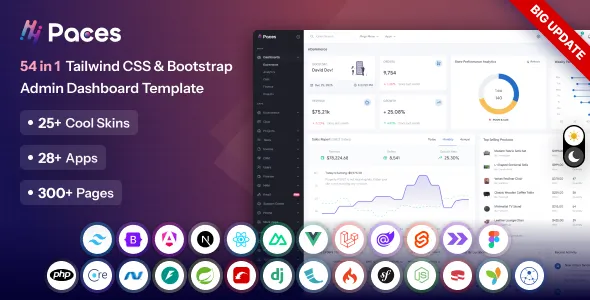
Paces – Tailwind CSS, Bootstrap, React, NextJs, Angular, Blazor, Laravel Admin Dashboard Template
Paces – Tailwind CSS, Bootstrap, React, NextJs, Angular, Blazor, Laravel Admin Dashboard Template is a comprehensive and modern admin dashboard solution created for developers, startups, SaaS companies, agencies, enterprises, application builders, and businesses that need a professional interface for managing web applications and digital products. With support for multiple popular technologies and frameworks, Paces provides a flexible foundation for building administration panels, analytics dashboards, CRM interfaces, project management systems, eCommerce back offices, business management platforms, SaaS applications, customer portals, and many other web-based management systems.
Modern Admin Dashboard Template
An admin dashboard is the central control interface of many modern web applications. It is where administrators, managers, employees, customers, or other authorized users monitor information, manage records, review reports, configure settings, and interact with application functionality.
Paces is designed around this requirement by providing a professional dashboard experience that can be adapted to a wide range of applications. Instead of creating every interface component from the beginning, developers can use the template as a structured starting point and customize the layouts according to their application’s requirements.
The design approach focuses on clarity, organization, responsiveness, and usability. Dashboard users often work with large amounts of information, so the interface needs to make important data easy to understand and common actions easy to locate.
Multi-Framework Dashboard Solution
One of the major advantages of Paces is its broad technology coverage.
The template is designed around multiple modern development environments, including:
- Tailwind CSS
- Bootstrap
- React
- Next.js
- Angular
- Blazor
- Laravel
This makes Paces suitable for development teams using different technology stacks. Instead of limiting the dashboard concept to a single framework, businesses can select the implementation that best matches their application architecture.
This flexibility is especially useful for agencies and development teams working on multiple projects because the same dashboard design language can be adapted across different technology environments.
Tailwind CSS Admin Dashboard
Tailwind CSS has become popular among developers who prefer utility-first styling and highly customizable interfaces.
A Tailwind-based version of Paces can provide a strong starting point for developers who want to create modern dashboards while maintaining control over layout, spacing, typography, responsive behavior, and component styling.
Tailwind CSS can make it easier to customize the dashboard around a specific product’s branding and design system.
Bootstrap Admin Dashboard
Bootstrap remains one of the most widely used front-end frameworks for web development.
A Bootstrap version of Paces can be useful for teams that already work with Bootstrap-based projects and want a professional dashboard without designing the entire interface from scratch.
Bootstrap’s familiar grid and component approach can help developers quickly adapt the dashboard to their applications.
React Admin Dashboard
React is widely used for modern interactive web applications.
A React implementation of Paces can provide a strong foundation for applications that require dynamic interfaces, reusable components, interactive charts, data tables, forms, dashboards, and user-specific content.
React developers can adapt dashboard sections into reusable components and connect them to APIs, databases, authentication systems, and application services.
Next.js Admin Dashboard
Next.js is commonly used for modern React applications that require advanced routing, rendering strategies, performance optimization, and scalable application structures.
Paces can provide a dashboard interface foundation for Next.js projects such as SaaS platforms, customer portals, business applications, analytics systems, and internal management tools.
Developers can connect the interface to their preferred backend services and data sources.
Angular Admin Dashboard
Angular is widely used for enterprise applications and structured front-end development.
An Angular version of Paces can help development teams build administration systems with reusable components, organized modules, forms, tables, dashboards, and application interfaces.
The template can serve as a visual starting point while developers integrate business logic and application-specific functionality.
Blazor Admin Dashboard
Blazor provides a Microsoft-oriented framework for building modern web interfaces using .NET technologies.
Paces can be adapted for Blazor applications that require administration panels, management interfaces, analytics dashboards, enterprise portals, and internal business systems.
This makes the template relevant to organizations already invested in the .NET ecosystem.
Laravel Admin Dashboard
Laravel is a popular PHP framework for building modern web applications.
Paces can provide an effective dashboard interface for Laravel-based systems such as CRM platforms, inventory systems, booking applications, eCommerce administration panels, project management software, and SaaS products.
Developers can connect the dashboard to Laravel routes, controllers, models, APIs, authentication systems, and databases.
SaaS Application Dashboard
Software-as-a-Service applications depend heavily on dashboard interfaces.
A SaaS dashboard often needs to provide users with information about their account, subscription, usage, projects, team members, reports, and settings.
Paces can be adapted to create this type of SaaS experience.
A typical SaaS dashboard may contain:
- Overview statistics
- Usage information
- Subscription details
- Recent activity
- Projects
- Team members
- Notifications
- Billing
- Reports
- Account settings
CRM Dashboard
Customer relationship management systems require interfaces for managing customer information and sales activities.
Paces can provide a visual foundation for CRM applications containing:
- Contacts
- Leads
- Opportunities
- Customers
- Sales pipelines
- Tasks
- Meetings
- Notes
- Reports
- Team activity
CRM dashboards can use charts and statistics to provide an overview of sales performance and customer activity.
Sales Dashboard
Sales teams often need real-time visibility into business performance.
A sales dashboard can display:
- Total revenue
- Monthly sales
- New customers
- Conversion rates
- Sales targets
- Pipeline value
- Open opportunities
- Team performance
Paces can be customized to present this information in a clear and professional format.
Analytics Dashboard
Analytics applications depend on data visualization.
A dashboard can present information through:
- Line charts
- Bar charts
- Area charts
- Pie charts
- Donut charts
- Progress indicators
- Statistical cards
- Tables
These elements allow users to understand trends without manually reviewing large datasets.
Business Intelligence Dashboard
Business intelligence systems require interfaces that help users analyze business information.
Paces can be adapted for BI applications containing sales reports, financial metrics, operational statistics, customer information, inventory data, and performance indicators.
The dashboard can become the central location for monitoring business health.
Project Management Dashboard
Project management applications need to present tasks, deadlines, team assignments, project status, and progress.
Paces can support interfaces for:
- Projects
- Tasks
- Milestones
- Team members
- Deadlines
- Priorities
- Activity
- Files
- Reports
A project dashboard can give managers a quick overview of ongoing work.
Task Management Interface
Task management systems often contain lists, cards, status indicators, due dates, priorities, and assigned users.
A Paces-based application can provide a clean environment for organizing these tasks.
Task statuses might include:
- To Do
- In Progress
- Review
- Completed
- Archived
The exact workflow can be customized according to the application.
Team Management Dashboard
Modern business applications frequently require employee and team management.
A team dashboard can include:
- Employee profiles
- Departments
- Roles
- Permissions
- Availability
- Performance
- Tasks
- Activity
Paces can provide a structured interface for these management requirements.
Employee Management System
HR and employee management platforms can use the dashboard structure to organize employee information.
Possible modules include:
- Employee directory
- Attendance
- Leave management
- Payroll
- Departments
- Job roles
- Performance
- Documents
The interface can be connected to the application’s backend and database.
HR Dashboard
Human resources teams need access to employee information and workforce statistics.
A modern HR dashboard can display:
- Total employees
- New hires
- Leave requests
- Attendance
- Open positions
- Department statistics
- Employee performance
Paces can be customized to support these workflows.
Finance Dashboard
Financial applications need to present numbers clearly.
A finance dashboard can include:
- Revenue
- Expenses
- Profit
- Invoices
- Payments
- Outstanding balances
- Cash flow
- Financial reports
Charts and summary cards can make financial information easier to understand.
Accounting Dashboard
Accounting software can use dashboard layouts to present invoices, transactions, customers, vendors, and reports.
Possible modules include:
- Accounts
- Invoices
- Expenses
- Transactions
- Payments
- Taxes
- Reports
- Customers
- Vendors
eCommerce Admin Dashboard
Online stores require powerful administrative interfaces for managing products, orders, customers, inventory, discounts, payments, and sales.
Paces can be adapted for eCommerce back-office systems.
An eCommerce dashboard may include:
- Total orders
- Revenue
- Products
- Customers
- Inventory
- Pending orders
- Completed orders
- Refunds
- Coupons
- Sales analytics
Product Management
Product management interfaces need organized forms and tables.
Administrators may need to manage:
- Product names
- Categories
- Prices
- Inventory
- Images
- Variations
- Descriptions
- SKU numbers
- Discounts
- Availability
A structured dashboard can simplify these operations.
Order Management Dashboard
Order management is another important component of eCommerce systems.
An order dashboard can display:
- Order number
- Customer
- Date
- Amount
- Payment status
- Fulfillment status
- Shipping status
Filters and sorting options can help administrators manage large order volumes.
Inventory Management
Inventory systems need accurate information about stock levels.
A dashboard can show:
- Current stock
- Low-stock products
- Out-of-stock items
- Inventory value
- Product movement
- Warehouse information
Paces can provide the interface structure for these inventory workflows.
Customer Management
Customer management systems can store and organize customer information.
A customer dashboard can contain:
- Customer profiles
- Contact details
- Purchase history
- Account status
- Notes
- Activity
- Support tickets
Support Ticket Dashboard
Customer support systems need an organized interface for managing incoming requests.
A support dashboard can include:
- Open tickets
- Pending tickets
- Resolved tickets
- Priority levels
- Assigned agents
- Customer information
- Response history
Paces can be adapted to provide a professional support management experience.
Help Desk Interface
A help desk application can organize customer conversations and service requests.
Useful sections include:
- Ticket list
- Ticket detail
- Customer information
- Agent assignment
- Internal notes
- Response editor
- Ticket status
- Priority
Project Analytics
Project managers can use charts and statistics to monitor project health.
Possible metrics include:
- Tasks completed
- Tasks pending
- Overdue tasks
- Project progress
- Team workload
- Deadline performance
Visual summaries help managers identify potential problems quickly.
Data Tables
Data tables are fundamental to admin dashboards.
They allow administrators to view and manage large amounts of structured information.
A table can contain:
- User information
- Product information
- Orders
- Transactions
- Customers
- Employees
- Tickets
- Projects
Useful table features can include pagination, sorting, filtering, search, bulk actions, and row-level actions.
Advanced Forms
Administrative applications often require complex forms.
Examples include:
- User registration
- Product creation
- Customer information
- Employee records
- Project creation
- Settings
- Billing information
A good form interface should provide clear labels, logical grouping, validation feedback, and accessible controls.
Form Validation
Validation helps users understand whether entered information is correct.
A dashboard application can use appropriate validation states such as:
- Required field
- Invalid value
- Valid input
- Warning
- Error
- Success
These states improve the overall user experience.
User Management
Admin dashboards frequently require user administration.
A user management module can include:
- User list
- User profiles
- Roles
- Permissions
- Account status
- Login information
- Activity
Administrators can use these interfaces to manage access to application features.
Role-Based Access
Many business applications have different types of users.
Examples include:
- Super administrator
- Administrator
- Manager
- Employee
- Customer
- Editor
- Analyst
Paces can provide the visual structure for role-based management screens, while actual permissions are implemented in the application logic.
Authentication Interface
A professional admin application typically includes authentication pages such as:
- Login
- Register
- Forgot password
- Reset password
- Verification
- Two-factor authentication
- Account recovery
These pages can be designed to maintain consistency with the main dashboard.
Login Page
The login page is the first interface many users see.
It should provide clear fields for authentication and links for password recovery and account registration where applicable.
Branding can be included to create a consistent application identity.
Registration Page
Applications serving customers or teams may require registration.
A registration interface can collect information such as:
- Name
- Password
- Company
- Phone
- Terms acceptance
The actual fields depend on the application’s requirements.
Password Recovery
A password recovery page allows users to regain account access.
A simple interface can request the user’s email address and explain the next steps.
User Profile
A user profile page can allow users to manage their personal information.
Potential fields include:
- Profile photo
- Name
- Phone
- Job title
- Company
- Address
- Preferences
Account Settings
Settings pages provide users with control over their account.
Possible settings include:
- Profile
- Password
- Notifications
- Language
- Appearance
- Security
- Preferences
Notification Center
A notification center can display important application events.
Notifications may include:
- New messages
- Task assignments
- System alerts
- Payment updates
- Customer activity
- Project changes
Messaging Interface
Some business applications require internal communication.
A dashboard can include:
- Conversations
- Contacts
- Messages
- Search
- Attachments
- Notifications
This can be adapted for team communication or customer support.
Calendar Dashboard
Calendar interfaces are useful for applications involving schedules, appointments, meetings, and deadlines.
A calendar can display:
- Meetings
- Tasks
- Appointments
- Events
- Deadlines
- Reminders
Appointment Management
Service businesses can use dashboard interfaces to manage appointments.
Possible modules include:
- Appointment list
- Customer information
- Service type
- Date
- Time
- Staff member
- Status
Booking Dashboard
Booking systems can use Paces to create management interfaces for reservations.
This can apply to:
- Hotels
- Clinics
- Salons
- Restaurants
- Consultants
- Events
- Travel businesses
Healthcare Dashboard
Healthcare applications can use admin dashboards for managing:
- Patients
- Doctors
- Appointments
- Medical records
- Departments
- Billing
- Staff
Sensitive healthcare information should be handled according to applicable privacy and security requirements.
Education Dashboard
Educational platforms can use dashboard layouts for:
- Students
- Teachers
- Courses
- Classes
- Assignments
- Grades
- Attendance
A learning management system can use the dashboard as a central administration interface.
School Management System
School management applications often need many modules.
A dashboard can provide access to:
- Student records
- Teacher records
- Classes
- Subjects
- Attendance
- Exams
- Fees
- Timetables
Learning Management Dashboard
LMS applications can use dashboards to display course statistics, enrollment information, lessons, assignments, student progress, and instructor activity.
Content Management Dashboard
CMS applications require interfaces for creating and managing content.
Possible modules include:
- Pages
- Posts
- Categories
- Tags
- Media
- Authors
- Comments
- Settings
Paces can provide a modern administrative experience for these systems.
Blog Administration
A blog dashboard can manage:
- Articles
- Authors
- Categories
- Tags
- Comments
- Drafts
- Published content
The interface can include writing and editing workflows.
Media Library
Content management applications often need a media library.
A media interface can organize:
- Images
- Videos
- Documents
- Audio
- Files
Users can browse, search, upload, and manage assets depending on the application.
File Management Dashboard
Business applications may need file management interfaces.
A file dashboard can include:
- Folders
- Documents
- File previews
- Upload actions
- Download actions
- Sharing
- Permissions
Cloud Storage Interface
The same visual patterns can be adapted for cloud storage applications.
Users can manage files, folders, storage usage, and sharing permissions.
Analytics Cards
Summary cards are useful for quickly communicating important metrics.
Examples include:
- Revenue
- Users
- Orders
- Projects
- Tasks
- Tickets
- Visitors
Cards can include comparison indicators and supporting information.
Dashboard Widgets
A flexible dashboard can contain different widgets based on the user’s role.
For example, an administrator may see system statistics while a sales employee sees sales metrics.
This allows the same dashboard framework to support different user experiences.
Customizable Dashboard Layout
Businesses can customize the dashboard according to their specific requirements.
Unused widgets can be removed while application-specific components can be introduced.
This makes the template a flexible starting point rather than a fixed interface.
Charts and Data Visualization
Data visualization can transform complex information into understandable visual patterns.
Charts can communicate:
- Trends
- Comparisons
- Distribution
- Growth
- Performance
- Progress
A dashboard can combine charts with tables and statistical cards for a more complete data experience.
Revenue Analytics
Financial and eCommerce applications can use revenue charts to display performance over time.
Common views include daily, weekly, monthly, quarterly, and yearly revenue.
User Analytics
SaaS and customer-focused applications can track user-related metrics such as:
- New registrations
- Active users
- Returning users
- Churn
- Engagement
- Account growth
Traffic Analytics
Web applications may also present traffic information.
A dashboard can show:
- Visitors
- Sessions
- Page views
- Traffic sources
- Geographic information
- Device categories
Performance Monitoring
Application dashboards can monitor operational metrics.
Examples include:
- Server status
- API performance
- Error rates
- Response times
- Service availability
Project Status Indicators
Visual status indicators help users understand progress quickly.
Common states include:
- Active
- Pending
- Completed
- Delayed
- Cancelled
- Archived
Responsive Layout
Modern admin dashboards must work across different screen sizes.
Paces can be adapted for desktop computers, laptops, tablets, and smartphones.
Responsive design allows navigation, cards, tables, forms, and charts to reorganize according to available screen space.
Mobile Admin Dashboard
Managers and employees increasingly need access to business systems from mobile devices.
A responsive admin interface allows users to check reports, review tasks, respond to notifications, and manage records without requiring a desktop computer.
Mobile-Friendly Tables
Large data tables can be challenging on small screens.
Responsive table strategies may include horizontal scrolling, card-based layouts, column prioritization, or responsive visibility.
The exact implementation can be selected according to application requirements.
Responsive Forms
Forms should remain usable on mobile devices.
Fields can be arranged vertically where necessary, buttons should be easy to tap, and validation messages should remain visible.
Sidebar Navigation
A dashboard sidebar provides access to major application modules.
Possible navigation categories include:
- Dashboard
- Users
- Products
- Orders
- Customers
- Reports
- Projects
- Messages
- Settings
A well-organized sidebar makes complex applications easier to navigate.
Collapsible Sidebar
A collapsible sidebar can provide more workspace when users need to focus on data.
On smaller screens, the navigation can be reduced to maximize the available content area.
Header Navigation
The dashboard header can contain:
- Page title
- Search
- Notifications
- User profile
- Quick actions
- Settings
The header can provide access to frequently used features.
Breadcrumb Navigation
Breadcrumbs help users understand their location within a complex application.
For example:
Dashboard → Products → Categories → Electronics
This is especially useful when applications contain multiple levels of navigation.
Search Interface
Global search can help users quickly find records.
Depending on the application, users may search for:
- Customers
- Products
- Orders
- Employees
- Projects
- Documents
- Tickets
Quick Actions
Quick actions allow users to perform frequent operations without navigating through multiple pages.
Examples include:
- Add user
- Create project
- Add product
- Create invoice
- New task
- Upload file
Notification Badges
Notification indicators can show users when new events require attention.
Examples include unread messages, pending approvals, new tickets, or system alerts.
Status Badges
Status badges make information easier to scan.
Examples include:
- Active
- Pending
- Paid
- Unpaid
- Completed
- Cancelled
- Draft
Modal Windows
Modals can be useful for focused actions such as confirmations, quick forms, previews, and alerts.
They should be used carefully so they do not interrupt important workflows unnecessarily.
Confirmation Dialogs
Administrative applications often need confirmation before destructive actions.
Examples include deleting a user, removing a product, cancelling an order, or permanently deleting a document.
Alerts and Notifications
System alerts can communicate success, warnings, errors, and information.
A consistent alert system improves usability and helps users understand the outcome of their actions.
Empty States
Empty states are important when users have no data yet.
Instead of showing a blank page, an application can explain what is missing and provide a relevant action.
For example, a project dashboard with no projects could display a message and a Create Project button.
Error States
Professional dashboards should also handle errors clearly.
An error state can explain what happened and suggest an appropriate next action.
Loading States
Applications often require time to retrieve data.
Loading indicators can communicate that the system is processing a request rather than appearing unresponsive.
Dark Mode Interface
Many users prefer dark interfaces, particularly for applications used for long periods.
A dark dashboard can reduce visual brightness and provide a modern appearance.
The exact implementation depends on the technology stack and customization.
Light Mode Interface
A light interface remains a popular choice for business applications because it provides a familiar, clean workspace.
Paces can support a professional appearance in either visual direction depending on the implementation.
Theme Customization
Businesses can customize dashboard themes to match their branding.
Possible customization areas include:
- Primary color
- Accent color
- Typography
- Logo
- Icons
- Sidebar appearance
- Buttons
- Cards
- Backgrounds
Design System Foundation
A consistent design system makes large applications easier to maintain.
Common components can share:
- Typography
- Spacing
- Colors
- Border styles
- Button styles
- Form styles
- Card styles
- Table styles
Paces can provide a visual starting point for establishing such consistency.
Reusable Components
Modern development frameworks benefit from reusable UI components.
Common components include:
- Buttons
- Cards
- Tables
- Forms
- Alerts
- Modals
- Tabs
- Dropdowns
- Navigation
- Charts
Reusable components can reduce duplicated work and help maintain consistency.
Developer-Friendly Structure
A dashboard template is most valuable when developers can understand and customize its structure.
Developers can adapt the interface to their application’s requirements, connect data sources, replace placeholder information, and integrate existing backend services.
API Integration
Modern dashboards often retrieve information through APIs.
Paces can serve as a front-end interface for API-driven applications.
API-connected dashboards can retrieve:
- Users
- Orders
- Products
- Analytics
- Transactions
- Projects
- Notifications
The exact API implementation depends on the application’s architecture.
REST API Dashboard
REST-based applications can connect dashboard components to endpoints for retrieving and updating application data.
This approach is common for React, Angular, Laravel, and other web applications.
Backend Integration
A dashboard needs to communicate with backend systems to become a functional application.
Potential backend integrations include:
- Laravel
- Node.js
- .NET
- PHP
- Java
- Python
- REST APIs
- GraphQL
Paces provides the interface layer while backend logic is implemented according to project requirements.
Laravel Application Management
Laravel developers can use the dashboard as the interface for backend-driven applications.
Common Laravel use cases include:
- CRM
- ERP
- eCommerce
- Booking systems
- SaaS
- Inventory
- Project management
- Content management
React Application Management
React developers can create dynamic dashboard applications using reusable components and application state management.
Angular Enterprise Applications
Angular is well suited to large, structured business applications.
Paces can serve as the visual layer for enterprise dashboards requiring multiple modules and complex workflows.
Next.js SaaS Applications
Next.js can be used to build modern SaaS products with dashboard experiences, account management, billing, analytics, and customer portals.
Blazor Business Applications
Blazor can support .NET-based business applications requiring interactive dashboards and administrative interfaces.
Tailwind-Based Custom Interfaces
Tailwind developers can customize layouts and styles extensively using utility classes and application-specific design systems.
Bootstrap-Based Business Applications
Bootstrap developers can take advantage of familiar grid and component patterns when adapting the dashboard to business applications.
Admin Dashboard for Startups
Startups need to move quickly while maintaining a professional product experience.
Paces can help startups establish an administration interface without spending excessive time designing common dashboard components.
Admin Dashboard for SaaS Businesses
SaaS companies can use the template for both internal administration and customer-facing application dashboards.
Admin Dashboard for Agencies
Web development agencies can adapt Paces for client projects across different industries.
Because it supports multiple technologies, agencies can use the design as a common reference across projects.
Admin Dashboard for Enterprises
Enterprise applications often contain large amounts of information and many user roles.
A structured dashboard can help organize complex business processes.
Admin Dashboard for Developers
Developers can use Paces as a foundation for prototypes, MVPs, internal tools, and production applications depending on their project’s requirements and implementation.
MVP Development
When developing a minimum viable product, speed is important.
A ready-made dashboard interface can reduce the amount of time required to design basic administration pages, allowing developers to focus on product functionality.
Internal Business Tools
Companies can use the template to build internal systems for employees.
Examples include:
- Employee portals
- Inventory tools
- Reporting systems
- Operations dashboards
- Project tracking
- Internal CRM
- Approval systems
ERP Dashboard
Enterprise resource planning systems require interfaces for multiple business functions.
A dashboard can connect modules such as:
- Finance
- HR
- Inventory
- Sales
- Purchasing
- Projects
- Customers
Warehouse Management
Warehouse systems can use dashboards to monitor:
- Stock
- Warehouses
- Transfers
- Orders
- Suppliers
- Inventory movement
Logistics Dashboard
Logistics applications can present:
- Shipments
- Deliveries
- Drivers
- Vehicles
- Routes
- Orders
- Delivery status
Marketing Dashboard
Marketing platforms can display:
- Campaigns
- Leads
- Conversion rates
- Traffic
- Advertising performance
- Email activity
- Social engagement
Email Marketing Dashboard
Email marketing software can use dashboard interfaces for:
- Campaigns
- Subscribers
- Templates
- Open rates
- Click rates
- Deliverability
- Reports
Subscription Management
SaaS applications can provide users with subscription dashboards containing:
- Current plan
- Billing cycle
- Usage
- Payment information
- Invoices
- Upgrade options
Billing Dashboard
Billing systems can display:
- Invoices
- Payments
- Outstanding balances
- Subscription status
- Payment methods
- Transaction history
Invoice Management
Invoice systems can provide tables and detail pages for:
- Invoice number
- Customer
- Date
- Amount
- Status
- Due date
Reporting Dashboard
Reports can combine tables, charts, filters, and export actions.
Users can select a date range, category, department, or other criteria before viewing results.
Export Functionality
Business dashboards often allow users to export information.
Possible export formats depend on the application’s implementation and may include spreadsheet files, CSV data, PDF reports, or other formats.
Filtering
Filters help users narrow down large datasets.
Common filters include:
- Date
- Status
- Category
- User
- Location
- Price
- Department
Pagination
Pagination improves performance and usability when datasets contain many records.
Instead of loading hundreds or thousands of rows simultaneously, the application can display manageable groups.
Sorting
Sorting allows users to organize records by fields such as date, name, price, status, or amount.
Bulk Actions
Administrative systems often need bulk operations.
Examples include:
- Delete selected
- Activate selected
- Deactivate selected
- Export selected
- Assign selected
- Change status
Permission Management
Complex applications can provide interfaces for managing user permissions.
Permissions might control access to:
- Pages
- Modules
- Actions
- Reports
- Records
The dashboard provides the interface while backend authorization enforces actual permissions.
Audit Logs
Enterprise applications may require activity tracking.
An audit log can display:
- User
- Action
- Date
- Time
- IP information
- Record affected
The exact information depends on the application’s privacy and security requirements.
Security Dashboard
A security section can provide users with information about account activity and security settings.
Possible areas include:
- Password
- Two-factor authentication
- Active sessions
- Login history
- Security alerts
Two-Factor Authentication Interface
Applications requiring stronger account security can include a two-factor authentication setup interface.
This can guide users through configuring an authentication method.
Session Management
Users can potentially view and manage active sessions from an account security page.
Admin Dashboard Performance
Dashboard performance matters because administrators may work with large datasets throughout the day.
Efficient loading, optimized queries, pagination, caching, and appropriate front-end rendering strategies can help improve performance.
Scalable Application Interface
A good dashboard design should remain usable as the application grows.
New modules can be introduced without redesigning the entire interface.
This makes a scalable dashboard framework useful for long-term software development.
Professional User Experience
A dashboard is often used repeatedly throughout the day, so usability is extremely important.
Consistent navigation, clear labels, predictable interactions, responsive layouts, and readable data presentation can reduce cognitive load.
Accessibility
Accessibility should be considered when implementing the dashboard.
Useful practices include:
- Keyboard navigation
- Descriptive labels
- Accessible forms
- Sufficient contrast
- Screen-reader-friendly structures
- Focus states
- Clear error messages
Accessibility improves usability for a broader range of users.
SEO Considerations for Dashboard Products
Public-facing product pages, documentation, landing pages, and marketing pages can be optimized for search engines.
Private authenticated dashboard screens generally do not need to be indexed.
The product website can target relevant searches around admin dashboard templates, React dashboards, Bootstrap admin templates, Tailwind dashboards, Laravel admin panels, Angular dashboards, Next.js dashboards, and related development terms.
Admin Dashboard Template SEO Keywords
Potential keyword themes include:
- Admin dashboard template
- Bootstrap admin dashboard
- Tailwind admin template
- React admin dashboard
- Next.js dashboard template
- Angular admin template
- Laravel admin dashboard
- Blazor admin template
- SaaS dashboard template
- CRM dashboard
- Business admin panel
- Responsive admin dashboard
- Analytics dashboard template
These keywords can be incorporated naturally into product pages, documentation, category pages, and supporting content.
Product Landing Page
A product landing page can showcase the main features of Paces.
Useful sections may include:
- Product introduction
- Framework support
- Dashboard previews
- Features
- Components
- Use cases
- Documentation
- Pricing
- FAQs
- Support
This can help potential customers understand the product before purchasing or downloading it.
Documentation Website
A good documentation system can explain how to install, configure, customize, and extend the dashboard.
Documentation topics may include:
- Installation
- Project structure
- Configuration
- Components
- Layouts
- Theme customization
- Routing
- Authentication integration
- API integration
- Deployment
Developer Documentation
Developers need clear information about how the template is structured.
Documentation can explain where components, assets, pages, styles, configuration files, and other resources are located.
Customization Guide
A customization guide can explain how developers can:
- Change colors
- Replace logos
- Modify navigation
- Add pages
- Remove components
- Update typography
- Customize cards
- Modify tables
Deployment
The final application can be deployed according to its technology stack and hosting environment.
For example, different deployment workflows may be used for Laravel, React, Next.js, Angular, Blazor, Tailwind, or Bootstrap implementations.
Admin Dashboard for Modern Web Applications
The demand for professional administration interfaces continues to grow as businesses move more operations online.
Every SaaS application, marketplace, CRM, eCommerce platform, internal tool, and management system needs an effective way to organize its data.
Paces provides a broad design foundation that can be adapted to these different requirements.
Why Choose Paces?
Paces combines a modern dashboard interface with support for multiple popular technologies. This makes it useful for developers and organizations that work across different technology stacks.
Its broad application possibilities allow it to serve as a foundation for many project types, from simple internal tools to sophisticated enterprise dashboards.
Suitable for Multiple Industries
Paces is not restricted to one business category.
It can be adapted for:
- Technology companies
- SaaS businesses
- eCommerce companies
- Agencies
- Finance platforms
- Education systems
- Healthcare applications
- Logistics businesses
- Marketing platforms
- HR systems
- Project management software
- CRM applications
- Enterprise software
- Booking platforms
Flexible Dashboard Architecture
Different businesses require different information.
A SaaS company may need subscription analytics, while a warehouse may need inventory data. A CRM needs customer records, while an HR system needs employee information.
Paces can be customized around these different requirements.
Modern Application Development
The template aligns with modern application development approaches by supporting popular front-end technologies and frameworks.
This allows developers to select the implementation that fits their existing development workflow.
Business-Focused Interface
An admin dashboard should prioritize useful information and efficient workflows.
Paces can be adapted to emphasize the metrics and actions that matter most to a particular business.
Productive Development Workflow
Starting with a professionally structured dashboard can allow developers to spend more time on application-specific functionality.
Instead of designing every button, card, form, navigation element, and dashboard layout independently, teams can customize an existing interface foundation.
Long-Term Application Growth
As an application gains users and features, the dashboard can evolve with it.
Additional modules, pages, reports, settings, roles, and integrations can be introduced over time.
This makes Paces suitable for projects that are expected to grow beyond an initial MVP.
Final Overview
Paces – Tailwind CSS, Bootstrap, React, NextJs, Angular, Blazor, Laravel Admin Dashboard Template is a versatile and modern dashboard solution for developers and businesses building web applications across multiple technology stacks. Its support for Tailwind CSS, Bootstrap, React, Next.js, Angular, Blazor, and Laravel makes it especially valuable for teams that work with different development environments or need a consistent dashboard design across multiple products.
From SaaS applications and CRM platforms to eCommerce administration, project management, finance systems, HR software, analytics platforms, education portals, healthcare applications, inventory systems, and enterprise management tools, Paces can provide a strong interface foundation.
The template can be customized with application-specific branding, navigation, components, charts, tables, forms, user roles, reports, and business workflows. Developers can connect the dashboard to APIs, databases, authentication systems, backend frameworks, and other application services according to their project architecture.
Its responsive approach makes it suitable for desktop, tablet, and mobile experiences, while reusable interface patterns can help maintain consistency as the application expands. Features such as dashboard cards, data tables, forms, charts, navigation, notifications, user profiles, settings, authentication pages, and management screens provide a broad starting point for modern business software.
For startups building an MVP, agencies creating client applications, developers developing SaaS products, and enterprises modernizing internal software, Paces – Tailwind CSS, Bootstrap, React, NextJs, Angular, Blazor, Laravel Admin Dashboard Template can serve as a practical and visually professional foundation for creating a powerful administration experience.
By combining a modern interface, responsive layouts, multiple technology options, flexible dashboard structures, reusable components, and extensive application possibilities, Paces can help development teams move from an initial interface concept toward a polished web application more efficiently while leaving room for extensive customization and future growth.