My Account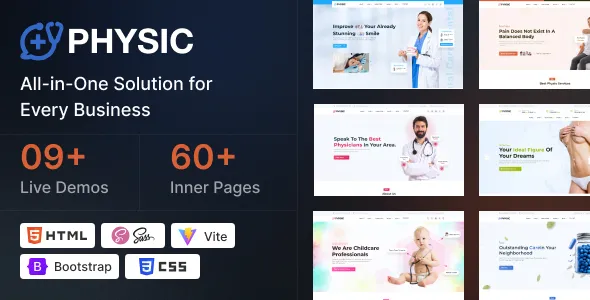
Physic – Hospital Doctor Clinic Medical Health Responsive HTML Template
Physic – Hospital Doctor Clinic Medical Health Responsive HTML Template is a professionally designed HTML website template created for hospitals, medical clinics, healthcare centers, private doctors, medical specialists, and other healthcare service providers looking to establish a modern online presence. With a responsive design approach and a healthcare-focused visual presentation, Physic offers a frontend foundation for building informative, accessible, and user-friendly medical websites. Whether you are developing a hospital website, a doctor’s professional profile, a healthcare service platform, or a medical clinic website, this template can help organize essential information and present healthcare services in a structured digital format.
A well-designed healthcare website plays an important role in communicating medical services, introducing healthcare professionals, providing facility information, and helping patients navigate essential details. Physic is designed around the needs of medical and healthcare-related websites, making it a potential starting point for organizations that want to present their services through a professional web interface. Its responsive layout helps accommodate visitors accessing the website from desktops, laptops, tablets, and smartphones.
Built using HTML-based web technologies, Physic can be customized by developers to align with a healthcare organization’s branding, content requirements, and operational objectives. The template can serve as a starting point for creating pages that introduce medical departments, describe healthcare services, highlight doctors, and provide contact information. Actual functionality such as appointment booking, patient registration, payment processing, or medical record management requires suitable backend development or third-party integrations unless specifically included in the purchased package.
What Is Physic Hospital Doctor Clinic Medical Health HTML Template?
Physic is a healthcare-oriented HTML website template intended for medical professionals and organizations that require a dedicated online presence. Instead of building a website interface from scratch, developers can begin with an existing design structure and customize its presentation according to the needs of a hospital, clinic, or medical practice.
Healthcare websites generally need to communicate information clearly and professionally. Patients and visitors should be able to understand available services, find information about doctors, explore medical departments, and locate relevant contact details without unnecessary confusion.
Physic can be considered for different medical website projects, including general hospitals, specialized clinics, dental practices, diagnostic centers, healthcare consultants, and individual medical professionals. Its intended design direction makes it suitable for projects that need a recognizable healthcare identity and a structured presentation of medical information.
As an HTML template, Physic primarily provides frontend website resources. Its actual page layouts, included components, scripts, and customization options depend on the specific package version. Developers should review the live preview and product documentation to confirm the included pages, assets, dependencies, and technical requirements before integrating it into a project.
Responsive Design for Healthcare Websites
Responsive web design is essential for healthcare websites because visitors may access important medical information using different devices and screen sizes. A patient might search for a doctor using a smartphone, explore hospital services on a tablet, or read detailed information from a desktop computer.
Physic is positioned as a responsive HTML template, supporting the development of layouts that adapt to different screen dimensions. Responsive presentation helps keep content readable and organized while reducing the need for visitors to zoom or scroll horizontally.
For smaller screens, navigation should remain straightforward, text should be legible, and important contact information should be easy to find. Medical service descriptions, doctor profiles, and departmental information should retain a logical structure when viewed on mobile devices.
Responsive design also benefits healthcare organizations that want to maintain a consistent visual identity across devices. However, the complete user experience depends on how the template is customized, the quality of its content, and the implementation of interactive elements.
Developers should test the finished website on different screen sizes and browsers. Particular attention should be given to navigation menus, forms, images, buttons, and any third-party components integrated into the template.
Website Solutions for Hospitals and Medical Centers
Hospitals and medical centers provide a wide range of healthcare services, making it important to organize their website content into clear and accessible sections. A professional medical website can introduce the institution, communicate available facilities, and help visitors identify relevant departments.
Physic can be used as a frontend foundation for a hospital website featuring sections such as Home, About Us, Departments, Doctors, Services, Facilities, FAQs, and Contact. Depending on the actual layouts included in the package, developers can customize the page structure to meet the institution’s requirements.
A hospital homepage can introduce the organization and highlight its primary medical services. Department pages can explain the specialties available, while doctor profiles can provide professional qualifications, areas of expertise, and consultation information.
Healthcare facilities can also use their websites to publish announcements, patient guidance, visiting information, and general educational resources. The content should be accurate, easy to understand, and regularly reviewed to ensure that visitors receive reliable information.
By organizing essential information within a consistent design, healthcare institutions can create a more convenient digital experience for patients, families, and other visitors.
Medical Clinic Website Development
Medical clinics often require websites that communicate their services, introduce their healthcare professionals, and provide practical information about consultations and facilities. A clinic website should help visitors understand what the organization offers and how to contact the appropriate department.
Physic can serve as a starting point for developing websites for general medical clinics, specialist practices, outpatient facilities, and private healthcare centers. The template’s frontend structure can be customized to reflect the clinic’s services, visual identity, and communication requirements.
A clinic homepage may introduce its medical team, highlight selected services, and provide relevant contact information. Dedicated pages can explain specialties such as general medicine, cardiology, dermatology, orthopedics, pediatrics, or other healthcare areas, depending on the clinic’s actual offerings.
Developers can also incorporate practical sections covering consultation procedures, clinic locations, operating hours, and frequently asked questions. These details help visitors find the information they need before contacting the organization.
The final website should avoid displaying services or qualifications that the clinic does not provide. Accurate content and a clear presentation are essential for maintaining a trustworthy healthcare website.
Doctor Profile and Professional Medical Websites
Individual doctors and medical specialists can benefit from a professional website that introduces their qualifications, expertise, and clinical services. A dedicated profile page can help patients understand a doctor’s professional background and locate relevant consultation information.
Physic can be adapted for websites belonging to individual physicians, medical consultants, and specialist practitioners. A customized website may include a professional introduction, qualifications, experience, areas of specialization, clinic details, and contact information.
Doctor profile pages can present information in an organized format, helping visitors distinguish between different specialists and understand their professional roles. Medical qualifications, registrations, and certifications should always be accurate and verified before publication.
A physician’s website may also include educational articles, general health information, and answers to frequently asked questions. Such content should be medically responsible, appropriately reviewed, and not presented as a replacement for individualized professional diagnosis or treatment.
A clear website structure helps medical professionals communicate their expertise while maintaining a professional and patient-focused digital presence.
Medical Departments and Healthcare Services
Hospitals and healthcare centers frequently offer services across multiple departments. Presenting these services through dedicated website sections can help visitors understand the available specialties and navigate the institution’s information more effectively.
Physic can be customized to present department information in a structured frontend layout. Depending on the healthcare organization’s requirements, developers may create individual pages for medical specialties, diagnostic services, treatment facilities, and other relevant departments.
For example, a hospital may provide information about cardiology, neurology, general surgery, pediatrics, gynecology, orthopedics, or diagnostic imaging. Each department page should explain the actual services offered and provide relevant details about its medical professionals and facilities.
Healthcare service pages can also introduce laboratory testing, preventive health services, consultation facilities, or specialized treatment programs when these are genuinely available.
A well-organized department structure allows visitors to explore the website without needing to understand the institution’s internal administrative organization. Clear navigation and descriptive page headings make medical information easier to locate.
Homepage Design and Healthcare Content Organization
The homepage is an important part of a hospital or clinic website because it introduces the organization and establishes the overall experience for visitors. Its content should communicate the institution’s identity and help users locate essential information.
Physic can provide a starting point for organizing healthcare-related homepage content, depending on the layouts available in the package. Developers may customize the page to include a prominent introduction, service summaries, doctor information, department highlights, and contact details.
The introductory section should clearly communicate the healthcare organization’s identity and primary services. Visitors should be able to understand the website’s purpose without navigating through several unrelated sections.
Medical department summaries can guide visitors toward more detailed information. Doctor profiles can introduce available specialists, while facility information can explain relevant services and resources.
The homepage may also include a contact section, location details, or a link to an appointment inquiry page. These elements should be organized according to the needs of the intended audience rather than added simply for visual decoration.
A balanced homepage design helps maintain readability and supports a convenient user experience across devices.
Customization and Healthcare Brand Identity
A healthcare website should reflect the identity of the hospital, clinic, or medical professional it represents. Customization makes it possible to create a consistent visual presentation that aligns with the organization’s branding and communication objectives.
Physic can be customized by developers using the available HTML, CSS, JavaScript, and related frontend resources. Depending on the package structure, modifications may involve colors, typography, spacing, images, navigation elements, and other visual components.
A hospital may prefer a clean and structured design that emphasizes clarity and professionalism. A specialist clinic might use a more focused presentation centered on its services and medical team, while a doctor’s personal website may prioritize professional information and consultation details.
Consistent typography and color choices help establish a recognizable visual identity. Images should be relevant to the healthcare organization and used appropriately to support communication.
Before making extensive changes, developers should review the template’s file structure and documentation. Maintaining organized code and testing modifications can help prevent unnecessary layout problems during customization.
HTML Structure and Frontend Development
Physic is an HTML website template intended to support frontend website development. HTML provides the structure of website content, while CSS controls visual presentation and JavaScript can support interactive behavior where included.
Developers can customize the frontend resources to build pages that reflect a healthcare organization’s requirements. This may involve modifying page sections, updating text and images, adjusting layouts, and integrating compatible frontend components.
The template can serve as a starting point for developers who want to reduce the time spent establishing a basic healthcare website interface. Instead of beginning with an entirely blank project, they can adapt existing design resources to the intended website structure.
The actual technologies, scripts, libraries, and dependencies should be confirmed through the package documentation. Developers should also check compatibility with their preferred development environment and review any installation or setup instructions supplied with the product.
Dynamic functionality such as patient databases, authentication, appointment management, and administrative systems requires suitable backend development or external services unless those components are explicitly included in the package.
Appointment Inquiry and Patient Contact
Patients often need a convenient way to contact a hospital, clinic, or medical professional. A website can support this process by presenting contact information and providing a clear pathway for appointment-related inquiries.
Physic can be customized to include contact sections and frontend forms where supported by the supplied files. A basic inquiry form might collect a visitor’s name, contact information, preferred department, and a short message.
However, an HTML form alone does not automatically provide appointment scheduling or secure data processing. Submission handling, email notifications, validation, database storage, availability management, and confirmation messages require appropriate backend functionality or third-party integrations.
For healthcare websites, privacy and security are particularly important. Developers should avoid collecting unnecessary personal or medical information through unsecured forms and should review applicable data protection requirements before implementing patient-facing systems.
A clearly designed contact experience can help visitors understand how to reach the organization while supporting responsible handling of information.
User-Friendly Navigation and Accessibility
Healthcare websites serve visitors with different technical abilities, devices, and accessibility requirements. Clear navigation and accessible content help make medical information easier to use and understand.
Physic can be customized to organize navigation around familiar sections such as Home, About, Departments, Doctors, Services, and Contact. The precise menu structure should reflect the actual content and priorities of the healthcare organization.
Developers should use descriptive headings, meaningful link labels, readable text, and appropriate color contrast. Interactive elements should be clearly identifiable, and form fields should have understandable labels and instructions.
Images that communicate important information should include suitable alternative text. Decorative imagery should not interfere with the readability of page content.
Accessibility should be considered throughout the development process rather than addressed only after the website is complete. Keyboard navigation, screen-reader compatibility, form usability, and responsive behavior should be tested as part of the website review.
These practices help create a more inclusive digital experience for patients, caregivers, and other visitors.
SEO-Friendly Structure for Medical Websites
Search engine optimization can help healthcare organizations improve the discoverability of their website and its informational content. A structured HTML template provides a starting point, but SEO performance depends on many factors, including content quality, technical configuration, competition, and website maintenance.
Physic can be customized to support a logical page structure in which individual pages focus on specific departments, medical services, doctors, or healthcare information.
Each page should have a descriptive title, a clear heading hierarchy, and original content relevant to its subject. A hospital may create separate pages for important departments, while a specialist clinic can develop focused service pages explaining its actual offerings.
Descriptive URLs and internal links can connect related pages and help visitors explore relevant information. Images should use appropriate file names and alternative text, while page resources should be optimized to support efficient loading.
Compatible SEO tools may assist with managing metadata, indexing settings, XML sitemaps, and other technical elements. Developers should review the final implementation for broken links, duplicate content, indexing issues, and unnecessary scripts.
Healthcare content should be accurate, responsible, and reviewed by qualified professionals when it includes medical information. Avoid unsupported treatment claims, misleading promises, and keyword repetition that reduces readability.
Performance Optimization and Mobile Experience
Website performance is an important part of the visitor experience, particularly for people accessing healthcare information through mobile devices or slower internet connections.
The performance of a Physic-based website depends on the implementation, image assets, scripts, hosting environment, and third-party integrations. Although the template is intended to support responsive presentation, the complete website should still be optimized and tested.
Developers can improve performance by compressing images, reviewing unnecessary scripts, minimizing oversized assets, and using appropriate caching or hosting configurations where suitable.
Medical websites should prioritize important content and avoid adding unnecessary visual effects that interfere with readability or loading speed. Pages containing doctor profiles, department information, and contact details should remain convenient to access.
Performance testing should include the homepage, service pages, department pages, and contact forms. Reviewing these pages on different devices helps identify potential problems before the website is launched.
Regular monitoring can help maintain a consistent experience as the website’s content and functionality expand.
Integrations and Additional Website Functionality
Healthcare organizations may require additional functionality beyond the frontend resources supplied with an HTML template. The appropriate integrations depend on the website’s purpose and the operational needs of the organization.
Physic can be used as a starting point for a customized website that connects with suitable backend systems or third-party services. Potential development requirements may include appointment scheduling, contact form processing, email notifications, analytics, content management, or other operational features.
A booking system may require calendar management, availability rules, and confirmation workflows. A patient portal may require secure authentication and carefully designed data access controls. Medical records and sensitive information should be handled through appropriate, secure systems rather than ordinary static frontend pages.
Before integrating additional tools, developers should evaluate compatibility, documentation, security requirements, and maintenance responsibilities. Each integration should serve a clear purpose and be tested carefully.
The final functionality depends on the actual package contents and the additional technologies used during implementation.
Security and Responsible Healthcare Website Development
Security and privacy are important considerations for every healthcare website. Visitors should be able to access general medical information and contact details without encountering misleading content or unnecessary risks.
When customizing Physic, developers should review the security implications of any external scripts, plugins, form services, or backend connections. The appropriate approach depends on the website’s architecture and the type of information it collects.
Websites that handle personal or medical information may require secure transmission, appropriate access controls, data protection procedures, and compliance with relevant regulations. These requirements cannot be satisfied by frontend design alone.
Organizations should also maintain accurate information about medical professionals, facilities, operating hours, and available services. Content should be reviewed periodically to ensure that visitors are not relying on outdated information.
A responsible development process combines appropriate technical safeguards with accurate content and ongoing maintenance.
Who Should Use Physic Hospital Doctor Clinic Medical Health HTML Template?
Physic can be evaluated by different healthcare professionals and organizations looking for a medical-focused HTML website foundation.
Hospitals and medical centers: Organizations can customize the template to present departments, facilities, healthcare services, and institutional information.
Medical clinics: General and specialized clinics can create a website that introduces their services, professionals, and contact details.
Individual doctors: Medical practitioners can develop professional websites featuring qualifications, experience, areas of expertise, and consultation information.
Specialist healthcare centers: Organizations focused on specific medical specialties can structure their website around relevant departments and services.
Diagnostic centers: Testing and diagnostic facilities can create informational pages describing available services, operating details, and contact pathways.
Healthcare consultants: Medical professionals offering consulting services can establish an online presence to communicate their professional background and service information.
Medical website developers: Freelancers and agencies can use the frontend template as a starting point for developing customized healthcare websites for clients.
The suitability of the template depends on the specific project requirements. Reviewing the demo, package contents, technical documentation, and available layouts helps determine whether the product meets the intended development needs.
Tips for Building a Professional Medical Website with Physic
Creating a successful healthcare website requires more than choosing a design template. The finished website should communicate accurate information, provide a clear structure, and make essential details easy to find.
Start by identifying the website’s primary audience and objectives. Determine whether it is intended for a hospital, specialist clinic, individual doctor, diagnostic center, or another healthcare organization.
Prepare the essential content before customizing the layout. This may include an organization overview, medical services, doctor profiles, department information, contact details, and relevant patient guidance.
Use consistent branding and replace all placeholder content with accurate information. Review the navigation structure to ensure that important pages are accessible without unnecessary steps.
Test the website on different screen sizes and browsers. Check forms, links, buttons, images, and any interactive components included in the package or added during development.
If the website requires appointment booking or patient-related functionality, plan the backend architecture and security requirements separately. Do not assume that static HTML resources provide complete operational systems.
Finally, establish a maintenance process that includes content reviews, technical testing, performance monitoring, and security updates for the technologies used in the project.
Final Thoughts on Physic Hospital Doctor Clinic Medical Health Responsive HTML Template
Physic – Hospital Doctor Clinic Medical Health Responsive HTML Template is a healthcare-oriented frontend design option for hospitals, medical clinics, individual doctors, specialist practices, and healthcare service providers looking to establish a professional online presence.
Its responsive HTML foundation can help developers create organized medical website pages, present healthcare services, introduce doctors, and communicate important institutional information. The template can be customized to reflect different healthcare branding requirements and website objectives.
As a frontend HTML product, its role is to provide a starting point for website design and development rather than automatically deliver a complete hospital management or patient care platform. Features such as appointment scheduling, patient registration, medical records, payment processing, and administrative management require additional implementation unless explicitly included in the package.
Before selecting Physic for a project, review the available demo, included files, technical requirements, documentation, and compatibility details. These checks help establish whether the template aligns with the intended website structure and development workflow.
With appropriate customization, accurate healthcare content, accessible navigation, responsive testing, and responsible technical implementation, Physic can serve as a useful foundation for building a professional medical website that supports communication, information access, and a consistent digital presence.