My Account
Pixy – Creative Agency WordPress Theme
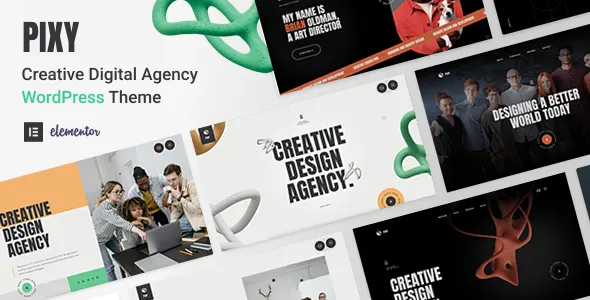
Pixy – Creative Agency WordPress Theme is a website design solution for creative agencies, digital marketing companies, branding studios, design professionals, freelancers, and businesses looking to establish a distinctive online presence with WordPress. A creative agency website needs to communicate ideas, demonstrate expertise, showcase completed projects, and help potential clients understand the value of its services. Pixy can be considered as a starting point for building a visually engaging website that presents creative work, introduces professional services, and supports brand communication.
In a competitive digital environment, a well-designed agency website can help businesses make a strong first impression. Prospective clients often want to explore a portfolio, learn about the team’s capabilities, understand the working process, and review examples of previous projects before starting a collaboration. An organized website can bring these elements together through clear messaging, attractive imagery, structured service pages, and convenient contact options.
WordPress provides a flexible content management system for managing website pages, publishing articles, uploading media, and maintaining business information. By combining a suitable theme with original content and consistent branding, creative professionals can develop a website that reflects their identity and communicates their strengths. The exact layouts, customization options, and integrations available with Pixy depend on the installed theme version and its documented features.
What Is Pixy Creative Agency WordPress Theme?
Pixy is a WordPress theme intended for creative agency websites and related professional projects. It can be evaluated by businesses that want to present their services, highlight visual work, and communicate their brand personality through a dedicated website.
Creative agencies work across a wide range of disciplines, including graphic design, website development, branding, digital marketing, advertising, content creation, user interface design, and creative strategy. A specialized agency website can organize these services into a clear structure, helping visitors understand what the business offers and how its expertise may meet their needs.
With suitable customization, Pixy can serve as a foundation for a homepage, About page, service descriptions, project portfolio, case studies, team profiles, blog, and contact page. Depending on the theme’s actual templates and compatible plugins, additional functionality may be possible for project inquiries, newsletter subscriptions, or other business requirements.
A successful agency website should focus on more than appearance. It should explain the agency’s approach, present relevant examples of work, and guide visitors toward meaningful next steps. Before selecting Pixy, review its current demo and documentation to confirm that its available layouts and supported features align with your project.
Modern Design for Creative Agencies
Visual presentation is particularly important for creative businesses because their websites often serve as demonstrations of their design capabilities. The layout, typography, color palette, imagery, and spacing can communicate the agency’s personality before visitors read the full content.
Pixy can be considered for a website that emphasizes a distinctive visual identity. Depending on the available customization settings, businesses may be able to adjust colors, typography, image presentation, page layouts, and other design elements to create a consistent appearance.
A branding agency might prefer a refined layout with carefully selected typography and detailed project presentations. A digital marketing company may choose a more energetic design with bold headlines and clear calls to action. A design studio could prioritize large visuals, creative transitions, and a portfolio that places completed work at the center of the experience.
The best visual approach depends on the agency’s audience and positioning. A website serving corporate clients may require a different presentation from one targeting independent creators, startups, or lifestyle brands.
Consistency is essential throughout the website. Use a coordinated color palette, recognizable logo, readable fonts, and repeatable design patterns across pages. Thoughtful visual choices help the website feel cohesive while allowing the agency’s projects and services to remain the main focus.
Responsive Design for Every Device
Potential clients may discover an agency through a smartphone search, explore its portfolio on a tablet, or review case studies on a desktop computer. A responsive website helps present content in a way that suits different screen sizes.
When evaluating Pixy, check the responsive behavior of the actual theme version across mobile, tablet, and desktop devices. Navigation menus, image galleries, project grids, forms, and text sections should remain accessible and easy to use.
Mobile visitors should be able to understand the agency’s main offering, explore selected projects, and locate contact information without unnecessary effort. Buttons and links should be easy to select, while text should remain readable without excessive zooming.
On larger screens, the website may have more room for detailed project layouts, wider image sections, and expanded content. Responsive behavior should preserve the design’s overall character while adapting the arrangement to the available space.
Testing should cover more than the homepage. Portfolio pages, service descriptions, blog articles, team sections, and contact forms can behave differently on smaller devices. Custom CSS, third-party widgets, and additional plugins may also affect the final layout.
A consistent cross-device experience helps ensure that the agency’s work remains accessible to visitors regardless of how they browse the website.
Showcase Your Creative Portfolio
A portfolio is often one of the most important sections of a creative agency website. It gives prospective clients a practical way to evaluate the agency’s visual style, technical capabilities, and experience with different types of projects.
Pixy can be considered as a foundation for presenting selected projects through image galleries, portfolio grids, or dedicated case study pages, depending on the layouts available in the installed version.
A branding studio might showcase logos, visual identities, packaging, and brand guidelines. A web design agency could feature website interfaces, landing pages, and digital experiences. A marketing company may present campaign concepts, content projects, and advertising materials.
Each project should provide enough context to explain the work. Include the client’s objective, the challenge addressed, the agency’s contribution, and the final deliverables. When reliable performance data is available and permission has been obtained, relevant outcomes can add useful context to the presentation.
Choose portfolio examples that reflect the services you want to attract. A carefully curated selection is often more effective than displaying every completed project without explanation.
Use high-quality images and maintain consistent image dimensions where appropriate. Optimize media files to support page performance, and make sure visitors can understand each project through both its visual presentation and supporting text.
Present Creative Services Clearly
Creative agencies often provide multiple services, and visitors need to understand how each offering can help them. A well-organized services section can explain the agency’s capabilities without overwhelming readers with unnecessary detail.
Depending on the available layouts, Pixy can be customized to present individual services through summaries, dedicated pages, or structured content sections.
Common agency services may include:
- Branding and identity: Visual identity development, brand guidelines, logo design, and brand communication.
- Web design and development: Website planning, interface design, responsive layouts, and development services.
- Digital marketing: Campaign planning, content strategy, online advertising, and digital audience engagement.
- Graphic design: Marketing materials, promotional graphics, editorial layouts, and visual assets.
- UI and UX design: User research, interface planning, usability improvements, and digital product design.
- Creative strategy: Campaign concepts, brand positioning, and coordinated creative direction.
These are examples of services a business might present, not a verified list of features included with the theme.
Each service description should explain what is offered, who it is intended for, and what clients can expect from the working process. Dedicated service pages can also provide space for relevant portfolio examples, frequently asked questions, and inquiry links.
Clear descriptions help prospective clients identify the services that match their needs and understand how to begin a conversation with the agency.
Build a Professional Agency Homepage
The homepage is often the first major introduction to a creative agency. It should communicate the business’s identity, explain its primary offering, and help visitors explore the most relevant information.
A Pixy-based homepage can be organized around an introductory headline, a short agency overview, featured services, selected projects, team information, client feedback, and contact opportunities, depending on the available templates.
The opening section should explain what the agency does and who it serves. Supporting text can communicate its approach, specialty, or value proposition without relying on vague promotional statements.
Featured projects provide a quick introduction to the agency’s capabilities. A services overview can direct visitors toward more detailed explanations, while a short About section introduces the team or creative philosophy.
Testimonials can add context when they come from genuine clients and are published with permission. A contact section or clear call to action can then guide interested visitors toward the next step.
Avoid filling the homepage with every possible section. Choose content that supports the agency’s primary goals and keeps the visitor’s journey straightforward.
A clear homepage structure helps visitors understand the business quickly and makes it easier to discover the services and projects most relevant to them.
Brand Identity and Visual Customization
A creative agency website should reflect the brand it represents. Customization allows businesses to move beyond a generic template appearance and create a presentation that supports their market positioning.
Depending on the theme’s settings and compatible editing tools, Pixy may offer ways to adjust typography, colors, layouts, spacing, images, and other visual elements. The exact customization options should be confirmed in the current documentation.
A minimalist design studio may use restrained colors, generous whitespace, and elegant typography. A technology-focused agency might prefer a contemporary visual style, while an advertising company could use more expressive imagery and stronger color contrasts.
The visual identity should remain consistent across all major pages. Establish a clear heading hierarchy, a small set of brand colors, consistent button styles, and a recognizable approach to image selection.
Replace placeholder content with authentic project examples, original text, and relevant business information. This helps ensure that the finished website communicates the agency’s real expertise rather than simply reproducing a demo layout.
Before making substantial changes, create a backup and consider using a staging environment. This allows you to test design adjustments without unnecessarily disrupting the live website.
Introduce Your Team and Creative Process
Clients often want to know who will be responsible for their projects and how the agency approaches its work. A team section can introduce key professionals, while a process section explains how a project moves from initial discussion to delivery.
If Pixy’s available layouts support team profiles, each profile can include a professional photograph, name, role, and short biography. Highlight relevant experience and responsibilities without overstating qualifications or achievements.
The creative process can be explained through practical stages such as discovery, planning, concept development, design, review, and delivery. Adapt these stages to reflect the agency’s actual workflow rather than presenting a generic process that does not match its operations.
Explaining the process can help clients understand what information they need to provide, how feedback is handled, and what they can expect during collaboration.
For agencies that work across different disciplines, this section can also explain how strategists, designers, developers, and marketing specialists contribute to a project.
Accurate team information and transparent process descriptions help make the agency more approachable and set clearer expectations for potential clients.
Case Studies That Demonstrate Your Expertise
Case studies provide an opportunity to explain the thinking behind a project rather than relying entirely on images. They can demonstrate how an agency identifies a problem, develops a solution, and delivers work aligned with a client’s objectives.
A case study page can include the project background, business challenge, creative approach, deliverables, and final outcome. Supporting images can illustrate important stages or showcase the completed work.
For example, a branding project might explain how the agency developed a new visual identity for a growing business. A web design case study could describe the goals of a website redesign and the decisions made to improve its structure and usability.
When performance metrics are available, include them only when they can be substantiated and explained accurately. Avoid presenting estimated outcomes as verified results.
Organize case studies so visitors can quickly understand the project category and the agency’s role. Related service links can help readers explore how the agency might support similar work.
A carefully maintained case study library can strengthen a portfolio by connecting creative execution with business objectives and practical decision-making.
SEO-Friendly Structure for Creative Agencies
Search engine optimization can help potential clients discover an agency through relevant searches. A well-structured WordPress website provides a foundation for publishing useful content, but search visibility also depends on competition, technical configuration, content quality, and other factors.
Each important page should have a clear purpose, a descriptive title, and a logical heading structure. Service pages can target the specific offerings the agency provides, while portfolio pages can explain project types and relevant expertise.
Use natural language that reflects how potential clients describe their needs. Avoid repeating keywords excessively or writing pages solely to include search phrases.
Descriptive URLs and relevant internal links help connect related pages. For example, a case study can link to a branding service page, while an article about website planning can direct readers toward the agency’s web design offering.
Images should have appropriate alternative text when they communicate meaningful information. Compress large media files and use suitable dimensions to support loading performance.
Compatible SEO plugins may provide tools for managing metadata, XML sitemaps, redirects, and other technical settings. The available functionality depends on the selected plugin and website configuration.
No theme can guarantee search rankings. Sustainable SEO requires useful content, technical maintenance, a logical site structure, and ongoing improvements based on audience needs.
Content Marketing and Agency Blogging
A blog can help a creative agency demonstrate expertise, explain industry concepts, and answer questions that prospective clients may have before starting a project.
Pixy may be suitable for combining agency pages with educational content, depending on the available blog layouts and WordPress configuration. Articles can cover branding, design principles, website planning, digital marketing, user experience, content strategy, or creative project management.
For example, a branding agency could publish a guide to developing consistent brand messaging. A web design studio might explain important considerations for planning a business website, while a digital marketing company could discuss campaign preparation or content organization.
Useful articles should provide practical information rather than repeating general promotional messages. Original examples, clear explanations, and actionable recommendations can make content more valuable to readers.
Internal links can connect articles to relevant services, portfolio projects, and contact pages. This helps visitors move naturally from learning about a subject to exploring the agency’s work.
A realistic publishing schedule is generally more sustainable than publishing large quantities of shallow content. Review articles periodically to ensure that recommendations, examples, and references remain accurate.
Lead Generation and Project Inquiry Forms
For many creative agencies, the website’s main business objective is to generate relevant project inquiries. Visitors need a straightforward way to ask questions, request a proposal, or discuss a potential collaboration.
Depending on the available theme features and compatible WordPress plugins, a Pixy website may be configured with contact forms or project inquiry forms. Do not assume that a complete lead management or booking system is included without checking the documentation.
A project inquiry form might ask for a name, business email, company name, required service, estimated project timeline, and a brief description of the client’s goals. Request only the information needed to begin a useful conversation.
Clear field labels and concise instructions make the form easier to complete. The website should also explain how visitors can expect to receive a response and provide alternative contact details when appropriate.
Test form submissions, email delivery, spam protection, validation messages, and confirmation behavior before launching the website. If inquiries are connected to an external service, verify that the integration works as intended.
Calls to action should be relevant to the page. A portfolio page might invite visitors to discuss a similar project, while a service page could encourage them to request a consultation or proposal.
A reliable inquiry process helps turn website interest into practical business conversations.
Performance and Website Loading Speed
A creative agency website often contains high-resolution project images, animations, video content, and interactive elements. These features can enrich the presentation, but they may also affect performance if they are not managed carefully.
The actual speed of a Pixy website depends on the theme implementation, hosting environment, image sizes, scripts, plugins, fonts, and external integrations. Responsive design alone does not guarantee fast loading.
Optimize images before uploading them and choose appropriate dimensions for each layout. Use efficient media formats where supported, and avoid loading large visual assets when a smaller version can provide the same result.
Review animations and third-party widgets to determine whether they contribute meaningfully to the experience. Remove unnecessary elements that add complexity without helping visitors understand the agency or its services.
Quality hosting, caching, and compatible optimization tools may improve performance depending on the website’s configuration. Measure results before and after making changes to understand their impact.
Test the homepage, portfolio, case studies, service pages, and blog on both desktop and mobile devices. Regular monitoring can help identify performance problems as the website grows.
A well-optimized website allows visitors to focus on the agency’s work without unnecessary delays.
Accessibility and User-Friendly Navigation
A professional agency website should make information easy to find and understand. Clear navigation, readable text, sufficient contrast, and accessible interactive elements can improve usability for a wide range of visitors.
When configuring Pixy, use logical heading levels, descriptive link text, appropriate alternative text for meaningful images, and clear form labels. Ensure that buttons and links can be identified without relying only on color.
Navigation labels should be familiar and concise. Depending on the agency’s structure, the main menu might include Home, About, Services, Work, Blog, and Contact.
Interactive elements should be usable with appropriate input methods, including keyboard navigation where supported. Forms should explain what information is required and provide understandable error messages.
Avoid excessive motion or distracting effects that make content difficult to follow. Test important pages across screen sizes and review the website with both automated accessibility tools and manual checks.
Accessibility is influenced by the theme, content, plugins, and implementation. Regular testing helps identify issues that may appear after design changes or software updates.
WordPress Plugins and Supporting Integrations
A creative agency website may need additional WordPress plugins for contact forms, SEO, analytics, security, backups, caching, and other business functions. The appropriate setup depends on the agency’s goals and the features already provided by the theme.
Before installing a plugin, review its compatibility with the current WordPress version and the installed version of Pixy. Check its documentation, update history, licensing terms, and support arrangements.
A contact form plugin may help collect project inquiries, while an analytics service can provide insights into website traffic and visitor behavior. SEO tools may assist with metadata and sitemap management, while backup and security tools support routine maintenance.
Agencies that publish newsletters, manage client inquiries, or connect external business systems should verify that the chosen tools meet their operational requirements.
Avoid installing multiple plugins that perform the same function unless there is a clear reason. Overlapping tools can introduce conflicts, increase maintenance work, and affect website performance.
After adding or updating an integration, test the relevant pages and user journeys. Pay particular attention to forms, navigation, responsive layouts, and any external services connected to the website.
Security and Ongoing Website Maintenance
A WordPress website requires ongoing maintenance to remain reliable and secure. Keeping the theme, WordPress installation, and compatible plugins updated can help reduce avoidable technical problems.
Use reputable hosting, enable HTTPS, create strong administrator passwords, and assign account permissions according to each person’s responsibilities. Obtain themes and plugins from trustworthy sources and review compatibility before installing updates.
Create regular backups and make sure the restoration process is understood. Before major updates or extensive customization, consider testing the changes in a staging environment.
Remove unused plugins and themes when appropriate, and periodically check for broken links, form errors, outdated content, and suspicious activity.
Creative agencies should also review their portfolio and service pages regularly. Remove outdated project information, correct contact details, update team profiles, and replace expired promotional content.
A consistent maintenance routine helps protect the website and ensures that it continues to represent the agency accurately.
Who Should Use Pixy Creative Agency WordPress Theme?
Pixy may be worth evaluating for a range of businesses and professionals that need a website centered on creative services, portfolio presentation, and brand communication.
Creative agencies: Present a range of creative services, selected projects, team information, and inquiry options.
Branding studios: Showcase visual identity projects, brand guidelines, packaging concepts, and brand strategy services.
Digital marketing companies: Explain marketing services, present campaign examples, and publish educational content.
Web design agencies: Feature website projects, interface concepts, development services, and case studies.
Graphic designers: Build a portfolio that highlights selected work, design skills, and professional experience.
Freelancers: Introduce individual services, explain expertise, and provide a convenient way for potential clients to make contact.
Advertising agencies: Present campaign concepts, creative work, service information, and relevant project outcomes.
UI and UX studios: Showcase digital product interfaces, design processes, and selected user experience projects.
Startups and creative businesses: Establish a recognizable online presence and communicate their offerings to prospective customers or partners.
The best choice depends on the required layouts, customization preferences, portfolio structure, and integrations. Review the current Pixy demo and documentation to determine whether the theme meets your specific requirements.
Tips for Building a Successful Website with Pixy
A theme provides the visual foundation, but the success of an agency website depends on the quality of its content, the relevance of its portfolio, and how effectively it serves prospective clients.
Start by defining the website’s primary objective. Determine whether the main goal is to generate project inquiries, present creative work, promote specific services, publish industry insights, or support several related activities.
Prepare essential content before customizing every page. This may include service descriptions, selected projects, case studies, team information, agency background, and contact details. Authentic content makes it easier to choose layouts that support the business.
Create a consistent visual identity using a suitable logo, coordinated colors, readable typography, and high-quality imagery. Replace demo content with original text and relevant project examples.
Organize the portfolio around the types of clients and projects the agency wants to attract. Provide context for selected work so visitors can understand the problem, the agency’s role, and the final deliverables.
Make contact options easy to find and test all inquiry forms before launch. Review mobile responsiveness, image loading, navigation, accessibility, and page performance.
Finally, maintain the website with regular backups, software updates, content reviews, and technical checks. These practices help keep the website useful as the agency develops.
Final Thoughts on Pixy Creative Agency WordPress Theme
Pixy – Creative Agency WordPress Theme is a potential option for creative agencies, branding studios, digital marketing companies, designers, freelancers, and other professionals seeking to establish a WordPress-based online presence. Its creative agency focus makes it relevant to projects that need to combine service information, visual storytelling, portfolio presentation, and client communication.
A thoughtfully customized website can bring together a clear homepage, structured service pages, selected projects, detailed case studies, team information, and convenient contact options. These elements help visitors understand what the agency does, evaluate its capabilities, and explore opportunities for collaboration.
The exact capabilities of Pixy depend on the installed theme version, its documented features, and the plugins or services used alongside it. Reviewing the current demo and documentation before installation helps ensure that the selected setup matches the project’s requirements.
Long-term effectiveness also depends on original content, responsive usability, accessible design, search optimization, website performance, and ongoing maintenance. A theme alone cannot guarantee search rankings or new clients, but it can provide a useful foundation for a professional and well-organized digital presence.
For businesses seeking a creative WordPress design starting point, Pixy is worth evaluating as part of a broader website strategy. With thoughtful customization, compelling project presentation, and accurate service information, an agency website can strengthen brand recognition, demonstrate expertise, and make it easier for prospective clients to start a conversation.