My Account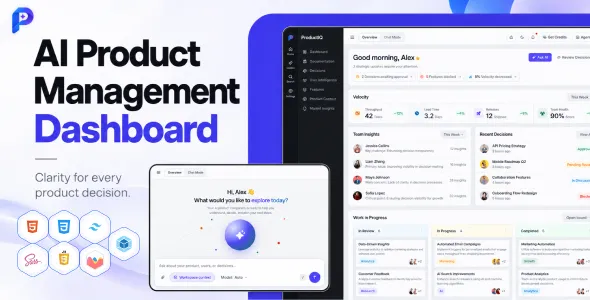
ProductIQ – AI Product Management Dashboard HTML Template
ProductIQ – AI Product Management Dashboard HTML Template is a modern dashboard template designed for product managers, SaaS companies, startup teams, business analysts, and technology professionals who need an organized interface for managing product-related information. With a focus on AI-driven product workflows, project visibility, data presentation, and operational efficiency, ProductIQ provides a starting point for building web-based product management dashboards. Whether you are developing a SaaS product platform, an internal business dashboard, a product analytics interface, or an AI-powered management application, this HTML template can be customized to support your project’s visual and functional requirements.
Product teams often work across multiple responsibilities, including roadmap planning, feature prioritization, user feedback analysis, product performance monitoring, and collaboration with different departments. An effective dashboard can bring important information into one interface, helping teams review progress, understand priorities, and organize their work more efficiently. ProductIQ is intended for projects that need a structured dashboard presentation for product-related activities, with opportunities to adapt the interface to different workflows and business objectives.
As an HTML template, ProductIQ offers a front-end foundation that developers can customize using the technologies and assets supplied with the package. Its visual components can be adapted to match a company’s branding, organize product information, and present relevant metrics. The final functionality depends on the template’s included files, supported libraries, and any additional development or integrations. Features involving live data, AI-powered analysis, authentication, or database operations may require separate implementation unless explicitly included in the current product package.
What Is ProductIQ – AI Product Management Dashboard HTML Template?
ProductIQ – AI Product Management Dashboard HTML Template is a dashboard design solution intended for applications focused on product management, AI-assisted workflows, business intelligence, and product operations. It provides a starting point for designing an interface that organizes product information into clear sections and helps users navigate different areas of a management application.
Product management involves coordinating ideas, requirements, development priorities, customer feedback, and performance measurements. When this information is scattered across multiple tools, teams may find it difficult to maintain a consistent understanding of current priorities. A centralized dashboard can provide a clearer overview of the information that matters most.
ProductIQ can be evaluated for SaaS product dashboards, product analytics platforms, AI-assisted planning tools, startup management applications, internal business systems, and other data-oriented web applications.
The template’s HTML-based structure gives developers control over its presentation and allows them to adapt layouts, styles, and components to the needs of a particular product. Depending on the included files, developers may be able to customize navigation, dashboard cards, tables, charts, forms, and other interface elements.
Before implementation, review the current product demo and documentation to confirm the available pages, dependencies, technical requirements, and included functionality. A dashboard template should not automatically be considered a complete product management system or a working AI application without verifying its documented capabilities.
Modern Dashboard Design for Product Teams
A well-designed dashboard helps users understand information quickly and move between important tasks without unnecessary complexity. Product managers may need to review project status, identify pending decisions, examine performance indicators, and locate relevant product information during a typical working day.
ProductIQ provides a starting point for presenting these activities through an organized dashboard interface. Its design can be customized to reflect the needs of product teams, startup founders, business analysts, and technology organizations.
A product management dashboard may include summary cards, project lists, performance charts, recent activity, task information, and shortcuts to important areas. The exact components depend on the supplied template and the additional functionality implemented by the developer.
Visual hierarchy is particularly important when a dashboard contains large amounts of information. Important metrics should be easy to identify, while secondary details should remain available without competing for attention. Consistent spacing, readable typography, clear labels, and restrained use of color can improve the overall experience.
ProductIQ can also be adapted to different organizational styles. A startup may prefer a compact dashboard focused on product priorities, while a larger organization may require more detailed navigation and reporting sections.
The goal is to create an interface that supports decision-making rather than simply displaying information. By organizing content around real user needs, developers can make the dashboard more practical and easier to maintain.
AI-Focused Product Management Workflows
Artificial intelligence is increasingly being explored for tasks such as summarizing customer feedback, organizing product requirements, identifying patterns in usage data, and assisting with documentation. Product teams may use these capabilities to reduce repetitive work and gain a clearer view of product information.
ProductIQ is positioned around AI-assisted product management, making it relevant to projects that require an interface for presenting AI-related workflows. Developers can adapt the dashboard to show AI-generated summaries, product insights, workflow suggestions, or other outputs when the necessary functionality is implemented.
For example, an application might provide a section where product managers review summarized feedback from customer interviews. Another workflow could present suggested feature priorities based on predefined criteria or help organize product requirements into structured categories.
However, an AI-oriented dashboard design does not automatically include a functional AI model, API connection, or intelligent recommendation engine. Such capabilities may require integration with an AI service, a back-end application, appropriate data processing, and suitable security controls.
AI-generated recommendations should also be reviewed carefully before they influence important product decisions. Teams should consider the quality of the source data, potential inaccuracies, privacy requirements, and the limitations of automated analysis.
ProductIQ can therefore be evaluated as a front-end foundation for AI-enabled product management applications, with the final capabilities determined by the actual implementation.
Product Analytics and Performance Monitoring
Product analytics helps teams understand how users interact with a digital product and whether its features support the intended business objectives. A dashboard can present selected measurements in a format that makes trends and potential problems easier to identify.
ProductIQ can be customized to display product-related metrics when the appropriate data sources and visualization components are available. Depending on the application’s purpose, these metrics may include active users, feature adoption, conversion rates, retention, engagement, customer feedback volume, or other indicators relevant to the product.
Charts, tables, and summary cards can help organize different types of information. For example, a trend chart may show how a metric changes over time, while a comparison table can present performance across product versions or user segments.
The meaning of each metric should be clearly explained. Teams should define measurement periods, data sources, and calculation methods so that users can interpret the dashboard consistently.
Live analytics requires a connection to an appropriate data source or application back end. Static sample values in a template should be replaced with actual data before the dashboard is used for operational decisions.
Developers should also consider how frequently metrics need to be updated and whether historical data must be stored. A carefully designed analytics interface helps product teams monitor progress while keeping the presentation relevant to their objectives.
Product Roadmap and Feature Prioritization
A product roadmap communicates planned development activities, strategic priorities, and the general direction of a product. It helps teams understand which initiatives are being considered, which are in progress, and how individual features relate to broader business objectives.
ProductIQ can serve as a starting point for a roadmap interface, depending on the layouts and components included in the template. Developers can adapt the dashboard to display initiatives, feature lists, milestones, status labels, and relevant planning information.
A roadmap for a SaaS application might include improvements to onboarding, reporting, integrations, or subscription management. An AI product team may organize its roadmap around data preparation, model evaluation, workflow improvements, and user experience enhancements.
Feature prioritization requires clear criteria. Teams may consider customer impact, strategic alignment, development effort, technical risk, and available resources. A dashboard can help present these criteria, but the prioritization methodology must be defined by the product team.
Interactive roadmap management may require additional functionality for creating, editing, reordering, and assigning items. If multiple users need to collaborate, the application may also need authentication, permission controls, and persistent storage.
A well-organized roadmap interface helps teams communicate plans more clearly and maintain a shared understanding of product priorities.
Project Tracking and Task Management
Product development involves coordinating tasks across design, engineering, research, marketing, and other functions. A project tracking interface can help teams review progress, identify outstanding work, and understand dependencies between activities.
ProductIQ can be customized to present project information through task lists, status indicators, progress summaries, or other dashboard components supported by the template.
A task management section might display a task name, assigned team member, priority, due date, status, and associated product initiative. Filters can help users focus on specific projects, teams, or time periods when the required functionality is implemented.
Project status labels should be consistent and easy to understand. Teams may distinguish between planned work, active development, items awaiting review, and completed tasks. The exact workflow should reflect how the organization manages its projects.
A functional task management system may require back-end logic for creating tasks, updating records, assigning users, tracking changes, and enforcing permissions. These operations should not be assumed to exist merely because a task table or status control appears in the template.
Developers should also consider how the interface handles large task lists, empty states, validation errors, and changes made by multiple users.
A clear project tracking interface can help teams maintain visibility over product development and support more organized collaboration.
Customer Feedback and User Insights
Customer feedback can help product teams understand user expectations, identify recurring problems, and discover opportunities for improvement. Organizing this information effectively makes it easier to connect product decisions with real customer needs.
ProductIQ can be adapted for an interface that displays customer comments, feature requests, survey results, support trends, or research summaries. The exact implementation depends on the components supplied with the template and the data sources connected to the application.
Feedback may be organized by topic, product area, sentiment, customer segment, or request frequency. A summary view can help teams identify recurring themes, while a detailed view may provide access to individual feedback records.
AI-assisted analysis could be added to summarize large collections of comments or suggest categories for incoming requests. Such functionality requires an appropriate processing workflow and should be evaluated for accuracy before teams rely on its output.
Feedback data should be handled responsibly. If records contain personal information or confidential customer statements, the application should apply suitable access controls and privacy practices.
Teams should also distinguish between a frequently mentioned request and a feature that necessarily deserves immediate development. Feedback is one source of evidence and should be considered alongside product strategy, technical constraints, and measurable business objectives.
A well-organized feedback interface helps teams maintain a clearer connection between customer needs and product planning.
Data Visualization and Dashboard Components
Data visualization can make complex product information easier to interpret. Charts, tables, progress indicators, and summary cards allow users to review important information without reading lengthy reports.
ProductIQ can be evaluated for dashboards that use visual components to present product metrics, project status, operational information, and other relevant data. The exact chart types and interface elements available depend on the supplied package.
Line charts may be suitable for showing changes over time, while bar charts can compare categories. Tables are useful when users need precise values or detailed records, and summary cards can highlight selected indicators.
Good visualization requires more than attractive graphics. Chart titles, labels, units, time periods, and legends should explain what the data represents. The scale should be appropriate, and the visual presentation should not exaggerate differences or obscure important context.
If the dashboard includes filters or date selectors, developers must connect those controls to the appropriate data logic. A filter that changes visually without updating the underlying information can mislead users.
For dashboards with frequently changing information, performance should be considered when retrieving and rendering data. Large datasets may require aggregation, pagination, or server-side processing.
By combining appropriate visualizations with clear explanations, developers can create a dashboard that supports more informed product discussions.
Responsive Design for Desktop, Tablet, and Mobile
Product managers and business teams may need to access product information from different devices. A responsive dashboard helps maintain usability whether a user is working on a desktop computer, reviewing information on a tablet, or checking an update from a smartphone.
ProductIQ’s actual responsive behavior should be verified through its current demo and supplied files. Responsive implementation generally involves adjusting navigation, content widths, card arrangements, tables, and spacing to fit different screen sizes.
A desktop dashboard may use several columns to display project summaries and analytics simultaneously. On a smaller screen, those sections may need to stack vertically or prioritize the most important information.
Tables require particular attention because wide datasets can become difficult to read on mobile devices. Developers may choose suitable horizontal scrolling, reduced column visibility, or alternative layouts depending on the information being presented.
Buttons, form controls, dropdown menus, and filters should remain usable with touch input. Text should remain readable without excessive zooming, and important content should not overflow the screen.
Responsive testing should cover the full application, including navigation, project views, analytics sections, and account-related pages where available. Custom scripts and third-party components should also be checked because they can affect the final layout.
A consistent responsive experience helps teams access product information conveniently across their preferred devices.
Customization and Brand Identity
A dashboard should reflect the identity of the organization using it while maintaining a clear and functional interface. Customization allows developers to adapt ProductIQ to a company’s colors, typography, terminology, and workflow requirements.
Depending on the template’s structure, customization may include changing brand colors, adjusting layouts, updating icons, modifying navigation, replacing sample data, and refining the presentation of cards and tables.
A startup may prefer a lightweight interface that emphasizes essential product metrics, while an enterprise team may require more detailed navigation and reporting areas. An AI software company might use a visual identity that supports its technology positioning without making the interface unnecessarily complicated.
Consistency is important across the application. Headings, button styles, status labels, spacing, and component states should follow a recognizable design system. This makes the dashboard easier to navigate and simplifies future maintenance.
Developers should inspect the supplied stylesheets, assets, and configuration files before making changes. If the template uses a CSS framework or component library, customizations should follow the intended structure to reduce conflicts.
Before applying major changes to a live application, keep a backup and test the revised interface in a development environment. This helps identify layout problems, broken interactions, and compatibility issues before they affect users.
HTML Template Flexibility for Developers
An HTML dashboard template gives developers direct control over the front-end structure and presentation of a web application. This can be useful for teams that want to customize the interface without building every page from scratch.
ProductIQ can be adapted according to the HTML, CSS, JavaScript, assets, and libraries included in the package. Developers can review the existing structure, replace placeholder content, customize components, and connect the interface to a suitable back-end system.
The template may be used as a foundation for an internal dashboard, a SaaS product interface, or a larger product management application. The appropriate approach depends on the technical requirements and the functionality already implemented.
If the project requires user accounts, database-backed records, role-based access, real-time updates, or AI integrations, additional application logic may be necessary. A static HTML template does not automatically provide these capabilities.
Developers should confirm the supported dependencies, browser requirements, and build instructions before beginning customization. Keeping the code organized and documenting new integrations can make the application easier to maintain.
A template-based workflow can reduce initial interface development effort while leaving room for project-specific customization.
SEO-Friendly Structure for Product Websites
Search engine optimization is relevant when a product-related website includes public-facing pages that need to be discovered through search engines. An internal dashboard that requires authentication has different SEO needs from a public marketing website.
ProductIQ is primarily a dashboard template, so SEO considerations depend on how it is used. If the project includes public product pages, documentation, or a marketing website, those pages can be optimized with descriptive titles, clear headings, useful content, and appropriate internal links.
Public pages should have a logical structure and provide meaningful information to visitors. Technical elements such as metadata, canonical URLs, indexing directives, and XML sitemaps should be configured according to the website’s architecture.
Private dashboard pages should not be exposed to search engines simply for the sake of increasing indexed URLs. Authentication and access controls should protect private product information and user-specific records.
Developers should also review page performance, image optimization, accessibility, and mobile usability. These elements contribute to the overall quality of the public website.
No dashboard template guarantees search rankings or organic traffic. SEO performance depends on the purpose of the website, content quality, technical configuration, competition, and other factors.
Performance Optimization and Efficient Loading
Dashboard performance affects how quickly users can access information and complete their tasks. Slow-loading charts, oversized assets, unnecessary scripts, and inefficient data requests can make a management interface difficult to use.
The performance of a ProductIQ-based application depends on its code, hosting environment, assets, integrations, and the volume of information displayed. Developers should test the finished application rather than assume that the template will perform equally well in every configuration.
Start by reviewing images, fonts, scripts, and external libraries. Remove unnecessary assets and optimize files that are required. Where appropriate, defer nonessential scripts and reduce the amount of code loaded on initial page access.
Data handling is also important. Dashboards that retrieve large amounts of information may benefit from pagination, server-side filtering, caching, or carefully designed API requests. These strategies should be selected according to the application’s architecture and data requirements.
Charts and tables should remain responsive when data volumes increase. Developers should test realistic datasets and review the interface for rendering delays or unnecessary reloading.
Monitoring tools and performance tests can help identify bottlenecks before they affect a large number of users. Regular reviews help maintain an efficient dashboard as the application evolves.
Accessibility and User-Friendly Navigation
A product management dashboard should make information easy to understand and interactions straightforward to complete. Accessible design helps users with different abilities navigate the interface and can improve usability for the entire team.
When customizing ProductIQ, use a logical heading hierarchy, semantic HTML, descriptive labels, and clear button text. Navigation items should explain their destination, while forms should identify required information and provide understandable error messages.
Text and background colors should have sufficient contrast. Status indicators should not rely only on color, and interactive controls should have visible focus states for keyboard users.
Tables should use appropriate headings, while charts should provide meaningful labels or alternative summaries where necessary. Important data should not be communicated exclusively through visual color differences.
If the dashboard includes dropdown menus, modals, date selectors, or other interactive components, test their keyboard behavior and focus management. Forms and validation messages should remain understandable to users relying on assistive technologies.
Accessibility depends on the template and subsequent customization. Automated tools can identify some issues, but manual testing is also important for common workflows.
An accessible interface supports more inclusive collaboration and makes the dashboard easier to use across different working environments.
Security, Privacy, and Data Management
Product management dashboards may contain sensitive information such as product roadmaps, customer feedback, business metrics, internal discussions, and development priorities. Protecting this information is an essential part of building a dependable application.
An HTML template does not automatically provide secure authentication or server-side authorization. Developers should implement suitable access controls in the application back end and ensure that users can only view or modify records they are permitted to access.
If the dashboard uses an API, the server should validate requests and enforce permissions rather than relying on front-end controls alone. Sensitive credentials should not be exposed in client-side code.
AI integrations introduce additional considerations when prompts or product data are sent to external services. Teams should review the provider’s data handling practices, avoid sharing unnecessary confidential information, and follow relevant privacy requirements.
Regular backups, dependency reviews, secure configuration, and monitoring can help reduce operational risks. Error messages and logs should be designed so that they do not unintentionally expose sensitive information.
If the application stores customer feedback or user-specific data, establish appropriate data retention and deletion practices. Clear policies help teams understand how information is managed.
A well-designed dashboard should combine a useful interface with suitable security, privacy, and data governance measures.
Integrations and Additional Functionality
A product management dashboard may need to connect with other business systems to provide meaningful information. Depending on the project, these integrations may include analytics platforms, project management tools, customer feedback services, authentication providers, reporting systems, or AI APIs.
ProductIQ can serve as a front-end starting point for an integrated application, but compatibility and implementation requirements should be confirmed before adding external services.
An analytics integration may supply usage measurements, while a project management connection could provide task status and development progress. An AI service may assist with summarizing feedback or organizing product information if the application is designed to support those workflows.
Each integration should be evaluated for reliability, security, cost, data permissions, and maintenance requirements. Developers should avoid adding tools that duplicate existing functionality without a clear benefit.
API connections require appropriate error handling, request validation, and secure management of credentials. The interface should provide useful feedback when a service is unavailable or data cannot be retrieved.
Test integrations in a development environment before deploying them. Verify that data is displayed correctly, user permissions are respected, and the dashboard remains usable when external services respond slowly or return errors.
Thoughtful integrations can extend the value of the dashboard while keeping the application manageable.
Who Can Use ProductIQ – AI Product Management Dashboard HTML Template?
ProductIQ can be evaluated for a variety of projects that need a structured interface for product information, analytics, and management workflows.
Product managers: Organize product priorities, review progress, and present relevant information to stakeholders.
SaaS companies: Develop an interface for product metrics, feature planning, user activity, and operational reporting.
AI startups: Build a dashboard foundation for applications that present AI-related workflows or product insights.
Business analysts: Create data-oriented interfaces for reviewing performance indicators, reports, and product-related information.
Technology teams: Customize dashboard layouts for internal tools, product operations, and project tracking.
Startup founders: Organize product information and establish a foundation for a management application tailored to the business.
Software development agencies: Adapt the template for clients building product management or analytics applications.
Independent developers: Use the existing front-end structure as a starting point for a customized web application.
Enterprise teams: Evaluate the template for internal dashboard projects that require a tailored presentation and additional back-end functionality.
The best fit depends on the required features, available integrations, technical environment, and documented capabilities of the current product version.
Best Practices for Building a Successful Product Dashboard
A successful product dashboard should help users complete real tasks and understand relevant information without unnecessary complexity. The following practices can help developers make effective use of ProductIQ.
Define the main use cases. Identify which decisions or tasks the dashboard should support before deciding which components to display.
Prioritize relevant metrics. Select measurements that connect directly to product goals and provide clear explanations of how they are calculated.
Organize information logically. Group related metrics, tasks, roadmaps, and feedback into understandable sections.
Use accurate data. Replace sample content with verified information before using the dashboard for operational decisions.
Keep the interface consistent. Apply a clear design system across navigation, cards, charts, forms, and tables.
Implement functionality carefully. Verify that interactive controls, filters, forms, and integrations perform the actions users expect.
Protect sensitive information. Use appropriate authentication, authorization, secure API handling, and privacy practices.
Test across devices. Check responsive layouts, navigation, charts, and tables on different screen sizes.
Monitor performance. Optimize assets and review data retrieval as the application grows.
Review accessibility. Test keyboard navigation, color contrast, form labels, and the presentation of visual data.
Maintain the application. Keep dependencies updated, document customizations, and review integrations periodically.
These practices help turn a dashboard template into a useful application interface that supports product operations and informed decision-making.
Final Thoughts on ProductIQ – AI Product Management Dashboard HTML Template
ProductIQ – AI Product Management Dashboard HTML Template is a potential starting point for developers, SaaS businesses, product managers, and technology teams looking to create a product-focused dashboard interface. Its intended application makes it relevant to projects involving product analytics, roadmap presentation, project tracking, customer feedback, and AI-assisted workflows.
A well-customized dashboard can bring important information together through organized layouts, clear navigation, useful data visualizations, and responsive components. Teams can adapt the interface to match their product strategy and prioritize the information that matters most to their users.
Because ProductIQ is an HTML template, its actual capabilities depend on the supplied files and any additional implementation. Functional AI analysis, live analytics, database operations, user authentication, and collaborative workflows may require separate development or integrations unless explicitly included in the product package.
Before choosing the template, review the current product demo and documentation to confirm the included components, technical dependencies, responsive behavior, and licensing requirements. Test the completed application for accessibility, performance, security, and data accuracy before using it in a production environment.
For developers seeking a customizable front-end foundation for a product management dashboard, ProductIQ can be evaluated as part of a broader application development strategy. With thoughtful customization, reliable data connections, appropriate security controls, and ongoing maintenance, the resulting dashboard can support clearer product workflows and more effective team collaboration.