My Account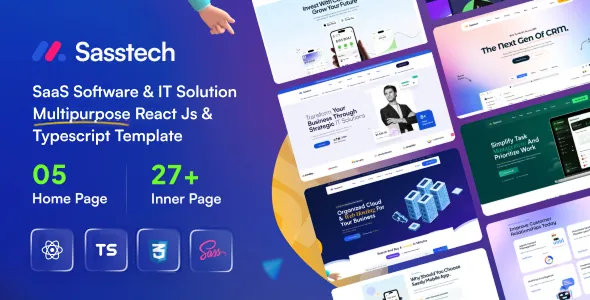
SassTech – React JS TypeScript – SaaS Software & IT Solution Multipurpose Template
SassTech – React JS TypeScript – SaaS Software & IT Solution Multipurpose Template is a versatile website template designed for SaaS companies, software developers, technology startups, IT service providers, digital agencies, and businesses looking to establish a professional online presence. Built around the React JS and TypeScript development ecosystem, this multipurpose template provides a foundation for creating modern websites that present software products, explain technology services, introduce digital solutions, and communicate business value. Whether you are launching a software-as-a-service platform, promoting a cloud-based application, showcasing IT consulting services, or developing a website for a technology company, SassTech offers a starting point for building a structured and visually consistent digital experience.
Modern technology businesses need websites that communicate complex products in a clear and accessible way. Visitors should be able to understand the purpose of a software solution, explore its benefits, review available services, and find the information they need before making a decision. SassTech can be customized to support these objectives through suitable page layouts, clear content sections, prominent calls to action, and consistent branding. Its multipurpose positioning makes it relevant to different software and IT business models, while React JS and TypeScript provide a development-oriented foundation for teams working with modern front-end technologies. The final website experience will depend on the included template files, available components, implementation choices, and any additional integrations added during development.
What Is SassTech React JS TypeScript Multipurpose Template?
SassTech is a multipurpose website template intended for SaaS software businesses, IT solution providers, and technology-focused organizations. It can be considered for websites that need to explain digital products, present professional services, communicate technical capabilities, and encourage potential customers to explore a business offering.
A SaaS company may use a suitable layout to introduce its application, explain important capabilities, and guide visitors toward a product demonstration or registration page. An IT consultancy can present its technical expertise, service categories, project experience, and contact details. A software startup can use the website to communicate its product vision, introduce its team, and share information with prospective customers or business partners.
React JS supports the development of component-based user interfaces, allowing developers to organize interface elements into reusable components. TypeScript adds static typing to JavaScript, helping development teams describe data structures, define component properties, and identify certain errors during development. Together, these technologies provide a practical foundation for maintaining structured front-end code.
The exact pages, components, integrations, and customization options included with SassTech depend on the particular product release. Before implementation, review the current demo, source files, documentation, and technical requirements to confirm that the template meets your project needs.
Modern Website Design for SaaS Businesses
Software-as-a-service companies need websites that make their products understandable to potential users. A clear website can explain the problem a platform addresses, identify its intended audience, and demonstrate why the solution may be useful.
SassTech can serve as a foundation for a SaaS website that introduces a product through an organized homepage and dedicated supporting sections. Depending on the available layouts, these sections may be adapted to explain product features, business benefits, subscription options, integrations, customer use cases, and frequently asked questions.
A project management platform, for example, may highlight collaboration, task organization, reporting, and workflow management. An analytics product might emphasize data visualization, reporting capabilities, and business insights. A customer relationship management platform could focus on contact organization, sales processes, and customer communication.
The most effective presentation begins with the needs of the intended audience rather than a long list of technical terms. Short explanations, descriptive headings, relevant screenshots, and clear calls to action help visitors understand the product more quickly.
When customizing SassTech for a SaaS business, ensure that all product claims accurately reflect the actual application. Pricing, integrations, security statements, and performance claims should be supported by current information.
React JS and TypeScript Development Foundation
React JS is widely used to create interactive web interfaces through reusable components. Instead of maintaining every interface element as an isolated block of code, developers can organize a website into smaller components that serve specific purposes. This approach can make larger front-end projects easier to structure and maintain.
TypeScript extends JavaScript with a type system that can help developers define expected values, describe objects, and establish clearer contracts between components. These features can be useful when building websites with multiple sections, repeated interface elements, or data-driven content.
A React JS TypeScript template can reduce the initial effort involved in creating a front-end interface because developers may be able to adapt existing layouts and components rather than starting from an empty project. The amount of reusable code and the precise development workflow depend on SassTech’s actual source implementation.
Developers should review the included package configuration, dependencies, component organization, asset structure, and build instructions before making major changes. Following the project’s established conventions can help maintain consistency as new pages and features are added.
It is also important to distinguish a front-end template from a complete software application. A website template does not automatically provide a production-ready backend, user authentication, subscription billing, database management, or SaaS business logic unless those capabilities are explicitly included or connected through additional development.
Multipurpose Design for IT and Technology Companies
Technology companies provide a broad range of services, including software development, cloud consulting, IT support, cybersecurity consulting, infrastructure planning, digital transformation, and system integration. Their websites need to present these offerings in a way that is relevant to different customer groups.
SassTech can be evaluated for projects that require a flexible presentation of technology services and business solutions. A company can organize its website around its primary service categories, technical expertise, industry experience, and business contact information.
An IT solutions provider may create separate sections for managed services, infrastructure support, and software implementation. A development agency could focus on custom applications, web development, and product engineering. A technology consultancy might explain its approach to modernization, system architecture, or digital strategy.
Clear service descriptions help visitors determine whether a provider can address their requirements. Each service page should explain the problem being solved, the process involved, and the type of outcome a client can reasonably expect.
A multipurpose template offers a starting point, but the final website should still reflect the company’s specific market, expertise, and audience. Removing irrelevant sections and prioritizing the most useful information can produce a more focused experience.
Build a Professional SaaS Product Landing Page
A product landing page is often designed around one main objective, such as encouraging visitors to explore an application, request a demonstration, start a trial, or contact the sales team. The page should present a consistent message and make the next step easy to understand.
SassTech may be adapted into a SaaS landing page using the relevant layouts and components supplied with the template. A typical structure can begin with a headline that describes the product’s value, followed by a short explanation and a prominent call to action.
The next sections can introduce key features, explain practical use cases, display product screenshots, and answer common questions. Depending on the business model, additional sections may explain subscription plans, supported integrations, onboarding, or customer support.
Every section should contribute to the visitor’s understanding of the product. Avoid filling the page with generic statements that could describe any software company. Instead, explain what the application does, who it is for, and which problems it helps users address.
If the website promotes a free trial or product demonstration, ensure that the relevant button leads to a functioning destination. Registration forms, email collection, and trial activation may require additional backend services or integrations beyond the front-end template.
Homepage Layout and Content Organization
The homepage provides an overview of the business and helps visitors navigate toward relevant information. A well-organized page should communicate the main offering without overwhelming users with too many competing messages.
A SassTech-based homepage can be planned around an introductory hero section, a summary of the main services or product features, business benefits, selected projects, customer feedback, and contact opportunities. The precise sections available depend on the supplied template layouts and components.
The hero section should communicate the primary value proposition in clear language. Supporting text can identify the target audience and briefly explain what the business provides. A call-to-action button can then direct visitors to a relevant page or conversion step.
Feature sections can explain important capabilities, while service cards can summarize the company’s main offerings. Product screenshots or relevant illustrations may help demonstrate how a platform works, provided the visuals accurately represent the real product.
The homepage should not attempt to explain every detail. Dedicated pages can provide more comprehensive information about individual services, pricing, product features, company background, and support.
Before publishing, test all navigation links and calls to action. A polished visual design is more useful when visitors can move through the website easily and complete the actions that matter to the business.
Showcase Software Features and Digital Solutions
Software product websites need to explain features in a way that connects technical capabilities with practical benefits. Visitors often want to know how a product will fit into their existing workflow and whether it can address a specific challenge.
SassTech can be customized to present software capabilities through organized sections, feature descriptions, screenshots, illustrations, or other available interface elements. A project management tool may highlight task assignment and team collaboration, while a financial platform may explain reporting and transaction management features.
Each feature description should focus on a meaningful user need. Instead of listing technical terminology without context, explain what the feature does, how it is used, and why it matters.
For example, a reporting feature might help users review operational data in one place. An automation capability could reduce repetitive manual steps if the product genuinely supports that function. A collaboration feature may help teams coordinate activities across different roles.
Use authentic product screenshots wherever possible. If the application is still under development, clearly distinguish illustrative mockups from functional product screens. This helps maintain transparency and prevents visitors from misunderstanding the current state of the software.
Responsive Design for Desktop, Tablet, and Mobile
A business website should remain easy to use across different screen sizes. Potential customers may discover a product on a smartphone, explore its features on a tablet, and return later using a desktop computer.
SassTech is positioned as a modern website template, but its actual responsive behavior should be confirmed using the included demo and tested after customization. Developers should check how navigation, text, images, cards, forms, and other interface elements behave at different viewport widths.
On smaller screens, headings should remain readable and buttons should be comfortable to select. Navigation should be straightforward, while important content should not be hidden behind unnecessary interactions. Large images and complex sections should adapt to the available screen space.
Responsive testing should cover more than the homepage. Service pages, feature sections, pricing layouts, contact forms, and any other supplied page types may behave differently depending on their content.
Custom CSS, embedded third-party services, additional scripts, and modified components can introduce layout issues even when the original template behaves correctly. Test the final implementation after each major design change to identify and resolve problems before launch.
Customization and Brand Identity
A professional website should reflect the business’s identity rather than look like an unchanged starter template. Consistent branding helps visitors recognize the organization and understand the character of its products or services.
Depending on the SassTech source files and supported customization options, developers may be able to adapt colors, typography, spacing, images, navigation, section order, and other visual details. The exact approach depends on the template’s implementation and component structure.
A SaaS startup might use a clean interface with concise copy and product-focused visuals. An enterprise IT provider may prefer a more formal presentation that emphasizes technical experience and business services. A creative software company might use a more expressive visual style while maintaining readable content and accessible controls.
Create a consistent design system before modifying every page. Establish a small set of brand colors, typography styles, spacing rules, button treatments, and image guidelines. Reusing these choices across the website can make the overall experience more cohesive.
Replace placeholder text and imagery with accurate business information. Review the final pages to ensure that the selected visual style supports the brand and that important content remains easy to understand.
Website Navigation and User Experience
Good navigation helps visitors locate information without unnecessary effort. For SaaS and IT websites, the most important pages often include product information, services, company details, pricing where applicable, resources, and contact options.
SassTech can be adapted to reflect the navigation requirements of a particular business. A smaller software company may need only a few main menu items, while an organization offering multiple solutions may require a more detailed information architecture.
Use familiar labels that clearly describe each destination. Avoid creating too many menu categories when a simpler structure would be easier to understand. Related services can be grouped logically, and important actions can be made visible without competing with every other element on the page.
Calls to action should use clear, specific wording. A button inviting users to request a demo should lead to a demo request process, while a contact button should direct visitors to an appropriate contact form or information page.
Test the complete user journey on desktop and mobile devices. Check menu behavior, links, forms, keyboard navigation, and confirmation messages. Small usability improvements can help visitors find the information they need and interact with the business more confidently.
SEO-Friendly Structure for Search Visibility
Search engine optimization helps search engines understand website content and helps relevant audiences discover useful information. A well-structured template can provide a foundation for SEO, but search performance also depends on content quality, technical implementation, competition, and ongoing optimization.
When customizing SassTech, give each page a clear topic and purpose. Use descriptive page titles, relevant headings, readable URLs, useful internal links, and original content that answers the intended audience’s questions.
A SaaS company might create dedicated pages for its core product, important features, industry use cases, integrations, and pricing. An IT services provider can build individual pages for distinct services rather than relying on one general page to explain everything.
Write naturally for prospective customers. Avoid repeating keywords excessively or publishing generic text solely to increase page length. The content should explain the actual product or service and provide information that helps visitors make informed decisions.
Image optimization is also important. Use descriptive file names where appropriate, meaningful alternative text for informative images, and efficient image dimensions. Review page loading performance and ensure that search engines can access important content.
Depending on the project’s needs, additional SEO tools or development work may be required for metadata, sitemap generation, canonical URLs, structured data, redirects, and other technical elements. Check the template’s current implementation rather than assuming that every SEO feature is already configured.
Performance and Front-End Optimization
Website performance influences how quickly visitors can access information and interact with the interface. Slow pages can make a product feel difficult to use before a visitor has even explored the offering.
The performance of a SassTech website depends on its implementation, assets, dependencies, hosting environment, and the customizations added during development. React JS and TypeScript alone do not guarantee fast loading, so the completed website should be measured and optimized.
Start by reviewing image sizes and formats. Large hero images, screenshots, and decorative graphics should be optimized for their display dimensions. Avoid loading unnecessarily large assets when a smaller version can provide sufficient visual quality.
Review external scripts, animation effects, fonts, and third-party widgets. Every additional resource can affect loading behavior, so retain features that contribute meaningful value and remove unnecessary elements.
Use appropriate build settings and follow the template’s documented production workflow. Depending on the setup, techniques such as code splitting, lazy loading, caching, and asset compression may help improve performance.
Test representative pages on both desktop and mobile connections. Monitor actual results and address the largest performance problems first instead of relying on assumptions about which optimizations will help.
Integrations and Functional Requirements
A website template can provide the front-end presentation for a software business, but many business processes require separate services or custom development. Understanding these requirements before launch helps prevent gaps between the website’s appearance and its actual functionality.
Depending on the project’s goals, a SassTech implementation may need connections to a contact form service, customer relationship management system, analytics platform, newsletter provider, scheduling tool, or software product backend.
A SaaS company might connect a demo request form to its sales process. A technology consultancy could route inquiries to a customer relationship management platform. A newsletter signup may require an email marketing service and appropriate consent handling.
If the website includes pricing sections, make sure the displayed plans match the real product offering. Subscription payments, recurring billing, account creation, and access control typically require suitable backend functionality or external services unless explicitly included in the supplied product.
Before adding an integration, review its documentation, compatibility, privacy requirements, and maintenance implications. Test the full process from the visitor’s first interaction through to the expected confirmation or business action.
Accessibility and Readable Content
Accessibility helps make a website usable by people with different abilities, devices, and interaction preferences. It also encourages clearer content, more understandable navigation, and better-designed interface components.
When customizing SassTech, use a logical heading hierarchy and descriptive link text. Form fields should have clear labels, and validation messages should explain what needs to be corrected. Informative images should have appropriate alternative text, while decorative images should not introduce unnecessary noise for assistive technologies.
Text and background colors should provide sufficient contrast. Important information should not depend on color alone, and interactive elements should have visible focus states where appropriate.
Ensure that menus, forms, and buttons can be used with a keyboard. Avoid interactions that require a mouse when an accessible alternative can be provided. Motion effects should also be reviewed to ensure that they do not create an uncomfortable experience for visitors.
Accessibility should be checked across the complete website rather than only on the first page. Automated testing tools can identify some issues, but manual keyboard checks and practical usability reviews remain valuable.
Security and Website Maintenance
A professional website needs regular maintenance to remain dependable as its software and dependencies evolve. React-based projects may rely on multiple packages, build tools, and external services, so developers should understand the maintenance requirements of the chosen implementation.
Before deployment, review the project’s dependencies and follow the documented installation and build instructions. Keep packages updated in accordance with compatibility requirements, monitor relevant security advisories, and test significant updates before applying them to the production website.
Sensitive credentials and private configuration values should not be exposed in client-side source code. Any functionality involving authentication, protected information, payments, or privileged operations should use an appropriate backend or trusted service.
Set up suitable hosting, HTTPS, error monitoring, and backup procedures according to the website’s architecture. If the site uses a separate backend or content management system, maintain those components as well.
Regularly check links, contact forms, page layouts, product details, and integration behavior. A planned maintenance routine helps identify issues before they interfere with customer inquiries or business operations.
Who Can Benefit from SassTech?
SassTech can be considered by a range of businesses and developers seeking a React JS TypeScript foundation for a SaaS or IT-oriented website.
SaaS startups: Businesses launching subscription-based software can create a website that explains their product, introduces its benefits, and directs visitors toward suitable next steps.
Software development companies: Development teams can adapt relevant pages to present their services, technical expertise, project examples, and business approach.
IT consulting firms: Technology consultants can organize their service offerings, explain their capabilities, and provide clear contact opportunities for prospective clients.
Technology startups: New technology businesses can establish an online presence that introduces their vision, products, and solutions.
Digital agencies: Agencies working with software, technology, and digital transformation projects can create a website that communicates their service portfolio.
Cloud service providers: Companies offering cloud-related services can use suitable layouts to explain their offerings, implementation approach, and support capabilities.
Product teams and developers: Front-end developers can evaluate the template as a starting point for a client project or internal product website, subject to the source code and license terms.
Business solution providers: Organizations offering digital tools or enterprise technology services can adapt the presentation to suit their target industries.
Suitability ultimately depends on the project’s requirements, the features included in the current template release, the desired integrations, and the developer’s implementation plan.
Tips for Getting Started with SassTech
Before customizing the template, define the website’s primary purpose. Determine whether the project is intended to promote a SaaS product, generate IT service inquiries, present a software company, or support another technology-related business objective.
Review the available demo and source files to understand the supplied page layouts, reusable components, asset organization, dependencies, and configuration requirements. Confirm that the current package supports the intended development environment.
Prepare the main content before extensively modifying the design. This may include a clear business introduction, product information, feature descriptions, service details, project examples, contact information, and frequently asked questions.
Establish a consistent visual identity and replace placeholder content with accurate material. Use authentic product screenshots and relevant imagery wherever possible, and ensure that the website’s messaging reflects the actual capabilities of the business.
Test the finished implementation on different screen sizes and browsers. Check navigation, forms, external links, performance, accessibility, and all important conversion paths. If the website connects to a backend or third-party service, verify the complete workflow rather than testing only the visual interface.
Finally, document the customized components and keep the project dependencies and deployment process organized. These practices make it easier to maintain the website as the business grows.
Final Thoughts on SassTech React JS TypeScript Template
SassTech – React JS TypeScript – SaaS Software & IT Solution Multipurpose Template is a potential starting point for businesses and developers building websites in the SaaS, software, and IT services sectors. Its multipurpose positioning makes it relevant to projects that need to introduce digital products, explain technology services, present business capabilities, and guide visitors toward meaningful actions.
React JS provides a component-oriented approach to building user interfaces, while TypeScript supports a more structured development workflow through static typing. These technologies can be useful for teams adapting reusable interface elements and maintaining a modern front-end project.
The quality of the finished website will depend on the supplied template, the accuracy of its content, the customization decisions, and the integrations required by the business. A front-end template should not be assumed to include a complete SaaS backend, payment processing, authentication system, or subscription management unless these capabilities are explicitly documented.
For the best results, review the current SassTech demo and documentation, confirm the included features and licensing terms, and test the template against your technical requirements before deployment. Combine a clear value proposition with responsive layouts, useful product information, accessible navigation, efficient assets, and reliable functionality.
With thoughtful customization and ongoing maintenance, SassTech can provide a foundation for a professional technology website that communicates its offerings clearly and supports the broader goals of a software business.