My Account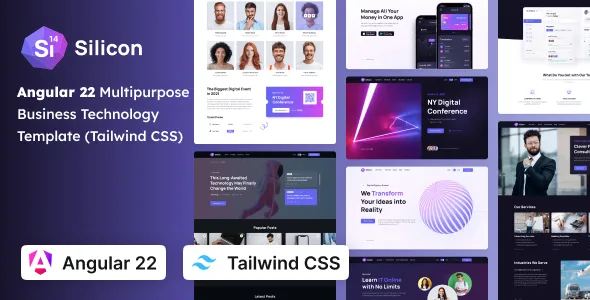
Silicon – Multipurpose Business, SaaS & Technology Tailwind CSS Angular 22 Template
Silicon – Multipurpose Business, SaaS & Technology Tailwind CSS Angular 22 Template is a versatile website template designed for businesses, software companies, SaaS startups, technology providers, digital agencies, and professional service organizations that need a modern online presence. Combining a multipurpose business concept with Tailwind CSS styling and an Angular 22 development foundation, Silicon provides a starting point for creating professional websites that introduce services, explain digital products, showcase technical expertise, and communicate business value. Its flexible positioning makes it suitable for a range of corporate and technology-focused projects that require a clean interface and adaptable content structure.
Modern businesses need websites that communicate their value clearly while providing visitors with a convenient way to explore products, understand services, and contact the organization. A well-planned business website can introduce a company’s mission, present its solutions, explain its advantages, highlight customer success stories, and guide potential customers toward meaningful actions. For SaaS companies and technology startups, the website may also need to explain software capabilities, introduce subscription offerings, communicate product benefits, and encourage visitors to request a demonstration or begin a trial.
Silicon can be customized to support these objectives through suitable page layouts, consistent branding, informative content, and clear calls to action. Tailwind CSS offers a utility-first approach to styling, while Angular supports component-based application development. The exact layouts, interactive elements, integrations, and technical capabilities available depend on the supplied template version and its documentation. With appropriate implementation, Silicon can serve as a foundation for building a professional website aligned with a business’s products, audience, and long-term goals.
What Is Silicon Multipurpose Business, SaaS & Technology Template?
Silicon is a multipurpose website template intended for businesses and technology-focused organizations that want a flexible starting point for presenting their services, products, and professional identity online. Its business, SaaS, and technology positioning makes it relevant to companies with different communication needs, from established service providers to emerging software startups.
A multipurpose template can help developers build a website without designing every interface element from scratch. Common website sections may include an introductory banner, company information, service descriptions, product highlights, feature summaries, testimonials, pricing information, frequently asked questions, and contact opportunities. The actual sections available in Silicon should be verified against the included demo and project files.
For a corporate business, the website may focus on company expertise, professional services, industry experience, and client relationships. A SaaS company may prioritize software features, product benefits, subscription options, and onboarding information. A technology provider might use its website to explain technical solutions, development services, digital transformation offerings, or specialized platforms.
Silicon can be evaluated for these different applications based on its supplied components and customization options. Before starting development, review the template documentation, package dependencies, supported framework versions, routing configuration, and installation instructions to confirm that the project matches your technical requirements.
Modern Website Design for Business and Technology Companies
A business website often serves as the first introduction to an organization. Visitors want to understand what the company does, who its services are intended for, and how its products or expertise can address their needs.
Silicon can provide a starting point for creating a structured business website that combines clear messaging with professional visual presentation. A well-organized homepage can introduce the business, summarize its main offerings, highlight important capabilities, and direct visitors to relevant pages.
Technology companies may need to explain complex services in a way that remains understandable to nontechnical audiences. Concise headings, meaningful illustrations, product screenshots, and clear descriptions can help visitors understand the purpose of a solution without requiring them to interpret extensive technical documentation.
Professional service businesses can emphasize experience, industry knowledge, project examples, and customer support. Software companies may focus on product functionality, integrations, security considerations, and the problems their tools help solve.
The final design should reflect the organization’s actual identity rather than relying on generic promotional language. Replace placeholder content with accurate service descriptions, relevant visuals, and specific information about the business’s capabilities.
Website Solutions for SaaS Startups
Software as a Service companies often need websites that explain a digital product, demonstrate its value, and encourage visitors to explore its features. A well-planned SaaS website can help potential customers understand how the software works and whether it fits their requirements.
Silicon can be adapted for SaaS businesses that need to introduce cloud-based applications, business platforms, workflow tools, productivity products, analytics services, or other subscription-based software solutions.
A SaaS homepage can begin with a concise product introduction and a clear explanation of the problem the software addresses. Feature sections can then describe key capabilities, while product screenshots or illustrations provide visual context.
Depending on the business model, additional pages may explain subscription plans, integrations, onboarding, customer support, security practices, and frequently asked questions. A product comparison section may help visitors evaluate different plans when multiple subscription levels are offered.
Calls to action should reflect the product’s actual availability. A company may invite visitors to request a demo, contact sales, create an account, or explore a free trial if those options are genuinely supported.
A frontend template does not automatically provide a working subscription platform, billing system, user authentication, or customer dashboard. These functions require appropriate application logic and integrations unless they are explicitly included in the supplied package.
Technology Company Website Development
Technology businesses operate across many areas, including software development, IT consulting, cloud services, cybersecurity, data analytics, artificial intelligence, infrastructure management, and digital transformation. Their websites need to explain their capabilities while helping potential customers identify relevant solutions.
Silicon can be considered for technology company websites that organize services into clear sections and present technical information in a professional format. Dedicated service pages can explain the company’s approach, typical project requirements, and the outcomes clients can reasonably expect.
An IT service provider might describe managed services, infrastructure support, software implementation, or technology consulting. A development company may showcase web applications, mobile solutions, enterprise software, and integration projects. A technology startup may focus on its product, technical approach, and target market.
Case studies can help explain how a company applies its expertise to real-world challenges. Where permission is available, businesses can describe project objectives, implementation details, and measurable outcomes supported by reliable information.
The most effective technology website balances technical accuracy with accessibility. Use clear explanations for general audiences and provide deeper technical details on pages intended for specialists.
Angular 22 Development Foundation
Angular is a web development framework used to build structured, component-based applications. It supports features such as reusable components, dependency injection, routing, forms, and other application-development capabilities, depending on the framework version and project configuration.
A template built for Angular can provide developers with a starting structure for organizing interface components and application pages. Common elements may include navigation, page headers, service cards, feature sections, buttons, forms, and footer layouts.
For a business website, reusable components can help maintain a consistent appearance across the homepage, service pages, product pages, and contact sections. Developers can update shared elements and adapt individual pages according to the requirements of the project.
The exact Angular compatibility of Silicon should be confirmed by inspecting the package configuration and documentation. Because framework versions can introduce changes to tooling and dependencies, developers should verify the required Node.js version, Angular CLI compatibility, package versions, and build instructions before installation.
The presence of Angular in a template does not necessarily mean that all application features are already implemented. Dynamic data, authentication, database access, payment processing, and other backend functionality may require additional development or external services.
Tailwind CSS Styling and Customization
Tailwind CSS is a utility-first CSS framework that allows developers to style interfaces using predefined utility classes. Instead of creating a separate custom style rule for every design decision, developers can combine utilities to control spacing, typography, colors, layout, borders, and responsive behavior.
For Silicon, Tailwind CSS can provide a practical styling approach for adapting the website to different business identities and page requirements, depending on the supplied configuration.
A technology startup may prefer a bold visual identity with prominent product illustrations, while a consulting company may choose a restrained palette and structured content sections. A SaaS platform might emphasize product screenshots, interface previews, and clearly defined calls to action.
Developers can customize colors, typography, spacing, responsive layouts, and component styling according to the project’s design system. It is important to follow the conventions used by the supplied template so that changes remain consistent and maintainable.
Before editing styles extensively, review the Tailwind configuration and supported version. Configuration conventions can differ between major releases, so the installed version and project documentation should guide customization.
A consistent styling system helps create a cohesive experience across pages and reduces the risk of visual inconsistencies as the website expands.
Multipurpose Layouts for Different Industries
One advantage of a multipurpose template is its potential to support different business categories without requiring an entirely new visual foundation for each project.
Silicon can be evaluated for a range of website applications, depending on its included layouts and the level of customization required.
Corporate businesses: Present company information, professional services, industry expertise, leadership, and contact details.
SaaS startups: Introduce software products, explain features, highlight integrations, and guide visitors toward product inquiries or account creation.
IT service providers: Describe technical support, consulting, development, infrastructure, and managed technology services.
Digital agencies: Showcase branding, web design, digital marketing, creative services, and completed client projects.
Software development companies: Present development capabilities, technical specializations, project examples, and delivery processes.
Consulting firms: Explain advisory services, areas of expertise, engagement models, and professional experience.
Technology product companies: Introduce digital tools, platforms, product capabilities, and relevant customer resources.
Emerging startups: Establish a brand identity, explain a new offering, and provide a central location for company updates and inquiries.
Each website should be tailored to its intended audience. A multipurpose foundation offers flexibility, but clear messaging and a well-planned content structure remain essential.
Homepage Structure and Content Organization
The homepage should introduce the organization and help visitors find the information most relevant to their needs. It should communicate the business’s primary offering without overwhelming visitors with unnecessary details.
A Silicon-based website can be organized around an introductory banner, a company overview, service summaries, product highlights, selected projects, customer feedback where available, and contact opportunities. The actual structure should be based on the template’s included components and the site’s objectives.
The introductory section should explain what the business offers and why the visitor may be interested. Supporting text can identify the target audience, summarize the main value proposition, and link to a relevant service or product page.
Service sections should describe the organization’s primary capabilities. Product-focused websites may use feature summaries or screenshots to demonstrate how a platform works.
A case study section can provide evidence of relevant experience, while an About section introduces the company’s background, working philosophy, or team. Frequently asked questions can address common concerns about services, implementation, pricing, or support.
Not every website needs every section. A small technology consultancy may benefit from a concise homepage, while a SaaS business with several products may require a more extensive structure.
SaaS Product Features and Benefits
A SaaS website should help visitors understand both what a product does and why its features matter. Listing technical capabilities without explaining their practical value can make a product difficult to evaluate.
Silicon can be customized to present product features through structured content sections, feature cards, illustrations, and supporting descriptions, depending on the included layouts.
A project management platform might explain task organization, team collaboration, and progress tracking. An analytics product could describe reporting, data visualization, and supported data sources. A workflow automation tool might demonstrate how it helps users reduce repetitive tasks and coordinate processes.
Each feature description should be accurate and specific. Explain what the feature does, who may benefit from it, and what requirements or limitations apply.
Where possible, product screenshots or demonstrations can make abstract concepts easier to understand. Visuals should represent the actual product rather than an unrelated or outdated interface.
If the product supports multiple subscription plans, feature comparisons can help visitors identify the most suitable option. Pricing, trial availability, integrations, and usage limits should be verified before publication.
Clear feature communication helps prospective customers evaluate the product without relying on exaggerated claims.
Services Pages for Professional Businesses
Service pages provide more detailed information about what a business offers and how its expertise may help customers. They also give visitors a direct place to learn about individual services without searching through the entire homepage.
Silicon can be adapted to support dedicated pages for web development, IT consulting, software implementation, cloud services, digital marketing, business strategy, or other relevant offerings.
Each page should explain the service in practical terms. Identify the problem it addresses, describe the process involved, and outline the deliverables or support that clients may receive.
For example, a software development service page could describe discovery, requirements planning, design, implementation, testing, deployment, and ongoing maintenance. An IT consulting page might explain technology assessment, system planning, integration, and improvement recommendations.
Where appropriate, include related case studies, frequently asked questions, and contact options. This allows visitors to connect service descriptions with examples of the company’s work.
Avoid making guarantees about outcomes that cannot be substantiated. Clear, realistic explanations help establish trust and make it easier for potential customers to decide whether to begin a conversation.
Pricing Pages and Conversion-Focused Design
Pricing information can help prospective customers understand whether a product or service fits their budget and requirements. For SaaS companies, a pricing page may compare subscription plans, feature availability, usage limits, and support options.
Silicon can be considered for presenting pricing information if the supplied template includes suitable layouts or can be customized to support them.
A pricing section should explain the differences between plans clearly. Use consistent terminology and make any important limitations easy to identify. If prices vary by usage, region, contract length, or selected services, explain those conditions rather than presenting misleading figures.
For service-based businesses, pricing may depend on project scope. In such cases, a page can explain the factors that influence a quotation and provide a straightforward way to request an estimate.
Conversion-focused design is not simply about adding more buttons. Visitors should receive enough information to make an informed decision before being asked to take action.
Calls to action may include requesting a demo, contacting sales, booking a consultation, or exploring a product, depending on what the business actually offers. Test each link and form to ensure that it leads to the intended destination.
Responsive Design for Desktop and Mobile Devices
Visitors may access business websites from desktop computers, laptops, tablets, and smartphones. Responsive layouts help ensure that the interface adapts to the available screen space and remains convenient to use.
Silicon’s responsive behavior should be checked in the supplied implementation. Developers should test the actual pages and components rather than assuming that every layout automatically works perfectly across all devices.
On mobile screens, headings should remain readable, navigation should be straightforward, and buttons should be large enough to select comfortably. Feature grids and pricing tables may need to change their arrangement to avoid horizontal scrolling.
Technology websites often contain product screenshots, diagrams, and interface previews. These assets should scale appropriately without becoming unreadable or extending beyond the viewport.
Tailwind CSS supports responsive styling through utility classes, but the final experience depends on how those utilities are applied in the template. Custom components, third-party widgets, and embedded content may require additional adjustments.
Test the homepage, service pages, product sections, pricing layouts, and contact forms at multiple screen widths. Regular testing after design changes helps preserve a consistent user experience.
SEO-Friendly Website Structure
Search engine optimization helps search engines understand website content and may improve the visibility of relevant pages. A template can provide a useful foundation, but rankings also depend on content quality, technical configuration, competition, and other factors.
Silicon can be developed with an organized structure that supports descriptive page titles, clear headings, relevant content, and logical internal links.
A technology company may create separate pages for important services instead of placing every offering on one page. A SaaS business can publish product pages, feature explanations, integration information, and educational resources that address the questions of its target audience.
Use descriptive URLs and connect related pages through internal links. A case study can link to the service used in the project, while a technical article can direct readers toward a relevant product or solution.
Images should have appropriate alternative text when they communicate useful information. Optimize file sizes and dimensions to support performance without sacrificing necessary detail.
For an Angular-based project, developers should review how search engines receive page content and metadata. Depending on the implementation, server-side rendering, prerendering, or another suitable rendering strategy may be needed for particular SEO requirements.
Configure page titles, meta descriptions, canonical URLs, social sharing metadata, and indexing directives appropriately for the actual project. These settings should be tested after deployment.
No template can guarantee specific search rankings or traffic levels. Sustainable SEO requires useful content, sound technical implementation, and ongoing review.
Website Performance and Loading Speed
Performance influences how quickly visitors can access information and interact with a website. For SaaS and technology companies, a smooth experience can make product exploration easier and reduce frustration.
The performance of a Silicon-based website depends on the implementation, hosting environment, JavaScript bundles, images, fonts, animations, and third-party integrations.
Start by optimizing images and using appropriate dimensions. Product screenshots should retain sufficient detail while avoiding unnecessarily large downloads. Modern image formats and responsive image delivery may help improve loading efficiency where supported.
Review the JavaScript dependencies included in the project and avoid adding packages without a clear purpose. Unnecessary code, large animations, and multiple external widgets can increase complexity and affect performance.
Angular performance depends on the application structure, change detection strategy, rendering approach, and other implementation choices. Developers should follow the documentation for the installed version and measure the actual behavior of the completed website.
Test the homepage and important internal pages separately. Product sections, pricing tables, interactive components, and external embeds may have different performance characteristics.
Use performance testing tools to identify specific issues before introducing additional optimization services. Regular monitoring can help maintain a reliable experience as content and functionality expand.
Accessibility and User-Friendly Navigation
A professional business website should make its content easy to understand and navigate. Accessible design helps people with different devices, abilities, and input methods use the website more effectively.
When customizing Silicon, use a logical heading hierarchy, readable text sizes, sufficient color contrast, and descriptive labels for interactive elements. Links should communicate their purpose, and buttons should clearly indicate the action they perform.
Forms should include associated labels, clear instructions, and understandable validation messages. Errors should explain how visitors can correct missing or invalid information.
Navigation menus should use familiar terminology and maintain a predictable structure. Visitors should be able to locate the company’s services, product information, pricing, and contact details without unnecessary effort.
Interactive components should support appropriate keyboard navigation, and visible focus indicators should help users understand which element is selected. Motion and animation should not prevent visitors from accessing important content.
Accessibility should be evaluated throughout development rather than added only at the end. Test important user journeys and review automated accessibility results alongside practical keyboard and screen-size checks.
Integrations and Additional Functionality
Business and SaaS websites may need integrations for contact forms, analytics, customer relationship management, newsletters, appointment scheduling, product demonstrations, or subscription workflows.
Silicon should be assessed according to the features actually included in the supplied package. A frontend template does not automatically provide a complete backend, database, customer account system, payment workflow, or SaaS application unless these functions are explicitly documented.
A contact form may require an API or third-party form service. Newsletter subscriptions may need an email marketing integration. Product account creation and subscription billing require suitable application logic and secure service connections.
If the website collects customer information, review data handling, access controls, privacy requirements, and the security practices of any connected provider.
Before adding integrations, check compatibility with the Angular version, project dependencies, and existing architecture. Avoid introducing overlapping tools that increase maintenance work without providing meaningful value.
After implementation, test the complete workflow. Confirm that submissions are delivered, external links work correctly, errors are handled appropriately, and the interface remains usable on mobile devices.
Security and Ongoing Maintenance
A business website requires ongoing maintenance to remain reliable and secure. Framework dependencies, third-party services, hosting environments, and business requirements may change over time.
Developers should review security advisories for the packages used by Silicon and follow the update guidance for the relevant Angular and Tailwind CSS versions. Test significant updates in a development or staging environment before deploying them to production.
Sensitive API keys, passwords, and server credentials should not be exposed in publicly accessible frontend code. If the website communicates with a backend, use appropriate server-side configuration and access controls.
Contact forms should include suitable validation and spam prevention. Any functionality that collects personal information should follow applicable privacy requirements and avoid gathering unnecessary data.
Keep backups of important source files, configuration, and connected data where applicable. Verify that recovery procedures work and document the deployment process so the site can be maintained consistently.
Content maintenance matters as well. Review product details, pricing, service descriptions, company information, links, and contact details regularly. Remove outdated announcements and correct information that no longer reflects the business.
Who Should Use Silicon Multipurpose Business, SaaS & Technology Template?
Silicon may be suitable for a variety of business and technology projects, depending on the supplied layouts, framework compatibility, and customization requirements.
SaaS startups: Introduce cloud-based software, highlight product features, explain subscription options, and guide visitors toward demos or account creation.
Technology companies: Present technical capabilities, digital solutions, software products, and relevant business information.
IT service providers: Describe infrastructure support, consulting, implementation, managed services, and other professional technology offerings.
Software development agencies: Showcase development expertise, completed projects, technical services, and delivery approaches.
Corporate businesses: Build a professional online presence with company information, services, industry experience, and contact opportunities.
Digital agencies: Present website design, branding, marketing, creative services, and selected client projects.
Consulting firms: Explain advisory services, areas of specialization, working methods, and professional experience.
Entrepreneurs and startups: Establish a brand identity, introduce a new product, and communicate the value of a business concept.
Technology product companies: Present platform capabilities, integrations, product information, and customer resources.
Before selecting Silicon for a production project, review the supplied demo, package documentation, dependencies, included pages, and supported Angular version to ensure that it meets your technical and design requirements.
Tips for Building a Successful Website with Silicon
Start by defining the website’s primary purpose. Determine whether the main objective is to generate business inquiries, introduce a SaaS product, present technology services, showcase projects, or support several related goals.
Identify the target audience and prioritize the information it needs. A software startup may focus on product features and onboarding, while an IT consultancy may emphasize professional services, technical expertise, and case studies.
Prepare original content before finalizing the page structure. Write a clear introduction, explain the main offerings, select relevant project examples, and confirm all business details.
Establish a consistent visual identity with a defined color palette, typography system, spacing rules, and button styles. Replace placeholder imagery with authentic visuals that accurately represent the business or product.
Keep navigation straightforward and give every page a clear purpose. Important actions should be easy to find, but the interface should not overwhelm visitors with unnecessary buttons or promotional elements.
Test the website across desktop and mobile devices. Check responsive layouts, accessibility, page metadata, image loading, forms, and all interactive elements.
If the project requires customer accounts, subscription billing, databases, or other dynamic functionality, plan those systems separately and verify that the required integrations are secure and compatible.
Finally, establish a maintenance routine for dependency updates, backups, performance monitoring, security checks, and content reviews. These practices help keep the website useful as the organization grows.
Final Thoughts on Silicon Multipurpose Business, SaaS & Technology Tailwind CSS Angular 22 Template
Silicon – Multipurpose Business, SaaS & Technology Tailwind CSS Angular 22 Template is a potential starting point for businesses, technology companies, SaaS startups, digital agencies, and professional service providers looking to create a modern website. Its multipurpose positioning makes it relevant to projects that need to communicate company information, explain services, introduce digital products, and present technical capabilities through a consistent interface.
The combination of Tailwind CSS and Angular can provide developers with a structured environment for styling and organizing reusable interface components. With appropriate customization, the website can be adapted to different business models and communication goals.
The final capabilities depend on the supplied template version, its included components, Angular compatibility, project configuration, and any additional integrations. Reviewing the documentation and testing the source code before implementation helps ensure that the selected setup meets the project’s needs.
A successful business website also requires original content, responsive layouts, accessible navigation, sound SEO practices, optimized performance, and ongoing maintenance. The template alone cannot guarantee search rankings, visitor growth, or conversions, but it can provide a useful foundation for a well-organized online presence.
For businesses seeking a flexible starting point for a corporate, SaaS, or technology website, Silicon can be evaluated as part of a broader development strategy. Thoughtful customization, clear communication, and regular improvements can help create a professional digital experience that supports brand recognition and meaningful customer engagement.