My Account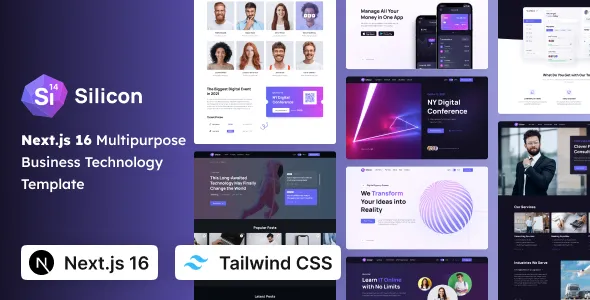
Silicon – Multipurpose Business, SaaS & Technology Tailwind CSS Next Template
Silicon – Multipurpose Business, SaaS & Technology Tailwind CSS Next Template is a versatile website template designed for businesses, technology companies, SaaS startups, software developers, digital agencies, and entrepreneurs who want to establish a modern and professional online presence. Combining a multipurpose website concept with Tailwind CSS and Next.js, Silicon provides a flexible starting point for creating business websites, software product landing pages, technology presentations, startup websites, and other digital experiences. Its intended versatility makes it suitable for projects that require a contemporary design approach, organized content sections, and a website structure that can be adapted to different business goals.
In a competitive digital environment, a professional website helps communicate a company’s value, introduce its products or services, and guide potential customers toward meaningful actions. Technology businesses often need to explain complex offerings in a simple way, while SaaS companies must present product benefits, subscription options, integrations, and essential information clearly. A multipurpose template can help organize these different requirements into a consistent website experience. With appropriate customization, Silicon can serve as a foundation for presenting company information, promoting software solutions, showcasing technology services, publishing articles, and generating business inquiries.
Next.js provides a React-based framework for developing modern web applications and websites, while Tailwind CSS supports utility-based styling and flexible interface customization. Together, these technologies offer developers a practical foundation for building structured, maintainable web experiences. The final capabilities of a website created with Silicon depend on the template version, its included components, the project configuration, and any additional services or integrations implemented during development. Reviewing the available demo and documentation before starting a project helps ensure that the template aligns with the intended requirements.
What Is Silicon Multipurpose Business, SaaS & Technology Template?
Silicon is a multipurpose website template intended for projects across business, software, SaaS, and technology-related industries. Rather than focusing on only one niche, a multipurpose template can be adapted to different types of websites by modifying its content, visual identity, page structure, and supporting components.
A SaaS startup may use the template as a starting point for presenting a cloud-based product, explaining its features, and encouraging visitors to explore a product demonstration. A technology consultancy could adapt the layout to introduce its services, describe its technical expertise, and present completed projects. A software company may use it to explain its solutions, publish product updates, and provide useful information to prospective customers.
Digital agencies and business service providers can also adapt a multipurpose structure to showcase their capabilities, introduce team members, explain their working process, and display case studies. Entrepreneurs launching a new digital product can use a dedicated landing page to communicate the product’s purpose and highlight its main advantages.
The template’s actual page collection, available layouts, reusable components, and included integrations should be verified against the current product documentation. Customization requirements may vary depending on the selected website concept and the level of functionality needed.
Modern Website Development with Next.js
Next.js is a React-based framework used to develop websites and web applications. It provides a structured development environment for creating reusable interface components, organizing application routes, and implementing different rendering approaches according to project requirements.
For a business website, a well-organized development structure makes it easier to manage multiple pages, such as Home, About, Services, Solutions, Pricing, Blog, and Contact. A SaaS website may require additional pages for individual product features, customer use cases, integrations, and frequently asked questions.
Using a Next.js template can give developers a starting point for organizing these pages without building every interface element from scratch. Developers can adapt the existing project structure to match their content strategy and add new pages when the website expands.
Next.js also supports different rendering and performance approaches, depending on the version and project configuration. Developers should review the template’s implementation to understand which features are already configured and which require additional development.
For projects involving customer accounts, subscriptions, dashboards, payment processing, or other application features, additional backend services and application logic may be necessary. A frontend website template should not be assumed to include a complete production-ready SaaS platform unless the product documentation explicitly confirms that functionality.
Flexible Styling with Tailwind CSS
Tailwind CSS is a utility-first CSS framework that helps developers style website interfaces using small, composable utility classes. This approach supports rapid visual adjustments and makes it possible to customize layouts without creating a separate CSS rule for every design decision.
For a Silicon-based website, developers can use Tailwind CSS to adjust spacing, colors, typography, alignment, responsive layouts, borders, and other visual details. These capabilities are useful when adapting a general-purpose design to a company’s branding and content requirements.
A technology startup may prefer a clean interface with concise headings and product screenshots. A software company may need structured feature sections and clear calls to action. A consulting business might require a more formal visual presentation with service descriptions, case studies, and client information.
Tailwind CSS can help maintain consistent design patterns across these different sections. Developers can define recurring visual conventions and apply them throughout the website, helping ensure that buttons, headings, cards, and other interface elements remain visually coherent.
The exact Tailwind CSS version, configuration, and customization conventions should be checked in the included source files. Developers should also review any custom styles or third-party components before making substantial changes.
Responsive Design for Desktop, Tablet, and Mobile
Responsive design helps a website remain usable across different screen sizes. Visitors may discover a SaaS product on a smartphone, review business services on a tablet, or explore technical information using a desktop computer. A responsive layout helps accommodate these different browsing environments.
Silicon can be customized to support a responsive presentation for business and technology websites. Depending on the included components, developers may adjust page layouts, navigation, text widths, image dimensions, cards, buttons, and content spacing for different devices.
On smaller screens, the most important information should remain easy to read and navigate. Headings should fit comfortably within the available width, buttons should be easy to select, and forms should be convenient to complete. Navigation menus should also provide a straightforward way to reach important pages.
For SaaS businesses, responsive presentation is particularly useful because prospective customers may review product features, pricing information, and contact options from mobile devices. Business service websites similarly benefit from making essential information accessible without unnecessary scrolling or difficult navigation.
Responsive behavior should be tested across the complete website rather than only on the homepage. Pricing tables, image galleries, comparison sections, feature grids, and embedded content may require additional adjustments. The final experience depends on the template implementation and any customizations introduced during development.
Suitable for SaaS Startups and Software Products
Software-as-a-Service companies need websites that explain their products, communicate their value, and help visitors understand whether a solution matches their requirements. A clear website structure can make product information easier to explore and encourage visitors to take appropriate next steps.
Silicon can be evaluated as a starting point for SaaS marketing websites that introduce cloud software, subscription-based tools, productivity applications, business platforms, or specialized digital services.
A SaaS homepage may include a concise product introduction, a summary of key capabilities, an explanation of common use cases, and links to more detailed product pages. Additional sections can describe workflows, integrations, customer benefits, pricing plans, and support resources when these are relevant to the offering.
For example, a project management startup might explain how its software helps teams organize tasks and monitor progress. An analytics company could introduce its reporting capabilities and explain how customers use data to make decisions. A customer relationship management provider may focus on sales workflows, customer records, and communication tools.
The most effective product website focuses on real customer needs rather than relying on vague marketing statements. Clear explanations, authentic product screenshots, and accurate information help visitors understand what the software does and how it may fit into their workflow.
Subscription management, user authentication, payment processing, and application dashboards should be implemented separately unless they are explicitly included in the template. A marketing website can introduce a SaaS product, but operational software functionality requires the appropriate technical infrastructure.
Build a Professional Business Website
A business website gives an organization a central place to introduce its identity, explain its services, and communicate with potential customers. It can also help prospective partners and clients evaluate the company’s expertise before making contact.
Silicon can be adapted for corporate websites, technology service providers, consulting companies, digital businesses, and growing organizations that need a professional online presence.
A business website may include a homepage, company overview, services, industry solutions, portfolio, blog, and contact page. Larger organizations may also require separate pages for individual departments, locations, case studies, careers, or customer resources.
The homepage should communicate the company’s primary offering as clearly as possible. A concise headline can explain what the organization does, while supporting text provides context about its audience and services. Subsequent sections can introduce relevant capabilities and guide visitors toward detailed information.
An About page can explain the company’s background, mission, and approach. Dedicated service pages can describe individual offerings, while case studies can demonstrate how the business addresses real customer challenges.
Business information should remain accurate and current. Outdated service descriptions, broken links, incorrect contact details, and unsupported claims can undermine trust. Regular content reviews help maintain a dependable professional website.
Website Solutions for Technology Companies
Technology companies often need to explain specialized products and services to audiences with different levels of technical knowledge. A website should present essential information in a way that is clear to decision-makers while still providing useful details for technical visitors.
Silicon may be suitable for technology businesses working in software development, cloud services, IT consulting, digital transformation, automation, data solutions, or other technology-related fields.
A technology website can introduce the company’s expertise, explain its service offerings, showcase selected projects, and outline the approach used to solve client problems. Separate solution pages can address the needs of different industries or customer groups.
For example, a software development company may highlight web application development, API integration, and application modernization. An IT consultancy might explain infrastructure planning, system integration, and technology advisory services. A cloud services provider could describe migration planning, deployment support, and ongoing management.
Case studies can make these offerings easier to understand by describing the original challenge, the implemented approach, and the outcome. Any performance figures or business results should be genuine, appropriately documented, and presented with sufficient context.
A well-structured technology website helps prospective customers identify relevant services without requiring them to understand every technical detail immediately.
Landing Pages for Digital Products and Services
Landing pages are designed around a specific communication or conversion objective. They may introduce a software product, promote a service, encourage visitors to request a consultation, or direct users toward a product demonstration.
A multipurpose template such as Silicon can provide a starting point for creating landing pages that focus on one primary offering. The content and page structure should be tailored to the intended audience and desired action.
A product landing page might begin with a clear headline and a short explanation of the product’s value. Supporting sections can explain important features, show the product in use, answer common questions, and provide a clear call to action.
For a business service, the landing page could describe the problem addressed, explain the service process, introduce relevant experience, and invite visitors to submit an inquiry. A startup landing page may emphasize the product concept, target audience, and key reasons to explore the offering.
Calls to action should be specific and relevant. Examples include requesting a consultation, exploring product features, viewing a demonstration, or contacting the business. The appropriate action depends on the product’s sales process and the visitor’s stage in the decision-making journey.
A focused landing page avoids unnecessary distractions and helps visitors understand the next step. Results should be evaluated using suitable analytics and actual visitor behavior rather than assumptions about which design will perform best.
Customization and Brand Identity
A professional website should reflect the identity of the business rather than look like an unchanged starter design. Customization helps communicate brand personality and creates a more consistent experience across different pages.
Developers can adapt a Silicon-based project by updating its colors, typography, logos, images, page content, spacing, and other supported design elements. The precise implementation depends on the template’s components and configuration.
A SaaS startup may prefer a modern visual identity with product imagery and concise content. A corporate organization may use a more restrained color palette and formal messaging. A creative technology agency might prioritize project visuals and distinctive typography.
Consistency matters throughout the website. Heading styles, body text, buttons, icons, and navigation elements should follow a recognizable visual system. This helps visitors understand the interface and creates a more professional presentation.
Images should support the website’s purpose. Authentic product screenshots, relevant project examples, team photography, and custom illustrations can provide more meaningful context than generic decorative visuals.
Before modifying the template, developers should review the project structure and identify where styles, components, and shared layout elements are defined. Maintaining reusable components can make future design updates easier and reduce inconsistencies across pages.
SEO-Friendly Website Structure
Search engine optimization helps search engines discover, understand, and evaluate website content. A well-organized template can provide a useful foundation, but search visibility also depends on content quality, technical implementation, competition, and other factors.
A Silicon-based website should use descriptive page titles, clear headings, meaningful URLs, useful internal links, and content that addresses the needs of its intended audience.
A SaaS business can create individual pages for important product features, industries, and use cases. A technology company may publish detailed service pages, while a consulting business can provide articles that answer common customer questions.
Each page should have a clear topic and a useful purpose. Avoid creating multiple pages that repeat the same information without offering additional value.
Image optimization is another important consideration. Use appropriate image dimensions, compress large files, and provide descriptive alternative text for meaningful images. These practices support accessibility and can help search engines interpret visual content.
Developers should also review the technical SEO implementation, including page metadata, canonical URLs, sitemap generation, indexing behavior, and structured data where appropriate. The specific setup depends on the Next.js version, rendering configuration, and additional tools used by the project.
No template can guarantee search rankings or a particular volume of organic traffic. Long-term SEO requires useful content, reliable technical implementation, and regular monitoring.
Content Marketing and Blogging
Content marketing helps businesses share expertise, answer customer questions, and provide useful information to their audiences. A blog can support a technology website by explaining product concepts, publishing tutorials, discussing industry developments, and addressing common business challenges.
Silicon can be evaluated for projects that combine marketing pages with an educational content strategy. Depending on the available templates and configuration, developers may adapt the project to include article pages, category navigation, featured posts, or other content sections.
A SaaS company might publish product tutorials, workflow recommendations, implementation guides, and feature announcements. A technology agency could write about software development, cloud infrastructure, or digital transformation. A consultant may share practical advice related to business operations and technology planning.
Useful articles should provide original insights and accurate explanations. Readers should be able to understand the topic and apply the information to their own questions or decisions.
Internal links can connect educational articles to relevant service pages and product information. This helps readers explore related content and discover appropriate solutions when they are ready.
The publishing process depends on the project’s content architecture. A blog may use local content files, a content management system, or another supported content source. Developers should confirm what is included and configure the appropriate publishing workflow for the intended website.
Conversion-Focused User Experience
A business website should make it easy for visitors to understand the offering and take a relevant next step. Conversion-focused design emphasizes clarity, useful information, and straightforward navigation rather than adding unnecessary visual elements.
For a Silicon-based website, important actions may include requesting a consultation, signing up for a product trial, contacting a sales team, exploring pricing, or viewing a demonstration. The best choice depends on the business model and the audience’s needs.
Each page should provide enough context for visitors to understand the value of the offering before presenting a call to action. A product page can explain key features and use cases, while a service page can describe the process and expected deliverables.
Forms should collect only the information necessary for the intended interaction. Excessive fields may make it harder for visitors to complete an inquiry. Clear labels, helpful instructions, and understandable validation messages can improve the experience.
Trust signals should be accurate and relevant. Genuine customer testimonials, verified case studies, transparent company information, and clear support details can help visitors evaluate the business.
Conversion optimization should be based on observed user behavior and appropriate measurement. Changes to headings, page structure, forms, or calls to action can be tested to determine whether they improve meaningful outcomes.
Performance and Website Optimization
Website performance affects how quickly visitors can access content and interact with a page. Slow loading, unnecessary scripts, and oversized images can create a frustrating experience, particularly for visitors using mobile devices or slower connections.
Next.js provides different approaches to rendering and optimization, but actual performance depends on how the template is implemented and deployed. Developers should measure the finished website rather than assume that the framework or template automatically ensures excellent performance.
Image optimization is a useful starting point. Use appropriately sized assets, select efficient formats where supported, and avoid loading large images when they are not needed. Fonts, animations, external scripts, and third-party integrations should also be reviewed for their impact on loading time.
Developers should check how shared components affect page rendering and whether unnecessary client-side JavaScript can be reduced. Appropriate caching, deployment configuration, and rendering strategies may also improve performance when configured correctly.
Performance testing should cover important pages, including the homepage, product pages, blog articles, and contact forms. Different layouts may behave differently depending on the amount of content and the number of interactive elements.
Monitoring tools can help identify issues that emerge as the website grows. Regular optimization supports a smoother experience and helps maintain a reliable digital presence.
Accessibility and Navigation
Accessible design helps more people use a website effectively. Clear navigation, readable typography, suitable contrast, descriptive links, and properly labeled form controls all contribute to a more understandable interface.
When customizing Silicon, developers should maintain a logical heading hierarchy and ensure that interactive elements have appropriate labels. Meaningful images should have useful alternative text, while decorative images should not create unnecessary noise for assistive technologies.
Navigation menus should use familiar wording and make important sections easy to locate. A business website might prioritize Services, About, Solutions, Resources, and Contact, while a SaaS website may emphasize Product, Features, Pricing, Documentation, and Support.
Buttons and links should be visually distinguishable. Keyboard navigation should be tested so visitors can move through interactive components without relying exclusively on a mouse or touchscreen.
Color should not be the only method used to communicate important information. Forms should provide understandable instructions and error messages, and page layouts should remain usable when text is enlarged.
Accessibility depends on the template’s implementation and the modifications made during development. Automated testing can identify some issues, but manual checks and real-world usability reviews are also valuable.
Integration with APIs and External Services
Modern business and SaaS websites often connect to external services to provide additional functionality. Depending on the project requirements, a Silicon-based website may be extended to work with analytics tools, contact forms, customer relationship management systems, content management platforms, or other services.
Next.js can support application integrations, but each integration requires appropriate configuration and implementation. Developers should not assume that a third-party service is already connected simply because the template includes a button or interface section for it.
A marketing website may connect inquiry forms to a business email system or customer relationship management platform. A SaaS product website might integrate an analytics service to measure visitor behavior or connect to a content management system to simplify article publishing.
If the project requires user authentication, subscription billing, payment processing, or account management, these features need suitable services, secure server-side logic, and appropriate testing. Sensitive credentials should be stored securely and never exposed in client-side code.
Before adding an integration, review its documentation, compatibility requirements, privacy implications, and ongoing maintenance needs. After implementation, test normal use cases, validation behavior, error handling, and responsive presentation.
Developer-Friendly Project Customization
A reusable template can help developers establish a consistent starting point for a new website. Instead of recreating common interface patterns for every project, they can adapt the existing structure to match the required pages and visual identity.
The Silicon template’s Next.js and Tailwind CSS foundation can be useful for developers who want to customize a modern frontend using React components and utility-based styling. The degree of flexibility depends on the included source code, component organization, dependencies, and licensing conditions.
Before development begins, review the project documentation, required software versions, installation instructions, and available scripts. Understanding the existing structure can reduce setup problems and make future changes easier to maintain.
Shared elements such as headers, footers, buttons, cards, and feature sections should be organized consistently where the template supports reusable components. This can reduce duplicated code and simplify future updates.
Developers should also review dependency versions, build configuration, environment variables, and deployment requirements. Keep development and production settings separate where necessary, and avoid exposing private API keys or other sensitive information.
When substantial changes are planned, version control and a suitable testing process can help track modifications and make it easier to recover from mistakes.
Security and Maintenance Considerations
A modern website requires ongoing maintenance to remain reliable. Even when a template provides a useful development foundation, security and stability depend on the way the project is configured, deployed, and updated.
Developers should keep supported dependencies updated, review security advisories, and test changes before applying them to a live website. Updates should be evaluated for compatibility with existing components and integrations.
Environment variables should be handled securely, with private credentials restricted to server-side environments where appropriate. Forms and API endpoints should include suitable validation and protection against misuse according to their functionality.
Website owners should also maintain backups of important content and configuration where applicable. A recovery plan is especially important for business websites that generate customer inquiries or support important commercial activities.
Regular maintenance should include checking broken links, reviewing published content, testing forms, monitoring performance, and verifying that important pages remain accessible. A structured maintenance routine helps identify problems before they significantly affect visitors.
Who Should Use Silicon Multipurpose Business, SaaS & Technology Template?
Silicon can be evaluated for several types of website projects that require a flexible business or technology-oriented design foundation.
SaaS startups: Businesses launching subscription-based software can create marketing pages that explain their products, features, and intended use cases.
Technology companies: Software providers and IT businesses can present their services, technical expertise, project examples, and company information.
Digital agencies: Creative and technology agencies can introduce their capabilities, showcase selected projects, and encourage prospective clients to make contact.
Business consultants: Consultants can explain their services, describe their approach, publish educational articles, and present relevant experience.
Software developers: Development teams can use the template as a starting point for presenting applications, software services, and technical solutions.
Entrepreneurs: Founders can build an online presence for a new digital product, business idea, or technology venture.
Corporate organizations: Established businesses can organize company information, services, solutions, and customer resources into a structured website.
Digital service providers: Companies offering cloud services, automation, analytics, or other specialized solutions can adapt the content to their target audiences.
The best fit depends on the project’s specific needs. Before selecting the template, review the available pages, source structure, responsive behavior, licensing terms, documentation, and compatibility requirements.
Tips for Building a Successful Website with Silicon
A successful website begins with a clear purpose. Before customizing the template, determine whether the primary objective is to introduce a company, promote a SaaS product, generate inquiries, showcase technology services, or publish educational content.
Identify the intended audience and prioritize the information that matters most to them. Prepare the main headlines, product explanations, service descriptions, project examples, and contact details before spending too much time on decorative adjustments.
Create a consistent visual identity using suitable colors, typography, imagery, and spacing. Replace placeholder text and visuals with relevant, accurate content that reflects the business and its audience.
Keep navigation simple and ensure that each page has a clear purpose. Important actions should be easy to find, and visitors should not need to search through unrelated sections to understand the offering.
Test the finished website across different devices and browsers. Review page loading, mobile navigation, image presentation, form submissions, accessibility, and any integrations added during development.
Before launch, verify the technical configuration, metadata, links, deployment settings, and required environment variables. After launch, monitor performance and visitor behavior, keep dependencies updated, and review content regularly.
Final Thoughts on Silicon Multipurpose Business, SaaS & Technology Tailwind CSS Next Template
Silicon – Multipurpose Business, SaaS & Technology Tailwind CSS Next Template is a potential starting point for businesses and developers who want to create a modern website for software products, technology services, digital agencies, consulting companies, or other professional projects. Its combination of Next.js and Tailwind CSS provides a development foundation that can be adapted to different branding requirements and content strategies.
For SaaS startups, the template can support a website that introduces a product, explains its features, and guides visitors toward a relevant action. Technology companies can use a customized layout to present their services and project experience, while business consultants can focus on their expertise and customer needs.
The effectiveness of the finished website depends on the template’s documented features, the quality of its content, the developer’s implementation, and the services integrated into the project. A template should be treated as a foundation rather than a complete substitute for product development, backend engineering, or a carefully planned digital strategy.
By combining clear messaging, responsive layouts, accessible navigation, useful content, thoughtful SEO practices, and regular technical maintenance, website owners can develop a professional online presence that supports their business objectives. Before beginning, review the current demo and documentation to confirm that Silicon matches your technical requirements and intended use case.