My Account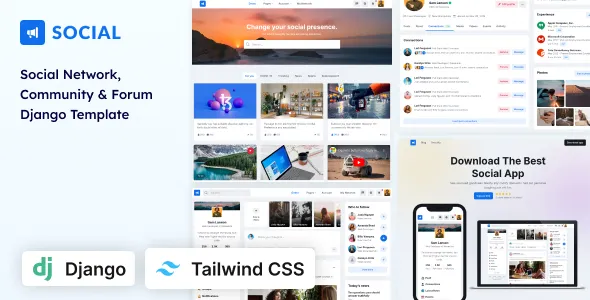
Social – Network & Community Django Template (Tailwind CSS)
Social – Network & Community Django Template (Tailwind CSS) is a modern web development template designed for building social networking platforms, online communities, membership websites, and interactive digital spaces. Combining the flexibility of Django with the utility-first styling approach of Tailwind CSS, this template provides a foundation for developers who want to create community-focused web applications with a structured interface and customizable design. Whether you are developing a professional networking platform, an interest-based community, a discussion website, or a social engagement application, Social can serve as a starting point for creating an organized and visually consistent online experience.
Online communities have become important spaces for communication, collaboration, knowledge sharing, and relationship building. Users increasingly expect digital platforms to offer clear navigation, accessible profiles, engaging content, and convenient ways to discover people with similar interests. A well-planned social networking website should make it easy for members to explore the platform, understand its features, participate in discussions, and manage their interactions. Social provides a design foundation that can be adapted to different community concepts and product requirements.
Built around Django, a Python web framework, and Tailwind CSS, a utility-first CSS framework, this template is intended for developers seeking a customizable foundation for web application development. The combination can support a structured development workflow in which application logic, page rendering, and visual styling are managed using appropriate technologies. The final functionality depends on the files included in the template, its implementation, and any additional development required for the intended application.
What Is Social – Network & Community Django Template (Tailwind CSS)?
Social – Network & Community Django Template (Tailwind CSS) is a web development template intended for projects that focus on social interaction, online communities, and user engagement. It provides a starting point for designing the interface of a community-oriented application that can be customized to match a specific audience, purpose, and brand identity.
A social platform may bring together people who share professional interests, hobbies, educational goals, creative activities, or local connections. Depending on the project’s objectives, its interface may include member profiles, content feeds, discussion areas, community directories, notifications, and other interactive sections. The availability of these features depends on the supplied template and the functionality implemented during development.
Django provides a Python-based framework for building web applications, while Tailwind CSS helps developers style interfaces through utility classes. Together, these technologies offer a flexible foundation for creating customized pages and connecting the interface with application logic.
The template can be evaluated for projects such as niche social networks, professional communities, membership platforms, creator communities, interest-based discussion websites, and collaborative online spaces. Developers can adapt the structure, content, and visual presentation to suit the project’s requirements.
Before beginning development, review the current product demo and documentation to verify the included pages, dependencies, setup instructions, and existing functionality. A template’s visual interface should not be assumed to include a complete production-ready social network unless the documented implementation confirms it.
Django Framework for Community Web Applications
Django is a high-level Python web framework that supports the development of maintainable, database-driven applications. It provides established tools and architectural patterns for handling requests, organizing application code, managing data models, processing forms, and implementing authentication when configured appropriately.
For a social networking project, Django can provide the foundation for managing users, member profiles, community content, discussion records, and other application data. Developers can design models that represent the relationships between members, posts, groups, comments, and related resources according to the requirements of the platform.
Django also includes features that can help with application security and data handling, although these protections must be configured and used correctly. Authentication, permissions, input validation, and access controls should be implemented according to the needs of the application.
Social can be evaluated as a front-end and application-template starting point for Django-based community projects. The amount of back-end functionality already included depends on the supplied code. Additional development may be necessary to connect interface components to database operations, user sessions, notifications, messaging, or moderation workflows.
Developers should follow the template’s setup instructions and confirm compatibility with the required Python and Django versions. A clear understanding of the included project structure can help simplify customization and reduce unnecessary redevelopment.
Tailwind CSS for Flexible Interface Design
Tailwind CSS is a utility-first CSS framework that allows developers to style interface elements by applying utility classes directly within markup. This approach can make it easier to control spacing, typography, colors, sizing, alignment, and responsive behavior without maintaining a large collection of custom CSS rules for every component.
For a social networking website, a consistent design system can help organize content feeds, profile layouts, navigation menus, member cards, discussion sections, and other interface elements. Developers can adjust these components to reflect the identity of the community while maintaining a coherent visual language.
Social uses Tailwind CSS as part of its stated technology stack. The exact implementation and supported customization options should be confirmed in the current product documentation.
Tailwind utilities can help developers create layouts that adapt to different screen sizes. For example, a multi-column community dashboard may use a different arrangement on a smartphone than on a desktop computer. Responsive utility classes can support these changes when implemented appropriately.
Customization can include adjusting brand colors, typography, borders, spacing, component states, and page layouts. Developers should also review the Tailwind configuration and build process to ensure that customized classes are included correctly in the generated styles.
Social Networking Website Design
The design of a social networking platform influences how easily users can understand its structure and participate in the community. A clear interface helps members discover relevant content, manage their profiles, and navigate between different areas without unnecessary friction.
Social can provide a foundation for a community-focused visual experience, depending on the layouts included in the template. Developers can organize the interface around the needs of the intended audience and the primary activities users are expected to perform.
A social networking interface may include a navigation area, a central content section, member information, community suggestions, and contextual actions. The final arrangement should be based on the platform’s requirements rather than including every possible component.
For a professional network, the design might prioritize member credentials, career interests, and industry discussions. An interest-based community may emphasize topic categories, shared content, and group participation. A creator community could focus on member profiles, published work, and audience engagement.
Visual consistency is important across all these experiences. Clear typography, appropriate spacing, predictable navigation, and recognizable interaction patterns help members understand the platform. A well-organized design also gives developers a stronger foundation for introducing additional features as the application grows.
Member Profiles and Personalization
Member profiles are a central component of many online communities. They provide a place for users to introduce themselves, share relevant information, and discover people with similar interests or professional backgrounds.
Social can serve as a starting point for designing profile pages that reflect the purpose of a community. Depending on the supplied layouts and additional development, a profile may display a profile photograph, display name, biography, interests, professional information, selected content, or community participation.
Profile customization should be guided by the needs of the platform. A professional networking application may require information about skills, experience, or industry interests, while a hobby community may prioritize interests, creative work, and preferred topics.
If users can edit their profiles, the application should provide suitable forms, validation, and permission checks. Members should only be able to modify information they are authorized to change, and sensitive information should not be exposed unintentionally.
Personalization may also involve allowing users to select profile preferences, manage visibility settings, or organize the content they share. Such functionality requires appropriate application logic and should not be assumed to exist solely because a profile interface is present in the template.
A thoughtfully designed profile experience can help members express their identity while giving other users useful context for community interactions.
Community Feeds and Content Sharing
Content feeds help social platforms organize updates, discussions, announcements, and other information shared by members. A well-structured feed makes it easier for users to browse recent activity and discover relevant contributions from their community.
Social can be customized as a foundation for displaying community content, subject to the components included in the template. A feed layout may present posts with author details, timestamps, text, images, links, and related actions where these are supported by the implementation.
Different communities require different publishing formats. A professional network may prioritize industry insights and career updates, while an educational community might focus on questions, study resources, and learning discussions. A creative platform may emphasize images, project showcases, and member portfolios.
A production-ready content feed requires more than visual presentation. Developers may need to implement database models, post creation forms, editing permissions, publication rules, pagination, and content retrieval. Features such as reactions, comments, sharing, or sorting require additional functionality unless already included.
Content controls should be designed carefully. Members need clear feedback when submitting or editing posts, and the application should handle invalid input appropriately. Uploaded files should be validated and stored using suitable security practices.
A useful feed structure helps users focus on meaningful content while providing a scalable foundation for future community features.
Groups, Communities, and Interest-Based Discussions
Groups allow people with shared interests to communicate within a more focused environment. They can be useful for professional associations, learning communities, hobby groups, regional networks, and specialized discussion platforms.
Social can be adapted for a website that organizes members around topics or shared goals. Depending on the available interface components and the required back-end implementation, a group section might present community descriptions, member counts, recent discussions, announcements, or links to group-specific content.
A group directory can help users discover communities that match their interests. Categories and descriptive summaries make the available groups easier to understand, while clear navigation allows members to move between general community content and focused discussions.
The application may also require membership rules, joining and leaving workflows, private group permissions, and moderation tools. These functions need appropriate data models and access controls. A visually displayed membership button does not automatically provide working membership management.
For communities that support private discussions, developers should verify that content is accessible only to authorized members. Group administrators may need controls for managing membership, removing inappropriate content, and maintaining community guidelines.
By organizing participation around relevant interests, a community platform can provide a more focused experience than a single, unrestricted content feed.
User Registration, Authentication, and Account Management
A community application often needs a reliable process for registration, sign-in, sign-out, and account management. These functions allow members to access personalized areas while protecting information that should not be publicly available.
Django includes authentication capabilities that developers can configure for suitable applications. Social may provide interface layouts for account-related pages, but the precise availability of registration forms, login screens, password recovery, and related workflows should be verified in the current template package.
A registration workflow can collect the information needed to create an account while avoiding unnecessary personal data collection. Form validation should explain errors clearly and help users correct invalid entries.
Authentication is only one part of account security. Developers should also review session handling, password reset procedures, permissions, rate limiting where appropriate, and account recovery processes. If email verification or multi-factor authentication is required, those features may need additional implementation.
Account management may include editing profile details, changing passwords, managing privacy preferences, and requesting account deletion. Each operation should verify that the person making the request has the appropriate authorization.
A consistent account experience helps users understand how to access and manage their membership while supporting the security requirements of the application.
Responsive Design for Desktop, Tablet, and Mobile
Community platforms should remain usable across a range of devices. Members may browse discussions on desktop computers, read updates on tablets, or access profiles and messages from smartphones.
Social uses Tailwind CSS, which can support responsive styling through utility classes. The actual responsiveness of the template depends on how its supplied layouts and components have been implemented.
On smaller screens, navigation may need to collapse into a compact menu, side panels may move below the main content, and multi-column layouts may become single-column views. Buttons and form controls should remain easy to select, while text and images should fit the available space.
Developers should test the complete interface rather than evaluating only the homepage. Profile pages, registration forms, discussion feeds, group directories, and administrative areas can have different layout requirements.
Responsive testing should include touch interactions, keyboard navigation, text scaling, image behavior, and horizontal overflow. Third-party components and custom styles should also be checked because they can introduce problems that are not visible in the original template.
A consistent mobile experience helps members participate in the community from different devices without needing to learn a separate interface for each screen size.
Search and Community Discovery
Search and discovery features can help members find people, groups, topics, and content relevant to their interests. As a community grows, a well-organized discovery experience becomes increasingly important.
Social can be used as a design foundation for search and directory interfaces where the necessary components are available or can be developed. Depending on the application’s purpose, users may need to search for member names, community topics, discussion titles, or other public information.
A member directory can present profiles with useful summaries and relevant categories. Group discovery can organize communities by subject or interest, while topic-based navigation can help users explore related discussions.
The actual search behavior depends on the application’s back-end implementation. Developers may need to build database queries, filtering rules, pagination, and appropriate indexing for larger datasets.
Search results should respect visibility settings and access permissions. Private profile details and restricted community content should not appear to unauthorized users. Input should also be validated and handled safely.
A clear discovery interface helps users navigate a growing collection of members and content while supporting the long-term organization of the platform.
Notifications and Member Engagement
Notifications can help members stay informed about relevant community activity. Depending on the platform’s goals, users may want to know when someone responds to a discussion, mentions them in a post, interacts with their content, or updates a group they follow.
Social can serve as a starting point for notification-related interface design if the relevant components are included or added during development. The actual notification system requires application logic that records events, determines recipients, and displays relevant updates.
A useful notification experience should prioritize information that matters to the member. Excessive alerts can become distracting, so users may benefit from controls that manage notification preferences and distinguish important events from routine activity.
Real-time notifications may require technologies such as WebSockets or a suitable external service, depending on the application’s architecture. Email notifications may require an email delivery configuration, while push notifications may involve additional platform-specific setup.
Developers should also consider notification privacy. Messages and previews should not expose sensitive content in contexts where it could be seen by unauthorized people.
A well-planned notification system can support engagement without overwhelming members, but its exact capabilities depend on the implementation rather than the visual template alone.
Django Template Customization and Development Workflow
One of the main advantages of a template-based workflow is the ability to start from an existing interface structure and customize it for a specific project. Social combines Django and Tailwind CSS, offering developers a foundation that can be adapted to different community concepts.
The customization process generally begins with reviewing the project files, installation instructions, dependencies, templates, static assets, and configuration. Understanding the existing structure makes it easier to identify where page layouts, styles, and application logic are managed.
Developers can then replace sample content, adjust the visual identity, organize navigation, and connect the interface to the required data models. Existing components should be reviewed before new ones are created, helping maintain consistency and avoid unnecessary duplication.
Tailwind CSS changes may involve updating utility classes and configuration settings. Depending on the project’s build process, developers may also need to rebuild the generated stylesheet after modifying the source files.
Django customization may involve configuring URL routes, views, templates, models, forms, and authentication. The exact tasks depend on which functions are already implemented in the supplied package.
Before making substantial changes, maintain backups or version control. Test the customized application in a development environment and document any new dependencies or setup steps. This approach makes the project easier to maintain as requirements change.
SEO-Friendly Structure for Community Websites
Search engine optimization can help public pages on a community platform become more discoverable. The appropriate strategy depends on whether the website is intended to expose public content to search engines or primarily serve a private membership audience.
Social can provide a foundation for page layouts and content organization, but SEO functionality requires appropriate implementation. Public pages may benefit from descriptive titles, relevant headings, useful content, readable URLs, and links between related topics.
For a public community, useful indexable content might include public group descriptions, community guidelines, informational articles, or selected discussions. Private member data and restricted conversations should remain protected rather than being exposed for indexing.
Developers should configure metadata, canonical URLs, XML sitemaps, and indexing directives where appropriate. Duplicate pages, empty profiles, and low-value automatically generated URLs should be reviewed carefully.
Performance and accessibility can also influence the overall user experience. Optimize images, maintain a logical heading hierarchy, and ensure that important content is accessible without unnecessary interface complexity.
Structured data may be appropriate for certain public pages when the content meets the relevant guidelines. Any structured information should accurately reflect what users can see on the page.
SEO results depend on content quality, technical implementation, competition, and other factors. A template can support an organized website, but it cannot guarantee rankings or organic traffic.
Performance Optimization and Scalability
As a community grows, the application may need to handle increasing numbers of users, posts, profiles, images, and requests. Performance should therefore be considered during development rather than addressed only after problems appear.
The actual speed of a Social-based application depends on its code, hosting, database design, image assets, third-party services, and deployment configuration. Django and Tailwind CSS do not automatically guarantee that a complete application will perform well under every workload.
Developers should optimize images and static assets, review unnecessary scripts, and measure page-loading behavior. Database queries should be evaluated for inefficiencies, particularly when loading content feeds, member directories, and group pages.
Pagination or carefully designed content-loading strategies can help avoid retrieving excessively large datasets at once. Caching may improve performance for suitable pages or frequently accessed data, provided that user-specific information and permissions are handled correctly.
For larger deployments, the application may require production-grade hosting, a properly configured database, background task processing, monitoring, and static asset delivery. The exact infrastructure should match the expected traffic and operational requirements.
Load testing and error monitoring can help identify bottlenecks before they significantly affect users. Regular evaluation supports a more dependable experience as the community expands.
Accessibility and Inclusive Community Experiences
An inclusive community website should make its content and interactions accessible to people with different abilities and ways of using technology. Accessibility improvements can also make the interface clearer and easier to use for all members.
When customizing Social, use semantic HTML elements and a logical heading structure. Navigation links should have descriptive labels, while buttons should clearly communicate their purpose.
Forms should include appropriate labels and understandable error messages. Keyboard users should be able to reach interactive elements in a predictable order, and focus indicators should remain visible.
Color contrast should be sufficient for readable text and controls. Information should not rely on color alone, and meaningful images should include appropriate alternative text.
Community-generated content can introduce additional accessibility challenges. Uploaded images, embedded media, and user-created links should be handled in ways that preserve usability wherever practical.
Automated accessibility tools can identify some issues, but manual testing is also important. Review keyboard operation, screen-reader behavior where possible, and the usability of common tasks such as registration, searching, posting, and profile editing.
Accessible design supports broader participation and helps create a more welcoming digital community.
Security, Privacy, and Community Moderation
Security and privacy are essential considerations for social networking applications because they may process user profiles, private information, uploaded files, and member-generated content.
Django provides security-related tools, but developers must configure them correctly and follow recommended practices. These include secure session handling, appropriate access controls, protection against common web vulnerabilities, and careful management of configuration secrets.
Private content should be accessible only to authorized users. Developers should verify permissions on the server rather than relying only on hidden interface elements. User-submitted data should be validated, and file uploads should be restricted and handled safely.
Community moderation is another important part of platform management. Depending on the application’s purpose, administrators may need tools for reviewing reports, removing inappropriate content, managing member accounts, and enforcing community guidelines.
Privacy controls should explain what information is collected, how it is used, and which profile details are public. Account deletion, data retention, and other privacy-related processes should be implemented according to the platform’s requirements and applicable law.
Backups, dependency updates, monitoring, and regular security reviews help maintain a dependable application. A polished interface should be supported by a secure back end and clear operational policies.
Integrations and Additional Functionality
A community platform may require integrations beyond its basic page layouts. The appropriate tools depend on the audience, business model, and features planned for the application.
Potential additions include email delivery, analytics, file storage, payment processing, search services, real-time communication, and external authentication providers. Each integration should be evaluated for compatibility, security, maintenance requirements, and cost.
Django provides a flexible environment for connecting application logic to external services, while Tailwind CSS can help maintain a consistent interface for new components. However, the actual integrations must be configured and tested.
A membership platform may need subscription management or paid access controls. A professional network may require advanced profile search, while a discussion community may benefit from moderation queues and reporting workflows. A creator platform could require media storage and content management.
Before introducing new dependencies, review the existing template and identify what is already included. Avoid adding overlapping tools without a clear reason, as unnecessary complexity can increase maintenance effort and create compatibility issues.
Every new integration should be tested for functionality, accessibility, performance, and security before it is deployed to a live application.
Who Can Use Social – Network & Community Django Template (Tailwind CSS)?
Social can be evaluated for a range of web application projects that bring users together around shared interests, goals, or activities.
Professional networking platforms: Create a foundation for connecting professionals, presenting profiles, and organizing industry discussions.
Interest-based communities: Build an online space where members can explore shared hobbies, exchange information, and participate in topic-focused groups.
Educational communities: Develop a platform for learners, educators, and study groups to share resources and discuss relevant subjects.
Creator communities: Organize member profiles, creative work, and community conversations around a particular field or audience.
Membership websites: Establish a customized interface for members to access relevant content and participate in community activities, with membership rules implemented as required.
Startup projects: Use a template-based starting point to develop and validate a community product before expanding its features.
Collaborative platforms: Create an interface for groups that need to communicate, exchange knowledge, and organize shared interests.
Web development agencies: Adapt the template for clients who require a Django-based community website with a customized design.
Independent developers: Use the existing structure as a starting point for a project that requires control over its interface and back-end architecture.
The suitability of the template depends on its current implementation and the features needed for the finished product. Reviewing the demo, documentation, dependencies, and included code can help determine whether it fits the project.
Best Practices for Building a Community Platform
A useful community platform requires more than attractive pages. It should have a clear purpose, understandable rules, reliable functionality, and an interface that supports meaningful participation.
Begin by defining the intended audience and the main activities the platform should support. Decide whether members will primarily share updates, join groups, publish professional information, exchange knowledge, or collaborate on specific interests.
Next, map the core user journeys. Consider how visitors register, complete profiles, discover communities, participate in discussions, manage notifications, and report inappropriate content. These journeys help determine which pages and features should be prioritized.
Keep the initial feature set manageable. Implement the essential functions first, then introduce additional capabilities based on user feedback and demonstrated requirements. A focused application is often easier to test, maintain, and improve than one that attempts to include every possible social feature from the beginning.
Establish clear community guidelines and moderation procedures. Members should understand acceptable behavior, reporting options, and the consequences of violating platform rules.
Test the application across devices and user roles. Verify registration, authentication, profile editing, content permissions, search, forms, and any implemented integrations. Security and privacy checks should be part of the development process rather than a final afterthought.
Finally, monitor performance and review user feedback after launch. A community evolves over time, and ongoing improvements help ensure that the platform remains useful as its audience and requirements grow.
Final Thoughts on Social – Network & Community Django Template (Tailwind CSS)
Social – Network & Community Django Template (Tailwind CSS) is a potential starting point for developers who want to create community-focused web applications using Django and Tailwind CSS. Its intended application makes it relevant to social networking projects, interest-based communities, professional platforms, membership websites, and collaborative digital spaces.
Django provides a Python-based foundation for application development, while Tailwind CSS offers a flexible approach to interface styling. Together, these technologies can support a customized website structure that developers adapt to the needs of a particular community.
A successful implementation should combine clear navigation, useful profile layouts, organized content, responsive design, and dependable application logic. Depending on the project’s requirements, additional development may be necessary for authentication workflows, member relationships, content feeds, notifications, messaging, moderation, and other interactive features.
Before choosing the template, review the current product demo and documentation to confirm the included pages, dependencies, framework compatibility, and existing functionality. Test the completed application for responsiveness, accessibility, performance, privacy, and security before making it available to users.
For developers seeking a customizable foundation for a Django-powered social network or community website, Social offers a starting point that can be evaluated as part of a broader development strategy. With thoughtful implementation, relevant features, and ongoing maintenance, the resulting platform can support meaningful digital connections and long-term community growth.