My Account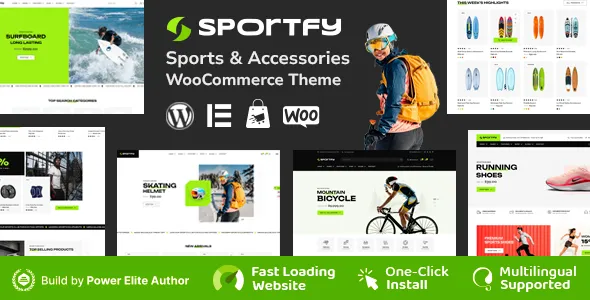
Sportfy – Sports Store WooCommerce WordPress Theme
Sportfy – Sports Store WooCommerce WordPress Theme is a website design solution for businesses that want to build an online sports shop using WordPress and WooCommerce. Designed for the sports retail niche, Sportfy can be considered by retailers selling athletic apparel, sports footwear, fitness accessories, training equipment, outdoor gear, and other sports-related products. A specialized eCommerce website helps businesses organize their product catalogs, communicate product information, promote featured collections, and provide customers with a convenient way to browse and purchase items online.
A successful sports store needs more than an attractive homepage. Customers should be able to explore product categories, compare available options, review product details, and move through the purchasing process with minimal confusion. Sportfy offers a potential starting point for creating this type of shopping experience, with its suitability depending on the templates, design options, and WooCommerce integrations available in the current release.
WordPress provides content management capabilities, while WooCommerce adds essential online store functionality such as product management, shopping carts, checkout, and order administration. Together, these tools can support a flexible retail website that businesses can adapt to their products, branding, and operational requirements. Before installation, store owners should review the current theme demo, documentation, compatibility information, and included features to confirm that Sportfy matches their needs.
What Is Sportfy Sports Store WooCommerce WordPress Theme?
Sportfy is a WordPress theme intended for sports-focused eCommerce websites. Its niche makes it relevant to retailers who want to present sports products through a dedicated online storefront rather than relying exclusively on a general business website or social media marketplace.
Sports retailers often sell products for different activities, including running, football, basketball, cycling, gym training, tennis, swimming, hiking, and other recreational pursuits. A well-organized online store can help shoppers find suitable products by category, brand, intended activity, size, or other available attributes.
A specialized store design can also help businesses communicate their identity. A retailer focused on performance apparel may emphasize clothing and footwear, while a general sports shop may offer equipment, protective accessories, training products, and outdoor essentials. Product-focused layouts allow the business to arrange its inventory according to its actual customer base.
Sportfy can be evaluated as a foundation for this type of store. The precise page layouts, catalog presentation, customization options, and integrations depend on the installed version and its supported plugins. Reviewing the available demo and documentation before building the store helps establish what is included and what may require additional configuration.
WooCommerce Integration for Online Sports Retail
WooCommerce is a widely used eCommerce platform for WordPress websites. It provides tools for managing products, processing orders, configuring store settings, and organizing the customer purchasing journey.
When paired with a compatible theme, WooCommerce can support an online sports store with product listings, individual product pages, shopping carts, checkout, and customer order information. The theme determines much of the visual presentation, while WooCommerce manages core store functionality.
For a sports retailer, the product catalog might include sportswear, running shoes, exercise equipment, team sports accessories, protective gear, and outdoor products. Each product can have its own description, images, price, inventory details, and supported variations.
Variable products are useful when an item is available in different sizes, colors, or other options. For example, a training shirt may be offered in several sizes, while sports shoes may come in multiple sizes and color combinations. The exact product settings depend on WooCommerce configuration and the extensions installed.
Store owners should verify that the current Sportfy release supports their intended WooCommerce version and required product features. Payment gateways, shipping methods, tax settings, and other operational functions may require separate configuration.
Homepage Design for a Sports Store
The homepage introduces the store and helps customers understand what it sells. A clear layout can highlight popular product categories, featured items, seasonal collections, promotional campaigns, and important shopping links.
A sports store homepage might begin with a prominent banner introducing the business’s main offering. Supporting sections can then guide shoppers toward footwear, clothing, training equipment, sports accessories, or specific activity-based collections.
Featured products can help bring attention to selected items, while category cards can simplify navigation for visitors who already know what they want. New arrivals may be useful for highlighting recently added inventory, and promotional sections can communicate genuine discounts or seasonal offers.
The homepage should avoid becoming crowded with too many competing elements. A shopper should be able to identify the store’s main categories and find a path toward the product catalog without unnecessary scrolling or confusion.
Sportfy’s actual homepage layouts and section controls should be confirmed through its current demo and documentation. Businesses can then adapt the available structure to their inventory, branding, and sales priorities.
Product Categories and Catalog Organization
A clear product catalog is essential for an online sports retailer. When products are organized logically, customers can find relevant items more easily and spend less time navigating unrelated listings.
Depending on the store’s inventory, useful categories may include:
- Sports apparel: T-shirts, jerseys, shorts, tracksuits, leggings, and training clothing.
- Sports footwear: Running shoes, football boots, basketball shoes, training shoes, and outdoor footwear.
- Fitness equipment: Resistance bands, dumbbells, exercise mats, skipping ropes, and training accessories.
- Team sports: Footballs, basketballs, volleyballs, protective equipment, and related accessories.
- Outdoor gear: Hiking accessories, camping essentials, hydration products, and outdoor activity equipment.
- Sports accessories: Water bottles, gym bags, socks, caps, wristbands, and other supporting products.
The category structure should reflect the actual products available rather than include sections that contain little or no inventory. Large stores may benefit from subcategories, while smaller retailers can often provide a simpler browsing experience.
WooCommerce supports product categories and tags, allowing store owners to organize inventory and connect related items. Product attributes can also help shoppers narrow their choices when suitable filtering functionality is available.
Before launch, review category names, navigation menus, and product placement to ensure that customers can understand the catalog without needing assistance.
Product Pages That Help Customers Make Decisions
Individual product pages provide the information shoppers need before adding an item to their cart. Clear descriptions, suitable images, accurate prices, and relevant specifications can help customers make informed purchasing decisions.
A sports product page may include the product name, price, available sizes, colors, materials, dimensions, care instructions, intended use, and other details appropriate to the item. Equipment listings may also need information about weight, measurements, included accessories, and manufacturer specifications.
Product images should show important details from useful angles. Apparel retailers may use clear product photographs, while equipment stores may benefit from images that communicate dimensions, construction, and included components.
Descriptions should explain practical product characteristics without exaggerating performance or making unsupported health or safety claims. If a product has specific usage limitations, those details should be communicated accurately.
Where supported by the theme and installed plugins, product pages may also display related items, customer reviews, stock information, or product recommendations. These elements can help shoppers explore additional products, but they should be configured carefully to avoid clutter.
Store owners should test product variations, price changes, stock status, and cart behavior before the website becomes available to customers.
Product Search, Filters, and Shopping Navigation
Customers may visit a sports store with a specific product in mind or browse to discover new equipment. Effective navigation should support both behaviors.
A product search function helps visitors locate items by name or relevant terms. Category menus can provide access to major product groups, while filtering tools may allow shoppers to narrow results by price, size, color, brand, or other product attributes when those filters are supported.
For example, someone looking for running shoes may want to compare available sizes and prices. A customer shopping for gym clothing might want to browse by apparel type or color. A well-organized catalog reduces unnecessary effort in both situations.
The availability of advanced filters depends on the theme, WooCommerce configuration, and any additional extensions. Store owners should confirm which features are included rather than assume that every filtering option is provided automatically.
Search and filtering should also be tested on mobile devices. Controls should be easy to locate, product results should remain readable, and shoppers should be able to clear filters or change their selections without difficulty.
Responsive Design for Mobile Shopping
Many customers browse online stores using smartphones and tablets. A responsive sports store should adapt to different screen sizes while keeping product information, navigation, and shopping controls easy to use.
Mobile visitors need readable text, appropriately sized product images, accessible menus, and buttons that are comfortable to tap. Product cards should present important information clearly without forcing users to zoom or scroll horizontally.
A mobile shopping experience should also make product variations, prices, availability, and cart controls easy to understand. If the checkout process becomes difficult on a small screen, customers may abandon their purchases.
When configuring Sportfy, test the homepage, category pages, product listings, individual product pages, cart, and checkout on several screen sizes. Responsive behavior can vary across different page types, particularly when additional plugins or custom sections are involved.
Performance should be assessed alongside layout. Large product photographs and unnecessary scripts can slow down mobile browsing, so image optimization and careful plugin selection are important.
The theme’s current demo provides a useful starting point for evaluation, but the completed store should be tested using real product content and the intended WooCommerce configuration.
Customization and Brand Identity
Brand identity helps an online sports store establish recognition and create a consistent shopping experience. A retailer may want a bold athletic appearance, a minimalist presentation, or a design that emphasizes a particular sport or product category.
Depending on the theme’s available settings and compatible tools, Sportfy may be customizable through options involving colors, typography, logos, page layouts, images, and other visual elements. The exact controls should be checked in the current documentation.
A sportswear retailer may use energetic imagery and strong typography, while a specialist equipment shop may prioritize product details and straightforward navigation. A store selling products for several sports may benefit from a balanced design that gives each category sufficient visibility.
Consistency is important across the entire website. Buttons, headings, category cards, product pages, and promotional banners should follow a recognizable visual system.
Use original brand assets and properly licensed images wherever possible. Product photography should accurately represent the items being sold, and promotional graphics should communicate genuine offers rather than misleading claims.
Before making substantial changes, keep a backup of the website and consider testing modifications in a staging environment.
Shopping Cart and Checkout Experience
The shopping cart and checkout process are central parts of any WooCommerce store. Customers should be able to review their selected products, confirm quantities, check available options, and understand the costs before completing an order.
WooCommerce provides core cart and checkout functionality, while the theme influences how compatible elements are displayed. Depending on the configuration, customers may be able to update quantities, remove products, enter shipping information, select a payment method, and review the order summary.
A good checkout experience should request only the information needed to process the order. Clear field labels and understandable error messages help customers correct mistakes without frustration.
Shipping charges, applicable taxes, discounts, and final order totals should be presented transparently. Store owners should also ensure that the checkout communicates the available delivery methods and any relevant restrictions.
The complete process should be tested using the payment gateway and shipping settings intended for the live store. Test orders can help identify issues with product variations, stock updates, confirmation messages, and order administration before customers begin purchasing.
Payment Gateways and Order Management
Online sports retailers need reliable payment and order-management processes. WooCommerce supports payment integrations, but the available methods depend on the chosen gateway, location, currency, business requirements, and installed extensions.
Depending on the market, a retailer may consider card payments, digital wallets, bank-based payment methods, or cash on delivery where appropriate. The actual options should be selected according to customer preferences, gateway availability, fees, and business policies.
Store owners should review the gateway’s documentation and test its complete workflow before launch. This includes payment confirmation, failed transactions, cancellations, refunds, and order-status changes.
WooCommerce also provides order-management tools that help administrators review purchases and manage fulfillment. Retailers should establish a consistent process for confirming orders, preparing products, communicating delivery information, and handling customer questions.
Payment credentials and sensitive transaction information should be handled according to the gateway’s security requirements. A theme does not independently guarantee secure payments; proper hosting, HTTPS, compatible integrations, and responsible configuration are essential.
Inventory and Product Variation Management
Sports stores often sell items with several variations, making accurate inventory management important. Apparel and footwear may require separate stock quantities for different sizes or colors, while equipment may be available in different models or specifications.
WooCommerce supports product types and inventory settings that can help businesses manage these differences. Store owners can configure stock levels, product variations, availability, and related information according to their operational needs.
Accurate stock data helps prevent customers from ordering unavailable products. It also supports clearer communication when an item is temporarily out of stock or available only in selected variations.
Retailers should review product data regularly, particularly when inventory changes frequently or the same products are sold through multiple channels. Where appropriate, compatible inventory extensions may support more advanced stock-management requirements.
Before launching the store, test how product availability changes when orders are placed and how the website displays unavailable variations. Reliable inventory management helps create a more predictable shopping experience.
SEO-Friendly Structure for a Sports eCommerce Website
Search engine optimization can help customers discover relevant products through search engines. A theme provides the visual and structural foundation, but rankings depend on many factors, including content quality, technical performance, competition, and the overall usefulness of the website.
Each category should have a clear purpose and descriptive name. Product pages should use accurate titles, helpful descriptions, and relevant specifications. For example, a running shoe listing should communicate the actual model, available options, and important product characteristics rather than rely on a vague description.
Descriptive URLs and internal links can help connect related products and categories. A sportswear category may link to relevant apparel products, while a product page can provide access to related accessories where appropriate.
Image optimization is particularly important for stores with large catalogs. Product images should use suitable dimensions and compressed file sizes, while alternative text should describe the image meaningfully where appropriate.
Compatible SEO plugins can assist with metadata, XML sitemaps, canonical settings, and supported structured data. Store owners should also review broken links, duplicate pages, indexation settings, and technical errors.
SEO should prioritize useful information for shoppers. Repeating keywords excessively or publishing nearly identical descriptions for every product can weaken content quality rather than improve it. No theme or plugin can guarantee a particular ranking position.
Content Marketing for Sports Retailers
Content marketing can help a sports store provide useful information beyond product listings. Articles, buying guides, and product-care resources can answer common questions and help customers understand their available options.
A retailer might publish guides about choosing running shoes, selecting suitable gym accessories, caring for sports apparel, comparing equipment types, or preparing for a particular outdoor activity. The topics should reflect the store’s inventory and the needs of its intended audience.
Informative articles can link to relevant categories or products when those links genuinely help readers. For example, a guide to selecting a gym bag may link to the store’s available bag collection.
Content should be accurate and appropriately qualified. Avoid unsupported claims about health benefits, injury prevention, or guaranteed athletic performance. Product specifications and manufacturer recommendations should be checked before publication.
A manageable publishing schedule is usually more effective than producing large quantities of repetitive articles. Useful, original content can strengthen the store’s informational value while giving visitors additional reasons to explore its catalog.
Performance Optimization for Product Catalogs
Website performance influences how easily customers can browse and purchase products. A large catalog with high-resolution images, multiple scripts, and several plugins may require careful optimization to remain responsive.
The actual performance of a Sportfy store depends on the theme implementation, hosting environment, image sizes, scripts, plugins, and WooCommerce configuration. The design alone does not guarantee fast loading.
Start by optimizing product photographs and using suitable dimensions for their display areas. Avoid uploading unnecessarily large files, and review whether decorative effects or third-party integrations provide enough value to justify their performance cost.
Quality hosting, caching, and other optimization tools may improve performance when selected and configured appropriately. However, store owners should test changes to ensure that caching does not interfere with cart contents, checkout, stock information, or other dynamic functionality.
Performance testing should cover the homepage, category pages, product pages, search results, and checkout. These areas can behave differently depending on their content and integrations.
Regular monitoring helps identify oversized assets and other issues as the product catalog expands. A fast, stable website makes it easier for customers to browse and complete their purchases.
Accessibility and User-Friendly Navigation
An online store should make products and shopping controls accessible to a wide range of users. Clear labels, readable text, sufficient contrast, and predictable navigation can improve the shopping experience.
When customizing the website, use logical heading structures, descriptive links, meaningful image alternative text, and clear labels for forms. Buttons should be recognizable as interactive elements, and important information should not be communicated through color alone.
Product variations should be presented clearly, with understandable labels for size, color, or other options. Cart and checkout forms should explain required fields and provide useful messages when information is missing or invalid.
Navigation should prioritize the main product categories and important store pages. Visitors should be able to reach product listings, shipping information, return policies, and contact details without unnecessary effort.
Accessibility depends on the theme, its configuration, the content, and any additional plugins. Automated checks can help identify some problems, but manual keyboard and mobile usability testing are also valuable.
Compatible Plugins and Additional Store Features
A WooCommerce store may need additional tools for product filters, wishlists, reviews, shipping calculations, analytics, marketing, security, and performance. The right selection depends on the store’s requirements and the features already included with the theme.
Before installing Sportfy, review its documented WordPress and WooCommerce requirements, recommended plugins, and compatibility information. If the demo includes particular extensions or premium tools, confirm whether those products are included or require separate licenses.
Select plugins from reputable sources and review their update history, documentation, support arrangements, and compatibility with the current WordPress environment. Avoid adding multiple extensions that perform the same function unless there is a clear reason.
After installing or updating a plugin, test the relevant parts of the store. This is particularly important for product variations, filtering, navigation, cart behavior, checkout, and mobile layouts.
Keeping the plugin setup focused can reduce maintenance work and lower the risk of conflicts.
Security and Ongoing Website Maintenance
A professional eCommerce store requires regular maintenance to protect its operation and maintain customer confidence. Security practices should be considered during setup and throughout the life of the website.
Use reputable hosting, enable HTTPS, maintain strong administrator credentials, and assign user permissions according to each person’s responsibilities. Keep WordPress, the theme, WooCommerce, and compatible plugins updated carefully, with backups available before significant changes.
Store owners should review the security practices of payment gateways and other external integrations. Sensitive payment details should be handled through appropriate payment providers rather than stored unnecessarily on the website.
Regular backups provide a recovery option if an update or accidental change disrupts the store. It is important to test the restoration process and ensure that product data, order records, and essential configuration can be recovered appropriately.
Maintenance should also include checking checkout functionality, reviewing shipping and return information, monitoring broken links, and updating product descriptions. A consistent maintenance routine helps keep the store reliable as the business grows.
Who Should Consider Sportfy?
Sportfy may be suitable for several types of businesses seeking a dedicated online sports retail website.
- Sportswear retailers: Businesses selling training clothing, jerseys, shorts, tracksuits, and other athletic apparel.
- Sports footwear shops: Retailers offering running shoes, training footwear, football boots, and related products.
- Fitness equipment sellers: Businesses offering exercise accessories, home workout equipment, and gym essentials.
- Team sports stores: Retailers specializing in products for football, basketball, volleyball, tennis, and other sports.
- Outdoor equipment businesses: Stores selling hiking accessories, outdoor essentials, and recreational gear.
- General sports retailers: Businesses with a mixed catalog of clothing, equipment, footwear, and accessories.
- Specialist online shops: Retailers focusing on a specific sport, activity, or customer group.
The best choice depends on the store’s size, product range, technical requirements, and desired customer experience. Reviewing the demo and documentation helps determine whether the available layouts and integrations are suitable for the intended business.
Tips for Building a Successful Sports Store
A theme provides the starting point, but the success of an online store depends on product information, catalog organization, usability, and reliable operations.
Begin by defining the store’s main product categories and target audience. Organize products into logical groups, prepare accurate descriptions, and ensure that images represent the items being sold.
Create a consistent visual identity using the business logo, colors, typography, and suitable promotional graphics. Keep navigation simple and make important categories easy to locate. Product pages should clearly communicate prices, variations, specifications, and availability.
Before launch, test the complete shopping journey on desktop and mobile devices. Check search, filters, product variations, cart updates, payment processing, shipping calculations, and order confirmation messages.
Prepare clear policies covering delivery, returns, refunds, privacy, and customer support. These details help customers understand the purchasing process and reduce avoidable confusion.
Finally, create a maintenance plan that includes software updates, backups, inventory reviews, performance monitoring, and periodic content improvements. A well-maintained store can provide a more dependable experience as the product catalog and customer base expand.
Final Thoughts on Sportfy Sports Store WooCommerce WordPress Theme
Sportfy – Sports Store WooCommerce WordPress Theme is a potential option for retailers who want to establish a sports-focused online shop using WordPress and WooCommerce. Its niche positioning makes it worth evaluating for businesses selling athletic apparel, sports footwear, fitness equipment, team sports accessories, and outdoor products.
A well-configured store can combine organized product categories, detailed listings, clear shopping navigation, and a straightforward checkout experience. WooCommerce provides core eCommerce functionality, while the theme’s templates and customization options shape the visual presentation.
The exact features, available layouts, integrations, and compatibility requirements should be confirmed through the current product demo and documentation before installation. Additional plugins or services may be required for advanced filtering, payments, shipping, or other specialized requirements.
Long-term success also depends on accurate product information, search optimization, responsive performance, accessibility, security, and consistent maintenance. A suitable theme can provide a useful design foundation, while careful configuration and customer-focused content help create a professional online shopping experience.