My Account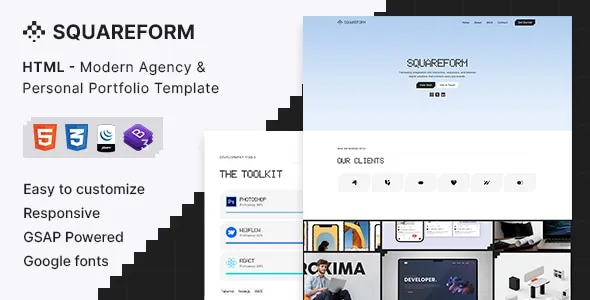
Squareform – Modern Agency & Personal Portfolio HTML Template
Squareform – Modern Agency & Personal Portfolio HTML Template is a versatile website template designed for creative agencies, freelancers, designers, developers, consultants, and independent professionals who want to establish a distinctive online presence. Combining a modern visual direction with flexible page structures, Squareform provides a starting point for building websites that showcase creative work, communicate professional services, and introduce personal brands. Whether you are developing a portfolio for a designer, presenting a digital agency, promoting freelance services, or creating a professional website for a creative studio, this HTML template can help organize your content into a clear and engaging digital experience.
A successful agency or portfolio website needs more than an attractive appearance. It should communicate what you do, demonstrate your expertise, present your best projects, and help potential clients understand how to work with you. Squareform can be customized to support these goals through carefully organized sections, project-focused content, service information, professional introductions, and contact opportunities. Its final appearance and functionality depend on the supplied template files, available page layouts, and any customizations or integrations added during development.
What Is Squareform – Modern Agency & Personal Portfolio HTML Template?
Squareform is a modern HTML website template intended for creative businesses and individuals who need a professional platform to present their work and services. HTML templates provide developers with a foundation for creating website pages using standard web technologies, including HTML, CSS, and JavaScript where applicable.
Unlike a hosted website builder, an HTML template generally gives developers direct access to the front-end source files. This makes it possible to customize page structures, styling, text, imagery, and interactive elements according to a project’s requirements. Developers can adapt the design to match a personal brand, agency identity, or client-specific visual direction.
Squareform is suitable for evaluating projects such as creative agency websites, personal portfolios, freelance service websites, design studios, developer portfolios, and professional presentation pages. The actual suitability depends on the included layouts, source-code organization, responsive behavior, and any documented dependencies.
For businesses that want a distinctive online presence, the template can serve as a starting point rather than a finished solution that requires no adjustments. Replacing demonstration content, refining navigation, optimizing images, and adapting the page structure to the target audience are important steps toward creating a website that feels authentic and useful.
Before implementation, review the current demo and documentation to understand the template’s included pages, supported features, file structure, and setup requirements.
Modern Design for Creative Websites
Visual presentation plays an important role in how visitors perceive an agency or professional portfolio. A well-organized website can make complex information easier to understand while helping a brand communicate its personality and creative direction.
Squareform is positioned for modern agency and portfolio projects, making it a potential foundation for websites that emphasize design quality, professional presentation, and selected work. The specific visual details should be evaluated through the available demo and template files rather than assumed from the product title alone.
A strong design approach balances visual interest with readability. Clear headings, consistent spacing, appropriate typography, and purposeful imagery help visitors move naturally through the content. Project thumbnails and portfolio sections should attract attention without making the page difficult to navigate.
Creative businesses may prefer a bold visual identity, while consultants and independent professionals may need a more restrained presentation. The template can be adjusted to support different brand directions where its source code and styling structure allow.
When customizing the design, maintain a consistent visual language across the homepage, project pages, service sections, and contact area. Repeated design patterns help visitors understand how the website works and make the overall experience feel more cohesive.
Responsive Website Development
Visitors may access a portfolio or agency website from desktop computers, laptops, tablets, and smartphones. Responsive design helps ensure that content remains usable across different screen sizes.
Squareform should be evaluated for responsive behavior before being used in a live project. Depending on the supplied implementation, responsive layouts may adjust content widths, navigation, columns, images, and spacing to fit smaller displays.
A responsive portfolio should keep project previews clear, ensure that text remains readable, and provide navigation controls that are convenient to operate on touchscreens. Buttons and contact links should also remain easy to identify and select.
Testing should cover more than the homepage. Portfolio grids, project detail pages, service sections, forms, and footer navigation may each behave differently at smaller viewport sizes. Long headings, oversized images, and embedded media can also affect the layout.
Developers can use browser developer tools and real devices to review the website at different widths. If issues appear, CSS media queries and layout adjustments can help refine the experience, depending on how the template is structured.
Responsive testing is an ongoing part of development. Changes to fonts, images, navigation, or third-party scripts can introduce new layout problems, so the site should be checked again after significant updates.
Ideal for Creative Agencies and Digital Studios
Creative agencies need websites that communicate their capabilities, explain their services, and demonstrate the quality of their work. Potential clients often want to understand an agency’s approach before deciding whether to make contact.
Squareform can be considered for agencies working in areas such as branding, graphic design, website development, digital marketing, creative strategy, content production, and visual communication. Its suitability for each use case depends on the available page layouts and the customizations required.
An agency homepage can introduce the business with a concise statement of its purpose and target audience. A services section can summarize the main offerings, while selected projects provide evidence of the agency’s experience. A dedicated About section can explain the team’s approach, values, or working process.
Portfolio case studies are especially useful for creative businesses. Rather than presenting images alone, each project can include a short explanation of the client’s objectives, the challenge involved, the agency’s contribution, and the final deliverables. Verified results can be included when reliable evidence is available.
A contact section should make it straightforward for prospective clients to ask questions or discuss a project. Clear calls to action can guide visitors from exploring the agency’s work to starting a conversation.
With suitable customization, Squareform can support a professional agency website that balances visual presentation with practical business information.
Build a Personal Portfolio Website
A personal portfolio helps freelancers, designers, developers, photographers, and other professionals introduce themselves and present relevant work in one convenient location.
Squareform provides a potential starting point for creating a personal portfolio that communicates professional skills, experience, project examples, and contact information. The content should be adapted to the individual’s profession and the opportunities they want to attract.
A web designer might showcase website layouts, user interfaces, and visual systems. A developer could feature web applications, code-related projects, and technical achievements. A graphic designer may highlight brand identities, illustrations, packaging, and campaign materials.
A portfolio is most effective when it presents selected work with enough context to explain its value. Visitors should understand the professional’s role in each project and the skills demonstrated by the finished result. Where appropriate, project descriptions can include the objectives, creative decisions, development process, and final outcome.
A personal introduction can explain the professional’s background and areas of expertise. A skills section may highlight relevant capabilities, while a resume or professional profile can provide additional information for prospective employers and clients.
The website should make contact details easy to locate. Email links, professional profile links, and a suitable contact form can provide convenient ways for interested visitors to connect, depending on the final implementation.
Showcase Projects with a Structured Portfolio
Project presentation is one of the central considerations when building an agency or personal portfolio. A useful portfolio helps visitors explore work efficiently and understand the experience behind each project.
Squareform can be customized for project-focused content where its available structure supports the required presentation. Depending on the final implementation, developers may organize projects using image grids, featured work sections, project summaries, or individual case-study pages.
Each project should have a clear title and suitable visual material. High-quality screenshots, photographs, mockups, and other relevant assets help demonstrate the work. Images should be optimized for web delivery to avoid unnecessary loading delays.
Project descriptions can explain the client’s requirements, the main challenge, the professional’s contribution, and the tools or methods used. For agency work, it is useful to identify the services delivered, while personal portfolios should clearly distinguish individual contributions from collaborative efforts.
If the website includes multiple projects, consider grouping them by category or service. A design agency might separate branding, web design, and digital campaigns. A developer portfolio could group applications, websites, and technical experiments.
Only include projects that support the portfolio’s purpose. A smaller collection of relevant, well-explained examples can communicate professional strengths more effectively than a large collection of unrelated work.
Service Pages for Professional Businesses
A creative agency or freelancer website should explain the services offered in language that prospective clients can understand. Clear service information helps visitors determine whether a business is suitable for their needs.
Squareform can be adapted to present service summaries and detailed descriptions, subject to the page layouts included with the template. Agencies may use dedicated sections or pages to explain branding, design, development, consulting, marketing, or other professional services.
Each service description should identify the intended audience, the problem addressed, and the type of work involved. For example, a web development service might explain the website planning and implementation process, while a branding service could describe identity design and visual consistency.
Avoid vague statements that do not explain what a client will receive. Specific descriptions of deliverables, project stages, and communication methods help establish realistic expectations.
Where relevant, service pages can link to related portfolio examples. This allows visitors to see how the agency or professional has applied a particular skill in practice.
Calls to action should be appropriate to the service. A prospective client may be invited to request a quotation, discuss a project, or ask for additional information. The final website should make these next steps clear without overwhelming visitors with repeated prompts.
Homepage Structure and Content Planning
The homepage introduces the website and helps visitors understand what the agency or professional offers. A strong homepage communicates the main message quickly and provides straightforward routes to important information.
A Squareform-based website can be planned around a clear introduction, selected projects, service summaries, professional information, and contact opportunities, depending on the layouts supported by the template.
The opening section should explain who the website represents and what visitors can expect to find. A concise headline supported by useful text can communicate the brand’s positioning without requiring visitors to search for basic information.
A featured-work section can direct attention toward the most relevant projects. A services summary can explain the primary offerings, while an About section can provide context about the business or professional.
Testimonials may be included when they are genuine and authorized for publication. Blog previews or insights can help demonstrate expertise if content marketing is part of the website’s strategy.
Not every website needs every section. A freelancer may benefit from a simple homepage with selected projects and contact information, while a larger agency may need more detailed service descriptions and team information.
Before building the page, define its primary objective. Each section should support that objective by informing visitors, demonstrating expertise, answering questions, or helping them take the next step.
Customization and Brand Identity
A website should reflect the identity of the business or individual it represents. Customization allows developers to replace generic presentation with a coherent visual system that supports the brand.
Because Squareform is an HTML template, developers can generally work directly with the relevant source files to adjust supported styling and content. The precise customization process depends on the template’s file structure, CSS organization, JavaScript dependencies, and documentation.
Important visual elements include brand colors, typography, spacing, imagery, buttons, navigation, and section layouts. A creative agency might choose a distinctive visual style, while a consultant may prefer a professional and understated appearance.
Consistency is more important than adding decorative elements to every section. Establishing a limited color palette, readable type hierarchy, and consistent button treatments can make the website feel unified.
Images should reinforce the intended message. Original project screenshots, team photographs, and relevant illustrations are generally more meaningful than unrelated stock imagery. Make sure you have the necessary rights to use published images and other creative assets.
When changing the source code, keep the project organized and test changes in a development environment before publishing them. Maintain backups of the original files so that accidental changes can be reversed.
SEO-Friendly Website Structure
Search engine optimization helps search engines interpret website content and helps potential visitors discover relevant pages. An HTML template provides a front-end foundation, but search visibility depends on content quality, technical implementation, competition, and other factors.
Squareform can be configured with descriptive page titles, useful headings, relevant text, internal links, and appropriate metadata. Developers should confirm that these elements are present and correctly implemented rather than assuming that a template automatically provides a complete SEO setup.
Each page should have a clear topic and purpose. An agency may create separate pages for its main services, while a personal portfolio can organize work into meaningful project pages. This structure gives visitors and search engines more context than a single page containing every detail.
Use descriptive URLs where the hosting setup allows them. Link related pages together so that visitors can move from service information to relevant projects and contact details.
Images should have appropriate alternative text when they communicate meaningful information. Decorative images can be handled differently according to accessibility and implementation requirements. Image file sizes should also be optimized to support performance.
If the website includes multiple pages or languages, review canonical URLs, indexing rules, redirects, and sitemap requirements where applicable. Connect suitable analytics and search monitoring tools if ongoing measurement is needed.
No HTML template can guarantee rankings, traffic, or conversions. A sustainable SEO strategy combines technical quality with useful content, relevant keywords, clear navigation, and regular maintenance.
Website Performance and Loading Speed
Performance influences how quickly visitors can view content and interact with a website. A portfolio that loads efficiently makes it easier for potential clients to explore projects, especially when browsing on mobile connections.
The speed of a Squareform website depends on its source code, image assets, scripts, fonts, hosting environment, and any external integrations. The template should be tested before launch to identify opportunities for improvement.
Images are particularly important on portfolio websites. Large project images can consume significant bandwidth, so use appropriate dimensions and efficient formats while retaining enough detail for the intended presentation. Avoid uploading unnecessarily large files when smaller versions will provide a comparable visual result.
Review CSS and JavaScript resources to identify unnecessary files or expensive operations. External libraries and third-party widgets should be included only when they provide useful functionality. Excessive animations or scripts may increase processing requirements, particularly on lower-powered devices.
Caching, compression, and suitable hosting configuration can improve delivery when supported by the environment. These optimizations should be tested rather than applied blindly.
Use performance testing tools to examine key pages, including the homepage, portfolio sections, service pages, and project details. Recheck the site after adding new assets or interactive elements, since later changes can affect loading behavior.
Accessibility and User-Friendly Navigation
A professional website should be usable by visitors with different devices, abilities, and browsing preferences. Clear navigation and accessible content help visitors locate information and interact with the website more confidently.
When customizing Squareform, use a logical heading hierarchy, descriptive link text, readable font sizes, and suitable color contrast. Form fields should have clear labels, and interactive elements should communicate their purpose.
Navigation should prioritize the most important sections. For a creative agency, these may include services, projects, About, and Contact. For a personal portfolio, selected work, professional information, and contact details may be more important.
Avoid relying on color alone to communicate essential information. Interactive controls should provide appropriate focus indicators for keyboard users, and images that convey meaning should have useful alternative text.
Accessibility also involves practical testing. Navigate through the website using a keyboard, review forms and menus, and check the page at different zoom levels. Automated auditing tools can identify some issues, but manual evaluation remains valuable.
The final level of accessibility depends on the original template, customizations, content, and third-party components. Regular reviews can help maintain a more inclusive and user-friendly experience as the website develops.
Contact Forms and Lead Generation
For agencies and freelancers, a website often serves as a channel for receiving inquiries and developing new business opportunities. Visitors should be able to contact the business without unnecessary effort.
Squareform can be adapted to include contact information, email links, and contact forms where the required implementation is available or added during development. A contact form may collect a visitor’s name, email address, service interest, and a brief project description.
Keep the form focused on information needed to respond. Too many required fields can discourage visitors from completing the process, while unclear labels may cause confusion.
Forms must be connected to a working submission process. A front-end HTML form alone does not automatically provide email delivery or secure server-side processing. Depending on the hosting environment, developers may need a backend endpoint or a compatible form service.
Before launch, test form validation, successful submissions, error handling, spam protection, and email delivery. Make sure visitors receive understandable feedback after submitting a message.
Privacy information should be provided where appropriate, especially when collecting personal information. The business should handle submitted data responsibly and follow applicable privacy requirements.
Clear contact opportunities help turn portfolio visitors into potential clients while preserving a professional user experience.
Suitable for Freelancers, Designers, and Developers
Squareform’s agency and portfolio positioning makes it worth evaluating for professionals who need to present their skills and completed work online.
Freelance designers: Showcase branding projects, website layouts, graphic design, illustrations, and other creative deliverables.
Web developers: Present websites, applications, technical projects, and relevant development experience.
Digital agencies: Introduce services, display client work, explain project processes, and provide contact opportunities.
Creative studios: Build a professional website that reflects the studio’s visual identity and areas of specialization.
Photographers: Organize selected work and provide information about photography services, subject to the suitability of the included layouts.
Marketing professionals: Present campaign examples, service offerings, professional experience, and relevant achievements.
Consultants: Explain areas of expertise, describe professional services, and guide visitors toward a consultation or inquiry.
Personal brands: Create a central destination for professional information, selected projects, published content, and contact details.
Each use case requires different content and priorities. Before selecting the template, review its available pages, responsiveness, customization requirements, and compatibility with the intended hosting environment.
HTML Template Flexibility for Developers
An HTML template can provide developers with direct access to the front-end elements that determine how a website looks and behaves. This can be useful when a project requires more control over the design than a closed website builder provides.
Squareform can be used as a starting point for customized front-end development, depending on its source files and documented dependencies. Developers can adapt the content structure, styling, and supported interactions to suit project requirements.
The template may also be integrated into a broader development workflow if its structure is compatible with the chosen tools. For example, a developer may reuse suitable front-end sections in a larger application or connect the presentation layer to a separate content management system. Such work generally requires additional development and should not be assumed to be included by default.
Before making changes, review the folder structure and identify the files responsible for page content, styling, images, and scripts. Understand any included libraries and setup instructions to avoid unnecessary compatibility problems.
Keep customizations organized and document significant changes. This makes future maintenance easier and helps other developers understand the implementation.
The degree of flexibility depends on the supplied code and the skills available within the development team. An HTML template can accelerate front-end work, but it does not automatically provide a database, administrative dashboard, user authentication, or other backend functionality unless these are separately implemented.
Browser Compatibility and Quality Testing
A website should provide a consistent experience across commonly used browsers and devices. Testing helps identify visual differences, JavaScript errors, broken links, and responsive layout problems before visitors encounter them.
When preparing a Squareform website for launch, test the main pages in current versions of widely used browsers. Review typography, navigation, image rendering, interactive elements, and form behavior.
Check all internal links and confirm that external links lead to the intended destinations. Images should load correctly, and missing assets should be resolved before the site is published.
Responsive testing should cover a range of viewport widths. Pay particular attention to navigation menus, multi-column layouts, project grids, and text that may overflow smaller screens.
Use browser developer tools to review console errors and investigate layout issues. If the website contains third-party scripts, verify that they load correctly and do not interfere with essential page functionality.
A final content review should check spelling, grammar, headings, service details, project descriptions, and contact information. Placeholder content should be replaced with accurate information before the website goes live.
Quality assurance is not a one-time task. Retest the website after significant code changes, content updates, or dependency upgrades to maintain a reliable experience.
Maintenance and Long-Term Website Management
After a website is launched, ongoing maintenance helps preserve its quality and usefulness. Even a static HTML website requires occasional attention to content, links, hosting configuration, security, and performance.
Review the portfolio periodically to ensure that featured projects remain relevant and accurately represent the professional’s current skills. Update service descriptions, contact details, biographies, and professional achievements when necessary.
Check for broken links and missing images. External resources may change, so embedded content, font services, and third-party integrations should be reviewed regularly.
If the website uses JavaScript libraries or other dependencies, monitor their compatibility and security status. Update components carefully and test the website before deploying changes. Maintain backups of the source files and production configuration so that the site can be restored if an update causes a problem.
Monitor performance as new projects and media are added. Portfolio websites can become slower over time if large image files accumulate or unnecessary scripts are introduced.
A simple maintenance routine can include content reviews, link checks, backup verification, security updates, and performance testing. Consistent maintenance helps ensure that the website continues to support the business or professional effectively.
Tips for Getting the Best Results from Squareform
A template is only the starting point for a successful website. The finished result depends on the relevance of its content, the quality of its customization, and how effectively it meets visitor needs.
Start by defining the primary purpose of the website. Decide whether the main goal is to attract agency clients, present a personal portfolio, promote services, or provide a professional introduction.
Prepare the essential content before making extensive design changes. Collect project images, service descriptions, an About section, professional credentials, and accurate contact details. This makes it easier to determine which sections are useful and which can be removed.
Replace demonstration text and placeholder images with original material. Use project descriptions that explain the work rather than relying exclusively on visual previews.
Keep the navigation simple and ensure that visitors can reach important information quickly. Use consistent branding and avoid unnecessary visual effects that distract from the content.
Optimize images and test the website across devices. Review loading speed, keyboard navigation, form functionality, and browser compatibility before launch.
Finally, create a plan for future updates. Adding new projects, refining service pages, and reviewing content regularly helps keep the website relevant as a business or professional career develops.
Final Thoughts on Squareform – Modern Agency & Personal Portfolio HTML Template
Squareform – Modern Agency & Personal Portfolio HTML Template is a potential option for creative agencies, freelancers, designers, developers, and professionals seeking a modern front-end foundation for an online portfolio or business website. Its intended focus on agency and personal portfolio projects makes it relevant to websites that need to present services, showcase completed work, and communicate a clear professional identity.
With suitable customization, the template can be adapted to support project galleries, agency introductions, service information, personal biographies, and contact opportunities. Developers can work with the available HTML, CSS, and JavaScript files to refine the presentation according to a brand’s needs and the technical requirements of the project.
The final result depends on the included layouts, code structure, responsive implementation, and any additional functionality introduced during development. Reviewing the live demo and documentation before implementation is the best way to confirm whether the template fits the intended project.
Long-term success also requires useful content, accessible navigation, optimized media, appropriate SEO configuration, quality testing, and ongoing maintenance. A template alone cannot guarantee search rankings or business growth, but it can provide a practical foundation for building a professional website.
For anyone planning an agency website or personal portfolio, Squareform is worth evaluating as part of a broader web development strategy. By combining the template’s available design resources with original content and careful implementation, developers can create an online presence that presents professional work clearly and supports meaningful connections with potential clients.