My Account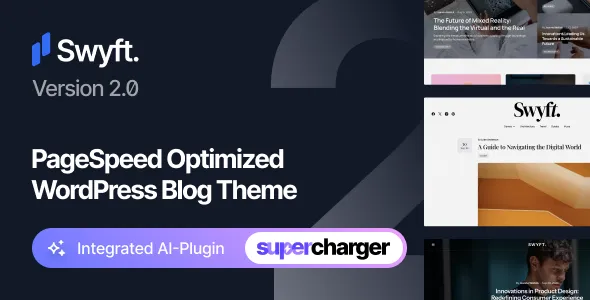
Swyft – PageSpeed Optimized WordPress Blog Theme
Swyft – PageSpeed Optimized WordPress Blog Theme is a modern website design solution for bloggers, content creators, publishers, writers, and digital entrepreneurs who want to build a professional WordPress website with an emphasis on speed, readability, and user experience. Designed for content-focused websites, Swyft offers a suitable foundation for presenting articles, sharing ideas, publishing news, and developing a recognizable online identity. Its performance-oriented positioning makes it an appealing choice for website owners who value fast-loading pages, accessible content, and a smooth browsing experience across desktop computers, tablets, and mobile devices.
Whether you are creating a personal blog, launching an online magazine, developing a niche publication, or building a business website with an active content strategy, Swyft provides a theme option worth considering. A well-designed blog should make it easy for visitors to discover new posts, navigate between categories, read articles comfortably, and return for future updates. Swyft is intended for this type of content-driven experience, combining a contemporary presentation with an approach that prioritizes website performance. With the appropriate WordPress configuration, optimized images, reliable hosting, and carefully selected plugins, you can use this theme as a foundation for a fast and engaging publishing platform.
Discover the Swyft WordPress Blog Theme
Swyft is built around the needs of modern online publishing, where attractive presentation and practical functionality must work together. Readers visit blogs for information, entertainment, opinions, tutorials, product insights, and useful advice. A theme should help communicate that information without creating unnecessary obstacles between the visitor and the content.
The Swyft WordPress Blog Theme can serve as a starting point for websites that publish regularly and need a consistent design across their articles and archive pages. Instead of treating each post as an isolated page, a structured blog layout helps connect related content, guide readers toward additional resources, and create a more cohesive website experience.
Its performance-focused identity is particularly relevant to publishers who want to make loading speed an important part of their website strategy. A lightweight approach to design, when supported by sensible configuration and efficient assets, can help reduce unnecessary page overhead. Actual performance depends on several factors, including the theme implementation, installed plugins, hosting environment, caching configuration, and the content displayed on each page.
For website owners looking for a professional blogging solution, Swyft combines a content-first purpose with an emphasis on efficient browsing and modern presentation.
PageSpeed-Oriented Website Performance
Website speed plays an important role in the overall quality of a blog. Visitors expect pages to load promptly, article layouts to appear correctly, and navigation to respond without unnecessary delays. A slow website may interrupt the reading experience and make it harder for users to explore additional content.
Swyft is positioned as a PageSpeed optimized WordPress blog theme, making it relevant for publishers who want to prioritize performance during website development. Selecting a performance-conscious theme can be a useful first step, but it is not a guarantee of a particular PageSpeed Insights score or loading time. Results should be measured on the actual website after the theme has been installed and configured.
A performance-focused publishing workflow may include several important practices:
- Use appropriately sized and compressed images throughout the website.
- Enable suitable page caching through your hosting provider or a compatible caching solution.
- Avoid installing unnecessary plugins that introduce additional scripts or styles.
- Review third-party advertising, analytics, and embedded media.
- Keep WordPress, the theme, and compatible plugins updated.
- Test important pages on both mobile and desktop devices.
- Monitor Core Web Vitals and address performance issues identified through testing tools.
When these practices are combined with an appropriate theme and hosting setup, website owners can work toward a more responsive and efficient publishing experience.
A Content-First Design for Bloggers
The main purpose of a blog is to deliver useful content in a format that readers can understand and navigate. Visual elements should support that purpose rather than compete with it. Swyft is suitable for content-led websites that need a clear framework for displaying articles, organizing topics, and encouraging visitors to continue reading.
A content-first design can help place attention on headlines, introductory paragraphs, article excerpts, featured visuals, and the main body of each post. Consistent spacing and a predictable page structure also make a website easier to understand, particularly when visitors arrive through search engines or links shared on social platforms.
Publishers can use this type of WordPress theme to develop a recognizable editorial style. By maintaining consistent typography, image treatments, category naming, and content formatting, a blog can feel more professional even as its article library grows.
The most effective layout depends on the website’s subject and audience. A technology blog may need space for tutorials and product discussions, while a travel publication may rely more heavily on photography and destination guides. A personal blog may focus on author identity and storytelling. Swyft can be evaluated as a foundation for these different publishing goals, with the final presentation depending on the theme’s available settings and the website owner’s configuration.
Responsive Blogging for Mobile and Desktop
Readers access online content from a wide variety of devices. Some browse on large desktop displays, while others read articles on mobile phones during short breaks, commutes, or travel. A modern blog needs to accommodate these different screen sizes without making content difficult to read.
Responsive design helps website layouts adapt to the available display area. On a smaller screen, content columns and navigation elements may need to rearrange, images should fit within their containers, and text should remain comfortable to read without horizontal scrolling.
Swyft is intended for contemporary WordPress blogging, where a consistent experience across devices is an important consideration. Before launching a website, test the actual theme installation at multiple viewport sizes. Check the main navigation, post archives, article pages, featured images, search interface, and any additional widgets or promotional sections you choose to include.
Mobile usability also depends on practical details such as adequate spacing between interactive elements, readable font sizes, suitable image dimensions, and forms that work correctly with touch input. Paying attention to these details can help visitors explore your content more comfortably.
Suitable for Personal Blogs and Professional Publications
Swyft can be considered for a broad range of publishing projects. Its core blogging purpose makes it relevant to individuals, independent writers, businesses, and publishers that need a website organized around regularly updated content.
Potential applications include:
- Personal blogs: Share personal experiences, reflections, hobbies, and everyday interests through an organized online journal.
- Lifestyle websites: Publish articles about wellness, fashion, home living, relationships, and daily routines.
- Technology blogs: Cover software, digital products, technology trends, tutorials, and industry developments.
- Travel blogs: Share destination guides, itineraries, travel advice, photography, and personal experiences.
- Food blogs: Publish recipes, cooking guides, restaurant discussions, and food-related stories.
- Business blogs: Support a company website with educational articles, industry insights, announcements, and useful resources.
- Creative portfolios with blogs: Combine project updates, professional insights, and personal articles to support an online identity.
- Niche publications: Build a focused resource around a particular hobby, profession, subject, or community.
The final suitability of Swyft for any particular project depends on the theme’s included layouts and customization options. Review the live demo, feature list, documentation, and supported integrations before selecting it for a website with specialized requirements.
Organize Articles into Clear Categories
As a blog grows, content organization becomes increasingly important. Readers should be able to identify relevant subjects and move between related articles without unnecessary effort. A thoughtful category structure can also help website owners maintain a consistent editorial workflow.
WordPress provides built-in tools for managing posts, categories, tags, and other content relationships. These tools can be used alongside Swyft to establish a practical publishing structure.
For example, a technology publication might organize articles into software, hardware, tutorials, industry news, and product reviews. A travel blog could use destinations, travel tips, accommodation, itineraries, and photography. A business website might separate company news, expert advice, case studies, and educational resources.
Use category names that are meaningful to your readers, avoid creating too many overlapping categories, and make sure every post has a clear place within the website. Descriptive article titles and useful internal links can further improve navigation.
A well-organized content archive gives visitors more opportunities to discover related posts and helps the website remain manageable as its library expands.
Improve Article Readability and User Experience
Readable content is essential for a successful blog. Even a visually attractive website can struggle to retain readers if paragraphs are difficult to follow, headings are unclear, or text appears crowded on smaller screens.
Swyft can be used as a starting point for building a comfortable editorial experience. To make the most of the theme, pay attention to how articles are written and formatted, as well as how they appear within the website layout.
Useful readability practices include:
- Write clear, descriptive headlines that communicate the purpose of each article.
- Divide long articles into meaningful sections using descriptive subheadings.
- Keep paragraphs focused on one central idea.
- Use lists when presenting steps, comparisons, or practical recommendations.
- Add relevant images where they genuinely support the subject.
- Maintain adequate contrast between text and background colors.
- Use descriptive link text so readers understand where a link leads.
- Include a clear introduction that explains what the reader can expect.
These improvements can make long-form content easier to scan and help readers locate the information they need. They are especially useful for educational articles, detailed guides, product comparisons, and tutorials.
Support a Consistent Brand Identity
A blog is often an important part of a personal or business brand. Its visual identity influences how readers recognize the publication and understand its subject. Consistent presentation across the homepage, category archives, article pages, and supporting sections helps the website feel unified.
With the available customization options in Swyft, website owners can work toward a visual style that reflects their brand. Depending on the theme’s supported settings, this may involve adjusting colors, typography, logos, menus, and other design elements.
A technology publication might use a restrained color palette and a structured editorial presentation. A creative lifestyle blog may favor softer colors and expressive photography. A professional business publication may benefit from a simple layout with strong typography and a clear content hierarchy.
When establishing a visual identity, prioritize consistency rather than adding too many decorative elements. Use a recognizable logo, maintain a limited palette, select readable fonts, and ensure featured images follow a coherent style. The objective is to make the content recognizable while preserving usability and performance.
WordPress Content Management
WordPress is widely used for blogs because it provides a familiar content management environment for creating, editing, and organizing posts. Instead of manually building every article page, publishers can work through the WordPress dashboard and use a consistent publishing workflow.
Swyft is intended for WordPress blog websites, so it can be evaluated by users who want to manage an editorial site within the WordPress ecosystem. WordPress’s standard post editor supports written content, headings, images, lists, links, and other common article elements.
A typical publishing workflow includes drafting an article, assigning a category, adding a featured image where appropriate, reviewing the permalink, preparing search snippets, checking the page preview, and publishing when the content is ready.
Website administrators should also establish regular maintenance practices. Keep backups, review user permissions, update supported software, and check for compatibility before applying major changes. For exact installation instructions and supported WordPress versions, consult the current Swyft documentation and product information.
Create a Professional Homepage for Your Blog
The homepage often serves as the main entry point for visitors who want to understand what a publication offers. It should communicate the site’s subject, present useful starting points, and make recently published or especially important articles easy to discover.
A well-planned blog homepage may include a recognizable site identity, an introduction to the publication, featured content, recent posts, selected categories, and links to important pages. The exact sections available in Swyft depend on its supplied layouts and customization features.
When planning the homepage, consider what a first-time visitor needs to know. A personal blog may introduce the author and highlight recent stories. A niche publication may direct visitors toward its most useful guides. A business blog may emphasize expert articles and resources connected to its products or services.
Avoid displaying every possible element at once. A homepage with too many competing sections can make navigation confusing and increase the amount of content that must load. Prioritize the most valuable information and use a logical visual hierarchy to guide visitors through the page.
Build a Long-Form Content Strategy
Long-form content can help publishers explore subjects in depth, answer reader questions, and establish a useful library of reference material. A WordPress blog theme should provide a consistent environment for presenting these articles so that readers can follow the information from introduction to conclusion.
Swyft may be considered for websites that publish tutorials, detailed guides, editorial commentary, research summaries, and educational resources. The quality of the final reading experience depends on both the theme layout and the quality of the content.
For a strong long-form article, begin with a clear purpose and organize the discussion into sections. Use headings that describe the information in each section, provide relevant examples, and explain specialized concepts in accessible language. Include supporting links when they help readers explore the topic further.
Internal links are particularly useful for connecting related articles. A beginner’s guide can link to advanced tutorials, while an overview article can direct readers to more specific resources. This creates a more useful content network and gives visitors additional ways to explore the publication.
Search Engine Optimization for Blog Websites
Search engine optimization helps search engines understand a website’s content and can improve the likelihood that useful pages are discovered by people searching for relevant information. A WordPress theme provides the presentation layer, but strong organic search performance requires a broader strategy involving content quality, technical accessibility, website structure, and user experience.
Swyft’s performance-oriented positioning makes it relevant to publishers who want to consider loading efficiency as part of their SEO workflow. However, no theme can guarantee search rankings. Search visibility depends on many factors, including the relevance of the content, competition, indexing, links, technical configuration, and search engine systems.
To support an effective SEO strategy:
- Create original articles that satisfy a clear search intent.
- Use descriptive titles and headings that accurately represent each page.
- Write useful meta descriptions for important articles and landing pages.
- Create readable URLs that reflect the subject of each page.
- Add descriptive alternative text to meaningful images.
- Link related articles where doing so helps readers.
- Submit an appropriate XML sitemap through supported search tools.
- Check for broken links, crawl issues, and unintended indexing restrictions.
- Monitor organic search performance and improve pages based on actual results.
Use SEO plugins only when they serve a clear purpose, and avoid duplicating features already provided by other tools. Review the current Swyft documentation to understand any theme-specific SEO support and determine whether additional configuration is required.
PageSpeed and Core Web Vitals Considerations
Performance is not determined by a single number. Tools such as PageSpeed Insights provide information about loading performance and user experience, while Core Web Vitals focus on important aspects of how a page loads, responds, and maintains visual stability.
When evaluating Swyft, test representative pages instead of relying only on a homepage score. Article pages, archive pages, search results, and pages containing large images or third-party embeds may perform differently.
A practical optimization process may include:
- Establish a baseline using a performance testing tool.
- Identify the largest images and other assets on important pages.
- Review scripts and styles added by plugins or external services.
- Configure caching and compression through suitable hosting or optimization tools.
- Check whether fonts, advertisements, and embedded content delay rendering.
- Retest after each significant change.
- Monitor real-user performance when sufficient traffic data becomes available.
Avoid adding optimization plugins without understanding their effects. Some tools can conflict with one another or alter scripts in ways that affect the layout and functionality. Make backups before major changes and test the website after applying optimization settings.
Swyft’s PageSpeed-focused positioning is a useful starting point for this work, but the actual outcome should always be verified on the finished website.
Image Optimization for Editorial Websites
Images make blog posts more engaging, help explain complex topics, and give readers visual context. However, large or poorly optimized images can increase page weight and slow down the browsing experience.
For a website built with Swyft, select images that fit the content and the layout in which they appear. Resize large source files before uploading them, use modern image formats when appropriate, and compress files without introducing distracting visual artifacts.
Choose featured images that communicate the subject of the article. Use descriptive filenames and alternative text that explains meaningful image content. Decorative images generally do not need lengthy descriptions, while informative images should have useful alternatives for readers who cannot see them.
Also consider how images behave on mobile devices. Avoid uploading unnecessarily large files for small display areas, and check that important subjects remain visible when images are cropped. Lazy loading may help reduce initial page work for suitable below-the-fold images, although implementation should be tested to ensure that important visible content is not delayed.
A disciplined image workflow supports both editorial quality and performance goals.
Typography and Visual Hierarchy
Typography shapes how readers interact with a blog. Font size, line length, line spacing, heading hierarchy, and contrast all affect whether content feels comfortable or difficult to read.
When customizing Swyft, choose fonts that support the tone of the publication while remaining legible across devices. Use a clear distinction between article titles, section headings, body text, captions, and navigation labels.
Long articles benefit from adequate line spacing and paragraphs that are not excessively wide. On mobile screens, ensure that body text remains readable without requiring users to zoom in. Avoid using too many font families or loading unnecessary font weights, because additional font files can increase page requests and affect performance.
A consistent typography system also makes content easier to maintain. When headings and body styles follow predictable rules, writers can concentrate on the substance of their articles rather than manually adjusting the appearance of each section.
Navigation and Content Discovery
Good navigation helps visitors understand the structure of a website and find relevant information. A blog can contain excellent articles but still frustrate readers if its categories, menus, and internal links are confusing.
Swyft can be evaluated as a foundation for a structured publishing site where navigation connects the homepage, content archives, and individual posts. Use WordPress menus and category tools, where supported by the theme, to create a straightforward browsing experience.
Keep primary navigation focused on the most important areas of the website. Place secondary resources, contact information, author details, or policy pages in suitable supporting locations. If the publication contains a large article library, consider whether search functionality or a well-organized archive would help readers find specific information.
Test navigation on mobile devices as well as desktop screens. Check that menu items are easy to select, dropdowns behave predictably, and visitors can return to the homepage or a broader category without unnecessary steps.
Content Marketing for Businesses and Brands
A blog can support a business by answering customer questions, explaining services, sharing industry knowledge, and providing useful educational resources. It can also give a brand a consistent platform for communicating expertise beyond its main product or service pages.
Swyft may be suitable for businesses that want to maintain an active WordPress publishing section. Depending on the website’s goals, articles can include practical tutorials, frequently asked questions, company updates, case studies, opinion pieces, and explanations of industry developments.
An effective content marketing strategy begins with the audience. Identify common questions, recurring challenges, and topics where your business can provide meaningful guidance. Develop articles that answer those questions accurately and organize them into a coherent content plan.
When appropriate, link educational posts to relevant service pages or resources. Keep these connections useful and transparent rather than making every article read like a sales pitch. Readers are more likely to value a business blog when its content genuinely helps them understand a subject or make an informed decision.
Monetization Opportunities for Bloggers
A growing blog may eventually support several revenue models. The best option depends on the audience, publishing niche, traffic quality, content strategy, and the level of trust established with readers.
Potential monetization approaches include display advertising, affiliate marketing, sponsored articles, digital downloads, paid newsletters, consulting services, and links to a business’s own products. Some approaches may require third-party services, payment integrations, or additional WordPress plugins.
Swyft can be assessed as a possible design foundation for a monetized content website, but the availability of specific advertising placements or commerce features should be confirmed in the current product documentation. The theme itself should not be assumed to provide every required payment, subscription, or membership function.
Keep performance and usability in mind when introducing monetization. Excessive advertising, intrusive pop-ups, or poorly configured third-party scripts can distract readers and negatively affect page speed. Select placements that suit the content and ensure that sponsored or affiliate relationships are disclosed where required.
Accessibility and Inclusive Reading
An accessible blog makes information easier to use for a wider range of visitors, including people who navigate with keyboards or rely on assistive technologies. Accessibility should be considered throughout design, content creation, and website maintenance.
When using Swyft, review the rendered website rather than assuming accessibility based solely on the theme’s name or description. Check color contrast, heading order, keyboard navigation, focus visibility, image alternatives, and the labeling of interactive controls.
Write descriptive links that make sense when read outside their surrounding paragraph. Avoid relying only on color to communicate important information, and ensure that forms display clear labels and understandable error messages. Videos may need captions, while complex diagrams may require explanatory text.
Accessibility is an ongoing process rather than a one-time adjustment. Test important pages after changing themes, installing plugins, or modifying the site’s layout. Addressing these details can make the website more usable and improve the experience for a broader audience.
Website Security and Maintenance
A professional blog needs regular maintenance to remain stable and reliable. Security issues, outdated software, incompatible plugins, and missing backups can affect the website regardless of which theme is installed.
Before launching a website with Swyft, confirm that the theme comes from a legitimate source and review its installation instructions, update policy, and compatibility information. Use supported versions of WordPress and PHP where required, and keep the theme and plugins updated according to their documentation.
A sensible maintenance routine should include regular backups, strong administrator passwords, limited user permissions, secure hosting, and monitoring for unexpected errors. Test major updates on a staging website when possible, particularly if the blog relies on many plugins or has customized templates.
Avoid installing extensions simply because they promise additional features. Every plugin should serve a clear purpose and be maintained by a trustworthy developer. Keeping the website’s software stack focused can simplify troubleshooting and reduce unnecessary complexity.
Customization and Website Flexibility
Every publication has different goals, branding requirements, and content priorities. Some bloggers want a simple writing-focused website, while others need a more elaborate editorial presence with several categories and featured content areas.
Swyft’s suitability for a particular project depends on its available customization settings, templates, and supported WordPress features. Review the product demo and documentation to confirm which elements can be adjusted directly and which may require additional development.
When customizing the website, start with the most important design decisions: logo placement, typography, color palette, navigation, article presentation, and homepage structure. Make changes incrementally and preview them on different screen sizes.
If custom code is necessary, use recommended WordPress practices and consider a child theme where appropriate so that supported theme updates do not overwrite your modifications. Keep a record of customizations and test them after updates.
A focused customization process can help create a distinctive publication without adding unnecessary design complexity.
Build a Search-Friendly Article Structure
A useful article structure helps readers understand information and can help search engines interpret the page. The most effective structure depends on the topic, but it should always follow a logical order.
Start with a descriptive title and an introduction that explains the subject. Use meaningful section headings to divide the main discussion into manageable parts. Where useful, include numbered steps, comparison tables, examples, summaries, or frequently asked questions.
For a tutorial, explain prerequisites before presenting the steps. For a review, establish the evaluation criteria and separate observations from opinions. For a reference guide, define important terms and provide links to relevant supporting resources.
A theme such as Swyft provides the website presentation framework, while the publisher remains responsible for creating accurate, original, and useful information. Avoid writing pages solely to repeat keywords or produce unnecessary length. Focus on meeting the reader’s needs and updating articles when facts or recommendations change.
Why Choose Swyft – PageSpeed Optimized WordPress Blog Theme?
Choosing a WordPress blog theme involves balancing presentation, performance goals, usability, customization, and long-term maintenance. Swyft is worth considering for website owners who want a theme specifically positioned around blogging and PageSpeed-conscious publishing.
Reasons to evaluate Swyft include:
- A blogging-focused purpose for content-driven websites.
- A performance-oriented identity that supports a speed-conscious development strategy.
- Potential suitability for personal blogs, niche publications, and business content websites.
- A WordPress-based publishing workflow for managing articles and categories.
- An opportunity to create a consistent editorial identity through supported design settings.
- A foundation for developing long-form content and organized article archives.
- Compatibility with a broader WordPress content strategy, subject to verified theme requirements and integrations.
These considerations should be weighed against the actual features included in the version you intend to purchase or install. Check the live demo, support terms, update history, documentation, and required dependencies before making a final decision.
Getting Started with Swyft
A careful setup process helps establish a stable foundation for a new blog. Begin by preparing a WordPress installation on suitable hosting and creating a backup if you are working on an existing website.
Next, obtain Swyft from its authorized distribution source and follow the current installation instructions. If the package contains multiple files, use the documentation to identify the correct installable theme archive. Do not assume that every download package can be uploaded directly through the WordPress theme installer.
After activation, review the available theme settings and configure the site’s identity, menus, homepage, post categories, and other required elements. Import demo content only if it is included and appropriate for your project, and remove any sample content you do not intend to use.
Publish a small set of representative articles before launch. Check how the homepage, archives, and individual posts appear, then test navigation, forms, mobile layouts, and page speed. Finally, confirm that backups, security measures, analytics, and search engine settings are configured as needed.
For the most accurate setup guidance, rely on the current Swyft documentation rather than generic instructions that may not match your version.
Who Should Use This WordPress Blog Theme?
Swyft may be a suitable option for people and organizations that want to establish or improve a content-driven WordPress website. Independent writers can use a blog to publish articles and develop an online presence. Businesses can maintain an educational resource center, while niche publishers can organize specialized information for a defined audience.
It may also interest content creators who want website performance to be part of their design decision. For these users, the theme should be considered alongside hosting quality, image optimization, caching, plugin selection, and ongoing performance monitoring.
Before choosing Swyft, identify your essential requirements. If you need specialized membership features, advanced editorial workflows, a complex multilingual setup, or extensive commerce functionality, confirm that the theme and any required integrations support those needs. A theme that suits a straightforward blog may not automatically provide every function required by a more complex publishing business.
Selecting a theme based on verified requirements helps prevent unnecessary development work and creates a clearer path toward launch.
Final Thoughts on Swyft – PageSpeed Optimized WordPress Blog Theme
Swyft – PageSpeed Optimized WordPress Blog Theme is an option to explore when building a modern WordPress blog with a focus on content presentation and website performance. Its blogging-oriented purpose makes it relevant to writers, publishers, creators, and businesses that want to share information through a structured editorial website.
A successful blog requires more than an attractive theme. It needs valuable content, clear navigation, a readable design, accessible interactions, reliable hosting, appropriate security measures, and ongoing optimization. By combining Swyft with a thoughtful content strategy and careful technical configuration, website owners can work toward a professional publishing experience that serves both readers and business goals.
Before making your final selection, examine the current theme demo and documentation, verify the available features and compatibility requirements, and test performance on your intended website. This will help you determine whether Swyft fits your publishing needs and provides the right starting point for your long-term WordPress blog.