My Account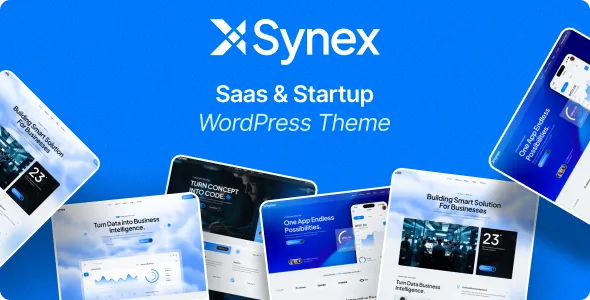
Synex – SaaS, Software & Startup WordPress Theme
Synex – SaaS, Software & Startup WordPress Theme is a modern, professional, flexible, and feature-rich WordPress theme designed for SaaS companies, software businesses, technology startups, web applications, mobile applications, software products, IT companies, digital platforms, tech agencies, app development companies, cloud-based businesses, and innovative technology brands. Synex provides a clean and contemporary website foundation for businesses that want to present their software products, digital solutions, services, features, pricing plans, integrations, company information, and technology expertise in a professional way.
Modern SaaS WordPress Theme
Synex is designed for modern SaaS businesses that need a professional online presence to showcase their software products and digital services. A SaaS website needs to communicate product features, benefits, pricing, integrations, customer resources, and business value clearly. Synex helps organize these important elements into a polished and user-friendly website experience.
Whether you are launching a new SaaS startup, promoting an established software platform, or building a website for a technology company, Synex can be customized according to your business identity, product requirements, and marketing strategy.
SaaS Company WordPress Theme
Create a professional SaaS company website with Synex. Showcase your company story, software products, services, technology, team, customer solutions, pricing, testimonials, resources, and contact information.
A well-structured SaaS website helps potential customers understand what your platform does, who it is designed for, and how they can get started.
Software Company WordPress Theme
Synex is suitable for software companies offering digital products, business applications, enterprise software, cloud platforms, productivity tools, automation software, analytics platforms, and other software solutions.
Create dedicated pages for individual software products and explain their features, use cases, integrations, pricing options, support resources, and benefits.
Startup WordPress Theme
Technology startups can use Synex to build a modern website from the beginning. Present your startup idea, product, mission, vision, team, technology, services, achievements, and future plans.
The flexible structure allows startups to begin with essential pages and expand the website as the company grows.
Technology Startup Website
Build a professional technology startup website with pages for your product, services, company, team, blog, resources, pricing, FAQs, and contact information.
Use clear messaging and strong calls to action to guide visitors toward learning more about your product or contacting your business.
Software Startup WordPress Theme
Software startups can showcase their applications, platforms, digital products, development expertise, and technology solutions through dedicated website sections.
Create product-focused landing pages that explain the purpose of your software and highlight important features.
SaaS Product Website
Create a dedicated SaaS product website that focuses on your software platform. Explain what the product does, which problems it solves, who can use it, and what features it provides.
Use feature sections, screenshots, benefits, integrations, FAQs, pricing, testimonials, and calls to action to create a complete product presentation.
SaaS Landing Page WordPress Theme
Synex can be customized for SaaS landing pages designed to promote a specific product or service. Create focused pages that highlight the product’s main value proposition, features, benefits, pricing, social proof, and signup or contact options.
Software Landing Page
Build professional software landing pages for applications, platforms, tools, plugins, digital products, and technology services.
Each landing page can focus on one product or campaign while providing visitors with relevant information and a clear next step.
SaaS Application WordPress Theme
SaaS application businesses can create modern websites for cloud-based applications, online platforms, business software, productivity tools, CRM platforms, project management systems, communication software, and other web applications.
Web Application WordPress Theme
Present your web application through a professional website that explains features, functionality, integrations, pricing, customer benefits, and support information.
Cloud Software WordPress Theme
Cloud software companies can use Synex to promote cloud-based platforms and digital services. Create pages for cloud products, features, integrations, security information, pricing, documentation, and support.
Cloud SaaS Website
Build a professional cloud SaaS website for businesses providing online software and cloud-based applications. Explain how customers can access and use your platform while showcasing important product capabilities.
B2B SaaS WordPress Theme
Synex is suitable for B2B SaaS companies targeting businesses and professional organizations. Create industry-specific pages, solution pages, product features, case studies, pricing information, and customer resources.
Enterprise SaaS WordPress Theme
Enterprise software businesses can use Synex to create detailed websites for large-scale software platforms. Showcase enterprise features, security information, integrations, support services, implementation solutions, and business use cases.
Business Software WordPress Theme
Create a professional website for business software products such as CRM systems, ERP platforms, project management software, accounting applications, HR platforms, analytics tools, collaboration software, and business automation solutions.
SaaS Dashboard Product Website
If your software includes a dashboard or application interface, create a marketing website that introduces the platform before users access the application.
Showcase dashboard screenshots, features, workflows, integrations, and benefits.
CRM Software WordPress Theme
CRM software companies can customize Synex to showcase customer relationship management solutions. Create pages for contact management, sales pipelines, customer data, reporting, automation, integrations, and other genuine features offered by your platform.
Project Management Software Website
Promote project management software through dedicated pages for task management, collaboration, project tracking, team communication, reporting, scheduling, and productivity features.
Productivity Software WordPress Theme
Create a professional website for productivity applications and digital tools. Showcase features, workflows, integrations, pricing plans, customer resources, and use cases.
Business Automation WordPress Theme
Businesses providing automation software can use Synex to present workflow automation, process management, task automation, integrations, and digital transformation solutions.
AI SaaS WordPress Theme
Artificial intelligence software companies can customize Synex to promote AI-powered applications, automation tools, machine learning platforms, AI assistants, analytics solutions, and other legitimate software products.
AI Software Website
Create dedicated pages explaining your AI software, its features, use cases, integrations, pricing, and customer resources.
Use accurate product information and avoid unsupported claims about artificial intelligence capabilities.
Machine Learning SaaS Website
Machine learning businesses can showcase predictive analytics platforms, machine learning applications, data tools, automation software, and AI development solutions.
Data Analytics SaaS WordPress Theme
Analytics platforms can use Synex to promote dashboards, reporting tools, business intelligence solutions, data visualization, analytics software, and data management platforms.
Cybersecurity SaaS WordPress Theme
Cybersecurity software companies can create professional websites for security platforms, monitoring tools, identity solutions, risk management software, security analytics, and other cybersecurity products.
Fintech SaaS WordPress Theme
Financial technology software companies can use Synex to present financial applications, business platforms, analytics tools, payment technology, accounting software, and other legitimate fintech solutions.
EdTech SaaS WordPress Theme
Educational technology companies can create websites for learning platforms, educational software, online course systems, classroom tools, student management software, and digital education products.
HealthTech SaaS WordPress Theme
Technology companies serving healthcare organizations can use Synex for software platforms, scheduling systems, management tools, analytics platforms, communication systems, and other technology solutions.
Marketing SaaS WordPress Theme
Marketing software businesses can showcase CRM tools, email marketing platforms, analytics systems, automation software, social media tools, SEO platforms, and other marketing technologies.
HR SaaS WordPress Theme
Human resources software companies can create professional websites for HR management platforms, recruitment systems, employee management software, payroll applications, attendance platforms, and workplace tools.
SaaS Pricing Page
Pricing is an important part of many SaaS websites. Create clear pricing pages that explain different plans, features, billing options, and product limitations.
Use comparison tables to help potential customers understand which plan fits their requirements.
SaaS Pricing Plans
Create pricing sections for Starter, Professional, Business, Enterprise, or other plans used by your software company.
Clearly communicate what is included in each plan and provide an appropriate call to action.
SaaS Free Trial Page
If your software offers a free trial, create a dedicated page explaining the trial period, available features, signup process, and any applicable conditions.
SaaS Demo Page
Create a product demo page where visitors can learn how your platform works. Add screenshots, videos, feature descriptions, and a request-demo call to action where appropriate.
Request a Demo WordPress Theme
Create professional request-demo sections for B2B SaaS businesses. Provide a simple form that allows potential customers to request a product demonstration or consultation.
SaaS Product Features
Create a detailed product features page that explains the functionality of your software.
Organize features into logical categories such as:
- Automation
- Analytics
- Collaboration
- Security
- Integrations
- Reporting
- Customization
- User Management
- Notifications
- Data Management
Only include features that your product actually provides.
Software Features Page
Present individual software features through dedicated sections. Explain what each feature does and how users can benefit from it.
SaaS Integrations Page
Create an integrations page showcasing the third-party applications and services that your SaaS product genuinely supports.
Organize integrations by categories and provide relevant information for each connection.
API Integration WordPress Theme
Software companies offering APIs can create dedicated pages for API capabilities, integrations, documentation, developer resources, authentication information, and support.
SaaS Developer Website
Create a developer-focused section with documentation, API references, SDK information, integration guides, technical resources, and developer support.
SaaS Documentation Website
Provide customers and developers with documentation that explains product setup, features, configuration, integrations, troubleshooting, and frequently asked questions.
Software Knowledge Base
Create a knowledge base containing tutorials, guides, FAQs, troubleshooting articles, product documentation, and educational resources.
SaaS Help Center
Build a dedicated help center where customers can find support information and product resources.
Organize content into categories to make information easier to locate.
Software Support Website
Create support pages explaining how customers can contact your team, access documentation, report issues, request assistance, and find answers to common questions.
SaaS Customer Portal Promotion
If your SaaS product includes a customer portal, use the marketing website to explain the portal’s purpose, features, security, and access process.
Software Login Page
Create clear links to your software login and signup areas so existing customers and new users can quickly access the platform.
SaaS Signup Landing Page
Create focused signup pages that explain your software and encourage visitors to create an account where applicable.
SaaS Onboarding Website
Create resources explaining the onboarding process, initial setup, account configuration, integrations, and product training.
Software Product Tour
Create a product tour page featuring the most important features and workflows of your software.
SaaS Product Screenshots
Use high-quality product screenshots to demonstrate the interface and functionality of your platform.
Screenshots can help visitors understand the product before starting a trial or requesting a demo.
Software Video Presentation
Add product videos or demonstrations to explain complex software features in an easy-to-understand format.
SaaS Testimonial Section
Showcase genuine customer testimonials to demonstrate real experiences with your software. Obtain appropriate permission before publishing customer information.
SaaS Customer Reviews
Create a customer review section using authentic feedback. Avoid fabricated reviews or unsupported claims.
SaaS Case Studies
Create detailed case studies showing how real customers use your software. Explain the business challenge, solution, implementation, and verified outcomes.
Software Portfolio WordPress Theme
Software development agencies can use Synex to showcase completed applications, websites, SaaS platforms, mobile apps, enterprise systems, and digital products.
Software Development Agency WordPress Theme
Create a professional website for a software development agency offering custom application development, web development, mobile app development, API development, software maintenance, and technology consulting.
App Development WordPress Theme
Mobile and web application development companies can use Synex to promote their development services and showcase completed projects.
Mobile App Development Website
Create pages for iOS development, Android development, cross-platform development, UI and UX design, testing, deployment, maintenance, and support.
Web Development Company Website
Present web development services including business websites, web applications, eCommerce platforms, custom CMS solutions, SaaS applications, and website maintenance.
Custom Software Development WordPress Theme
Custom software development companies can explain their development process, technology expertise, project management approach, testing procedures, and ongoing support.
Software Consulting WordPress Theme
Software consultants can use Synex to present technology consulting, product strategy, software architecture, digital transformation, development consulting, and technology planning services.
Technology Consulting Website
Create dedicated consulting pages that explain your expertise and the technology challenges your business helps customers address.
SaaS Startup About Us Page
Tell your startup story through a professional About Us page. Explain your company’s background, mission, vision, team, product journey, and values.
SaaS Team Page
Introduce your founders, developers, designers, product managers, consultants, sales professionals, and other team members.
Startup Founder Profiles
Create professional founder profiles featuring accurate information about their experience, responsibilities, expertise, and role within the company.
SaaS Company Careers Page
Create a careers section to showcase available positions, company culture, professional opportunities, benefits, and application instructions.
Technology Jobs Website
Technology companies can use Synex to create dedicated pages for software engineering, product management, design, sales, customer success, cybersecurity, cloud engineering, and other roles.
SaaS Company Blog
Create a professional SaaS blog where you publish product updates, industry insights, educational guides, tutorials, software tips, technology trends, and customer resources.
Software Blog WordPress Theme
Publish articles about software development, SaaS business models, cloud computing, artificial intelligence, automation, cybersecurity, productivity, and digital transformation.
Technology Blog SEO
Create useful, original content targeting questions and topics relevant to your customers.
Use descriptive headings, internal links, optimized images, useful examples, and natural keyword placement.
SaaS Content Marketing
Content marketing can help software companies educate potential customers and improve online visibility.
Publish guides, tutorials, comparison articles, case studies, product updates, FAQs, and industry insights.
SaaS SEO WordPress Theme
Synex provides a strong foundation for building an SEO-friendly SaaS website. Create optimized product pages, feature pages, solution pages, industry pages, blog articles, documentation, FAQs, and landing pages.
SaaS SEO Strategy
Build your SaaS SEO strategy around real search intent. Create useful pages that answer customer questions and explain your product clearly.
Potential keyword topics include SaaS WordPress Theme, Software WordPress Theme, Startup WordPress Theme, SaaS Company WordPress Theme, Software Product WordPress Theme, Technology Startup WordPress Theme, Cloud Software WordPress Theme, SaaS Landing Page WordPress Theme, and Software Company WordPress Theme.
Software Product SEO
Optimize software product pages around the actual features, use cases, industries, and problems your product addresses.
Avoid keyword stuffing and focus on helpful content.
SaaS Local SEO
Technology companies serving specific locations can create local pages containing accurate business information, service areas, office details, and contact information.
SaaS Industry Pages
Create dedicated industry pages showing how your software can be used by specific sectors.
Possible industries include:
- Healthcare
- Finance
- Education
- Retail
- Manufacturing
- Logistics
- Real Estate
- Professional Services
- Marketing
- Technology
Only create industry pages for markets your software genuinely serves.
SaaS Solution Pages
Create solution pages focused on specific customer requirements. Explain how your software supports particular workflows, departments, industries, or business objectives.
SaaS Use Cases
A use-case section can explain practical ways customers can use your software.
Present realistic workflows and examples rather than unsupported promises.
SaaS Comparison Pages
Create comparison pages when appropriate to explain differences between your software and alternative solutions. Keep comparisons factual, accurate, and regularly updated.
SaaS FAQ WordPress Theme
Create detailed FAQ pages answering common questions about your software, pricing, integrations, security, support, onboarding, and account management.
SaaS Security Page
Software companies can create dedicated security pages explaining authentication, encryption, access control, backups, monitoring, compliance, and other security measures that are genuinely implemented.
Software Privacy Page
Provide clear privacy information explaining how customer and visitor information is handled.
Make sure your privacy documentation accurately reflects your actual practices and applicable regulations.
SaaS Terms Page
Create a professional terms and conditions page containing the appropriate legal information for your software business.
Software Product Updates
Create a changelog or product updates section where customers can discover new features, improvements, fixes, and important announcements.
SaaS Release Notes
Publish organized release notes to communicate product changes and updates to users.
Software News Website
Create a news section for company announcements, product launches, partnerships, events, awards, and technology updates.
SaaS Community Website
If your product has a customer or developer community, create a dedicated community section with relevant resources, discussion links, events, and educational material.
SaaS Partner Program
Create pages for technology partnerships, integrations, reseller programs, affiliate programs, and business partnerships where applicable.
Software Reseller Website
Software businesses can promote reseller opportunities through dedicated pages explaining the program structure, benefits, requirements, and contact process.
SaaS Affiliate Program
If your software offers an affiliate program, create a clear affiliate information page describing eligibility, commission structure, promotional guidelines, and application procedures.
SaaS Analytics Website
Analytics-focused SaaS businesses can create pages for dashboards, reporting, business intelligence, data visualization, metrics, and insights.
Business Intelligence WordPress Theme
Business intelligence software companies can showcase reporting systems, dashboards, data visualization, analytics, and decision-support tools.
Automation Software WordPress Theme
Automation platforms can create professional pages describing workflows, integrations, triggers, actions, automation rules, and business processes.
Workflow Automation Website
Create dedicated pages for workflow automation solutions and explain how customers can configure and manage their processes.
Collaboration Software WordPress Theme
Collaboration platforms can showcase team communication, file sharing, task management, project collaboration, notifications, and productivity features.
Communication Software Website
Create professional pages for communication platforms, business messaging systems, video collaboration tools, team communication software, and related applications.
Remote Work SaaS WordPress Theme
Software businesses serving remote teams can use Synex to promote collaboration, project management, communication, productivity, and remote workforce solutions.
Product Management Software Website
Product management platforms can create pages for product planning, roadmaps, task management, collaboration, analytics, and product workflows.
CRM SaaS Landing Page
Create focused CRM landing pages describing customer management, sales workflows, automation, reporting, communication, and integrations.
ERP SaaS Website
ERP software companies can showcase business management, finance, inventory, operations, reporting, and enterprise workflows.
HR Software Landing Page
Create HR software pages featuring employee management, recruitment, attendance, payroll, performance management, and other genuine capabilities.
Accounting Software Website
Accounting platforms can create professional pages for invoicing, reporting, financial management, expense tracking, accounting workflows, and integrations.
SaaS Subscription Website
Subscription-based businesses can clearly explain their billing plans, subscription options, renewal policies, and account management procedures.
Software Pricing Comparison
Use organized pricing tables to compare different plans and help visitors identify relevant features.
SaaS Enterprise Contact Page
Enterprise software businesses can create contact pages for sales consultations, demos, implementation discussions, and enterprise support.
SaaS Sales Landing Page
Create dedicated sales landing pages focused on product benefits, features, customer examples, pricing, and contact options.
SaaS Lead Generation Website
Use clear calls to action such as Start Free Trial, Request Demo, Talk to Sales, Get Started, Explore Features, and Contact Us.
SaaS Conversion Optimization
A strong SaaS website should guide visitors through a logical journey:
Homepage → Product → Features → Use Cases → Pricing → Testimonials → FAQ → Signup or Demo
This structure helps users understand your product before taking action.
SaaS Homepage Design
Create a powerful homepage that immediately communicates your software product and its primary value proposition.
Include product highlights, key features, use cases, customer proof, integrations, pricing information, FAQs, and calls to action.
SaaS Hero Section
Use the hero section to communicate your product’s purpose clearly. Add a concise headline, supporting text, product image or interface preview, and a relevant call to action.
SaaS Feature Highlights
Showcase the most important product features near the top of the homepage so visitors can quickly understand the platform.
SaaS Benefits Section
Explain practical benefits of your software without making unrealistic promises.
Focus on the actual capabilities and value your product provides.
SaaS Integration Showcase
Display supported integrations and explain how customers can connect the software with other platforms.
SaaS Customer Logo Section
If permitted, display genuine customer or partner logos to demonstrate your business relationships.
SaaS Testimonial Slider
Present authentic customer feedback in an organized format. Include names, job titles, company names, or photographs only with appropriate permission.
SaaS CTA Section
Use clear calls to action throughout the website to encourage visitors to explore features, request a demo, start a trial, contact sales, or learn more.
Responsive SaaS WordPress Theme
Synex is designed for a responsive website experience across desktops, laptops, tablets, and smartphones. Visitors can explore your software products, features, pricing, blog, and contact information from different devices.
Mobile-Friendly SaaS Website
A mobile-friendly SaaS website allows potential customers to learn about your product and interact with important website sections while using smartphones and tablets.
User-Friendly SaaS Website
Clear navigation and organized content help visitors quickly locate Products, Features, Solutions, Pricing, Resources, Company, and Contact pages.
Professional SaaS Website Design
Synex provides a contemporary foundation for creating a professional software website. Customize the design with your own logo, colors, typography, graphics, screenshots, and brand identity.
SaaS Branding
Create a consistent visual identity across your website using your company’s logo, brand colors, typography, product imagery, icons, and marketing content.
SaaS Website Performance
Maintain good website performance by optimizing images, using reliable hosting, updating WordPress and plugins, minimizing unnecessary scripts, and monitoring site speed.
SaaS Website Security
Protect your WordPress website using secure hosting, strong passwords, regular backups, updated software, security monitoring, and appropriate user permissions.
SaaS Website Accessibility
Improve accessibility with readable typography, descriptive links, logical headings, accessible forms, keyboard-friendly navigation, alternative text, and suitable contrast.
SaaS Website Content Management
Keep your website updated with current product information, pricing, features, integrations, team details, blog posts, documentation, and company news.
SaaS Website for Startups
Startups can launch with essential pages such as Home, Product, Features, Pricing, About, Blog, FAQ, and Contact. Additional solution pages, case studies, resources, and integrations can be added as the business grows.
SaaS Website for Established Companies
Established SaaS businesses can create extensive websites containing multiple products, industries, solutions, integrations, customer stories, documentation, resources, and support sections.
SaaS Website for Agencies
Digital agencies and technology agencies can use Synex to promote SaaS development, software development, web applications, mobile apps, automation, consulting, and technology services.
SaaS Website for Freelancers
Independent software developers, consultants, designers, and technology professionals can create professional portfolio websites featuring services, projects, experience, testimonials, and contact information.
Software Portfolio Website
Create a portfolio that showcases applications, websites, dashboards, SaaS platforms, mobile applications, enterprise systems, and other technology projects.
Technology Case Study Website
Use case studies to demonstrate your company’s expertise. Explain the project challenge, solution, technology, implementation, and verified results.
SaaS Resources Page
Create a resources section containing guides, eBooks, articles, templates, documentation, webinars, videos, case studies, and FAQs.
Software Learning Center
Technology companies can create educational resources to help customers understand their software and related technology topics.
SaaS Tutorial Website
Publish step-by-step tutorials showing users how to configure features, connect integrations, manage accounts, and complete common workflows.
Software Training Website
Create training resources for customers, administrators, developers, and other users.
SaaS Webinar Page
Create pages for webinars, product demonstrations, training sessions, technology events, and educational presentations.
SaaS Event Website
Promote technology conferences, product launches, workshops, webinars, meetups, and other business events.
Startup News Section
Share company milestones, funding announcements, product updates, partnerships, team news, and industry participation where appropriate.
Technology Press Page
Create a media or press page containing company information, announcements, press releases, media resources, and contact details.
SaaS Investor Presentation Website
Technology startups can create dedicated company information pages presenting their business model, product, market, team, milestones, and growth strategy.
SaaS Business Model Website
Explain your SaaS business model, subscription structure, product offering, customer segments, and service approach clearly.
Software Product Launch Website
Use Synex to create a dedicated product launch website featuring launch information, product features, screenshots, videos, pricing, FAQs, and signup options.
SaaS Product Marketing
Build product marketing campaigns around specific features, industries, customer groups, or use cases. Create dedicated landing pages for each campaign.
Software Feature Marketing
Create feature-focused pages that explain the purpose, functionality, and practical value of individual product capabilities.
SaaS Industry Marketing
Develop industry-specific landing pages for the markets your software serves. Explain relevant workflows and use cases using accurate information.
SaaS Email Marketing Landing Page
Create landing pages designed to support email campaigns. Match the landing page content to the email message and provide a clear next step.
SaaS Campaign Landing Page
Create campaign-specific pages for product launches, seasonal promotions, feature announcements, webinars, events, and other marketing activities.
SaaS Conversion Funnel
Build a clear conversion journey from discovery to product education and finally signup, demo request, or sales contact.
SaaS Customer Success Website
Create a customer success section featuring onboarding information, resources, case studies, testimonials, training, and support options.
Customer Onboarding Resources
Provide new customers with setup guides, tutorials, FAQs, documentation, and support information.
SaaS Customer Education
Educational resources can help customers understand product capabilities and use the software more effectively.
Software FAQ Page
Answer questions about product functionality, pricing, integrations, security, account management, support, onboarding, and subscriptions.
SaaS Technical FAQ
Create technical FAQs for developers and IT teams covering APIs, integrations, authentication, compatibility, infrastructure, and technical requirements.
SaaS Sales FAQ
Answer common sales questions regarding pricing plans, demos, contracts, implementation, support, and enterprise requirements.
SaaS Website Footer
Use the footer to provide quick access to Products, Features, Solutions, Pricing, Resources, Company, Support, Contact, Privacy Policy, and Terms pages.
SaaS Website Navigation
Create a simple navigation system that helps visitors move between product information, solutions, pricing, resources, company information, and contact pages.
SaaS Website Information Architecture
Organize website content logically to create a smooth experience for both visitors and search engines.
A possible structure is:
Home → Product → Features → Solutions → Industries → Pricing → Resources → Company → Contact
SaaS Internal Linking
Connect related pages using relevant internal links. Link product pages to features, features to use cases, use cases to case studies, and resources to relevant services.
SaaS Technical SEO
Maintain optimized page titles, meta descriptions, headings, URLs, image attributes, internal links, structured content, and a logical site structure.
SaaS Content SEO
Create original content that provides genuine value to software users and potential customers. Avoid duplicate content and excessive keyword repetition.
Software Product Keywords
Potential SEO keyword topics include SaaS WordPress Theme, SaaS Website Theme, Software WordPress Theme, Startup WordPress Theme, Software Company WordPress Theme, SaaS Landing Page Theme, Technology Startup Theme, Software Product Theme, Cloud Software Theme, and SaaS Business WordPress Theme.
SaaS Long-Tail Keywords
Target specific search phrases related to your product, industry, features, use cases, and customer needs.
Long-tail content can help attract visitors with more specific search intent.
SaaS Blog Content Strategy
Publish content across different stages of the customer journey.
Educational articles can attract new visitors, comparison and use-case content can help evaluation, and product documentation can support existing customers.
SaaS Thought Leadership
Technology companies can publish expert articles, industry insights, research summaries, technical guides, and professional opinions to establish their expertise.
SaaS Brand Awareness
Use your website, blog, social media, email marketing, webinars, events, and educational content to strengthen your software brand.
SaaS Digital Marketing
Synex can serve as the foundation for a broader digital marketing strategy. Create landing pages for paid campaigns, SEO pages for organic search, resource pages for content marketing, and product pages for conversion campaigns.
SaaS Lead Generation
Use contact forms, demo requests, trial signups, consultation buttons, newsletters, downloadable resources, and other appropriate conversion opportunities.
SaaS Business Growth
A professional website can support SaaS growth by helping potential customers discover your product, understand its capabilities, compare plans, explore use cases, and contact your sales team.
SaaS Website for Global Businesses
SaaS companies serving international customers can create dedicated pages for different markets, industries, products, and customer segments.
Multilingual SaaS Website
If your business serves multiple languages, structure your website content carefully and provide professionally translated versions of important pages.
SaaS Website for Global Startups
International technology startups can use Synex to present their products, team, company story, markets, partners, and customer resources to audiences around the world.
SaaS Website for Remote Companies
Remote technology businesses can showcase their distributed team, digital products, services, company culture, careers, and communication approach.
SaaS Website for Product Teams
Product-led companies can create detailed product pages, feature documentation, use cases, release notes, and educational resources.
Product-Led Growth Website
Create a website that allows visitors to understand the product independently through feature pages, documentation, tutorials, pricing, FAQs, and product demonstrations.
SaaS Website for Sales-Led Businesses
Sales-focused SaaS businesses can emphasize demos, consultation requests, enterprise solutions, case studies, testimonials, and contact opportunities.
SaaS Website for Hybrid Businesses
Companies using both product-led and sales-led approaches can create separate paths for self-service users and enterprise prospects.
SaaS Enterprise Solutions
Create dedicated enterprise pages explaining large-scale deployment, administration, security, integrations, support, and customization.
SaaS Implementation Services
If your business provides implementation services, create pages describing onboarding, migration, configuration, integration, training, and ongoing support.
SaaS Migration Services
Software companies can create pages explaining migration assistance, data transfer, integration, configuration, testing, and post-migration support.
Software Integration Services
Create dedicated pages for connecting your software with CRM, ERP, accounting, communication, analytics, productivity, and other platforms that you genuinely support.
SaaS Maintenance
Publish information about software updates, maintenance schedules, support procedures, product releases, and service availability where appropriate.
SaaS Uptime Information
If your company publishes service availability information, create a status page or link to your existing service-status system.
Software Status Page
Provide customers with a convenient way to check product availability, incidents, maintenance, and service updates.
SaaS Customer Support
Create a complete support ecosystem using FAQs, documentation, tutorials, knowledge bases, contact forms, support email, ticketing systems, and other appropriate channels.
SaaS Community Resources
Build educational and community resources that help users learn from your team and other customers.
SaaS Product Roadmap
If publicly sharing your roadmap, create a dedicated page showing planned, active, and completed product improvements.
Software Changelog
Maintain a clear changelog to keep users informed about product improvements and releases.
SaaS Website Scalability
As your software company grows, expand your website with new products, features, industries, case studies, integrations, documentation, locations, and resources.
Professional SaaS Brand Website
Synex gives startups and software businesses a professional foundation for presenting their digital products. Customize every important section with your own content, branding, product information, screenshots, and customer resources.
Complete SaaS Business Website
A complete SaaS website can include:
- Homepage
- Product Pages
- Features
- Pricing
- Solutions
- Industries
- Integrations
- Case Studies
- Testimonials
- Resources
- Blog
- Documentation
- FAQ
- About Us
- Team
- Careers
- Contact
- Support
Synex can be adapted to organize these sections according to your business model.
SaaS Website Conclusion
Synex – SaaS, Software & Startup WordPress Theme is a modern, professional, responsive, and flexible WordPress solution for SaaS companies, software startups, technology businesses, software development agencies, cloud platforms, web applications, mobile applications, digital products, IT companies, technology consultants, and innovative startup brands.
With Synex, you can build a professional website that showcases your software products, features, pricing plans, integrations, use cases, industries, customer stories, professional team, resources, and company information.
Create dedicated pages for SaaS products, software applications, cloud platforms, business tools, AI solutions, automation platforms, analytics products, CRM software, project management tools, cybersecurity products, HR software, marketing platforms, and other legitimate digital solutions.
Present your software features through clear sections and dedicated pages. Showcase screenshots, product demonstrations, integrations, pricing plans, FAQs, testimonials, and case studies to help potential customers understand your product before they make a decision.
For SaaS startups, Synex provides a strong foundation for creating a professional digital identity. Present your startup story, founders, team, product journey, mission, vision, technology, and business solutions in a modern format.
For established software businesses, the theme can support a larger content structure with multiple products, solution pages, industry pages, integrations, customer stories, documentation, support resources, blogs, webinars, and company information.
Synex is also suitable for software development agencies and technology consultants. Showcase custom software development, web application development, mobile app development, API development, cloud solutions, software consulting, digital transformation, and other technology services.
From an SEO perspective, Synex provides an excellent foundation for creating optimized product pages, feature pages, solution pages, industry pages, landing pages, blog articles, FAQs, case studies, and resource content. By publishing original and useful information and using relevant keywords naturally, you can build a stronger search presence for your SaaS or software business.
The responsive structure helps ensure that your website can provide a professional experience across desktop, tablet, and mobile devices. Visitors can explore your product, features, pricing, resources, blog, and contact information from different screen sizes.
Create clear navigation and strong calls to action such as Start Free Trial, Request a Demo, Explore Features, Talk to Sales, Get Started, and Contact Us. Guide visitors from discovering your product to understanding its features and finally taking the next appropriate step.
Whether you are launching a SaaS startup, promoting a software product, building a technology company website, creating a software agency portfolio, or developing a professional website for an established digital business, Synex provides a versatile WordPress foundation.
Build a modern, professional, SEO-friendly, responsive, and conversion-focused online presence with Synex – SaaS, Software & Startup WordPress Theme. Showcase your technology, explain your software, highlight your features, present your pricing, introduce your team, share customer stories, publish valuable content, and create a powerful digital home for your SaaS or software business.