My Account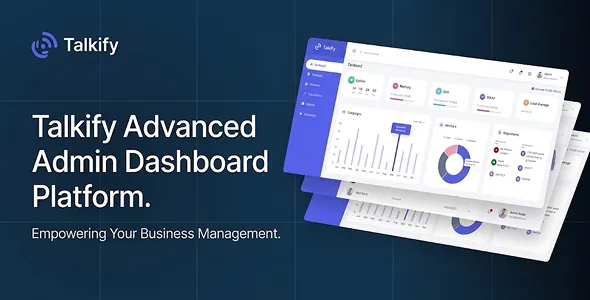
Talkify – Call & SMS With Campaign Maintain Admin Dashboard Template
Talkify – Call & SMS With Campaign Maintain Admin Dashboard Template is a modern admin dashboard website template designed for businesses, communication service providers, marketing teams, and organizations that need an organized interface for managing calling activities, SMS communication, and campaign-related operations. It provides a frontend starting point for developing a centralized administration panel where users can monitor communication information, organize campaign data, review activity, and manage different operational sections through a structured dashboard experience.
Businesses increasingly rely on direct communication to connect with customers, share updates, send notifications, and promote products or services. Managing these activities across separate tools can make it difficult to maintain an organized overview of communication workflows. A dedicated administration interface can help bring relevant information together and make routine management tasks easier to navigate. Talkify is intended for projects that require a dashboard presentation focused on call and SMS management, campaign organization, and communication-related administration.
As an admin dashboard template, Talkify can serve as a starting point for developers building a communication management platform or internal business application. Its interface can be customized with relevant data, navigation sections, tables, charts, forms, and other dashboard components according to the supplied package. The actual functionality depends on the included source code, configuration, and integrations. Features such as sending SMS messages, initiating calls, tracking delivery status, managing contacts, and executing campaigns generally require suitable backend development and connections to communication service providers.
What Is Talkify Call and SMS Admin Dashboard Template?
Talkify is an administration dashboard template intended for applications involving call management, SMS communication, and campaign-related activities. It provides a visual foundation for building an interface that helps administrators organize communication information and access important operational sections from a centralized environment.
Communication platforms may handle different types of activities, including customer calls, text message notifications, promotional campaigns, contact management, and communication history. An organized dashboard can make these activities easier to review by presenting relevant information in structured sections.
Talkify can be evaluated for communication service providers, digital marketing agencies, customer engagement platforms, call centers, business communication applications, and organizations that manage customer outreach activities.
The template is intended to support the frontend presentation of an administration system. Developers can adapt its interface to match the requirements of a specific application, connect it to suitable data sources, and implement the business logic needed for operational use. The included documentation should be reviewed to confirm the available pages, components, dependencies, and supported technologies.
Centralized Communication Management Dashboard
A centralized dashboard helps administrators access important communication information without navigating between unrelated interfaces. For businesses that manage calls and SMS campaigns, a clear overview can make daily operations easier to understand.
Talkify can be used as a starting point for creating a communication management dashboard with sections for activity summaries, campaign information, communication records, and other administrative data, depending on the layouts included in the template.
A dashboard may display information such as total communication activity, recent campaign performance, message records, call summaries, and pending operational tasks when the relevant data is available through the connected system.
The value of a dashboard depends on how effectively it organizes information. Important metrics should be easy to recognize, while detailed records should remain accessible through dedicated pages or tables. Administrators should be able to understand the status of their communication activities without dealing with unnecessary visual complexity.
Talkify’s interface can be customized to prioritize the information most relevant to the intended application.
Call Management Interface
Call management is an important part of many business communication systems. Organizations may use calling services for customer support, sales inquiries, appointment confirmations, service updates, and other business-related conversations.
Talkify can provide a frontend foundation for presenting call-related information within an administrative dashboard. Depending on the supplied components and the connected application, developers may organize call records, activity summaries, contact details, and relevant status information.
A call management interface may include information such as:
- Call history and activity records.
- Contact or customer details.
- Call dates and timestamps.
- Call duration, where available.
- Incoming and outgoing call classifications.
- Call status information.
- Assigned team members or operators.
- Relevant notes and follow-up details.
These elements can help administrators review communication activity and understand how calls are handled within the organization.
However, an HTML or admin dashboard template does not automatically provide telephony services. Initiating calls, receiving calls, recording conversations, and retrieving call details require suitable telecommunication services, backend logic, and authorized integrations. Developers should verify which interface elements are included and implement the required functionality separately.
SMS Management and Messaging Interface
SMS communication is commonly used for customer notifications, appointment reminders, verification messages, order updates, service announcements, and promotional communication. A structured SMS management interface can help businesses organize these activities.
Talkify can be adapted for an SMS administration panel where relevant message information is displayed in a clear and manageable format. Depending on the available layouts, developers can create sections for message records, recipient information, campaign details, and message status.
An SMS management system may organize information such as:
- Recipient contact details.
- Message content.
- Sending date and time.
- Message status.
- Campaign association.
- Delivery information when supplied by the provider.
- Sender information.
- Communication history.
A well-organized interface can make it easier to review message activity and investigate communication issues. Administrators may also need access to relevant campaign records and delivery reports.
Actual SMS sending and delivery tracking require integration with an SMS gateway or communication service provider. The backend must handle authentication, message requests, provider responses, delivery reports, error handling, and applicable messaging regulations. Talkify should therefore be treated as a dashboard foundation rather than a standalone messaging service.
Campaign Management and Organization
Campaign management is an important part of business communication. Organizations may create campaigns to announce new products, share service updates, promote offers, remind customers about appointments, or communicate important information.
Talkify can be considered for an administration interface that organizes campaign-related information. Developers can adapt the available layouts to present campaign names, descriptions, schedules, recipient groups, and performance information where supported by the application.
A campaign management section may include:
- Campaign name and description.
- Campaign type, such as SMS or call-based outreach.
- Target audience or contact group.
- Planned campaign schedule.
- Campaign status.
- Associated message content.
- Activity summaries.
- Performance information from connected services.
Organizing campaigns in one location can help administrators understand which activities are planned, active, completed, or require attention.
Campaign scheduling, audience selection, automated execution, and reporting require backend functionality. The actual capabilities depend on the application connected to the dashboard and the communication services used by the business.
Dashboard Analytics and Communication Reports
Reports help businesses understand communication activity and evaluate whether their outreach processes are meeting operational goals. A dashboard that presents relevant metrics can make it easier to identify patterns and review campaign outcomes.
Talkify can be customized to display communication-related statistics through dashboard cards, tables, charts, and other visual components included in the supplied package.
Depending on the available data, an application may present information such as:
- Total calls during a selected period.
- Incoming and outgoing call counts.
- SMS messages submitted.
- Message delivery results.
- Campaign activity.
- Recent communication records.
- Customer engagement information.
- Activity comparisons over different periods.
The usefulness of these reports depends on accurate data collection and clear presentation. Metrics should be defined consistently so that administrators understand what each figure represents.
For example, a message submitted to an SMS provider is not necessarily the same as a successfully delivered message. Similarly, a call attempt should not automatically be counted as a completed conversation. Reports should reflect the definitions and information supplied by the connected systems.
Talkify can provide a visual starting point for presenting these insights, while data collection and reporting calculations must be implemented through the relevant backend.
Contact and Customer Information Management
Communication activities often depend on accurate customer and contact information. Businesses need to organize recipient details, maintain relevant records, and ensure that communication is directed to the appropriate audience.
Talkify can be adapted to include contact-related administration sections, depending on the available interface components. Developers may use these sections to present customer names, phone numbers, contact categories, and other information required by the application.
A contact management interface may support workflows such as reviewing customer details, organizing contacts into groups, and accessing communication history. The exact functions depend on the backend and the data model used by the final application.
Contact information should be handled responsibly. Businesses should apply suitable access controls, protect personal information, and follow applicable privacy and communication requirements. Contact lists should not be used for unsolicited messaging without the necessary permissions or legal basis.
A well-organized contact interface can support more consistent communication while helping administrators maintain accurate records.
Admin Dashboard Layout and Navigation
An administration dashboard should make important sections easy to locate. When users manage several communication activities, clear navigation helps them move between records, campaigns, reports, and settings.
Talkify can be customized around a navigation structure that reflects the needs of the communication platform. Depending on the included design, developers may organize sections for the dashboard overview, calls, SMS records, campaigns, contacts, reports, and configuration.
Navigation labels should be familiar and descriptive. Administrators should be able to identify the purpose of each section without needing to guess what a menu item represents.
A logical page hierarchy also helps when the application grows. Additional sections can be introduced for user administration, permissions, service configuration, billing, or other operational requirements when those features are part of the project.
The final navigation structure should be based on the actual needs of the users rather than including unnecessary pages simply to make the dashboard appear more complex.
Tables, Records, and Data Presentation
Tables are commonly used in administration systems because they allow users to review multiple records in a structured format. Communication platforms may need tables for call logs, SMS records, campaign information, contact lists, and activity reports.
Talkify can serve as a starting point for presenting this type of information through suitable table layouts and data components, depending on what is included in the template.
Useful table columns may include record identifiers, contact details, activity dates, communication types, campaign names, and status indicators. The exact fields should reflect the data available in the application.
For larger datasets, developers may implement search, sorting, filtering, and pagination through JavaScript or backend services. These features can help administrators find relevant records without browsing every entry manually.
Tables should remain readable and easy to use. Important information should be prioritized, while less frequently needed details can be placed in dedicated record views. Responsive table behavior should also be tested on smaller devices.
User Roles and Administrative Access
Communication management platforms may be used by different types of users. An administrator may need access to system-wide settings, while campaign managers may focus on outreach activities and support staff may only need to review assigned communication records.
Talkify can be adapted to present different administrative sections according to the access requirements of the final application. However, actual role-based access control must be implemented through the backend or authentication system.
A communication platform may define roles such as:
- Super Administrator: Oversees the application and manages major configuration settings.
- Administrator: Handles day-to-day platform administration.
- Campaign Manager: Organizes campaigns and reviews related information.
- Communication Operator: Works with assigned calling or messaging activities.
- Reporting User: Reviews authorized reports and performance information.
Access permissions should be based on job responsibilities. Sensitive customer data, communication records, and service configuration should only be available to authorized users.
A dashboard interface can display different menus or controls according to user permissions, but hiding an interface element alone does not provide security. The backend must verify permissions for every protected action and data request.
Responsive Design for Different Devices
Administrators may need to access communication information from desktop computers, laptops, tablets, or smartphones. Responsive presentation helps ensure that important dashboard information remains usable across different screen sizes.
Talkify can be customized for different devices according to the responsive behavior supported by its supplied styles and layouts. Developers should test the navigation, tables, cards, charts, forms, and other interface elements across relevant viewport sizes.
On smaller screens, dashboard cards may need to stack vertically, navigation may require a compact menu, and tables may need horizontal scrolling or alternative layouts. Text should remain readable, and interactive controls should be easy to select.
Responsive testing should include both summary pages and detailed management sections. A dashboard may look appropriate on desktop but become difficult to use when it contains wide tables or complex reporting components.
Custom CSS and additional JavaScript can also affect responsive behavior. Testing after major modifications helps identify layout problems before deployment.
Customization and Branding
A communication management platform should have a consistent visual identity that matches the organization or software product behind it. Customization helps transform a general dashboard layout into an interface that feels connected to the business.
Talkify can be adapted through changes to colors, typography, logos, icons, spacing, navigation labels, and dashboard content, depending on the supplied source code and styling structure.
A communication service provider may choose a professional visual identity that emphasizes clarity and operational efficiency. A marketing platform may use a more prominent visual presentation for campaign-related information. An internal business tool may prioritize readability and straightforward navigation.
Consistency should be maintained across all administrative pages. Buttons, forms, tables, status indicators, headings, and navigation elements should follow a recognizable design system.
Developers should review how styles and shared components are organized before making extensive changes. Keeping custom code separate and documenting important modifications can simplify future maintenance.
Search, Filtering, and Record Management
Communication platforms can generate a large volume of records over time. Administrators may need to locate a particular contact, review a campaign, find an SMS record, or examine call activity from a specific period.
Talkify can be extended with search and filtering interfaces according to the requirements of the final application. Depending on the supplied components, developers may customize search fields, filter controls, date selections, and record views.
Useful filters may include:
- Date range.
- Communication type.
- Campaign name.
- Contact or recipient.
- Message or call status.
- Assigned operator.
- Activity category.
These tools can make record management more efficient when connected to accurate application data. Search and filtering should return relevant results and provide understandable feedback when no matching records are found.
For large datasets, server-side filtering and pagination may be more appropriate than loading every record into the browser. The implementation should be selected according to the scale and architecture of the application.
Integration with Communication Service Providers
Call and SMS management applications often rely on external communication providers to deliver messages and support calling workflows. These services may offer APIs for initiating calls, sending messages, retrieving records, and receiving status updates.
Talkify can be used as a frontend starting point for an application that connects to suitable communication APIs. The actual integration depends on the service provider, available endpoints, authentication requirements, and backend architecture.
A typical integration process may involve:
- Selecting a suitable calling or SMS service provider.
- Reviewing the provider’s API documentation.
- Creating secure server-side authentication and configuration.
- Connecting the dashboard to backend endpoints.
- Handling provider responses and errors.
- Updating records and reporting information.
- Testing communication workflows before production use.
API credentials should be stored securely on the server rather than exposed in browser-side code. Communication requests should also be validated and logged appropriately.
Developers should review the template documentation and the chosen provider’s requirements before estimating the work needed for integration.
Security and Privacy Considerations
Communication platforms may process customer phone numbers, contact information, message content, call records, and campaign details. Protecting this information is an important part of building a reliable application.
Talkify provides a possible frontend foundation, but application security must be implemented through the complete software architecture. Developers should use secure authentication, role-based permissions, protected API endpoints, and suitable data handling practices.
Important considerations include:
- Use HTTPS for data transmission.
- Store API credentials securely on the server.
- Apply appropriate access controls.
- Validate and sanitize user input.
- Protect sensitive communication records.
- Maintain suitable logs and audit information.
- Use secure session management.
- Create regular backups.
- Follow applicable privacy and messaging regulations.
Businesses should also respect consent and opt-out requirements when sending promotional messages. Calling and SMS campaigns must comply with the laws and service-provider policies applicable to their target regions.
Security should be reviewed throughout development and maintenance rather than treated as a final design step.
Performance and Dashboard Usability
A dashboard should load efficiently and allow administrators to work with information without unnecessary delays. Large datasets, complex charts, external scripts, and repeated API requests can affect performance.
The actual performance of a Talkify-based application depends on its implementation, hosting environment, frontend assets, backend services, and connected APIs.
Developers can improve performance by reviewing unused scripts, optimizing images, minimizing unnecessary requests, and loading detailed data only when required. Large tables may benefit from server-side pagination, while dashboard summaries can use appropriately designed API responses.
The interface should also prioritize usability. Important information should be easy to recognize, labels should be understandable, and administrative workflows should avoid unnecessary steps.
Testing should include realistic data volumes rather than only small demonstration datasets. This helps identify performance issues before the application is used in a production environment.
Who Can Use Talkify Admin Dashboard Template?
Talkify may be suitable for different businesses and development projects that require a call, SMS, and campaign administration interface.
Communication Service Providers: Build an administrative interface for organizing communication activity and presenting service-related information.
Call Centers: Create a dashboard foundation for reviewing call records, operator information, and communication summaries.
Digital Marketing Agencies: Organize SMS campaign information and related marketing activity through a centralized interface.
Customer Engagement Platforms: Develop administrative pages for customer communication and outreach workflows.
Business Communication Applications: Present calling and messaging information in an organized environment for business users.
SMS Marketing Platforms: Create a frontend for managing campaign records, recipient information, and message-related reports.
Software Development Companies: Use the dashboard as a starting point for custom communication management applications.
Internal Business Teams: Build an administrative interface for authorized staff who manage customer communication activities.
The best use case depends on the template’s supplied features, the required backend services, and the intended application workflow.
Tips for Building a Communication Platform with Talkify
A well-designed dashboard should be supported by a clear application plan. Before customizing Talkify, identify the main communication activities that the platform needs to support.
Start by defining the primary users and their responsibilities. Determine whether the application will be used by administrators, campaign managers, operators, reporting teams, or customers. This will help establish the required navigation and permission structure.
Next, identify the communication services that need to be integrated. Calling and SMS providers may have different API requirements, data formats, authentication methods, and usage policies. Review these requirements before beginning backend development.
Prepare the data structure for contacts, calls, messages, campaigns, and reporting records. Clear data organization makes it easier to connect the frontend to the backend and maintain consistent information.
Customize the dashboard to prioritize frequently used activities. Use clear labels, readable tables, useful filters, and understandable status indicators. Avoid adding unnecessary sections that make the interface difficult to navigate.
Before deployment, test authentication, permissions, communication integrations, message status updates, call records, campaign workflows, and reporting accuracy. Verify that sensitive information is protected and that the system handles provider errors appropriately.
Finally, plan for regular maintenance, security reviews, backups, dependency updates, and performance monitoring. These practices help keep the application dependable as communication activity grows.
Final Thoughts on Talkify – Call & SMS With Campaign Maintain Admin Dashboard Template
Talkify – Call & SMS With Campaign Maintain Admin Dashboard Template is a potential starting point for developers and businesses planning a communication management application. Its intended focus makes it relevant to projects involving calling activities, SMS administration, campaign organization, customer outreach, and communication reporting.
A well-customized dashboard can bring important communication information into one organized interface. Administrators may use the frontend to review activity summaries, explore records, organize campaigns, and access relevant operational sections. Businesses can adapt the presentation to their own workflows and branding requirements.
The final capabilities depend on the supplied source code, available components, project configuration, and connected services. Features such as actual call handling, SMS delivery, campaign scheduling, customer management, and reporting require suitable backend development and authorized service integrations. Reviewing the documentation and included files before implementation is essential.
Long-term reliability also depends on secure API integration, accurate data management, access control, privacy practices, responsive testing, and regular maintenance. A dashboard template alone cannot provide a complete communication platform, but it can offer a useful frontend foundation for a carefully developed application.
For developers and businesses seeking an administration interface for call, SMS, and campaign-related workflows, Talkify can be evaluated as part of a broader communication software project. With thoughtful customization and reliable backend integration, it can help create a structured administrative experience for managing business communication activities.