My Account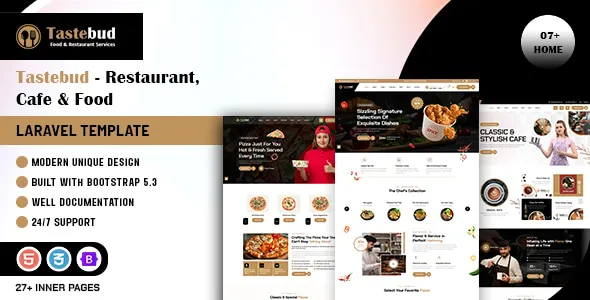
Tastebud – Restaurant, Cafe & Food Laravel Template
Tastebud – Restaurant, Cafe & Food Laravel Template is a website development template designed for restaurants, cafés, food businesses, dining establishments, and hospitality service providers looking to build a professional online presence. Built around the Laravel framework, Tastebud provides a foundation for creating food-focused websites that introduce restaurant brands, showcase menus, highlight dining experiences, and make important business information accessible to visitors. Its multipurpose positioning makes it suitable for different food-related businesses, from casual cafés and family restaurants to specialty dining establishments and food service providers.
A restaurant website plays an important role in helping customers discover a business, explore its menu, understand its atmosphere, and find essential information before visiting. Customers often look online for food options, opening hours, location details, special menus, and ways to contact a restaurant. A well-organized website can make this information easy to find while presenting the business in a visually appealing way.
Tastebud can be customized to match different restaurant concepts and branding requirements. Developers can adapt its frontend layouts, content sections, and Laravel-based project structure to create a website suited to a particular food business. Depending on the supplied source files and implemented functionality, the template can also be extended with backend features and suitable integrations for restaurant-related workflows.
What Is Tastebud – Restaurant, Cafe & Food Laravel Template?
Tastebud is a Laravel website template intended for businesses operating in the restaurant, café, and food industry. Laravel is a PHP framework used to develop web applications and backend systems. Its architecture can support structured application development, routing, database interactions, and server-side functionality when configured and implemented appropriately.
Unlike a basic static HTML template, a Laravel-based project can provide a foundation for more extensive website development. Developers can work with its supplied layouts and application structure to customize pages, organize content, and connect the website with suitable backend services.
Tastebud is relevant to restaurants that want to introduce their business, present food offerings, and communicate with potential customers through a dedicated website. It can also be evaluated by developers building websites for cafés, bakeries, food outlets, dining services, and hospitality businesses.
The exact pages, features, dependencies, and backend capabilities should be confirmed through the current product demo and documentation. A Laravel template does not automatically include every restaurant management feature, so functions such as online payments, table reservations, order processing, and delivery management should be verified before implementation.
Website Design for Restaurants and Dining Businesses
A restaurant website should reflect the character of the dining business while making important information accessible. Customers may visit the website to discover the menu, explore food photographs, check business hours, or learn about the restaurant’s location.
Tastebud can be customized to present a restaurant through organized content sections and food-focused visuals. A restaurant may use the homepage to introduce its concept, highlight popular dishes, communicate its dining style, and guide visitors toward the menu or contact page.
A professional restaurant website can include:
- Restaurant introduction and brand story
- Food and beverage menu
- Featured dishes and specialties
- Food photography and gallery sections
- Restaurant location and contact information
- Opening hours
- Special offers and announcements
- Customer reviews and testimonials
- Reservation or inquiry information
The final structure should reflect the business’s actual needs. A small café may prefer a simple website focused on its menu and location, while a larger restaurant may need additional pages for private dining, events, catering, or multiple food categories.
Ideal for Cafés and Coffee Shops
Cafés often build their identity around beverages, food selection, atmosphere, and customer experience. Their websites should communicate what makes the café distinctive and help visitors understand what they can expect.
Tastebud can be adapted for coffee shops, tea houses, dessert cafés, bakery cafés, and casual dining spaces. A café website may feature sections for coffee varieties, specialty drinks, breakfast options, sandwiches, desserts, and seasonal selections.
A coffee shop could use its homepage to introduce its brand and highlight signature beverages. Dedicated menu sections can then provide details about available drinks and food items.
Photography can play an important role in presenting the café’s atmosphere. Images of coffee preparation, interior spaces, desserts, and food presentations can help visitors understand the business’s style.
A café may also publish information about takeaway services, special events, or loyalty programs if these are part of its actual operations. Any interactive ordering or membership features require suitable backend functionality or third-party integrations.
Restaurant Menu Presentation and Food Categories
The menu is one of the most important sections of a restaurant website. Visitors often want to understand what is available before deciding where to eat.
Tastebud can be customized to organize food and beverage offerings into clear categories. Depending on the supplied layouts, developers may create sections for starters, main courses, desserts, beverages, snacks, breakfast, and specialty dishes.
A structured menu can help customers browse available options without feeling overwhelmed. Each menu item may include a dish name, short description, price, and relevant photograph where appropriate.
Restaurants should ensure that menu information remains accurate. Prices, ingredients, portion details, availability, and dietary information should be reviewed regularly.
For businesses with changing menus, a backend content management system can make updates more convenient. The implementation of editable menu records depends on the supplied Laravel functionality or additional development.
A well-organized menu should prioritize clarity. Customers should be able to identify the food category they are interested in and understand the basic details of each offering.
Food Photography and Visual Presentation
Food photography can strongly influence how visitors perceive a restaurant. High-quality images help communicate the appearance of dishes, the dining environment, and the overall personality of a food business.
Tastebud can be customized with relevant photographs and visual content that reflect the restaurant’s menu and brand identity. Images of signature dishes, freshly prepared meals, beverages, desserts, and interior spaces can make the website more engaging.
A restaurant may use a featured food section to highlight popular dishes or seasonal specialties. A gallery can provide a broader view of the dining experience, while individual menu images can help visitors understand particular offerings.
Image selection should be consistent with the actual business. Generic stock photographs may be useful during initial development, but original food photography can make the finished website more authentic.
Developers should also optimize image dimensions and file sizes. Large photographs can affect loading performance, particularly for visitors using mobile devices or slower internet connections.
Homepage Layout and Restaurant Introduction
The homepage provides the first major introduction to a restaurant website. It should communicate the business’s identity and guide visitors toward important information.
Tastebud can be customized around a homepage structure that introduces the restaurant, highlights its menu, and provides clear contact opportunities. The exact sections depend on the available layouts and source components.
A restaurant homepage may include:
- Main banner with restaurant branding
- Short introduction to the business
- Featured menu categories
- Signature dishes
- About the restaurant section
- Food photography gallery
- Customer feedback
- Special announcements
- Contact and location information
The introductory section should explain the restaurant’s concept and make it clear what kind of dining experience it offers.
Featured dishes can encourage visitors to explore the full menu. A short About section can communicate the restaurant’s background, while contact information helps visitors find the business.
Not every restaurant needs a long homepage. The best structure is one that gives visitors useful information without unnecessary sections or repetitive content.
About Us and Restaurant Brand Story
An About page provides an opportunity to introduce the restaurant’s history, concept, values, and approach to food. Customers may be interested in learning about the business before visiting, particularly when choosing a new dining destination.
Tastebud can be customized to present information about the restaurant’s background and identity. A family-owned restaurant may describe its history and traditions, while a modern café might introduce its food philosophy and approach to customer experience.
A restaurant can also explain its cuisine, ingredient preferences, cooking approach, or specialty dishes where these details are accurate.
Team introductions may be included when they contribute meaningful information. Photographs and short descriptions of chefs or other staff members can help communicate the people behind the business.
The About page should use genuine information rather than generic statements. Authentic details can make the restaurant’s story more relevant to visitors.
Laravel Framework for Restaurant Website Development
Laravel is a PHP framework commonly used for building web applications and server-side systems. It provides a structured development environment with tools for routing, database interaction, request handling, and application organization.
Tastebud’s Laravel foundation makes it relevant to developers who want to work within a PHP-based framework rather than rely exclusively on static website files.
Depending on the supplied implementation, developers can customize application routes, views, controllers, and other project components to suit the website’s requirements. They can also connect the project to a suitable database and implement server-side operations.
Before starting development, review the template’s documentation and project configuration. Check the required PHP version, Laravel version, Composer dependencies, database requirements, environment settings, and installation instructions.
The exact Laravel structure should be understood before making major modifications. Following the supplied development instructions can help reduce setup problems and support easier maintenance.
Backend Customization and Dynamic Content
A restaurant website may need to display information that changes over time. Menus, prices, announcements, opening hours, and special offers may need regular updates.
A Laravel-based project can be extended to support dynamic content management when the required backend functionality is implemented. Developers may connect website sections to database records so that authorized administrators can update information without manually editing every page.
Possible dynamic content areas include:
- Restaurant information
- Food categories
- Menu items and prices
- Food images
- Special offers
- Customer inquiries
- Opening hours
- Location details
- Blog or announcement content
The actual availability of these features depends on the supplied project. A visual menu page does not automatically mean that a working menu management system is included.
Developers should determine which content needs to be editable and design the appropriate database structure and administrative operations. Input validation, access permissions, and secure file handling should be included when implementing dynamic content.
Online Food Ordering and Restaurant Inquiries
Many restaurants use their websites to receive customer inquiries or provide information about ordering options. A convenient online experience can help customers understand how to request food or contact the business.
Tastebud can be evaluated as a starting point for a restaurant website that may later be extended with online ordering functionality. Depending on the supplied components, developers can customize order-related pages, forms, and interface elements.
A food ordering workflow may require customers to select menu items, review quantities, provide delivery or collection information, and confirm their requests.
For a functional ordering system, developers need to implement product records, order processing, customer information handling, and suitable confirmation mechanisms. Payment processing requires integration with a supported payment gateway and appropriate server-side validation.
Restaurants should also define practical ordering conditions, including delivery areas, operating hours, minimum order requirements, and item availability.
Unless the current package explicitly includes a complete ordering system, these capabilities should be treated as additional development work rather than assumed template features.
Table Reservations and Dining Inquiries
Restaurants that accept table reservations may benefit from providing a convenient way for visitors to submit booking requests. Customers often want to select a preferred date, time, and party size before visiting.
Tastebud can be customized with reservation-related interface elements if suitable pages or components are available. A restaurant may use a reservation inquiry form to collect customer details and preferred dining information.
A typical reservation request may include:
- Customer name
- Contact information
- Preferred date
- Preferred time
- Number of guests
- Special requests
A frontend form can provide the visual structure, but a functional reservation system needs backend processing and appropriate data storage.
Restaurants that require real-time table availability must also implement a system that considers table capacity, existing reservations, opening hours, and booking rules. Email notifications or confirmation messages may require additional integrations.
The reservation process should be tested carefully to prevent duplicate bookings and incorrect availability information.
Suitable for Bakeries and Dessert Businesses
Bakeries and dessert businesses need websites that present their products clearly and encourage customers to explore available selections.
Tastebud can be adapted for bakeries, cake shops, dessert cafés, pastry businesses, and specialty food outlets. The menu can be organized around cakes, pastries, cookies, breads, desserts, beverages, and seasonal products.
A bakery website may highlight signature items and provide information about custom orders. A cake business could create separate sections for celebration cakes, wedding cakes, and customized dessert arrangements.
Product descriptions should include relevant details such as sizes, flavors, ingredients, and ordering conditions when applicable.
Food photography can help customers compare products and understand the presentation style. A gallery may also showcase previous custom creations, provided that the images represent genuine business work.
If the business accepts online orders or custom requests, the website will need suitable form processing, order storage, and communication functionality.
Suitable for Food Delivery and Catering Businesses
Food delivery and catering companies have different website requirements from traditional dine-in restaurants. They may need to communicate service areas, menu packages, ordering procedures, and event-related offerings.
Tastebud can be customized for these business models by organizing content around the services offered.
A food delivery company may present menu categories, delivery information, ordering conditions, and contact details. A catering business might create sections for corporate events, private celebrations, wedding functions, and customized menus.
Dedicated pages can explain package options, service requirements, and how customers can request a quotation.
For catering businesses, inquiry forms can collect event dates, guest numbers, venue details, and menu preferences. A functional quotation or booking process requires appropriate backend implementation.
Businesses should keep service areas, pricing conditions, and availability information accurate to avoid creating unrealistic expectations.
Responsive Design for Desktop, Tablet, and Mobile
Restaurant websites are frequently visited on smartphones, especially when customers are searching for nearby food options or checking a menu while away from home.
Tastebud should be evaluated for responsive behavior across desktop computers, tablets, and mobile devices. Developers should review the supplied layouts and test how navigation, images, menus, and forms adapt to different screen sizes.
Important responsive considerations include:
- Readable menu descriptions and prices
- Mobile-friendly navigation
- Images that fit the available screen width
- Buttons with comfortable touch areas
- Contact details that are easy to access
- Forms that are simple to complete
- Consistent spacing and alignment
The menu deserves particular attention because customers may spend considerable time browsing food categories and item descriptions.
Developers should test all important pages rather than relying only on the homepage. Custom styles, scripts, and additional integrations may affect the responsive experience.
SEO-Friendly Restaurant Website Structure
Search engine optimization can help restaurants improve their online discoverability and reach people searching for food and dining options. A well-structured website provides a foundation, but search performance also depends on content quality, competition, technical implementation, and local business information.
A Tastebud-based website can be organized around clear pages for the restaurant’s main services, food categories, and business information.
Important SEO practices include:
- Descriptive page titles and meta descriptions
- Logical heading structures
- Clear and readable URLs
- Relevant internal links
- Descriptive image alternative text
- Optimized food photographs
- Accurate contact and location information
- Appropriate sitemap and indexing configuration
- Relevant local business information
Restaurants may benefit from publishing accurate location details and consistent business information across their website and other online profiles.
Menu pages should use clear food descriptions rather than repeating the same keywords excessively. Useful content about cuisine, specialties, dining options, and services can help visitors understand the business.
Local SEO should reflect the actual restaurant location and service area. Avoid publishing misleading location pages or unsupported claims about availability.
A website template cannot guarantee search rankings or customer traffic. Long-term visibility requires accurate information, original content, technical maintenance, and a positive user experience.
Content Marketing and Restaurant Blog
A restaurant blog can help businesses share updates, introduce food-related topics, and communicate information about their cuisine or dining experience.
Tastebud can be extended with blog content if the supplied project includes suitable layouts or developers add the required functionality.
Restaurants may publish articles about seasonal menus, ingredient choices, food preparation, local cuisine, special events, or dining recommendations. A bakery might share information about different cake styles, while a café could introduce coffee varieties or beverage preparation methods.
Useful blog content should provide genuine information rather than repeat promotional messages. Articles can also introduce new menu items, explain restaurant services, or answer common customer questions.
Internal links can connect relevant articles with menu pages, special offers, and contact information. This helps visitors explore the website naturally.
If blog posts need to be managed through an administrative interface, developers must implement the appropriate content storage and editing functionality.
Customization and Restaurant Brand Identity
A restaurant website should reflect the business’s personality and dining concept. A consistent visual identity helps create a recognizable presentation and supports the overall customer experience.
Tastebud can be customized according to the restaurant’s branding requirements. Depending on the available styles and components, developers may adjust colors, typography, images, spacing, buttons, navigation, and page layouts.
A fine-dining restaurant may prefer an elegant presentation, while a casual café may choose a more relaxed and approachable visual style. A bakery might emphasize product photography, while a family restaurant may prioritize menu clarity and location information.
Consistency should be maintained across the homepage, menu, About page, gallery, and contact sections. Repeated elements should follow the same design rules.
Use photographs and content that represent the actual business. Accurate menus, original food images, and genuine restaurant information can make the website more trustworthy than generic placeholder content.
Performance and Website Optimization
Website performance affects how easily customers can browse a restaurant’s pages. A website that loads efficiently makes it more convenient to review menus, explore photographs, and locate contact information.
The performance of a Tastebud-based project depends on its Laravel implementation, hosting environment, database queries, image assets, scripts, stylesheets, and external integrations.
Developers can improve performance by optimizing photographs, removing unnecessary resources, using suitable caching strategies, and reviewing database operations where applicable.
Food websites often use large photographs, so image optimization is particularly important. Images should be sized appropriately for their display areas and compressed without losing too much visual quality.
The website should be tested across important pages, including the homepage, menu, gallery, and contact sections. Administrative screens should also be reviewed if they are part of the project.
Performance monitoring after deployment can help identify issues as the website receives more visitors or additional content.
Security and Laravel Website Maintenance
A Laravel website requires appropriate security practices and ongoing maintenance. Restaurant websites may collect customer inquiries, reservation information, and other personal details, so these records should be handled carefully.
Developers should follow the supplied installation instructions and use supported software versions. Environment variables and sensitive credentials should be protected rather than exposed in publicly accessible files.
Important maintenance practices include:
- Keeping Laravel and dependencies updated
- Using secure hosting and HTTPS
- Protecting database credentials
- Validating user-submitted information
- Applying appropriate access permissions
- Maintaining regular backups
- Reviewing file upload handling
- Monitoring errors and application activity
If the website includes an administrative interface, access should be restricted to authorized users. Password management and role-based permissions should be implemented according to the project’s requirements.
Backups should be tested periodically so that the business has a recovery option if a technical problem occurs.
Who Should Use Tastebud – Restaurant, Cafe & Food Laravel Template?
Tastebud may be suitable for several businesses and development projects within the restaurant and food industry.
Restaurants: Dining establishments can customize the website to introduce their business, present menus, and provide essential visitor information.
Cafés and coffee shops: Coffee businesses can showcase beverages, food selections, café interiors, and special offerings.
Bakeries: Bakeries can present bread, cakes, pastries, desserts, and custom order information.
Dessert shops: Specialty dessert businesses can organize product categories and highlight signature creations.
Food outlets: Casual dining businesses and food outlets can create a website that explains their menu and operating details.
Catering companies: Catering providers can introduce event services, menu packages, and inquiry options.
Food delivery businesses: Delivery-focused companies can customize the website around food categories, delivery information, and customer inquiries.
Hospitality businesses: Hotels and hospitality providers with restaurant facilities can adapt the website to present their dining services.
Freelance developers: Independent developers can use the Laravel project as a starting point for suitable restaurant website projects.
Web development agencies: Agencies can customize the template for clients in the restaurant, café, and food service industries.
Before selecting the template, review its current demo, documentation, Laravel version, dependencies, included pages, and actual functionality to confirm that it matches the project requirements.
Tips for Building a Successful Restaurant Website with Tastebud
A successful restaurant website should make it easy for visitors to understand the business, explore the menu, and find essential information. The template provides a foundation, but the final experience depends on accurate content and careful customization.
Start by identifying the restaurant’s concept and target audience. Decide which information visitors need most, such as menu details, location, opening hours, ordering options, or reservation information.
Prepare the website content before customizing every section. This may include the restaurant introduction, food categories, dish descriptions, prices, contact details, and service information.
Use original food photographs wherever possible. Images should represent the actual menu and be optimized for website performance.
Keep the navigation simple and make important pages easy to access. The menu, About page, and contact information should not be hidden behind unnecessary navigation steps.
Review the Laravel project structure before making technical changes. Confirm the required PHP and Laravel versions, installation process, dependencies, and database configuration.
If the project needs online ordering or reservations, plan the backend requirements carefully. Implement suitable data validation, secure payment integration where needed, and clear customer confirmations.
Finally, test the website on desktop and mobile devices. Review menus, forms, navigation, images, page loading, and all integrated functionality before launch. Regular maintenance will help keep the restaurant’s online information accurate and reliable.
Final Thoughts on Tastebud – Restaurant, Cafe & Food Laravel Template
Tastebud – Restaurant, Cafe & Food Laravel Template is a website development resource for restaurants, cafés, bakeries, food outlets, catering providers, and other businesses in the food industry. Its restaurant-focused positioning makes it relevant to projects that need a professional way to introduce a food business, present menu offerings, showcase dining experiences, and communicate essential information.
Built around the Laravel framework, Tastebud provides a starting point for developers working with PHP-based website projects. Its structure can be customized to match different restaurant concepts, brand identities, and content requirements.
The final capabilities depend on the supplied source code, Laravel version, documentation, dependencies, and additional development work. Features such as online ordering, table reservations, payment processing, customer accounts, and dynamic menu management require suitable backend functionality or third-party integrations unless explicitly included.
For businesses and developers looking for a restaurant-focused Laravel website foundation, Tastebud can be evaluated as part of a broader web development project. With accurate menu information, appealing food photography, consistent branding, responsive customization, secure implementation, and ongoing maintenance, it can help establish a professional online presence for a restaurant, café, or food business.