My Account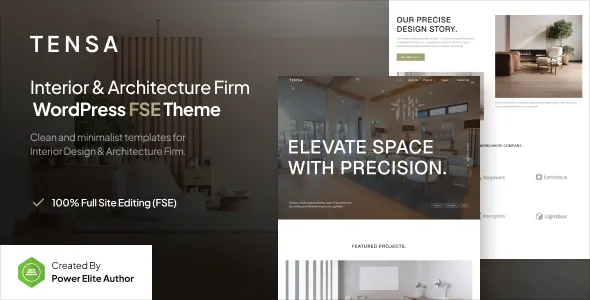
Tensa – Interior Design & Architecture Firm Gutenverse FSE WordPress Block Theme
Tensa – Interior Design & Architecture Firm Gutenverse FSE WordPress Block Theme is a website design solution for interior designers, architecture studios, residential design consultants, commercial space planners, and creative professionals who want to establish a polished online presence with WordPress. Designed for the architecture and interior design niche, Tensa can be considered as a foundation for presenting design services, showcasing completed projects, introducing creative teams, and communicating a firm’s approach to transforming residential, commercial, and professional spaces.
A successful architecture or interior design website should combine visual presentation with clear information. Potential clients often want to explore a studio’s portfolio, understand its services, learn about its design philosophy, and discover how to begin a project. A well-organized website helps visitors move naturally from discovering the firm’s work to understanding its capabilities and making an inquiry. With suitable customization, this theme can support a consistent brand identity and a professional presentation tailored to the studio’s target audience.
WordPress provides tools for managing pages, publishing articles, organizing images, and maintaining website content. Full Site Editing enables users to customize compatible theme areas through the WordPress Site Editor, while Gutenverse can extend the available block-based design options. The actual layouts, templates, and editing features depend on the current theme release and its configuration. Reviewing the official product demo and documentation before installation is recommended to confirm that the available capabilities match the project’s requirements.
What Is Tensa Interior Design and Architecture WordPress Theme?
Tensa is a niche WordPress theme intended for architecture firms, interior design studios, and related creative businesses. Its design focus makes it worth evaluating for professionals who need a website that introduces their expertise, presents project imagery, and explains the services they offer to prospective clients.
Architecture and interior design businesses often work across several project categories, including residential interiors, commercial offices, hospitality environments, retail spaces, renovations, and architectural planning. A professional website can organize these offerings into dedicated sections, helping visitors identify the services most relevant to their requirements.
A design studio may also need to communicate its creative philosophy, design process, experience, and professional team. Portfolio pages can illustrate completed work, while service pages provide information about the scope of the firm’s offerings. An about page can explain the studio’s background, and a contact page can make it easier for potential clients to discuss upcoming projects.
The Full Site Editing approach provides a block-based method of managing compatible website templates and reusable sections. The specific editing controls, layouts, and integrations included with Tensa should be confirmed through its current documentation before the theme is selected.
Full Site Editing With WordPress Blocks
Full Site Editing is a modern WordPress approach that allows users to customize compatible theme elements through the Site Editor. Rather than relying entirely on traditional theme customization methods, website owners can work with blocks and supported templates to manage different areas of their website.
Depending on the theme’s implementation, editable areas may include headers, footers, navigation menus, page templates, and reusable template parts. These tools can help maintain consistent branding across different sections of an architecture or interior design website.
For example, a studio can use a consistent header to display its logo, primary navigation, and portfolio link. A footer can organize business details, service links, social profiles, and contact information. Reusable layouts can help keep service pages and project descriptions visually consistent.
Full Site Editing capabilities vary according to the theme files, WordPress version, and installed configuration. Before making extensive customizations, users should review the available templates and determine whether any additional plugins are required for their intended design.
Gutenverse Block Editor Integration
Gutenverse is a WordPress design ecosystem that works with the block editor and can provide additional tools for arranging page content. Compatible blocks may help website owners build structured layouts without having to create every page element from scratch.
For an architecture studio, these tools may be useful for arranging portfolio sections, service descriptions, introductory content, team profiles, client feedback, and inquiry prompts. The available blocks and design controls depend on the installed Gutenverse version and its compatibility with the theme.
A project page, for example, can combine a title, introductory text, project photographs, design details, and supporting information in a logical sequence. A service page can introduce the offering, explain its scope, and direct visitors toward a consultation inquiry.
Consistent use of headings, spacing, typography, and image proportions can help create a coherent visual experience throughout the website. Before installation, users should verify the theme’s plugin requirements and confirm whether any demo layouts rely on premium extensions or separately licensed features.
Responsive Design for Modern Architecture Websites
Responsive design is essential for a professional website because visitors may explore projects on smartphones, tablets, laptops, and desktop computers. Architecture and interior design websites often contain large photographs and detailed project presentations, making responsive behavior particularly important.
Images should adapt to different screen sizes without becoming distorted or difficult to view. Text should remain readable, navigation should be straightforward, and important contact links should be easy to access. Portfolio grids may need to change their column structure on smaller screens to preserve a comfortable browsing experience.
When configuring Tensa, test the homepage, project galleries, service pages, team sections, and contact forms across different screen sizes. A layout that appears balanced on a desktop may require adjustments on a smartphone, especially when it includes large images, complex block arrangements, or custom styling.
Responsive behavior should also be checked after installing additional plugins or changing page layouts. Testing the complete website helps identify issues before the studio begins directing prospective clients to it.
The current product demo can provide an initial reference, but the finished website should be tested with actual content and images to ensure that it performs as intended.
Website Design for Interior Design Studios
Interior design firms rely on visual presentation to communicate their creativity, technical understanding, and approach to space planning. A professional website should make it easy for visitors to explore the studio’s work while understanding the services available.
Tensa can be evaluated as a starting point for an interior design studio that wants to present residential interiors, commercial environments, renovation projects, furniture planning, or other design services. The final presentation will depend on the available layouts and customization options.
A homepage may introduce the studio’s philosophy and highlight selected projects. Dedicated service pages can explain the firm’s areas of expertise, while a portfolio section demonstrates the range and character of its work. An about page can introduce the designers and describe the studio’s approach to collaboration.
Visual consistency is important throughout the website. A carefully selected image style, typography system, and color palette can help create a recognizable identity without distracting visitors from the work itself.
Content should be accurate and specific to the studio. Statements about professional qualifications, project experience, and completed work should reflect genuine achievements and services.
Architecture Firm Website Presentation
Architecture firms often need websites that communicate both creative vision and professional capability. Their prospective clients may be interested in residential architecture, commercial buildings, renovations, spatial planning, or other architectural services.
A structured website can introduce the firm’s approach, present completed projects, and explain its role at different stages of the design process. Project pages can show how the firm responds to particular site conditions, functional requirements, and aesthetic objectives.
For example, a residential architecture studio may emphasize home design, renovation planning, and spatial organization. A commercial firm might focus on offices, retail spaces, hospitality environments, or other business properties. A multidisciplinary practice may organize its work by project type or service category.
Portfolio content should explain more than the appearance of a finished building. Where appropriate, project descriptions can outline the client’s objectives, the design challenge, the firm’s contribution, and the final result. This provides useful context for prospective clients evaluating the studio’s capabilities.
The theme can serve as a presentation foundation, but the quality of the final website depends on the accuracy of the content, the selection of projects, and the clarity of the overall structure.
Portfolio Galleries and Project Showcases
A portfolio is one of the most important parts of many architecture and interior design websites. It allows prospective clients to review previous work, understand the studio’s visual style, and assess whether its experience aligns with their needs.
Project galleries can be organized by category, such as residential interiors, commercial architecture, office design, hospitality projects, renovations, or retail environments. The best structure depends on the firm’s portfolio and the type of clients it wants to attract.
Each featured project should include relevant images and enough information to explain the work. A useful project presentation may identify the project type, location where appropriate, design objectives, scope of work, and the firm’s contribution. Additional details can describe material choices, spatial planning, lighting considerations, or other relevant design decisions.
Images should be high quality and accurately represent the completed work. Where projects were completed in collaboration with other professionals, the website should describe the studio’s role clearly and give appropriate credit when necessary.
Before building the portfolio, review the available gallery and project layouts in the current theme release. The chosen presentation should make it easy for visitors to browse multiple projects and open individual case studies without unnecessary navigation.
Residential Interior Design Services
Residential interior design services focus on creating living environments that balance aesthetics, functionality, and the needs of the people using them. A website can help studios explain their approach to different room types, home styles, and project requirements.
Depending on the firm’s actual services, dedicated pages may cover living room design, bedroom interiors, kitchen planning, bathroom design, storage solutions, furniture selection, lighting plans, and complete home interiors.
Each service page should explain what the studio provides and how clients can begin the process. For example, a kitchen design page might describe the firm’s approach to layout planning, storage, material selection, and coordination with relevant contractors.
Project photographs can illustrate the studio’s style, while descriptive content helps visitors understand the practical decisions behind the finished spaces. The website should avoid implying that every project follows the same process or that particular results can be guaranteed regardless of budget and site conditions.
A clear presentation of services helps prospective clients determine whether the studio is suitable for their project and what information they should prepare before requesting a consultation.
Commercial and Office Interior Design
Commercial interior design involves creating environments that support the activities, identity, and operational needs of a business. Offices, retail stores, hospitality venues, studios, and other commercial spaces may each require different planning considerations.
A design firm can use dedicated pages to explain its experience with commercial interiors and the services it provides. Depending on the firm’s scope, these may include space planning, layout development, material selection, lighting concepts, furniture planning, and coordination with other professionals.
For office projects, the website might describe how design decisions support circulation, collaboration, privacy, and practical use of space. Retail and hospitality projects may require greater emphasis on customer movement, brand identity, and the atmosphere of the environment.
Case studies can provide valuable context by explaining the objectives of a project and the design decisions made to address them. Photographs should be accompanied by accurate descriptions of the firm’s contribution.
A well-organized service section helps business clients understand the studio’s capabilities before initiating a discussion about their project.
Customization and Visual Brand Identity
A professional design website should reflect the firm’s brand rather than appear like an unchanged demo. Customization helps create a recognizable identity and ensures that the visual presentation supports the studio’s positioning.
Depending on the available settings and compatible tools, Tensa may support adjustments to colors, typography, spacing, images, layouts, and other visual elements. The exact options should be verified in the current documentation.
A minimalist studio may prefer neutral colors, generous spacing, and understated typography. A creative interior design firm might choose warmer tones and expressive imagery, while a commercial architecture practice may prioritize structured layouts and clear project information.
Consistency is important across the homepage, portfolio, service pages, and contact section. Headings, buttons, navigation links, and image treatments should follow a recognizable design system.
Photography should support the firm’s identity and show relevant work. Properly licensed images and original project photography are preferable to generic visuals that do not communicate anything about the business.
Before making extensive design changes, keep a backup and consider testing substantial modifications in a staging environment. This reduces the risk of disrupting the live website.
Homepage Structure and Content Organization
The homepage should introduce the studio, communicate its main services, and direct visitors toward relevant information. A clear layout helps prospective clients understand the firm’s purpose without requiring them to explore every page.
A possible structure includes an introductory headline, a short studio overview, selected projects, service summaries, information about the team, client testimonials where genuine, recent articles, and contact details. The exact sections should be selected according to the firm’s goals and the layouts available in the theme.
A prominent portfolio section can help visitors discover the studio’s work, while service summaries explain what the business offers. A company introduction can describe its design philosophy, and a contact section can make it easy to request further information.
Not every website needs every possible section. A small interior design studio may benefit from a compact homepage that emphasizes selected projects and core services, while a larger architecture firm may require more extensive navigation.
Every section should serve a purpose. Avoid adding decorative elements or lengthy descriptions that make important information harder to find.
SEO-Friendly Website Structure
Search engine optimization can help prospective clients discover an architecture or interior design firm through relevant searches. A theme provides a visual foundation, but search performance also depends on content quality, technical configuration, competition, and the usefulness of the website.
Each service page should have a clear purpose, a descriptive title, and content that accurately explains the firm’s offering. A studio may create separate pages for residential interior design, commercial interiors, architectural planning, and renovation services if those offerings are genuinely available.
Descriptive URLs, logical heading structures, and relevant internal links can help connect related pages. A project case study may link to the service associated with the work, while an informational article can direct readers to a relevant portfolio or service page.
Images should use suitable dimensions and meaningful alternative text where appropriate. Large project photographs should be optimized to balance visual quality and loading speed.
Compatible SEO plugins may assist with metadata, XML sitemaps, redirects, and supported structured data. Website owners should also monitor broken links, duplicate content, indexation settings, and mobile usability.
Search optimization should focus on providing useful information for potential clients. Excessive keyword repetition and thin, repetitive project descriptions can weaken the website’s quality rather than improve its visibility. No theme can guarantee a particular search ranking.
Content Marketing for Architecture and Interior Design
Content marketing can help a design firm explain its approach, answer common questions, and demonstrate its knowledge of architecture and interiors. WordPress provides publishing tools for maintaining articles alongside the website’s main pages.
Potential topics include interior design planning, choosing materials, improving space organization, understanding renovation stages, comparing design styles, or preparing for an architectural consultation. The best subjects depend on the firm’s expertise and the questions its clients frequently ask.
Articles should provide practical, accurate information rather than simply repeat promotional language. A guide to planning a renovation might explain the importance of defining objectives, establishing a realistic budget, and coordinating relevant professionals.
Internal links can connect educational articles to related services and portfolio examples. This helps visitors move from learning about a topic to exploring the firm’s work when appropriate.
A sustainable publishing schedule is more useful than producing large quantities of repetitive content. Original information, clear explanations, and relevant examples can make the website a more valuable resource for prospective clients.
Contact Forms and Project Inquiries
A clear inquiry process is essential for architecture and interior design firms because prospective clients often need to discuss project requirements before deciding how to proceed.
Depending on the available integrations, the website can include contact links, inquiry buttons, or compatible WordPress form plugins. The current theme documentation should be checked to determine which functions are included and which require additional installation.
A project inquiry form may request a name, email address, project type, approximate location, and a short description of the intended work. Budget and timeline fields can be included when they are relevant to the firm’s consultation process.
Forms should collect only the information needed for an initial discussion. Clear labels and concise instructions make the process easier to complete, especially on mobile devices.
After submission, visitors should receive an understandable confirmation and information about what happens next. Website owners should test form validation, spam protection, email delivery, and mobile usability before launching the website.
A reliable contact process helps convert portfolio interest into meaningful project discussions.
Website Performance and Image Optimization
Architecture and interior design websites often rely on large images to communicate visual quality. However, oversized photographs and unnecessary scripts can slow down the website and make browsing less convenient.
Actual performance depends on the theme implementation, hosting environment, image dimensions, fonts, plugins, and external integrations. A visually attractive layout does not automatically guarantee fast loading.
Start by optimizing photographs and using suitable dimensions for each display area. Compress images while retaining enough detail for visitors to appreciate the design work. Avoid loading unnecessarily large files where smaller versions would be sufficient.
Review third-party widgets, animation effects, and additional scripts to determine whether they provide meaningful value. Quality hosting and compatible caching tools may help when configured appropriately.
Testing should cover the homepage, portfolio pages, individual project case studies, service pages, and contact forms. Image-heavy pages may behave differently from simpler content pages, so performance should be measured across the complete website.
Regular monitoring can help identify oversized assets and other issues as the portfolio grows. A well-maintained website provides a more comfortable experience for visitors and supports broader search optimization efforts.
Accessibility and User-Friendly Navigation
An effective website should make information easy to understand and access. Clear navigation, readable typography, sufficient contrast, and meaningful interactive labels can improve usability for a wide range of visitors.
When customizing the website, use logical heading levels, descriptive links, suitable image alternative text, and clear labels for form fields. Buttons should be distinguishable from ordinary text, and important information should not rely on color alone.
Navigation should prioritize the pages visitors are most likely to need. For an architecture or interior design firm, these may include services, portfolio, about the studio, insights, and contact information.
Portfolio images should have appropriate descriptions where useful, while interactive galleries should remain understandable and usable. Contact forms should provide clear instructions and helpful messages when required information is missing.
Accessibility depends on the theme, its configuration, the content, and any additional plugins. Automated testing can identify some problems, but manual keyboard and mobile usability checks are also valuable before launch.
WordPress Compatibility and Plugin Considerations
A WordPress website may require additional plugins for forms, SEO, analytics, security, backups, caching, and other functions. The appropriate combination depends on the firm’s requirements and the features already included in the theme.
Before installing Tensa, review the documented WordPress requirements, supported Gutenverse version, theme dependencies, and compatibility information. If the demo uses premium extensions or additional design tools, verify whether those products are included or require separate licenses.
Choose plugins from reputable sources and review their update history, documentation, support arrangements, and compatibility with the current WordPress environment. Avoid installing several extensions that perform the same task without a clear reason.
After adding or updating a plugin, test the affected pages. This is particularly important for portfolio layouts, navigation, contact forms, responsive behavior, and block-based content sections.
Keeping the plugin setup focused can make the website easier to maintain and reduce the risk of unnecessary conflicts.
Security and Ongoing Website Maintenance
A professional design website requires regular maintenance to remain reliable. Even a visually polished website can develop issues if its software, plugins, content, and access permissions are not reviewed.
Website owners should use reputable hosting, enable HTTPS, maintain strong administrator credentials, and assign WordPress user roles according to each person’s responsibilities. WordPress, the theme, and compatible plugins should be updated carefully, with backups available before significant changes.
Regular backups provide a recovery option if an update or accidental change disrupts the website. It is also important to verify that backups can be restored successfully.
Maintenance should include checking contact forms, reviewing portfolio links, updating service information, and removing outdated content. Project descriptions should remain accurate, and images should continue to represent the firm’s work appropriately.
A consistent maintenance schedule helps preserve the website’s quality as the business and its portfolio grow.
Who Should Consider Tensa?
Tensa may be worth evaluating for businesses that need a website focused on architecture, interiors, and related design services.
- Interior design studios: Firms that want to showcase residential or commercial interior projects and explain their design services.
- Architecture firms: Practices that need to present completed buildings, design concepts, project experience, and professional capabilities.
- Residential designers: Professionals specializing in home interiors, room planning, renovations, and residential styling.
- Commercial space planners: Consultants working with offices, retail environments, hospitality venues, and other commercial spaces.
- Renovation specialists: Businesses that explain renovation services and present relevant project examples.
- Creative design agencies: Studios that combine spatial design, visual presentation, and related creative services.
- Independent architects: Professionals who need a portfolio website featuring selected work, qualifications, services, and contact details.
The best choice depends on the project’s requirements, available content, and preferred editing workflow. Reviewing the current demo, documentation, templates, plugin dependencies, and customization options helps determine whether the theme is suitable.
Tips for Building a Successful Website With Tensa
A theme provides the design foundation, but the success of the finished website depends on the quality of the portfolio, the clarity of the content, and how effectively the website serves prospective clients.
Start by defining the site’s primary objective. Determine whether the main goal is to attract project inquiries, showcase completed work, explain design services, publish educational articles, or support several related activities.
Prepare the essential content before finalizing the page layouts. This may include a studio introduction, service descriptions, selected projects, team profiles, contact information, and useful articles. Replace demo text and placeholder imagery with accurate material.
Choose portfolio projects that represent the firm’s strengths and target market. Each project should have a clear title, relevant images, and a concise explanation of the work. Where appropriate, describe the objectives, design decisions, and the firm’s contribution.
Maintain a consistent visual identity through colors, typography, spacing, and image treatment. Keep navigation simple and make important services and contact options easy to locate.
Before launch, test the website on different devices and screen sizes. Review image loading, navigation links, contact forms, accessibility, and the accuracy of all published information.
Finally, establish a maintenance plan covering backups, software updates, performance monitoring, and periodic content reviews. These practices help keep the website useful as the studio develops.
Final Thoughts on Tensa Interior Design and Architecture Firm WordPress Block Theme
Tensa – Interior Design & Architecture Firm Gutenverse FSE WordPress Block Theme is a potential starting point for architecture practices, interior designers, residential design consultants, and commercial space planning businesses seeking a WordPress website. Its niche positioning and block-based approach make it worth evaluating for projects that require a professional portfolio, organized service pages, and a consistent visual identity.
A well-planned website can combine project galleries, service information, studio introductions, educational articles, and convenient inquiry options. WordPress Full Site Editing and compatible Gutenverse tools may support customization, depending on the current theme release and installed configuration.
The exact capabilities, layouts, editing controls, and integrations should be confirmed through the current product demo and documentation. Website owners should also review compatibility requirements and determine whether additional plugins or paid extensions are necessary.
Long-term success depends on more than the design. Original project content, search optimization, responsive performance, accessibility, website security, and regular maintenance all contribute to a dependable online presence. With thoughtful customization and accurate information, a professional website can help a design firm communicate its capabilities, present its work effectively, and support its broader business goals.