My Account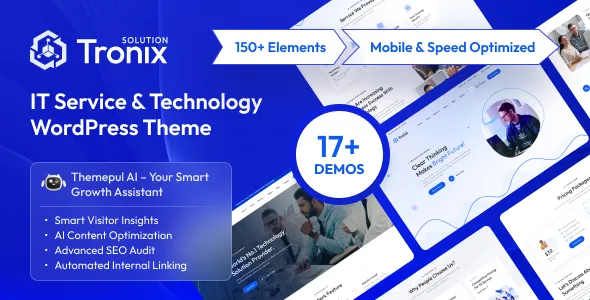
Tronix – IT Service And Technology WordPress Theme
Tronix – IT Service And Technology WordPress Theme is a website design solution for IT service providers, technology companies, software development agencies, managed service providers, computer support businesses, and digital transformation consultants seeking to establish a professional online presence. In a competitive technology market, a well-structured website helps businesses explain their services, demonstrate their expertise, introduce their teams, and build confidence with potential customers. Tronix provides a technology-focused starting point for creating a business website that communicates technical capabilities through organized content, professional presentation, and clear navigation.
Technology businesses often offer services that require explanation before a potential customer can make a decision. Visitors may want to learn about software development, IT consulting, cloud solutions, cybersecurity, technical support, network management, or digital transformation services. A professional website can organize these offerings into dedicated sections so that customers understand what the company does, which problems it addresses, and how they can request further information.
Tronix can be considered for organizations that want to present their technology services through WordPress. Depending on the current theme version, available templates, and compatible plugins, a website built with Tronix may be customized with service pages, company information, project showcases, team profiles, blog content, and contact forms. The precise functionality should be confirmed through the product documentation before installation. By combining a suitable layout with original content, a consistent brand identity, and a customer-focused structure, businesses can create a website that supports their marketing and communication goals.
What Is Tronix IT Service And Technology WordPress Theme?
Tronix is a technology-oriented WordPress theme intended for businesses that want to present IT services and technology-related offerings through a dedicated website. Rather than starting with a design created for an unrelated industry, businesses can use a technology-focused theme as a foundation for organizing technical services, company expertise, project information, and customer inquiries.
IT companies may use this type of website to introduce their technical capabilities and explain how they support clients. Software development agencies can present their development services and completed projects, while managed service providers may focus on IT support, infrastructure management, and business technology solutions.
WordPress provides tools for managing pages, publishing articles, uploading images, and maintaining navigation. Depending on the theme’s supported features and compatible extensions, additional functionality may be configured for service inquiries, project portfolios, testimonials, team profiles, or other business requirements.
A successful technology website needs more than a modern appearance. Its content should explain technical services in language that prospective customers can understand. It should also provide reliable contact information and guide visitors toward an appropriate next step.
Before building a complete website, review Tronix’s current documentation, WordPress compatibility, included layouts, and supported plugins. This helps ensure that the chosen setup aligns with the company’s design preferences and operational needs.
Modern Website Design for IT and Technology Businesses
Technology companies need a website that communicates professionalism, innovation, and reliability. Potential clients may be evaluating several service providers, so the website should make the company’s capabilities easy to understand and its business information easy to find.
Tronix can serve as a starting point for a technology website that combines structured service information with contemporary visual presentation. The design can be adapted to reflect the company’s brand, audience, and market position, depending on the available customization settings.
An IT consulting company might prioritize clear service descriptions, industry experience, and client engagement. A software development agency may emphasize digital products, technical capabilities, and project examples. A managed IT provider could focus on ongoing support, infrastructure services, and business continuity.
The homepage should quickly communicate what the business offers and whom it serves. A concise headline, supporting explanation, and relevant call to action can help visitors understand the company’s primary value proposition.
Visual elements should support the message rather than distract from it. Technology-related illustrations, project screenshots, team photography, and carefully selected graphics can reinforce the company’s identity when they are relevant to the content.
A consistent visual system across the homepage and internal pages helps create a professional experience. By combining organized content with clear navigation, businesses can make complex technology services easier to explore.
Ideal for IT Service Providers
IT service providers support businesses with technology requirements that may include computer systems, network infrastructure, technical troubleshooting, software configuration, and ongoing maintenance. A website gives these companies a central place to explain their services and communicate with prospective clients.
Tronix can be evaluated for an IT service website featuring dedicated pages for technical support, IT consulting, network management, infrastructure planning, system maintenance, and other services actually provided by the company.
Each service page should explain the problem being addressed, the type of support available, and the intended customer. For example, a small business may need assistance with computer systems and everyday technical issues, while a larger organization may require infrastructure planning or coordinated IT support.
Businesses can also describe their service process, response arrangements, support coverage, and engagement options where those details are accurate. Clear explanations help customers understand what to expect before making contact.
A professional IT website should avoid vague promises that fail to explain the actual service. Instead, use practical language, relevant examples, and transparent descriptions of the company’s capabilities.
A well-organized service structure makes it easier for visitors to identify relevant offerings and request information about the support they need.
Software Development and Digital Solutions
Software development companies often need to explain a broad range of technical services, from website creation and custom applications to enterprise software, API integration, and system modernization. A technology-focused website can organize these capabilities into clear categories.
Tronix may be used as a foundation for a software development agency website that introduces its services, development process, project portfolio, and technical expertise. The final presentation depends on the theme’s available layouts and customization tools.
A software development company could create separate pages for web application development, mobile application development, custom software, e-commerce solutions, system integration, and ongoing application maintenance where these services are offered.
Each page should explain the business value of the service. Rather than listing programming languages without context, describe the types of applications the company builds, the problems those applications address, and the support available throughout the project lifecycle.
Project case studies can help demonstrate experience. A useful case study explains the client’s challenge, the solution delivered, the company’s contribution, and any measurable outcomes that can be accurately documented.
Businesses should distinguish between services they provide directly and capabilities delivered through partners or third-party platforms. Accurate descriptions help establish trust and ensure prospective clients understand the company’s actual expertise.
Website Solutions for Managed IT Services
Managed IT service providers often deliver ongoing technology support to organizations that need help maintaining reliable systems. Their websites should explain the scope of their services, the types of clients they support, and the way their support arrangements operate.
Tronix can be considered for a managed service provider website that presents offerings such as routine maintenance, infrastructure monitoring, help desk support, network administration, device management, and technology planning, depending on the provider’s actual capabilities.
Businesses may benefit from explaining how their service model works. Visitors might want to understand the difference between one-time technical assistance and an ongoing support arrangement, what systems can be supported, and how service requests are handled.
Dedicated pages can outline support options, covered environments, onboarding procedures, and communication channels. Service-level commitments should be stated only when they are genuinely offered and documented.
A managed IT company may also publish educational resources explaining common technology challenges, system maintenance practices, or ways to improve organizational technology management.
The website should make it straightforward for business owners and decision-makers to request a consultation or discuss their current IT environment. Clear service information and practical next steps can support more productive customer conversations.
Cybersecurity and Technology Consulting Services
Cybersecurity and technology consulting are important areas for businesses that need to assess risk, improve systems, and make informed decisions about their digital infrastructure. A website can explain these services without overwhelming visitors with unnecessary technical terminology.
Tronix can be customized for companies offering cybersecurity consulting, security assessments, technology planning, risk management, compliance support, or infrastructure reviews where these services are part of their business.
A cybersecurity service page might explain the general purpose of security assessments, the types of systems reviewed, and the process used to identify areas requiring attention. A technology consulting page could describe how the company helps organizations evaluate software, plan system upgrades, or improve existing workflows.
Technical claims should be accurate and proportionate. Businesses should not suggest that a particular service guarantees complete security or eliminates every possible risk. Instead, explain the scope of the service and the practical improvements it is intended to support.
Case studies, professional qualifications, and documented experience can help demonstrate credibility when they are genuine and relevant.
Because security-related services often involve sensitive information, the website should also communicate responsibly about data handling, confidentiality, and the process for initiating a professional discussion.
Cloud Computing and Digital Transformation
Cloud computing and digital transformation services help organizations evaluate how technology can support their operations, collaboration, and growth. Businesses providing these services need a website that explains both the technical offering and its practical relevance.
Tronix can be considered for cloud service providers and technology consultants offering cloud migration planning, cloud infrastructure support, application modernization, collaboration solutions, or digital process improvement, depending on their actual service portfolio.
A cloud services page can describe the types of systems the company works with, the business situations in which cloud solutions may be appropriate, and the support available during implementation.
A digital transformation page may explain how the company helps clients review existing processes, identify opportunities for improvement, and plan technology changes. Relevant project examples can make these services easier to understand.
Avoid presenting cloud migration or digital transformation as an automatic solution for every organization. The right approach depends on existing infrastructure, security requirements, budget, technical constraints, and business priorities.
Clear service descriptions help potential customers determine whether they need a consultation and which information they should prepare before contacting the company.
Professional Homepage and Business Presentation
The homepage is often the first point of contact between a technology company and a prospective customer. It should provide a clear introduction to the business and direct visitors toward the most relevant information.
A Tronix-based website can be organized around a concise introduction, service summaries, company information, project highlights, client feedback where available, and contact opportunities. The precise sections depend on the theme’s available layouts and the organization’s goals.
The opening section should explain what the company does and who it serves. Supporting content can introduce the main service categories, while project examples demonstrate relevant experience.
An About section can summarize the company’s background, working approach, and areas of specialization. A team section may introduce the people responsible for delivering the services, while a blog preview can direct visitors toward helpful educational resources.
Calls to action should be appropriate to the business. Examples include requesting a consultation, discussing a project, or contacting the support team. Each action should lead to a working destination.
Not every company needs a long homepage. A small IT consultancy may benefit from a concise structure, while a larger technology organization may require more extensive service navigation and project information.
The goal is to help visitors understand the business quickly and find the next step that matches their needs.
Service Pages That Explain Technical Offerings
Technology companies often provide multiple services that appeal to different audiences. Dedicated service pages help organize these offerings and give each one enough space for a meaningful explanation.
Tronix can be customized to support a structured service section, subject to the available templates and editing options. Each service page should address a particular customer need rather than repeating the same general marketing language.
A page about software development might explain the types of applications the company builds, its development process, and the information needed to prepare a project estimate. A technical support page could explain the systems covered and how customers request assistance.
A network management page may describe infrastructure planning, maintenance, and troubleshooting. A cloud consulting page can explain assessment and implementation services, while a cybersecurity page may outline the scope of security reviews.
Service pages should include relevant examples and clear calls to action. Frequently asked questions may help answer common concerns before visitors contact the business.
Organizing services into separate pages also helps the company direct marketing campaigns toward the most relevant information. Visitors arriving from a search or referral can explore the service that matches their immediate requirements without navigating an unrelated list of offerings.
Portfolio and Technology Project Showcases
A project portfolio helps technology companies demonstrate their capabilities through examples of completed work. It can be particularly useful for software developers, web agencies, system integrators, and technology consultants.
Tronix can be evaluated for a project showcase using the portfolio layouts or page-building tools available in the installed version. Each project should provide enough context for visitors to understand the nature of the work and the company’s contribution.
A useful case study typically introduces the client’s challenge, explains the solution, and describes the implementation at an appropriate level of detail. Where reliable data exists, the business may include measurable outcomes, such as reduced processing time or improved workflow efficiency.
For software development projects, screenshots can illustrate interface design and application functionality. IT infrastructure projects may benefit from simplified diagrams or explanations of the systems involved, provided confidential information is not exposed.
Client names, logos, screenshots, and project details should only be published when the company has the appropriate permission. Sensitive system information should be removed or generalized when necessary.
A carefully selected portfolio communicates expertise more effectively than a large collection of unexplained images. Focus on projects that demonstrate the services and industries the company wants to serve in the future.
Responsive Design for Modern Devices
Technology websites should remain usable across desktops, laptops, tablets, and smartphones. Potential customers may research a service on a mobile device and later return to the website from a larger screen when reviewing project details.
Tronix’s responsive behavior should be verified using the current theme version. Test the homepage, service pages, portfolio sections, blog articles, and contact forms at multiple screen sizes.
On smaller devices, headings should remain readable, navigation should be easy to operate, and content should fit the available space. Important service information and contact buttons should not become difficult to locate.
Responsive design is particularly important for pages containing diagrams, screenshots, tables, and embedded content. These elements may require adjustments to avoid horizontal scrolling or awkward layouts.
Custom CSS, third-party widgets, and additional plugins can influence responsive behavior. After making significant changes, review the affected pages on both mobile and desktop screens.
A responsive website supports a more consistent user experience and helps prospective clients explore the company’s services regardless of the device they use.
SEO-Friendly Structure for IT Service Websites
Search engine optimization can help technology companies attract visitors who are researching technical services, comparing providers, or looking for solutions to specific business challenges. A WordPress theme provides a foundation, but organic visibility depends on content quality, technical configuration, competition, and ongoing maintenance.
A Tronix website should use descriptive page titles, clear heading structures, relevant internal links, and readable URLs. Each page should focus on a clear topic and explain the service or question it addresses.
For example, a software development company can create dedicated pages for its main development services. An IT support provider can explain its support model, while a cybersecurity consultancy can publish useful information about its assessment services.
Content should be written for the intended audience. Avoid excessive keyword repetition and generic paragraphs that do not explain the business’s actual capabilities. Natural language, practical information, and original examples make service pages more useful.
Compatible SEO plugins may assist with meta descriptions, XML sitemaps, canonical settings, and other supported configuration tasks. Website owners should also review broken links, mobile usability, image optimization, indexing issues, and page loading performance.
Technical businesses may benefit from publishing detailed educational content that answers common customer questions. Internal links can connect these articles with relevant service pages and contact opportunities.
No theme can guarantee a specific ranking position or amount of traffic. Sustainable SEO requires relevant information, sound technical practices, and continued attention to visitor needs.
Content Marketing and Technology Blogging
Technology changes frequently, and potential customers often need help understanding unfamiliar services, emerging tools, and common IT challenges. A company blog can provide educational information while demonstrating the organization’s knowledge.
WordPress supports publishing articles and organizing them into categories. Tronix can be considered for a website that combines service information with a technology blog, depending on the theme’s available blog templates and configuration.
An IT support company might publish articles about computer maintenance, network reliability, software updates, and common technical problems. A development agency could discuss website planning, application design, API integration, or software maintenance.
A cybersecurity consultant may create general educational content about account security, data protection, and organizational security practices. A cloud services provider could explain cloud migration considerations and the importance of planning before implementation.
Articles should provide practical value rather than repeat broad marketing claims. Explain technical concepts in language appropriate for the intended audience, and support specific claims with reliable information when needed.
A manageable publishing schedule helps maintain quality and consistency. Existing articles should also be reviewed periodically so that outdated recommendations and obsolete technology references can be corrected.
Useful content can help visitors understand a service before contacting the company and provides additional opportunities to connect educational resources with relevant service pages.
Lead Generation and Contact Forms
For many IT service businesses, the main purpose of a website is to generate qualified inquiries. Prospective clients may want to discuss a software project, request technical support, arrange a consultation, or ask for information about an ongoing service agreement.
A Tronix website can be configured with appropriate contact options using the features supported by the theme and compatible plugins. Depending on the company’s workflow, this may include a general contact form, a project inquiry form, or a consultation request page.
A project inquiry form could collect a name, business email, company name, service of interest, and a short description of the project. The form should ask only for information that is useful at the initial stage.
Technical support businesses should distinguish between general sales inquiries and requests from existing customers who need assistance. If support is provided through a separate portal or ticketing platform, the website should direct customers to the correct channel.
Calls to action should be specific and easy to identify. A service page might invite visitors to discuss their requirements, while a portfolio page could encourage them to inquire about a similar project.
Before launch, test form validation, email delivery, confirmation messages, and spam protection. Avoid requesting sensitive credentials or confidential technical details through an ordinary public contact form.
A dependable contact experience makes it easier for potential clients to begin a conversation with the business.
Client Testimonials and Trust-Building Content
Technology services often involve significant decisions, including investments in software, infrastructure, security, and ongoing support. Visitors may want evidence that a provider has relevant experience and communicates professionally.
Tronix can be customized to present trust-building content where supported by the theme’s layouts. This may include genuine client testimonials, team profiles, professional qualifications, project case studies, and clearly explained service processes.
Testimonials should come from real customers and accurately reflect their experiences. If a company includes a client’s name, logo, or quotation, it should have the appropriate permission to do so.
Case studies can offer more detailed evidence by describing the business challenge, the work completed, and the outcome. Where measurable results are included, the figures should be accurate and presented with sufficient context.
Team profiles can introduce relevant professional experience, while company information can explain how the business approaches project communication, support, and delivery.
Trust-building content should be specific rather than exaggerated. Avoid unsupported claims about being the best provider, guaranteeing results, or eliminating every technical risk.
When the website communicates capabilities transparently and provides genuine evidence of experience, potential customers can make a more informed assessment of whether the company is suitable for their requirements.
Customization and Technology Brand Identity
A technology website should reflect the company’s identity, services, and intended audience. Customization helps distinguish the business from competitors and ensures that the design supports the content.
Tronix’s customization options should be confirmed through the current documentation. Depending on the available settings and compatible editing tools, users may be able to adjust colors, typography, page layouts, images, menus, and other visual elements.
A software development studio may prefer a clean interface with application screenshots and concise explanations. An IT support company could prioritize practical service information, while a technology consultancy might use a more corporate visual style.
Consistency is important across the entire website. A defined color palette, heading hierarchy, button style, and image treatment can help maintain a recognizable presentation.
Use authentic company information and relevant visual assets. Replace demonstration text, sample contact details, and placeholder images before publishing the website.
When customizing the design, prioritize readability and usability over decorative effects. Visitors should be able to understand the services and locate contact information without navigating around unnecessary visual distractions.
Keep backups before major changes, and test customized layouts across devices. This helps preserve the website’s usability as its design and content develop.
Website Performance and Loading Speed
Website performance is important for technology companies because visitors expect digital services businesses to provide a dependable online experience. Slow-loading pages can interrupt research and make it harder for prospective clients to explore service details.
The performance of a Tronix website depends on the theme implementation, hosting, images, scripts, plugins, fonts, and external integrations. A modern visual design does not automatically guarantee fast loading.
Start by optimizing images, including project screenshots and portfolio graphics. Use appropriate dimensions and compression so that the visuals remain clear without unnecessarily increasing page size.
Review animations, embedded media, external widgets, and scripts to ensure that they provide real value. Unnecessary components can increase loading time and complicate maintenance.
Suitable hosting, caching, and performance tools may improve results when configured correctly. Measure performance before and after significant changes to understand whether the adjustments are effective.
Test several types of pages, including the homepage, service pages, project case studies, and blog articles. Pages with extensive images or interactive elements may require additional attention.
Regular performance reviews help identify inefficient assets and compatibility issues as new content and integrations are added. A well-maintained website provides a more comfortable experience and supports the company’s professional presentation.
Accessibility and User-Friendly Navigation
A technology website should make information easy to find and understand. Clear navigation, readable text, consistent page structure, and accessible interactive elements help visitors explore services without unnecessary difficulty.
When configuring Tronix, organize the main navigation around the pages that matter most to the intended audience. These might include Services, About Us, Projects, Blog, and Contact, with additional sections for specialized offerings where necessary.
Use logical heading structures, descriptive link text, suitable color contrast, and meaningful labels for forms. Buttons should be visually recognizable, and interactive elements should be tested for keyboard usability.
Technical diagrams and project screenshots should have appropriate alternative text when they communicate important information. Essential details should not be available only through an image.
Forms should provide clear instructions and understandable validation messages. Visitors should know which fields are required and what happens after they submit a request.
Accessibility depends on the theme, the content, and the way components are configured. Automated checks can identify some issues, while manual testing helps reveal additional usability problems.
A well-organized and accessible website makes technical information more approachable for a wider range of prospective customers.
WordPress Plugins and Technology Integrations
A technology company may need additional WordPress tools for contact forms, search optimization, analytics, security, backups, performance, and other business functions. The appropriate combination depends on the services offered and the functionality already supported by the theme.
Before installing a plugin alongside Tronix, review its compatibility with the installed WordPress version and the theme’s documented requirements. Check its maintenance history, support arrangements, documentation, and licensing terms.
A contact form tool may support customer inquiries, while an SEO plugin can assist with metadata and sitemap management. Analytics tools can provide information about visitor behavior, subject to appropriate privacy practices and consent requirements.
Some companies may also need integrations with a customer relationship management platform, email marketing service, scheduling system, or customer support portal. These should be evaluated separately to ensure that they fit the business’s workflows and technical requirements.
Avoid installing overlapping plugins that perform the same function without a clear reason. Unnecessary integrations can increase complexity, create conflicts, and affect performance.
After adding or updating a plugin, test the relevant pages and user journeys. Verify that forms submit correctly, navigation remains functional, and the website continues to work on mobile devices.
Choosing a small, compatible set of supporting tools can make the website easier to manage and maintain.
Security and Ongoing Website Maintenance
A professional IT company website should be maintained carefully because its reliability contributes to the business’s credibility. Routine maintenance helps keep software current, preserve content, and reduce avoidable technical issues.
Website owners should update WordPress, Tronix, and compatible plugins according to the documented requirements. Before major updates, create a backup and consider testing the changes in a staging environment.
Use strong passwords, appropriate user permissions, HTTPS, and reputable hosting. Install themes and plugins from trustworthy sources and remove components that are no longer required.
Backups should be stored securely, and the restoration process should be tested. This provides a recovery option if an update, configuration change, or technical problem disrupts the website.
Maintenance should also include regular reviews of published information. Service descriptions, team details, project examples, contact information, and blog articles should remain accurate and relevant.
Check forms, navigation links, external integrations, and mobile layouts after significant updates. If the website includes a separate support or customer portal, ensure that its links remain correct.
A consistent maintenance routine supports a more reliable website and helps the company maintain a professional digital presence.
Who Should Use Tronix IT Service And Technology WordPress Theme?
Tronix may be suitable for different technology-related businesses that need a professional WordPress website to explain their services and communicate with prospective customers.
IT service providers: Introduce technical support, infrastructure services, system maintenance, and business IT solutions.
Software development agencies: Present web development, custom software, application projects, and technical expertise.
Managed service providers: Explain ongoing support arrangements, IT management, and infrastructure services.
Cybersecurity consultancies: Describe security assessment services, risk management, and related consulting capabilities.
Cloud service providers: Present cloud consulting, migration planning, infrastructure support, and related technology services.
Technology consultants: Explain advisory services, technical planning, digital transformation, and system improvement projects.
Web development companies: Showcase website projects, development services, and relevant case studies.
IT support companies: Provide information about support services, customer contact channels, and service coverage.
Technology startups: Introduce new products, explain the company’s purpose, and build a professional digital presence.
Digital solution providers: Organize software, integration, and business technology services into clear categories.
The best fit depends on the company’s actual requirements. Before selecting Tronix, review the included layouts, customization options, responsive behavior, compatibility, and the availability of any required integrations.
Tips for Building a Successful Website with Tronix
A technology theme provides the starting point, but the finished website’s effectiveness depends on its content, organization, and relevance to the target audience.
Begin by defining the primary goal of the website. Determine whether the business needs to generate service inquiries, present software projects, explain managed IT offerings, promote consulting services, or support several related activities.
Plan the navigation around the needs of prospective customers. Make it easy to locate the service descriptions, company information, project examples, educational resources, and contact options.
Prepare original content before customizing every page. This may include a company introduction, detailed service descriptions, team biographies, case studies, and answers to frequently asked questions.
Use a consistent visual identity. Select appropriate colors, typography, and imagery, and replace all demonstration content with accurate company information.
Explain technical services in practical language. Visitors should understand what the business offers, which problems it addresses, and how to begin a conversation. Add technical detail where it helps the intended audience make an informed decision.
Test the website across different devices. Review navigation, loading performance, form submissions, accessibility, and any external integrations before launch.
After publishing, maintain the website through regular software updates, secure backups, content reviews, and performance checks. These practices help the website remain useful as the business grows.
Final Thoughts on Tronix IT Service And Technology WordPress Theme
Tronix – IT Service And Technology WordPress Theme is a technology-focused WordPress design option for IT service providers, software development agencies, managed service businesses, cybersecurity consultants, cloud specialists, and technology companies seeking a professional online presence.
With thoughtful customization, a website built around Tronix can organize technical services, introduce the company, present project examples, publish educational content, and provide convenient contact opportunities. A clear page structure helps prospective customers understand the business and identify the services relevant to their requirements.
The exact capabilities of a Tronix website depend on the current theme version, its documented features, the available customization tools, and compatible plugins. Businesses should verify the requirements for specific functions and integrations before including them in their website plans.
Long-term success also depends on original content, responsive usability, accessibility, website performance, security, and regular maintenance. A theme alone cannot guarantee search rankings, qualified leads, or business growth, but it can provide a foundation for a well-organized and professional digital presence.
For businesses looking to communicate their IT and technology services through WordPress, Tronix can be evaluated as part of a broader digital strategy. By combining a suitable design with accurate service information, genuine project examples, and dependable website management, organizations can create an online destination that supports customer communication and presents their technical capabilities with clarity.