My Account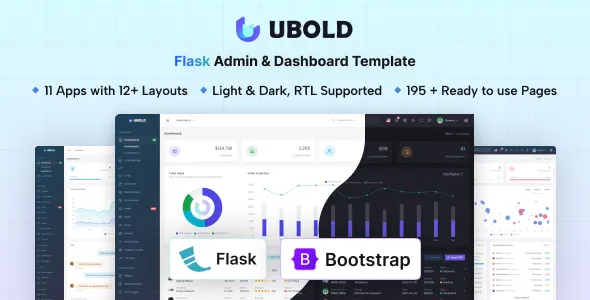
UBold – Flask Admin & Dashboard Template
UBold – Flask Admin & Dashboard Template is a modern web interface solution designed for developers, startups, businesses, and software teams that need a structured foundation for building administrative panels, management systems, and data-driven web applications. Combining the flexibility of the Flask Python framework with an organized admin dashboard interface, UBold can help simplify the process of creating internal tools, monitoring systems, business management platforms, and custom web applications. Its admin-focused design makes it a suitable starting point for projects that require organized navigation, clear information presentation, and an interface that can be adapted to different operational needs.
Administrative dashboards play an important role in modern web applications because they bring important information, controls, and management functions into one accessible environment. Businesses use dashboards to review performance indicators, manage records, monitor activity, and perform routine operational tasks. UBold – Flask Admin & Dashboard Template provides a foundation for developing these types of interfaces while allowing developers to customize the visual presentation and connect the frontend to the functionality their applications require.
Whether you are developing a business administration platform, a customer management system, an inventory application, a reporting interface, or a custom software product, UBold can serve as a starting point for organizing the user interface. By adapting the template to your application’s requirements, you can create an administrative experience that supports your workflow, improves information accessibility, and maintains a consistent visual structure.
Modern Admin Dashboard Design
An effective admin dashboard should make complex information easier to understand and routine tasks easier to complete. Users should be able to navigate between sections, locate important records, review relevant data, and access the tools they need without unnecessary confusion. UBold is intended for administrative interface development, where organization, usability, and clarity are essential.
A dashboard template provides an initial design structure that developers can customize for their specific application. Instead of building every interface element from scratch, teams can begin with the supplied layout and adapt its components, navigation, and content to match their project. This can help establish a consistent appearance throughout the application and reduce repetitive frontend development work.
Depending on the included version and components, an admin dashboard project may use interface patterns such as navigation menus, content panels, data tables, summary cards, forms, charts, and settings pages. Developers should verify the exact components available in the UBold package before planning around any specific feature.
The primary objective is to create a practical interface that helps users understand information quickly and carry out their tasks efficiently. With thoughtful customization, UBold can be adapted to support a wide range of business and technical workflows.
Built with Flask and Python
Flask is a lightweight web framework for Python that provides the foundation for building web applications. It is commonly used for projects that need flexible routing, request handling, server-side logic, and integration with additional Python libraries. Unlike larger frameworks that prescribe more of the application structure, Flask allows developers to choose how they organize many aspects of their project.
UBold – Flask Admin & Dashboard Template brings an administrative interface concept into a Flask-oriented development workflow. This can be useful for Python developers who want to build management interfaces for existing applications or create new web-based tools that rely on server-side processing.
Flask can be extended with database libraries, authentication solutions, form-handling tools, and other packages according to the needs of a project. Developers can use these capabilities to build the backend functionality required by their dashboards. However, the presence of a Flask admin template does not automatically mean that all database operations, authentication features, or business workflows are already implemented.
The exact integration between the interface and Flask should be checked in the product documentation. Depending on the supplied package, some parts may require additional configuration or development before they can be used in a production application.
A Structured Foundation for Administrative Applications
Administrative applications often contain multiple sections with different purposes. Users may need to manage accounts, review transactions, update records, configure settings, or generate reports. A consistent interface helps keep these activities organized and makes the application easier to maintain as new requirements emerge.
UBold can provide a starting point for structuring these administrative experiences. Developers can organize pages around specific tasks and group related functionality into logical sections. Clear navigation and consistent page layouts help users move between different parts of an application while maintaining a familiar experience.
For example, a business dashboard might contain an overview page, a customer section, a reporting area, and an application settings page. An inventory system might instead focus on products, stock records, suppliers, and order information. The final structure should reflect the actual requirements of the application rather than forcing every project into the same navigation model.
A reusable interface foundation can also make future updates easier. When components and layouts follow consistent patterns, developers can refine the application without having to redesign each page independently.
Suitable for Business Management Systems
Businesses often depend on internal software to organize daily operations and keep important information accessible. A centralized administrative interface can help employees manage records, review activity, and access the tools required for their responsibilities.
UBold – Flask Admin & Dashboard Template can be customized for business management applications that need a dedicated administrative interface. Depending on the project’s requirements, potential applications include customer management tools, employee portals, internal reporting systems, service management platforms, and operational dashboards.
A business management dashboard might display summary information, provide access to frequently used records, and organize administrative tasks into clearly defined sections. Developers can adapt the interface to represent the information that matters most to their organization.
The backend can then be developed to support the necessary operations, such as retrieving records, updating information, applying business rules, and managing user permissions. These capabilities must be implemented and tested as part of the application unless they are explicitly included in the template.
By combining an organized interface with suitable backend logic, businesses can create tools that align more closely with their operational processes.
Useful for Data Monitoring and Reporting
Many web applications need a central place where users can review information and understand changes over time. Reporting dashboards can present key indicators, organize records, and make important data easier to examine.
UBold may be adapted for data-oriented interfaces where information needs to be presented in a clear and organized format. Depending on the available components, developers may be able to use suitable cards, tables, charts, and other visual elements to support reporting workflows.
A sales dashboard, for example, might summarize orders and revenue. A service monitoring tool could display ticket counts and activity summaries. An operational dashboard might focus on resource utilization, recent events, or task completion. These are examples of possible custom implementations rather than guarantees about the template’s included functionality.
For reliable reporting, the application must obtain accurate data from appropriate sources and process it correctly. Developers should consider how information is collected, validated, updated, and displayed. Charts and summary indicators should be clearly labeled, and important values should be presented with enough context for users to interpret them correctly.
Flexible Layout and Interface Customization
Every administrative application has different design requirements. Some need a compact interface that emphasizes data density, while others benefit from larger visual elements and simplified navigation. A customizable dashboard foundation helps developers adjust the presentation to the intended audience and workflow.
UBold can be adapted through changes to supported layout elements, colors, typography, spacing, icons, and content organization. The available customization options depend on the actual files, stylesheets, and components included in the downloaded package.
Developers can align the interface with a company’s brand identity by applying consistent colors, selecting appropriate typography, updating logos, and using relevant visual assets. They can also adjust page layouts to make frequently used actions easier to locate.
Good customization should support usability rather than simply changing the appearance. Important controls should remain recognizable, related information should be grouped logically, and unnecessary decoration should not distract users from their work.
A consistent design system helps ensure that the dashboard remains cohesive as additional pages and functions are introduced.
Organized Navigation and Page Structure
Navigation is an important part of any admin panel. Users should be able to understand where they are, locate the relevant section, and move between related tasks without excessive effort.
An administrative dashboard may organize its navigation around application modules, user roles, or business functions. UBold can serve as a starting point for arranging these sections into a coherent structure, depending on the layouts supplied with the template.
For a customer management application, navigation might include customers, interactions, reports, and settings. For a warehouse system, it might include inventory, suppliers, orders, and stock activity. The labels and hierarchy should be based on the language users already understand.
Developers should also consider the difference between visual navigation and actual authorization. Hiding a menu item does not provide adequate security on its own. Sensitive operations and protected routes must be validated on the server, using appropriate authentication and authorization rules.
A clear and secure navigation structure can make the dashboard more useful for both administrators and everyday users.
Forms and Data Management Workflows
Administrative applications commonly rely on forms for creating, editing, and reviewing information. These forms may be used to register customers, update inventory, modify account details, configure application settings, or process internal requests.
A dashboard template can provide a visual foundation for these workflows, depending on the form components included in the product. Developers can adapt the available interface patterns to present labels, input controls, action buttons, validation messages, and other necessary elements.
Well-designed forms should explain what information is required and help users correct mistakes. Related fields should be grouped logically, and error messages should identify the problem in clear language. Important actions, such as deleting records or submitting sensitive changes, should include suitable safeguards.
The Flask backend should validate submitted information independently of frontend checks. Browser-side validation can improve convenience, but it cannot replace server-side validation or security controls. Applications that manage sensitive or business-critical records should also consider appropriate logging, permissions, and recovery procedures.
When implemented carefully, these workflows can help make administrative tasks more consistent and manageable.
Potential for Customer Relationship Management Applications
Customer relationship management systems help businesses organize customer information, track interactions, and coordinate follow-up activities. A web-based CRM often needs a central interface for reviewing records, managing contact details, and accessing customer-related information.
UBold can be customized as the frontend foundation for a lightweight CRM or a specialized customer management application. Depending on the project’s scope, the interface may be organized around customer profiles, activity records, communication history, tasks, and reporting.
A complete CRM requires more than an administrative layout. Developers must determine how customer data is stored, which users can access it, how records are updated, and whether additional services such as email, scheduling, or external CRM integrations are needed.
Flask can support the server-side functionality required for such an application when combined with suitable database and integration tools. Developers should design the data model and permission structure around the business requirements before introducing production customer information.
This approach can help transform a general dashboard interface into a tool tailored to a particular organization’s customer management process.
Inventory and Operations Dashboard Applications
Inventory and operations systems help organizations monitor resources, maintain records, and coordinate activities. Their administrative interfaces often need to present structured information in tables, forms, and summary panels.
UBold can provide a starting point for building these interfaces, subject to the components available in the template. A customized inventory dashboard might organize products, stock levels, suppliers, purchase records, and order information. An operations dashboard could instead focus on service activity, task assignments, operational metrics, or process status.
The backend must handle the actual business logic, including data persistence, quantity calculations, validation, and record updates. Developers should ensure that concurrent changes, permissions, and error conditions are handled correctly when multiple users interact with the same information.
For operational reporting, information should be displayed consistently and updated according to the application’s data requirements. Clear labels and useful filtering options can help users locate records and interpret results efficiently.
The ability to customize the interface around a specific workflow makes an admin template useful as a foundation for specialized internal software.
Responsive Dashboard Experience
Administrative applications are often used on desktop computers, but users may also need access from tablets or mobile devices. Responsive design helps the interface accommodate different screen sizes while keeping important functions accessible.
When the supplied UBold version includes responsive layouts, developers should test how its navigation, forms, tables, cards, and other elements behave across different viewports. Large data tables may require alternative layouts or horizontal scrolling on smaller screens, while navigation may need a more compact presentation.
Responsive behavior should be evaluated based on the actual interface rather than assumed from the product name. Developers can adjust styles and component layouts where necessary to improve readability and usability on smaller displays.
Touch targets should be appropriately sized, important information should not become difficult to access, and page content should avoid unwanted horizontal overflow. Forms should remain practical to complete on mobile devices.
A responsive administrative interface can improve flexibility for teams that need to review information while away from their primary workstation.
Security Considerations for Flask Dashboards
Security is particularly important for admin panels because they may provide access to sensitive business information and operational controls. A professional-looking dashboard does not automatically make an application secure.
When building with UBold and Flask, developers should implement appropriate authentication, authorization, session management, and input validation. Protected pages and sensitive actions should require the correct permissions, and server-side checks should be applied to all relevant requests.
Applications that process forms should use suitable protections against common web vulnerabilities. Depending on the configuration, this may include cross-site request forgery protection, safe output handling, secure cookie settings, and appropriate request validation. Database queries should be implemented using safe practices, and secret keys or credentials should not be exposed in publicly accessible source files.
Developers should also review dependencies, configure production settings carefully, and use HTTPS in the deployed environment. Error messages and logs should provide useful diagnostic information without unnecessarily exposing sensitive data.
The specific security measures required depend on the application’s design and deployment environment. They should be planned as part of the backend implementation rather than treated as features automatically supplied by an admin template.
Performance and Maintainability
An administrative dashboard should remain responsive as the amount of displayed information and the number of users grow. Performance depends on both the frontend interface and the backend implementation.
Developers can improve the experience by avoiding unnecessarily large assets, organizing frontend resources efficiently, and loading only the information required for a particular view. On the Flask side, database queries, server-side processing, caching strategies, and pagination can influence response times.
For data-heavy applications, displaying every record at once may become inefficient. Pagination, filtering, search, and appropriate query optimization can help users work with large datasets more effectively.
Maintainability is equally important. A clear project structure, consistent naming conventions, reusable components, and documented configuration choices can make future development easier. Version control and automated tests can also help teams identify regressions when modifying the application.
UBold can provide the interface foundation, while developers remain responsible for ensuring that the completed system meets its performance, reliability, and maintenance requirements.
Search, Filtering, and Table-Based Interfaces
Many admin panels rely on tables to display users, transactions, products, tickets, or other structured records. Search and filtering tools can make these tables more useful by helping users locate specific information without reviewing every row manually.
Depending on the components available in the template, developers may be able to adapt table-oriented layouts for their own data management workflows. A completed implementation could include searchable fields, filters, sorting, pagination, and links to detailed record pages.
These features need appropriate data handling behind the interface. For small datasets, client-side filtering may be sufficient, while larger collections often benefit from server-side queries and pagination. Developers should also consider what happens when a search returns no results or when a requested record is unavailable.
Table layouts should communicate column headings clearly and remain usable on smaller displays. When information is sensitive, the backend must ensure that users can retrieve only the records they are authorized to access.
A well-planned data interface can make routine administrative tasks faster and reduce the effort required to manage complex records.
Integration with Databases and External Services
Most production dashboards need to connect to a source of data. Flask applications can integrate with relational databases, data services, APIs, and other systems according to the project’s requirements.
UBold can act as the interface layer for an application that retrieves and presents information from these sources. Developers must determine how the data is fetched, validated, processed, and delivered to the frontend.
For example, a business reporting application may retrieve data from a relational database, while a monitoring dashboard may consume information from an external API. A customer management platform might need integrations with email services or other business tools.
These integrations should not be assumed to be included with the template unless the product documentation explicitly confirms them. Developers should review the supplied files and identify which connections require additional code, credentials, or third-party services.
Proper error handling is also important. If an API becomes unavailable or a database request fails, the application should respond predictably and provide an appropriate message rather than exposing technical details to end users.
Deployment and Production Preparation
Moving a Flask dashboard from development to production requires careful configuration. The application should use a suitable production server and deployment setup rather than relying on Flask’s built-in development server for public-facing use.
Before deployment, developers should review environment variables, secret management, database configuration, logging, error handling, dependency versions, and security settings. Static assets should be served appropriately for the chosen hosting architecture, and database migrations should be managed safely where applicable.
The application should also be tested in an environment that resembles production. Developers should verify that routes work correctly, permissions are enforced, forms behave as expected, and important pages remain usable across supported browsers and screen sizes.
Deployment options will depend on the project’s dependencies, infrastructure preferences, and operational requirements. The appropriate instructions should be based on the actual application configuration and the documentation provided with the template.
A structured deployment process helps reduce avoidable errors and provides a more reliable foundation for ongoing maintenance.
Who Should Use UBold – Flask Admin & Dashboard Template?
Python developers can use a Flask-oriented dashboard foundation when building server-rendered web applications or administrative tools.
Web development agencies can evaluate the template as a starting point for client projects that require a custom admin interface, subject to the product’s license terms.
Startups and small businesses can adapt the interface for internal tools, reporting applications, or operational management systems.
Software development teams can use an admin interface foundation to organize application data and administrative workflows.
Backend developers working with Flask can combine the interface with suitable Python libraries, databases, and APIs to implement project-specific requirements.
Students and learning developers can study the structure of an admin dashboard and use the project as a reference while learning about web application development, provided the source package and license permit that use.
The level of experience needed depends on the customization. Basic content changes may be straightforward, while database integration, authentication, deployment, and advanced business logic require additional technical knowledge.
Benefits of Starting with an Admin Dashboard Template
Building an administrative interface from scratch can require substantial effort across layout design, navigation, reusable components, forms, data presentation, and responsive behavior. Starting from a suitable template can reduce some of this initial work and provide a visual structure for further development.
UBold offers a potential starting point for teams that want to concentrate on application-specific requirements rather than creating every interface pattern independently. Developers can assess the included layouts, adapt them to the project’s branding, and connect them to the appropriate Flask routes and backend services.
A consistent interface can also improve usability when similar elements are used across multiple sections. However, the actual value depends on how closely the supplied design matches the project’s needs and how much modification is required.
Before choosing the template for a commercial project, review its current preview, supported components, dependency versions, license terms, and documentation. This helps ensure that the package is appropriate for the intended technical environment.
Conclusion
UBold – Flask Admin & Dashboard Template is a potential foundation for creating administrative panels, business management interfaces, reporting tools, and data-driven web applications with a Flask and Python development workflow. Its admin dashboard focus makes it relevant to projects that need an organized interface for navigating information, managing records, and supporting operational tasks.
By customizing the available layouts and connecting them to suitable backend functionality, developers can adapt the template to applications such as customer management systems, inventory dashboards, reporting platforms, and internal business tools. Responsive design, consistent navigation, clear data presentation, accessibility, security, and performance should all be considered during development.
The template should be evaluated according to the actual components and integrations included in the product package. Database functionality, authentication, permissions, external API connections, and other production requirements may need additional implementation.
For developers and businesses seeking a starting point for a Flask-based administrative interface, UBold – Flask Admin & Dashboard Template can help establish the visual structure of a custom web application while leaving room to tailor the final solution to specific workflows, technical requirements, and branding goals.