My Account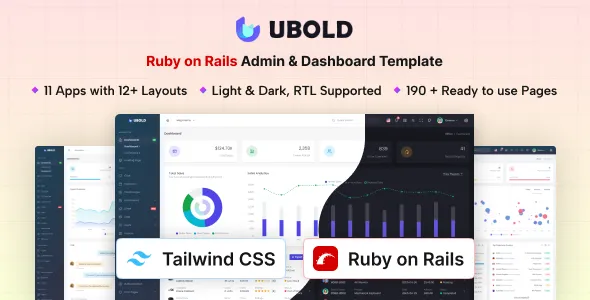
UBold – Ruby on Rails Tailwind CSS Admin & Dashboard Template
UBold – Ruby on Rails Tailwind CSS Admin & Dashboard Template is a versatile administration and dashboard template designed for developers, startups, businesses, and organizations that need a structured interface for managing application data, monitoring business activities, and presenting important information. Combining Ruby on Rails with Tailwind CSS, UBold provides a development foundation for creating administrative panels, business dashboards, internal management systems, reporting interfaces, and web application backends. Its combination of a server-side web framework and utility-first styling approach makes it a potential choice for projects that require organized layouts, reusable interface components, and flexible customization.
Modern web applications often need a dedicated administrative interface where authorized users can review information, manage records, monitor activity, and perform operational tasks. Building these interfaces from scratch can require considerable effort, particularly when an application includes multiple sections, data tables, forms, navigation menus, and reporting screens. An admin dashboard template can help simplify the initial interface development process by providing a starting point that developers can adapt to their application’s requirements.
UBold can be evaluated for projects such as customer management systems, inventory applications, financial reporting platforms, business management tools, project tracking software, and other data-driven applications. Developers can customize the interface to match their branding, organize navigation around specific workflows, and connect the frontend with the appropriate application logic. The exact pages, components, charts, and utilities included depend on the template version and its documentation, so reviewing the current product demo and source files is important before implementation.
What Is UBold Ruby on Rails Tailwind CSS Admin & Dashboard Template?
UBold is an administration dashboard template intended to help developers create structured backend interfaces for web applications. Rather than serving as a conventional public-facing website design, an admin dashboard focuses on the tools and information that users need to manage an application or business process.
A typical administrative interface may include a sidebar, top navigation, summary cards, data tables, forms, charts, notification areas, and account settings. These elements help users navigate different sections and access frequently used functions without moving through unrelated pages.
With a suitable implementation, UBold can provide a starting point for dashboards used by business owners, administrators, operations teams, analysts, and application users. For example, a business management application may require an overview of active customers, recent transactions, pending tasks, and important operational indicators. An inventory system might focus on stock records, product details, supplier information, and order activity.
The Ruby on Rails and Tailwind CSS foundation can support a development workflow that combines server-side application structure with customizable interface styling. However, the template should not automatically be assumed to include a complete business management application, database schema, authentication system, or production-ready reporting engine. Those capabilities depend on the included implementation and the additional development required for the project.
Ruby on Rails Framework for Web Application Development
Ruby on Rails is a web application framework built with the Ruby programming language. It provides conventions and tools for organizing application code, handling requests, working with databases, rendering views, and implementing server-side functionality.
For an admin dashboard, Rails can be used to develop the application logic that powers the interface. Depending on the project, this may include managing users, processing submitted forms, retrieving records, validating data, enforcing permissions, and preparing information for display.
Rails follows a convention-oriented development approach that helps teams organize applications consistently. Its established patterns can make it easier to maintain projects as new features and administrative workflows are introduced.
A dashboard for a customer relationship management system, for instance, might include customer records, contact details, interaction history, and follow-up tasks. Rails can support the backend logic for retrieving and updating these records, while the dashboard interface presents the information in a usable format.
The exact Rails version, supported dependencies, database configuration, and application structure should be checked in the UBold documentation. Developers should confirm that the template is compatible with their intended Ruby and Rails environment before beginning implementation.
Tailwind CSS for Flexible Dashboard Styling
Tailwind CSS is a utility-first CSS framework that allows developers to build interfaces using small styling classes. It supports customization of layouts, typography, spacing, colors, borders, responsive behavior, and other visual properties.
In an admin dashboard, consistent styling is especially important because users may work with many different screens throughout the day. Navigation menus, data tables, cards, buttons, form fields, and status indicators should share a recognizable visual language.
Tailwind CSS can help developers adjust these elements to match a product’s design system. A business application might use a restrained color palette and compact information panels, while an analytics dashboard may need more space for charts, metrics, and reporting controls.
The utility-based approach can also help teams make layout adjustments without maintaining large numbers of separate custom CSS rules. Reusable components and consistent styling conventions can further simplify future updates.
The exact Tailwind CSS version and build configuration depend on the template’s implementation. Before modifying styles, developers should review the source files, configuration, and documented customization process to understand how the design system is organized.
Dashboard Layout and Navigation Structure
An effective admin dashboard should make important functions easy to locate. Clear navigation helps users understand the application’s organization and move between related tasks without unnecessary confusion.
UBold can be evaluated as a foundation for dashboards that use structured navigation and organized content areas. Depending on the included layout, the interface may be adapted to use a sidebar, header, page title area, content panels, and other common administrative elements.
A customer management application might group pages into Customers, Contacts, Tasks, Reports, and Settings. An inventory platform could organize Products, Stock Levels, Suppliers, Orders, and Analytics. A project management system might prioritize Projects, Teams, Tasks, Activity, and Account Settings.
Navigation labels should reflect the actual tasks users need to complete. Related pages should be grouped logically, while important actions should remain easy to find. Avoid including unnecessary navigation items simply because they appear in a starter design.
As an application grows, its navigation may need to accommodate additional roles, features, and workflows. Developers should plan the structure around the needs of the intended users rather than treating the dashboard layout as a fixed arrangement.
Responsive Design for Desktop, Tablet, and Mobile
Responsive design helps administrative interfaces adapt to different screen sizes. Although many dashboard users work on desktop computers, managers and team members may also need to review information using tablets or smartphones.
A responsive UBold implementation can be customized to accommodate different devices, depending on the included layouts and responsive components. Developers should pay particular attention to sidebar behavior, data tables, charts, form fields, navigation controls, and content spacing.
On smaller screens, the dashboard should prioritize essential information and maintain usable controls. Buttons should be easy to select, labels should remain readable, and forms should not require unnecessary horizontal scrolling.
Wide tables can be particularly challenging on mobile devices. Depending on the application, developers may use controlled horizontal scrolling, responsive column visibility, or alternative record layouts to make the information easier to review.
Charts and reporting panels should also be tested across screen sizes. Axis labels, legends, and values need to remain understandable when the available width changes.
Responsive behavior should be verified across all important pages rather than judged from the main dashboard alone. Custom components and third-party integrations can introduce layout problems that require additional adjustments.
Data Tables and Record Management Interfaces
Data tables are a common part of administrative applications because they allow users to review multiple records in a structured format. Customer lists, inventory records, transactions, support tickets, and employee information are examples of data that may be presented in tables.
UBold can be considered for projects that need an organized interface for displaying and managing application records. The available table components and their capabilities should be verified in the current template documentation.
A useful table should present the most relevant fields without overwhelming users. Column headings should be clear, important information should be easy to scan, and related actions should be accessible without cluttering the interface.
Depending on the project requirements, developers may implement search, filtering, sorting, pagination, bulk selection, and record-level actions. These functions require appropriate application logic and data handling; they should not be assumed to work automatically unless included and documented.
For example, an inventory dashboard may allow staff to locate a product by name, filter records by category, and review stock status. A customer management system could provide filters for account status, region, or customer type.
Developers should also consider empty states, loading indicators, validation messages, and error handling. These details help users understand what is happening when data is unavailable or an operation cannot be completed.
Forms and Input Management
Forms enable users to create records, update existing information, submit requests, and configure application settings. They are therefore an essential part of many administrative dashboards.
A UBold-based interface can be adapted for forms used in customer management, product administration, employee records, project configuration, and other operational workflows, depending on the components included in the template.
Good form design starts with clear labels and a logical field order. Related fields should be grouped together, required information should be identified, and instructions should be provided where users might otherwise be uncertain.
Validation is also important. Users should receive understandable feedback when a field is missing, a value is incorrectly formatted, or an operation cannot be completed. Error messages should explain the problem and, where possible, help users correct it.
The frontend provides only one part of form processing. A Ruby on Rails application should also validate submitted data on the server and enforce the relevant business rules. Client-side validation can improve usability, but it should not replace server-side checks.
For sensitive or important operations, consider confirmation steps, clear success messages, and appropriate error handling. These measures help reduce accidental changes and improve confidence in the administrative workflow.
Charts, Analytics, and Reporting Dashboards
Business dashboards often use charts and summary metrics to help users understand operational performance. Reporting interfaces may display activity over time, compare categories, highlight trends, or summarize important business indicators.
UBold may provide a starting point for analytics-oriented interfaces, but the specific chart types, reporting components, and included libraries should be confirmed from the current product documentation.
A sales dashboard might present revenue trends, order counts, and customer activity. An operations dashboard could summarize completed tasks, outstanding requests, and processing times. A project dashboard may display progress, deadlines, and workload distribution.
Reports should focus on metrics that help users make decisions. Too many unrelated indicators can make a dashboard harder to understand, while poorly labeled charts can lead to incorrect interpretations.
Developers should clearly identify time ranges, measurement units, categories, and data sources. Comparisons should use consistent definitions so users can understand what the figures represent.
The backend must provide accurate and appropriately aggregated data for the charts. Depending on the application, this may involve database queries, reporting services, background processing, or integration with external data sources. A chart component alone does not create a complete analytics system.
User Management and Access Control
Many administrative applications require different levels of access. An administrator may need to configure the system, while a manager may only need to review reports and a staff member may be permitted to update a limited set of records.
A UBold-based dashboard can be adapted to present user management screens and role-specific navigation when these functions are implemented in the application.
Possible user administration workflows include viewing user records, updating profile details, assigning roles, managing account status, and reviewing relevant activity. The actual functionality depends on the application requirements and the backend implementation.
Access control must be enforced by the server rather than relying only on hiding navigation items or buttons. Sensitive actions should verify that the current user has permission to perform the requested operation.
Developers should also consider session management, password handling, account recovery, and appropriate authentication practices. These are application security responsibilities and should be implemented according to the framework’s current guidance.
If UBold includes authentication-related interface screens, confirm whether they are connected to a working authentication system or are visual examples that require additional implementation.
Customization for Different Business Applications
One of the main advantages of a multipurpose admin dashboard is its potential to support different application concepts. Developers can adapt the interface structure, labels, colors, navigation, and data presentation to match the requirements of a particular business.
For a customer relationship management system, the dashboard could focus on contacts, opportunities, tasks, and customer history. For inventory management, the emphasis might be on products, suppliers, warehouse records, and stock movements.
A finance-related application may require transaction records, account summaries, and reporting views. An education management system could organize student information, course records, schedules, and administrative tasks. A project management application may prioritize task status, team activity, deadlines, and progress reports.
The most effective customization starts with a clear understanding of the users and their workflows. Identify the information they need most frequently, the actions they perform regularly, and the decisions they must make.
Avoid adding features solely because they appear useful in other applications. Every section should support a defined requirement and contribute to a coherent user experience.
Before changing the template extensively, review the available components and determine which elements can be reused. A planned approach can reduce duplicated work and make future maintenance easier.
Developer-Friendly Structure and Maintainability
A well-organized project structure helps developers understand an application and maintain it as requirements change. Ruby on Rails provides established conventions for organizing server-side application code, while Tailwind CSS supports a consistent styling workflow.
The UBold source structure, dependencies, and reusable components should be reviewed before development begins. The extent to which the template supports modular customization depends on the implementation supplied with the product.
Developers should identify shared layouts, common interface elements, page templates, and styling configuration. Where appropriate, recurring components can be reused across multiple screens to maintain visual consistency and reduce duplicated code.
Version control helps teams track changes and collaborate more effectively. Keeping customizations organized also makes it easier to review modifications and investigate problems after updates.
Dependencies should be checked for compatibility and maintained according to the project’s requirements. Before upgrading Ruby, Rails, Tailwind CSS, or other packages, review the relevant release notes and test the application in a development or staging environment.
Clear documentation of installation steps, configuration settings, environment variables, and deployment procedures can reduce onboarding time for future developers.
Integrations and External Services
Administrative applications frequently depend on external services for communication, analytics, storage, payments, or business operations. A dashboard template can provide the interface through which users access these functions, but integrations generally require additional development.
Depending on the project, a UBold-based application may be extended to connect with email services, customer relationship management platforms, payment providers, reporting systems, or third-party APIs.
For example, a business application might send notifications when a record changes, while an inventory system could synchronize product information with another service. A reporting dashboard may retrieve data from an external API or combine information from multiple sources.
Before implementing an integration, review its API documentation, authentication requirements, rate limits, error handling, and data protection implications. Credentials should be stored securely and should not be exposed in client-side code or public repositories.
Integrations should be tested for both successful and unsuccessful responses. The interface should communicate useful status information when a service is unavailable or a request cannot be completed.
Do not assume that a visual integration screen means the underlying external service is already configured. Verify the included functionality and implement any required connections separately.
Performance and Dashboard Optimization
Performance is important in administrative applications because users may interact with the dashboard repeatedly throughout the workday. Slow page loads, inefficient database queries, and unnecessarily complex interfaces can reduce productivity.
The performance of a UBold implementation depends on the Rails application, database structure, server configuration, frontend assets, dependencies, and deployment environment.
Developers should begin by measuring performance under realistic conditions. Review page response times, database queries, asset sizes, and the behavior of frequently used screens.
Large datasets may require pagination, filtering, or carefully designed database queries to avoid loading unnecessary records. Reporting pages may benefit from appropriate aggregation or caching, depending on how frequently the data changes and how accurate the information must remain.
Frontend assets should also be managed carefully. Unnecessary scripts, oversized images, and excessive visual effects can increase loading costs without improving usability.
Performance improvements should be based on measured bottlenecks rather than assumptions. After making changes, retest important workflows to ensure that the application remains responsive and that the data is still accurate.
Security and Data Protection
Admin dashboards often provide access to important business information, making security a critical part of development. The template’s visual design does not by itself guarantee that the completed application is secure.
Developers should implement authentication, authorization, server-side validation, and secure session handling according to the needs of the application. Access to sensitive records should be restricted to authorized users.
Input validation and appropriate protections against common web vulnerabilities are also important. Use the security mechanisms supported by the current Ruby on Rails version and follow established framework guidance.
Private credentials, API keys, and database connection details should be managed through secure configuration practices. Avoid placing secrets in publicly accessible source files or exposing them through frontend code.
Regularly review dependencies, apply appropriate security updates, and test changes before deploying them to production. Backups and a recovery plan can help protect important application data if a technical problem occurs.
Where personal or financial information is involved, the application should follow the relevant data protection requirements and organizational policies. Security should be considered throughout development rather than added only after the interface is complete.
Testing and Quality Assurance
Testing helps confirm that an administrative dashboard works as expected and supports the workflows users rely on. Even when a template provides reusable interface components, the completed application must be tested after customization and integration.
Start by checking navigation, page rendering, forms, buttons, and record management workflows. Verify that users can complete important tasks and that errors are handled in a clear and predictable way.
For data-driven pages, confirm that the displayed information matches the expected records and that filtering, sorting, pagination, and reporting logic behave correctly when implemented.
Responsive testing should cover different screen sizes and relevant browsers. Keyboard navigation and accessibility checks can help identify usability issues that may not be obvious during mouse-based testing.
Backend tests should verify business rules, permissions, validation, and data processing. Where external services are involved, test failure scenarios as well as successful requests.
Before release, review environment configuration, production assets, database migrations, logging, and deployment settings. A consistent testing process reduces the risk of introducing avoidable problems into the live application.
Who Should Use UBold Admin & Dashboard Template?
UBold can be considered by developers and organizations building administrative interfaces for different types of applications.
Business application developers: Create structured interfaces for managing business records, workflows, and operational information.
SaaS startups: Develop administrative screens for internal tools or supporting interfaces for a larger software product.
Project management teams: Organize project records, tasks, status information, and team activity according to the application’s requirements.
Inventory management businesses: Build interfaces for products, stock records, suppliers, and order-related workflows.
Data and analytics teams: Create reporting interfaces that present relevant metrics and support operational decision-making.
Software development agencies: Use the template as a starting point for client applications that require a consistent administrative interface.
Internal operations teams: Develop tools for tracking requests, managing records, and coordinating business activities.
Entrepreneurs and product teams: Establish a dashboard foundation that can be customized as a product concept evolves.
The right choice depends on the required functionality, technical environment, development experience, and available documentation. Review the template’s current demo, included source code, dependencies, licensing, and compatibility requirements before adopting it for a project.
Best Practices for Building with UBold
A successful admin dashboard should be designed around the tasks users need to perform. Begin by defining the application’s purpose and identifying the primary user roles, data types, and operational workflows.
Plan the navigation before adding every possible page. Group related functions together and keep frequently used actions easy to locate. Prioritize information according to its importance rather than filling the interface with unnecessary metrics and panels.
Use consistent naming, spacing, typography, colors, and status indicators throughout the application. Clear visual conventions make it easier for users to understand the interface and reduce the learning curve.
Pay attention to practical details such as empty states, loading indicators, validation messages, confirmation prompts, and permission errors. These states are part of the user experience and should receive the same care as the main dashboard screen.
Keep the backend logic separate from presentation concerns wherever the project structure allows. Use server-side validation, enforce permissions, and ensure that data displayed in the dashboard reflects the actual application state.
Finally, maintain the project through version control, testing, dependency updates, performance monitoring, and suitable backups. These practices help keep the application maintainable as new requirements emerge.
Final Thoughts on UBold – Ruby on Rails Tailwind CSS Admin & Dashboard Template
UBold – Ruby on Rails Tailwind CSS Admin & Dashboard Template is a potential starting point for developers who need a structured interface for business applications, data management systems, reporting tools, and internal administrative platforms. Its combination of Ruby on Rails and Tailwind CSS brings together a server-side web development framework and a flexible styling approach that can support customized dashboard experiences.
A well-planned dashboard can make business information easier to review, simplify routine administrative tasks, and provide a consistent interface for managing records. With appropriate customization, developers can adapt the design to different application concepts while maintaining a coherent visual structure.
The final capabilities depend on the actual template release, its included components, compatibility with the selected development environment, and the additional application logic implemented by the development team. Authentication, database operations, permissions, analytics, and external integrations should be verified rather than assumed.
By focusing on clear navigation, responsive layouts, accessible forms, reliable data handling, security, and ongoing maintenance, developers can use a dashboard template as part of a practical application development workflow. Before starting, review the current product documentation and demo to confirm that UBold matches the project’s technical requirements and intended use.