My Account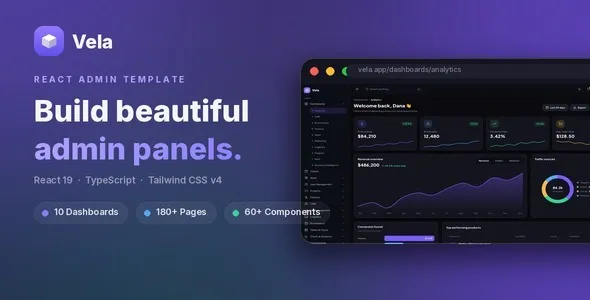
Vela – React Admin Dashboard Template
Vela – React Admin Dashboard Template is a modern dashboard website template designed for developers, businesses, startups, SaaS companies, and digital agencies that need a structured interface for managing application data, monitoring business activities, and presenting important information in an organized format. Built around the React development ecosystem, Vela provides a starting point for creating administrative interfaces, analytics dashboards, management panels, internal business tools, and web application backends. Its dashboard-focused purpose makes it suitable for projects that require a professional interface for displaying metrics, organizing records, navigating application sections, and managing information efficiently.
Administrative dashboards are essential components of many modern web applications. They help business owners, administrators, employees, and authorized users access important information from a centralized interface. Depending on the application, a dashboard may present sales figures, user activity, performance indicators, reports, customer records, inventory details, operational statistics, or system notifications. A well-organized dashboard can make these tasks easier by presenting information through clear layouts, meaningful visual hierarchy, and intuitive navigation.
Vela – React Admin Dashboard Template offers a foundation for developing this type of interface. Developers can adapt the template to match a project’s branding, data structure, and administrative requirements. It can be considered for business management applications, analytics platforms, customer relationship management interfaces, project management tools, eCommerce administration panels, and other web-based software projects. The precise features, included components, page layouts, and dependencies should be verified against the current product package and documentation before implementation.
Modern React Admin Dashboard Design
React is widely used to develop interactive user interfaces, making it a practical choice for dashboard applications that contain reusable components and frequently changing information. An admin dashboard built with React can organize interface elements into components that developers can maintain, reuse, and adapt across multiple pages.
Vela is intended to provide a starting point for React-based administrative interface development. Rather than building every screen from the beginning, developers can review the supplied structure and customize the relevant layouts for their application. Depending on the package, this may involve adjusting navigation, page content, typography, colors, data presentation, and other interface elements.
A professional dashboard should help users understand the information presented without unnecessary complexity. Important metrics should be easy to identify, navigation should follow a predictable structure, and related information should be grouped logically. Consistent design patterns can also reduce the learning curve for employees and administrators who use the application regularly.
For businesses developing internal tools or commercial software, a coherent dashboard interface can support a more polished user experience. Vela can serve as a starting point for that experience, while the final implementation should be adapted to the actual workflows and requirements of the target application.
Suitable for Different Web Applications
Administrative dashboards are used across many industries, and their requirements vary according to the type of information being managed. A dashboard for a financial application may focus on transactions and account summaries, while a project management tool may emphasize tasks, deadlines, team activity, and progress indicators.
Vela – React Admin Dashboard Template can be evaluated for projects that need a flexible administrative interface. Developers may adapt it for business applications, SaaS products, service platforms, operational systems, reporting tools, and internal company portals, depending on the included layouts and the work required to customize them.
A SaaS company might use an adapted dashboard to organize subscription information, user accounts, product usage statistics, and account settings. An eCommerce business could develop an administrative interface for reviewing orders, products, customers, and sales reports. A digital agency might use a customized version as the foundation for an internal project tracking or client management application.
These are potential implementation scenarios rather than guaranteed built-in features. Data management, authentication, permissions, reporting logic, and external integrations may require additional development or a connection to an existing backend service.
Reusable React Components
Reusable components are one of the central concepts in React development. They allow developers to divide a complex interface into smaller units that can be reused throughout an application. Common dashboard components may include navigation menus, headers, cards, buttons, tables, forms, alerts, dropdowns, and content panels.
A React dashboard template can help establish a consistent approach to these interface elements. If Vela includes reusable components, developers can review their implementation and adapt them to suit the application’s visual style and functionality. The exact component library and organization should be confirmed by inspecting the supplied source code.
A consistent component structure can simplify future updates. For example, a shared header can be maintained in one place rather than recreated separately for every page. Standardized buttons and form controls can also help ensure that similar actions look and behave consistently throughout the application.
Developers can extend the interface by creating additional components for project-specific requirements. A reporting application may need specialized chart panels, while a customer management system may require contact cards, activity timelines, and filtering controls. These additions can be incorporated into the existing architecture when the codebase supports the required customization.
Dashboard Overview and Key Performance Indicators
Many administrative applications use a main overview page to summarize important activity. Rather than requiring users to open multiple sections, an overview can present essential indicators and direct attention toward areas that need further investigation.
A customized Vela dashboard can be structured around relevant key performance indicators, or KPIs. Depending on the application, these might include revenue, active users, completed tasks, pending requests, inventory levels, customer registrations, or operational performance.
Metric cards can present a value alongside a descriptive label and, where meaningful, a comparison with an earlier period. Developers should ensure that each figure has a clear definition and comes from a reliable data source. Changes in revenue, for example, should use a consistent reporting period and calculation method.
The overview should prioritize information that helps users make decisions. Displaying too many metrics at once can create unnecessary visual noise, so it is useful to identify the most important indicators before finalizing the page structure.
When connecting the interface to a live backend, the application should also account for loading states, empty datasets, delayed responses, and errors. A polished dashboard communicates these states clearly instead of presenting misleading placeholder values as if they were real business results.
Data Visualization and Analytics Interfaces
Data visualization can make complex information easier to interpret. Charts, graphs, progress indicators, and summary tables can help users recognize trends, compare categories, and understand changes over time.
Vela can be considered for analytics-focused applications where developers want to build a structured dashboard around business data. If chart components or visualization libraries are included in the supplied package, they should be reviewed for compatibility, customization options, and licensing requirements. Additional charting tools may be integrated if the project requires them.
A sales dashboard might display revenue trends, order volumes, or product performance. A SaaS analytics interface could present account growth, feature usage, or subscription changes. An operations dashboard might summarize task completion, response times, or resource utilization.
Good visualization design depends on choosing an appropriate chart type and labeling the information clearly. Line charts are commonly useful for trends over time, while bar charts can compare categories. Tables may be more suitable when users need exact values rather than a visual summary.
Charts should also remain understandable when data changes. Developers should plan for missing values, large datasets, different date ranges, and responsive layouts. Colors should be used consistently, and important distinctions should not rely on color alone.
Tables for Organized Data Management
Tables are useful in administrative interfaces because they allow users to review structured records in a compact format. They may be used for customer lists, product catalogs, orders, transactions, employees, tasks, support requests, or other application records.
A Vela-based application can incorporate table views where appropriate, depending on the supplied components and the level of customization required. A well-designed table typically uses clear column headings, consistent spacing, readable values, and a predictable approach to row actions.
For applications with many records, developers may need sorting, search, filtering, pagination, column visibility controls, or bulk actions. These features can improve usability, but they should be implemented according to the actual requirements and data volume rather than assumed to exist in the base template.
Tables should also support different screen sizes. Wide datasets may need responsive containers, carefully selected columns, alternative mobile views, or horizontal scrolling where appropriate. Important actions should remain discoverable without forcing users to navigate an unnecessarily crowded interface.
When tables display sensitive information, access to the underlying records must be controlled by the backend. Hiding a column in the interface is not a substitute for proper authorization and data protection.
Forms and Administrative Workflows
Forms are an essential part of many dashboard applications. Administrators may use them to create new records, update existing information, configure settings, manage products, assign tasks, or enter operational data.
A customized React admin dashboard can provide a consistent interface for these activities. Vela may serve as the design foundation for form layouts and controls, subject to the components included in the package. Developers can adapt the fields, labels, validation messages, and submission behavior to the needs of each workflow.
Forms should use descriptive labels and explain any required information. Validation messages should identify problems clearly and help users correct them without losing previously entered data. Where a submission takes time, a loading indicator and disabled submit action can help prevent accidental duplicate requests.
The front-end should also communicate the outcome of a submission. Success messages, error notifications, and field-level feedback help users understand whether an operation was completed.
React components alone do not guarantee that data will be stored securely or consistently. The application needs suitable backend endpoints, server-side validation, authorization checks, and error handling to support real administrative workflows.
User Management and Role-Based Interfaces
Many applications require different levels of access for administrators, managers, employees, customers, or other user groups. A dashboard can make these roles easier to manage by providing appropriate navigation and views for each audience.
Vela can be evaluated as a starting point for a user management interface, provided that the required layouts are available or can be developed. Such an interface might include user lists, profile details, account status indicators, role labels, and actions for authorized administrators.
Role-based access control must be implemented correctly. The user interface can hide options that are irrelevant to a particular role, but the backend must independently verify whether each user is permitted to access a resource or perform an operation.
For example, an employee may be allowed to view assigned tasks but not change billing settings. A manager may have access to team reports, while a system administrator may be responsible for user configuration. These rules should be defined according to the organization’s policies and enforced by the application’s authorization layer.
If Vela does not include authentication or user management functionality, these capabilities will need to be developed or integrated separately. Review the current documentation before selecting the template for a project with complex account requirements.
Navigation and Sidebar Organization
Navigation is a major part of the dashboard experience. Administrative applications often contain several modules, and users need a reliable way to move between them without losing track of their current location.
A dashboard built with Vela can organize navigation around the application’s main functions. Depending on the use case, menu items might include Overview, Analytics, Users, Projects, Products, Orders, Reports, Settings, and Help.
The most effective structure reflects the actual workflows of the people using the application. Frequently used sections should be easy to access, while less common settings can be grouped into secondary navigation areas. Descriptive labels help users understand where each item leads.
A sidebar can be useful when an application has multiple modules, while a compact top navigation may suit simpler projects. The final layout should account for the number of pages, the importance of quick navigation, and the available screen space.
Active states, page titles, breadcrumbs, and clear menu grouping can help users understand their current location. On mobile devices, navigation may need to collapse into a menu that remains easy to operate with touch input and keyboard controls.
Responsive Design for Different Devices
Administrative users do not always work from desktop computers. Managers may check reports on tablets, employees may update information from mobile devices, and support teams may need to access records while away from their usual workstation.
For this reason, responsive behavior should be evaluated when selecting and implementing Vela – React Admin Dashboard Template. Check the supplied version to determine which screen sizes and layout patterns it supports, and test all important pages after customization.
A responsive dashboard should keep navigation usable, maintain readable text, and display key information without unnecessary horizontal scrolling. Metric cards may rearrange into fewer columns, while charts and tables may need adjusted widths or alternative layouts.
Touch-friendly controls are particularly important on smaller screens. Buttons, dropdowns, and form inputs should be easy to operate without accidental selections. Dialogs and menus should also fit within the visible viewport.
Responsive testing should cover real content rather than only sample text. Long usernames, large numerical values, extensive table rows, and validation messages can reveal layout issues that are not apparent in a simple demonstration.
Customizable Branding and Visual Styling
Businesses often want their internal tools and commercial applications to reflect a consistent brand identity. A dashboard that uses familiar colors, typography, and visual patterns can feel more closely connected to the rest of the product.
Vela can be customized to align the dashboard interface with a company’s branding, depending on the flexibility of the supplied code. Typical changes include updating the logo, adjusting the color palette, selecting suitable fonts, modifying spacing, and refining buttons, cards, and navigation elements.
A consistent design system makes the interface easier to maintain as new pages are added. Developers can define shared styles for headings, body text, borders, shadows, spacing, and interactive states. Reusing these values reduces the likelihood of inconsistent layouts across the application.
Branding should not come at the expense of usability. Text needs adequate contrast, form controls should be easy to identify, and important actions should remain visually distinct. A restrained visual system often works well for administrative tools because it helps users focus on the information and tasks that matter.
Before making extensive style changes, developers should inspect how the template organizes its CSS and React components. Understanding the existing structure can make customization more efficient and reduce the risk of unintended changes across multiple pages.
React Development and Code Customization
React enables developers to build user interfaces from components and manage dynamic interface state. This makes it useful for dashboards that need reusable layouts, interactive controls, and changing data.
Vela offers a potential starting point for developers who want to build on a React-based interface rather than implement every visual element from scratch. The supplied project structure, scripts, and dependencies should be inspected before development begins.
Common tasks may include installing project dependencies, configuring the development environment, updating page components, connecting data sources, adjusting styles, and preparing the application for deployment. The exact workflow depends on the version of React and the build tools included with the template.
Developers should also review the project’s routing approach, state management patterns, component organization, and dependency versions. If a dashboard needs multiple routes, shared state, complex forms, or real-time data, the implementation should follow a consistent architecture that remains manageable as the application grows.
Custom functionality should be added carefully. Reusable components, clear naming, predictable data flow, and appropriate error handling can make the application easier to maintain. Before deployment, verify that the production build works correctly and that no development-only settings or placeholder data remain unintentionally exposed.
Integration With APIs and Backend Services
Most production dashboards rely on data from a server, database, or external service. The front-end presents the information and lets authorized users interact with it, while backend systems are responsible for retrieving, validating, and storing the underlying records.
A customized Vela application can be connected to suitable APIs where the template structure and project requirements permit. Developers may integrate endpoints for user records, product data, sales reports, project information, notifications, or other application resources.
A reliable integration should account for loading states, empty responses, invalid data, authentication failures, network errors, and server-side problems. Users should receive clear feedback when information cannot be retrieved or an operation fails.
API requests should follow the security model of the application. Credentials and sensitive secrets must not be embedded in publicly accessible front-end code. Access tokens should be handled appropriately, and the backend should enforce authentication, authorization, input validation, and rate limits where needed.
If the dashboard needs live updates, developers can consider polling, server-sent events, WebSockets, or other approaches according to the application’s performance and infrastructure requirements. These integrations generally require additional implementation beyond a static interface.
Security Considerations for Admin Dashboards
Administrative interfaces often provide access to important business information, making security a central part of implementation. A professional-looking dashboard should not be considered secure simply because it uses React or a polished template.
Developers should implement authentication through an appropriate system and ensure that protected API endpoints verify user identity. Authorization rules should determine which records and operations each user can access. Sensitive actions may require additional verification or audit logging depending on the application.
Input validation should take place on the server even when the front-end also validates fields. Output should be handled safely, and dependencies should be reviewed for known vulnerabilities. Configuration secrets should be stored in appropriate environment settings rather than exposed in client-side bundles.
Session management, secure transport, access expiration, password recovery, and account protection should be planned according to the project’s risk profile. Applications that manage personal, financial, health-related, or confidential business information may require additional safeguards and compliance reviews.
Vela should be treated as an interface foundation unless its current documentation explicitly confirms otherwise. Security-critical functionality must be designed, implemented, and tested as part of the complete application.
Performance and Efficient Dashboard Rendering
Dashboard interfaces can become demanding when they display many charts, large tables, complex forms, or frequently updated data. A responsive and efficient implementation helps users complete administrative tasks without unnecessary delays.
Developers working with Vela should review the initial JavaScript bundle, asset sizes, component rendering behavior, and external dependencies. Unnecessary packages and unused code can increase the amount of information a browser needs to download and process.
React applications may benefit from appropriate code splitting, lazy loading of less frequently used routes, and careful management of component state. Expensive calculations should be evaluated and optimized where profiling indicates a genuine problem. Performance techniques should be applied based on evidence rather than added indiscriminately.
Data-heavy interfaces may need server-side pagination, filtering, or sorting so that the browser does not have to render thousands of records at once. Charts should also be designed with the size and frequency of incoming datasets in mind.
Testing should include realistic data volumes and common user workflows. A dashboard that performs well with a few demonstration records may behave differently when it contains large datasets or several simultaneous visualizations.
Accessibility and Usability
Accessibility is an important consideration for administrative applications used by employees, customers, and other stakeholders with different needs and abilities. A usable dashboard should provide clear information and predictable interaction patterns.
When customizing Vela, developers should use semantic HTML elements, meaningful labels, logical heading structures, visible keyboard focus, and descriptive link text. Interactive controls should be usable without a mouse, and dropdowns, dialogs, and navigation menus should support appropriate keyboard behavior.
Color contrast should be sufficient for text, icons, buttons, and status indicators. Important states should not be communicated through color alone; for example, a status label can combine color with text or an icon.
Forms should provide clear instructions and accessible error messages. Charts may need accompanying text summaries or data tables so that important information is not available only through visual presentation.
Automated accessibility checks can identify common issues, but manual testing is also necessary. The completed application should be reviewed using keyboard navigation, different screen sizes, and assistive technology where appropriate.
Useful for SaaS Products and Commercial Applications
Software-as-a-Service businesses often need an administrative interface for managing accounts, reviewing usage, monitoring performance, and configuring application settings. A React dashboard template can provide a starting point for this part of the product.
Vela may be considered for SaaS applications that need an organized back-office interface or a foundation for internal administration. Developers can adapt the navigation and page layouts to the product’s modules, while custom APIs and backend services provide the actual business logic.
A subscription management interface might display plan information, account status, usage statistics, and billing history. A customer support platform could focus on tickets, customer profiles, and response metrics. A project collaboration tool may prioritize assignments, deadlines, and team activity.
These capabilities require appropriate application logic and should not be assumed to be included in the base template. A SaaS product may also require tenant isolation, subscription billing, audit trails, notification systems, and account-level permissions. Such features must be implemented and tested independently unless the supplied package explicitly includes them.
Suitable for Freelancers, Agencies, and Development Teams
Freelancers and development agencies frequently create custom dashboards for clients across multiple industries. Starting with a suitable React template can help establish an initial interface and reduce the amount of repetitive layout work required.
Vela can be evaluated for client projects that need a dashboard-oriented visual foundation. Developers can review the included pages and components, identify reusable elements, and adapt the design to the client’s workflows and branding requirements.
A structured development process begins with documenting the required screens, data sources, user roles, and interactions. Once these requirements are clear, the team can determine which parts of the template can be reused and which components need to be built or replaced.
Code quality and maintainability should remain priorities throughout the project. Reusable components, documented integrations, consistent naming conventions, and automated tests can make future enhancements easier to deliver.
Before using the template in a commercial project, review the license and any restrictions on redistribution, client delivery, or use within commercial products. Also verify the terms of included third-party libraries, fonts, and other assets.
Important Things to Check Before Purchase
Before choosing Vela – React Admin Dashboard Template for a project, review the current product demonstration and documentation to confirm that the package meets your technical and design requirements.
Check the included page layouts, reusable components, available dashboard variations, charting tools, form elements, table components, and navigation patterns. Confirm the React version, build tooling, package dependencies, installation process, and any stated browser requirements.
If you require authentication, role-based access, API integration, real-time data, file uploads, or payment management, determine whether these capabilities are included or will need additional development. Do not assume that a visual example demonstrates a complete production-ready workflow.
It is also useful to examine the source code and assess how easily the template can be customized. Review the component structure, styling approach, routing, and documentation before committing to a larger project.
Finally, consider ongoing maintenance. Dependencies may need updates, and application requirements may change as a business grows. A template should fit not only the initial design but also the long-term development plan.
Conclusion
Vela – React Admin Dashboard Template provides a potential foundation for building modern administrative interfaces, analytics dashboards, business management tools, SaaS backends, and data-driven web applications. Its React-based development approach makes it relevant to projects that benefit from reusable interface components and a structured dashboard experience.
With appropriate customization, developers can adapt the interface to present business metrics, organize records, support administrative workflows, and establish a consistent visual identity. Navigation, tables, charts, forms, and overview panels can be arranged according to the needs of the application and the components available in the supplied package.
For a successful implementation, combine the dashboard design with reliable API integration, secure authentication, server-side authorization, accessible interactions, responsive layouts, and performance testing. Advanced functions such as user management, live analytics, database operations, and payment processing should be verified or developed separately rather than assumed to be included.
If you are looking for a React-based starting point for an admin panel or business application, Vela – React Admin Dashboard Template is worth evaluating against your project requirements, source code, documentation, compatibility, and licensing terms. A carefully customized and maintained implementation can provide a practical interface for managing information and supporting everyday application workflows.