My Account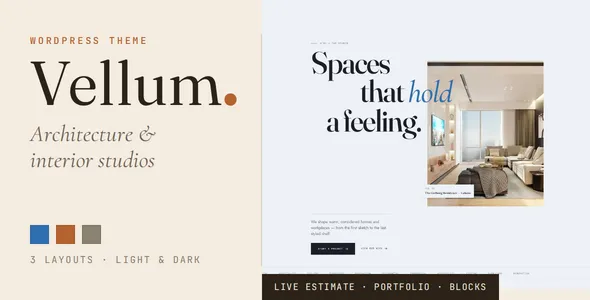
Vellum — Architecture & Interior Design Studio WordPress Theme
Vellum — Architecture & Interior Design Studio WordPress Theme is a stylish website solution designed for architects, interior designers, architecture studios, residential design firms, and creative professionals who want to establish a distinctive online presence. With an emphasis on visual presentation, professional branding, and clear content organization, Vellum provides a foundation for showcasing architectural projects, interior design concepts, studio services, and creative portfolios. Whether you operate an independent design practice, manage a multidisciplinary architecture firm, or offer specialized interior design services, this WordPress theme can help you present your work in a polished and engaging digital environment.
An architecture and interior design website should do more than display photographs. It should communicate your design philosophy, demonstrate your expertise, explain your services, and help potential clients understand how your studio approaches each project. Vellum is suited to building this kind of professional presentation by bringing portfolio content, studio information, service descriptions, and contact details together in one organized website. Its architecture-focused identity makes it relevant for businesses that want their online presence to reflect creativity, precision, thoughtful planning, and attention to detail.
From residential architecture and luxury interiors to commercial spaces, hospitality environments, and contemporary renovations, Vellum offers a theme concept that can be adapted to different creative disciplines. You can use it to introduce your studio, present completed projects, explain your design process, and guide visitors toward making an inquiry. With WordPress as its foundation, the theme also provides a content management environment for maintaining and expanding your website as your portfolio and business develop.
A Professional Website for Architecture and Interior Design
Vellum is designed around the needs of architecture and interior design professionals who rely on strong visual communication. Prospective clients often want to see examples of previous work before deciding whether to contact a studio. A well-organized website helps them explore your style, understand your capabilities, and evaluate whether your approach matches their requirements.
An architecture studio website can serve several purposes at once. It can introduce your company, explain the services you provide, display selected projects, share your professional background, and provide straightforward ways to get in touch. Vellum offers a suitable starting point for bringing these elements into a cohesive digital presentation.
The theme can be adapted for established architecture firms, boutique interior design studios, freelance architects, landscape designers, renovation consultants, and other professionals working in the built environment. By aligning your visual identity, project photography, typography, and written content, you can create a website that communicates a consistent brand experience.
Instead of relying on a generic business layout, an architecture-focused theme gives you a more relevant framework for presenting design work. This makes Vellum a useful option for professionals who want their website to function as both a portfolio and a business development tool.
Elegant Presentation for Creative Brands
Visual consistency plays an important role in how clients perceive an architecture or interior design business. A thoughtfully presented website can communicate professionalism before a visitor reads a detailed service description. Vellum provides a foundation for developing a refined brand experience that complements the character of your projects.
You can customize the presentation using your studio logo, brand colors, project imagery, written content, and other visual elements supported by your selected setup. A restrained palette, carefully selected typography, and high-quality photographs can help establish a sophisticated appearance without distracting visitors from the work itself.
For architecture studios, this presentation can emphasize structural form, material selection, spatial planning, and the relationship between buildings and their surroundings. Interior designers can focus on furniture arrangements, textures, lighting, color palettes, and the atmosphere of completed spaces.
A consistent visual approach also helps visitors recognize your brand across different pages. When your homepage, project portfolio, service pages, and contact section share a coherent style, the website feels more organized and easier to explore.
Architecture Portfolio for Showcasing Completed Projects
A project portfolio is one of the most important components of an architecture website. Clients frequently use portfolio examples to assess a studio’s experience, aesthetic direction, and ability to work across different project types. Vellum can be used to create a structured portfolio that gives your work the attention it deserves.
You can organize projects according to your studio’s specialties, such as residential architecture, commercial buildings, interior renovations, hospitality design, workplace planning, or contemporary homes. Each project can be presented with suitable images and supporting information, depending on the available page layouts and your WordPress configuration.
A detailed project presentation may include the project title, location, category, design concept, materials, scope of work, and selected photographs. You can also explain the original design challenge and describe how your team approached the solution. This context helps visitors understand the thinking behind the finished result.
For example, a residential project could highlight how natural light, circulation, storage, and material choices contribute to a comfortable living environment. A commercial interior project might explain how the layout supports customer movement, staff collaboration, or the identity of a business.
Organizing your portfolio into clear categories helps visitors find work relevant to their needs. A potential homeowner may want to explore residential projects, while a commercial client may focus on office interiors or business premises. A logical portfolio structure makes these journeys more convenient.
Interior Design Portfolio for Visual Storytelling
Interior design depends heavily on the presentation of space, light, texture, proportion, and atmosphere. A strong online portfolio should allow these qualities to remain central to the visitor experience. Vellum can provide a foundation for presenting interior design work through carefully selected photographs and descriptive project content.
Interior designers can use project pages to display living rooms, bedrooms, kitchens, bathrooms, dining spaces, offices, retail environments, and hospitality interiors. Each project can tell a story about the client’s requirements, the design direction, and the decisions that shaped the final space.
Photography is particularly important for this type of website. High-resolution images with consistent lighting and composition can help visitors appreciate the relationship between architectural elements, furniture, finishes, and decorative details. Combining wide-angle room photographs with close-up images of materials or fixtures can create a more complete impression of the design.
You can also include short descriptions explaining the inspiration behind a project, the intended atmosphere, and the practical considerations involved. These details help distinguish your work from a simple gallery of images and give prospective clients a better understanding of your design process.
For studios that work across multiple styles, portfolio categories can help separate contemporary, minimalist, traditional, luxury, industrial, and other interior design approaches where relevant to the business.
Homepage Designed Around Your Studio Identity
The homepage is often the first point of contact between a design studio and a potential client. It should communicate what your business does, what makes it distinctive, and where visitors can explore its work. Vellum can serve as the starting point for creating a homepage that brings these messages together.
A well-planned architecture homepage can introduce the studio through a concise headline, a compelling project image, and a clear explanation of its primary services. Featured projects can then demonstrate the quality and range of your work, while additional sections can introduce your team, describe your approach, and direct visitors to relevant service pages.
Interior design studios may choose to emphasize their signature style, selected room transformations, or the experience they provide throughout a design project. Architecture firms may instead prioritize building design, planning expertise, sustainable design principles, or the variety of projects they undertake.
A clear homepage structure helps prevent visitors from feeling overwhelmed. Rather than placing every detail on the first page, you can use concise introductions and relevant links to guide users toward the information they need.
The exact homepage sections and layout options available will depend on the theme package, installed plugins, and supported customization tools. Reviewing the current Vellum demo and documentation before building your site will help you identify the best structure for your goals.
Architecture and Interior Design Services
A professional website should explain the services offered by your studio in language that potential clients can easily understand. Vellum can be used to create dedicated service pages that outline your areas of expertise and help visitors determine whether your business is a suitable fit.
Architecture firms may offer residential architecture, commercial building design, space planning, renovation design, architectural consultation, or project coordination. Interior design businesses may focus on residential interiors, commercial interiors, furniture selection, lighting concepts, material specifications, or complete interior planning.
Each service page can explain what the service includes, which clients it is intended for, and how the process typically works. Adding relevant project examples can provide useful evidence of your experience and connect service descriptions with real work.
For example, a residential architecture page might describe the stages of a project, from understanding the client’s requirements to developing a design concept and coordinating the next steps. An interior design page could explain how a studio approaches space planning, color selection, materials, furniture, and lighting.
Clear service information also helps visitors understand the difference between individual consultations and larger projects. When services are described accurately, potential clients can make more informed inquiries and begin conversations with realistic expectations.
Dedicated Project Detail Pages
A portfolio becomes more useful when individual projects have their own dedicated pages. Rather than presenting every project as a collection of images alone, you can use project detail pages to explain the purpose, context, and outcome of each design.
A detailed project page may include an introduction, a gallery of completed work, project specifications, design objectives, and a summary of the creative approach. Where appropriate, you can also describe the materials used, important spatial decisions, challenges encountered, and considerations that influenced the result.
These pages help communicate the value of your services. Prospective clients can learn not only what a finished project looks like but also how your studio responds to requirements and translates ideas into practical design solutions.
For studios that have worked with different client types, project detail pages can demonstrate versatility. A selection of residential, commercial, hospitality, and workplace projects can show the breadth of your experience without requiring visitors to read an extensive company introduction.
The available portfolio templates and project management features should be confirmed against the current theme package. Where the desired structure is not provided by default, WordPress page layouts, compatible plugins, or additional development may be needed.
About the Studio and Professional Expertise
Clients often want to know who will be responsible for their project before choosing an architecture or interior design firm. An About page provides an opportunity to introduce your studio, explain its philosophy, and communicate the experience behind your work.
Vellum can be used to present your company history, professional background, creative values, and approach to collaboration. You might explain why your studio prioritizes thoughtful planning, functional spaces, quality materials, responsible design, or personalized client service.
If your business includes multiple professionals, you can introduce team members and describe their roles. Information about architects, interior designers, project coordinators, and other specialists can help visitors understand the capabilities of your team.
Professional qualifications, awards, industry memberships, and relevant achievements may also be included when they are accurate and applicable. These details can strengthen your presentation without relying on exaggerated marketing claims.
An effective About page should remain focused on the client as well as the company. Explaining how your experience helps address design challenges gives visitors a clearer reason to consider your services.
Responsive Design for Desktop, Tablet, and Mobile Visitors
People may discover an architecture studio through a search engine, a social media link, a referral, or a shared project page. They may visit from a desktop computer, a tablet, or a smartphone. A responsive website is therefore important for presenting your work across different screen sizes.
Vellum is positioned as a WordPress theme for modern design businesses, making responsive presentation an important consideration when evaluating the theme. Before publishing, review the current demo and test your actual installation on common screen sizes to confirm how its layouts behave.
For an architecture portfolio, responsive design involves more than shrinking a desktop page. Project photographs should remain clear, navigation should be easy to use, text should remain readable, and contact links should be accessible on smaller screens.
A well-adjusted mobile experience can make it easier for visitors to browse a project gallery, read service descriptions, or contact your studio while on the move. It also supports a consistent brand experience when clients move between devices.
Image dimensions, gallery settings, typography, and page-builder configurations can all influence the final result. Testing your customized website before launch helps identify layout problems and allows you to make adjustments where necessary.
WordPress Content Management
WordPress provides a familiar content management system for maintaining website pages, publishing articles, and updating business information. For design studios that regularly complete projects or refine their services, the ability to update content is valuable.
With Vellum installed and configured, you can use your WordPress environment to manage the content supported by the theme. This may include studio information, portfolio pages, service descriptions, contact details, and editorial content, depending on the theme’s structure and installed plugins.
Keeping your portfolio current helps demonstrate that your studio remains active and continues to develop its work. You can replace older project images, add recently completed assignments, revise service descriptions, and update your company information as your business evolves.
WordPress also supports a broad ecosystem of plugins for functions such as contact forms, search engine optimization, backups, security, analytics, and performance management. However, plugin compatibility and the availability of specific theme integrations should be checked before installation.
A reliable content management workflow makes it easier to maintain a professional website without rebuilding the entire design whenever a new project is completed.
Customization for Your Brand
Architecture and interior design studios often have distinctive identities. Some prefer a minimal presentation with generous white space, while others use bold typography, rich colors, or editorial-style photography. A suitable theme should provide a foundation that can be adapted to your brand rather than forcing every studio into the same appearance.
Vellum can be evaluated as a starting point for developing a visual identity that reflects your company’s character. Depending on the included customization features, you may be able to adjust colors, typography, logos, images, page content, and other design elements through the available WordPress tools.
For a minimalist architecture practice, a restrained palette and carefully selected project imagery may help emphasize proportion and materiality. A luxury interior design studio might choose warmer tones, elegant typography, and large photographs to establish a more premium visual direction.
A commercial architecture firm may prefer a more structured presentation that highlights services, technical experience, and project categories. A boutique studio could focus on selected projects and a more personal introduction.
Before committing to extensive customization, review the theme’s supported options and documentation. Certain changes may require a compatible page builder, additional plugins, custom CSS, or professional development.
Search Engine Optimization for Architecture Websites
Search engine optimization can help potential clients discover your studio when they search for architecture, interior design, renovation, or related services. A well-organized website provides a foundation for publishing useful content and making your services easier for search engines and visitors to understand.
Vellum can be used as part of an SEO-focused WordPress website when paired with appropriate content, technical configuration, and ongoing optimization. The theme alone cannot guarantee search rankings, traffic, or indexing results.
Start by giving each important page a clear purpose. Your homepage can describe your studio and its primary location or service area. Individual service pages can focus on specific offerings, while portfolio pages can explain completed projects in meaningful detail.
Use descriptive page titles, useful headings, concise meta descriptions, and readable URLs. Add relevant alternative text to meaningful images, particularly when photographs communicate important project information. Avoid inserting long lists of keywords into image descriptions or page copy.
Architecture studios can also publish articles about design considerations, renovation planning, material choices, space utilization, and other topics that answer real client questions. These articles can provide additional entry points to the website while demonstrating professional knowledge.
If your business serves a specific city or region, ensure that your location and service area are represented accurately. Search performance depends on multiple factors, including content quality, competition, technical accessibility, website reputation, and the relevance of your pages to user searches.
Image Optimization for Visual Portfolios
Large project photographs are central to architecture and interior design websites, but they can also affect loading performance. A portfolio with many unoptimized images may become slow, particularly on mobile connections.
Before uploading photographs, prepare them for web use. Choose suitable dimensions, compress files while preserving acceptable visual quality, and use efficient image formats supported by your website setup. Avoid uploading multiple oversized versions of the same image when they are not required.
Descriptive filenames can make your media library easier to manage. For example, a filename that identifies a residential interior project is generally more useful than a generic camera-generated filename. Write alternative text that accurately describes the content of meaningful images and supports accessibility.
Organize galleries so visitors can explore projects without unnecessary repetition. A strong selection of relevant images is often more effective than displaying every photograph from a project.
The final performance of Vellum will depend on its implementation, hosting environment, image assets, scripts, plugins, and caching configuration. Test your completed website using performance tools and address issues identified during testing rather than assuming that any theme automatically delivers a particular speed score.
Lead Generation and Client Inquiries
An architecture or interior design website should make it straightforward for potential clients to start a conversation. Visitors who appreciate your portfolio need a clear path to ask about services, discuss project requirements, or request further information.
Vellum can provide the visual foundation for placing contact information and inquiry prompts throughout your website. Depending on your selected setup, you may use compatible contact-form plugins or other integrations to collect client inquiries.
A useful inquiry form should request only information that is necessary for the initial conversation. Depending on your services, this could include a name, email address, project type, location, approximate project scope, and a short description of the requirements.
You can also include your business email, telephone number, office location, and relevant social media profiles. Ensure that contact details remain consistent across the website and that visitors understand what will happen after submitting a form.
Prominent but unobtrusive calls to action can guide visitors from portfolio pages to relevant service descriptions or the contact page. For example, a completed residential project might link to your residential design service, allowing interested visitors to explore related information before making an inquiry.
Any contact forms, automated replies, or third-party integrations should be tested before launch to ensure that submissions reach the intended destination.
Blog and Design Insights
An architecture or interior design blog can support your website by sharing professional knowledge and answering questions that matter to prospective clients. It also gives your studio a way to explain its design philosophy beyond the projects featured in the portfolio.
You could publish articles about planning a home renovation, selecting interior materials, improving natural lighting, designing efficient workspaces, or balancing aesthetics with functionality. Project case studies can explain the thinking behind completed work, while studio updates can introduce new services or noteworthy milestones.
Educational content is most useful when it provides practical information rather than repeating broad marketing statements. An article about kitchen planning, for example, could discuss workflow, storage, lighting, and circulation. A guide to office interiors might explain how furniture arrangement and zoning support different work activities.
WordPress supports publishing and organizing articles into categories and tags. The precise presentation of blog posts will depend on Vellum’s included templates and your chosen configuration.
Maintain a realistic publishing schedule and prioritize accuracy. A small collection of genuinely useful articles can be more valuable to your audience than a large volume of repetitive content.
Suitable for Different Architecture and Interior Design Businesses
Vellum’s architecture and interior design focus makes it a potential starting point for several types of creative businesses.
Architecture firms: Present residential buildings, commercial developments, renovation projects, architectural concepts, and studio services in a professional portfolio.
Interior design studios: Showcase living spaces, kitchens, bedrooms, workplaces, hospitality interiors, and other completed design projects through organized galleries and project descriptions.
Residential design specialists: Explain your approach to home planning, renovations, extensions, and the creation of functional living environments.
Commercial interior designers: Present office layouts, retail interiors, restaurants, hospitality spaces, and other environments designed for business use.
Freelance architects and designers: Build a personal professional portfolio that introduces your expertise, displays selected work, and provides direct contact information.
Landscape and spatial design professionals: Adapt the website’s content to highlight outdoor environments, spatial planning, and related creative services where the layout and available customization options are suitable.
Renovation and remodeling companies: Combine project photographs with service descriptions and inquiry information to help visitors understand the company’s capabilities.
The most effective implementation will depend on your specific business model. Review the available layouts and current demo to determine whether the theme supports your preferred project structure and content presentation.
User Experience and Website Navigation
Clear navigation helps visitors understand the structure of your website and find relevant information without unnecessary effort. For an architecture studio, the primary navigation might include Home, Projects, Services, About, Insights, and Contact.
Project categories can be arranged so users can distinguish between residential, commercial, and interior design work. Service pages should be grouped logically, while the contact page should remain easy to find from different parts of the website.
Consistent headings, readable paragraphs, descriptive links, and clear visual hierarchy can improve the experience for both desktop and mobile visitors. Avoid overwhelming users with too many menu options or placing essential information behind unnecessarily complex navigation.
Accessibility should also be part of the design process. Use sufficient color contrast, meaningful link text, descriptive alternative text, and a logical heading structure. Ensure that interactive controls can be accessed and understood by users who rely on keyboards or assistive technologies.
These improvements benefit visitors with different needs and make the website easier to maintain. The final user experience will depend on the theme configuration, content, and any additional functionality installed.
Security and Website Maintenance
A professional business website should be maintained regularly to protect its content and keep its functionality reliable. WordPress maintenance generally includes updating the core platform, reviewing theme and plugin updates, checking compatibility, and monitoring website performance.
Before applying major updates, create a backup of the website and verify that your hosting environment supports the required software versions. Test important pages and forms after updates to confirm that the website continues to work as expected.
Use strong administrator passwords, limit unnecessary user permissions, and install plugins only from sources you trust. Remove unused extensions and themes when appropriate, and maintain a backup strategy that allows you to restore the website if something goes wrong.
Security plugins, backup tools, and monitoring services may be useful depending on your hosting setup and business requirements. Their compatibility should be checked before adding them to your installation.
These practices help maintain the long-term reliability of an architecture portfolio and reduce the risk of avoidable interruptions to client inquiries or project presentations.
Getting Started with Vellum
Setting up Vellum begins with reviewing the theme package, its installation requirements, and its documentation. Confirm that the version you obtain is compatible with your WordPress installation and that any required plugins are available.
Install the theme through the appropriate WordPress administration tools or the installation method specified by the provider. If the package includes demo content or starter layouts, review the available import instructions before applying them to an existing website. Demo imports may replace or add content, so use a backup and understand the import process before proceeding.
Once the theme is installed, establish your brand identity by adding your logo, selecting suitable typography and colors, and preparing project images. Create the essential pages for your business, including the homepage, portfolio, services, About page, and contact page.
Replace placeholder content with original information that accurately represents your studio. Check every navigation link, review images on mobile devices, test contact forms, and ensure that page titles and metadata are configured appropriately.
Before launching, inspect the website for missing images, incomplete text, broken links, layout inconsistencies, and performance issues. Review the current theme documentation for details about supported layouts, required plugins, and customization options.
Why Choose an Architecture-Focused WordPress Theme?
A specialized theme can make it easier to organize a website around the priorities of a particular industry. For architecture and interior design businesses, those priorities often include project photography, portfolio organization, service presentation, and a visual identity that reflects the studio’s creative approach.
Vellum offers a focused starting point for developing this kind of online presence. Instead of beginning with an unrelated business design, you can work toward a website that gives project imagery and design services a central role.
WordPress adds flexibility through its content management features and broad plugin ecosystem. This can help a studio expand its website over time, from a basic portfolio to a more comprehensive business resource that includes articles, additional project pages, lead-generation forms, and supporting content.
However, the right theme depends on the website you want to build. Consider the quality of the included layouts, ease of customization, documentation, update history, compatibility requirements, and any recurring costs associated with required extensions. Check the live demo and official product information before making a purchase decision.
Final Thoughts
Vellum — Architecture & Interior Design Studio WordPress Theme is a theme option for professionals who want to present architecture and interior design work through a cohesive WordPress website. Its industry-focused concept is suited to building a digital portfolio that brings together project showcases, service information, studio introductions, and contact opportunities.
Whether you are creating a website for an established architecture firm, an independent interior design practice, or a creative studio specializing in residential and commercial spaces, Vellum can serve as a starting point for presenting your expertise online. With carefully selected photographs, original project descriptions, clear navigation, and consistent branding, you can develop a website that communicates your design philosophy and helps prospective clients explore your services.
For the strongest results, combine the theme with useful content, optimized images, responsive testing, appropriate SEO practices, and regular WordPress maintenance. Confirm the exact features, integrations, and compatibility details in the current product demo and documentation so your final website meets your business requirements.