My Account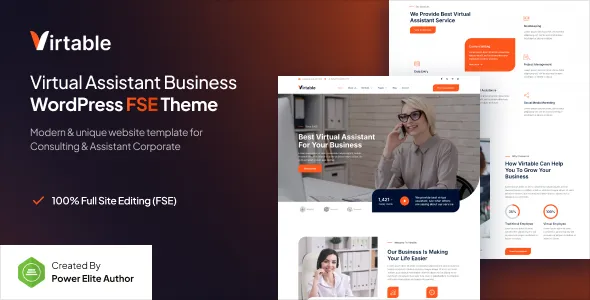
Virtable – Virtual Assistant Business Gutenverse FSE WordPress Block Theme
Virtable – Virtual Assistant Business Gutenverse FSE WordPress Block Theme is a website design solution for virtual assistants, remote administrative professionals, freelance service providers, online business managers, and virtual support agencies looking to establish a professional online presence with WordPress. Built around the virtual assistant business niche, Virtable offers a potential foundation for presenting professional services, communicating expertise, showcasing client projects, and attracting new business inquiries. Its Full Site Editing (FSE) and Gutenverse positioning makes it relevant to website owners interested in building and customizing their website through a block-based WordPress workflow.
As more businesses use remote professionals to manage administrative tasks, customer communication, scheduling, research, and other operational responsibilities, virtual assistants need websites that clearly explain their services and demonstrate their value. A well-organized website can help potential clients understand available support options, explore professional experience, review service packages, and request an initial consultation. With suitable customization and relevant content, Virtable can help virtual assistant businesses communicate their offerings and build a consistent digital identity.
WordPress provides a flexible content management system for creating pages, publishing articles, organizing media, and maintaining business information. Full Site Editing allows users to customize supported areas of a WordPress website through blocks and site editor tools, while Gutenverse provides a block-based design environment. The exact templates, design controls, and available components depend on the installed theme version and its documented compatibility. Before launching a website, review the current theme demo and documentation to confirm that Virtable meets your business requirements.
What Is Virtable Virtual Assistant Business WordPress Theme?
Virtable is a WordPress block theme positioned for virtual assistant businesses and remote professional service providers. Its specialized focus makes it worth considering for individuals and agencies that offer administrative support, business assistance, digital operations, or other services delivered remotely.
Unlike a general corporate website, a virtual assistant website needs to communicate the services available, the types of clients supported, and the practical benefits of outsourcing specific tasks. Visitors should be able to understand the professional’s capabilities, review relevant experience, and determine how to begin a working relationship.
Virtable can be evaluated for several types of professional websites, including freelance virtual assistants, executive assistants, remote administrative agencies, online business managers, customer support providers, and digital operations consultants. Depending on the business model, a website may include service pages, professional profiles, client testimonials, pricing information, case studies, educational articles, and contact forms.
The theme’s Full Site Editing and Gutenverse positioning is relevant for users who prefer a block-based approach to website customization. However, specific page templates, patterns, and design elements should be confirmed in the current release. Features such as appointment booking, client portals, automated workflows, and payment processing may require additional plugins or external services.
Professional Design for Virtual Assistant Businesses
A professional website helps virtual assistants communicate reliability, organization, and expertise. Potential clients often compare several service providers before deciding whom to hire, so a clear presentation can make it easier to understand what each professional offers.
Virtable provides a niche-specific design direction for websites that need to present virtual assistance and remote business support services. Depending on the available layouts and customization options, users can organize their content around service offerings, professional experience, business benefits, client results, and consultation opportunities.
A freelance virtual assistant may prioritize a personal introduction, a list of services, relevant skills, and a straightforward contact pathway. A virtual assistant agency may need a broader structure that introduces the company, explains its service categories, highlights its team, and describes how client engagements work.
Visual consistency helps reinforce a professional image. Clear headings, readable typography, appropriate spacing, and consistent button styles make it easier for visitors to navigate the website. Professional photographs, relevant illustrations, and authentic work examples can also help communicate the brand’s personality.
The design should support the content rather than distract from it. Visitors should quickly understand who the business serves, what tasks it handles, and how they can request assistance.
Full Site Editing with WordPress Blocks
Full Site Editing is a WordPress approach that enables users to customize supported website areas through the Site Editor and block-based tools. Depending on the theme’s structure, users can work with elements such as templates, template parts, navigation, headers, footers, and global design settings.
Virtable’s FSE positioning makes it relevant to website owners who want to manage their website through a block-oriented editing experience. Rather than relying entirely on traditional theme settings or custom code, users may be able to arrange supported blocks and adjust the presentation of their pages through visual editing tools.
This approach can help virtual assistant businesses create consistent layouts for service pages, professional profiles, blog articles, and contact sections. Reusable design elements may also help maintain a unified appearance across the website.
The precise editing options depend on the current theme release, the WordPress version, and any supporting plugins. Not every theme offers the same templates or customization controls, so users should verify which elements can be edited directly through the Site Editor.
Before making substantial changes, it is useful to understand how global styles, template parts, and individual page content work together. This helps reduce duplicated work and makes future updates easier to manage.
Gutenverse Block-Based Website Customization
Gutenverse is associated with block-based website design for WordPress. A compatible block workflow can help users build page layouts by arranging content and design elements within the WordPress editing environment.
For a virtual assistant website, block-based customization may be useful for organizing service descriptions, introducing team members, presenting client feedback, displaying project examples, and creating clear calls to action. The specific blocks and design options available depend on the installed Gutenverse components and the theme version.
A service page could combine a heading, an introduction, a list of tasks handled, and a contact section. A professional profile could include a short biography, relevant experience, areas of expertise, and links to selected work. An agency page could use consistent content sections to explain its process and introduce its team.
Block-based editing can also help users maintain a consistent layout without manually coding every section. However, advanced interactions or specialized business functions may still require custom development or additional plugins.
For the best results, use the available design tools to create layouts that support the business’s goals. Avoid adding unnecessary visual effects or excessive content that could make the website difficult to navigate.
Website Solutions for Freelance Virtual Assistants
Freelance virtual assistants often need a website that introduces their professional background, explains their services, and attracts clients who need reliable remote support. A focused website can provide a central destination for potential clients to learn about the assistant’s skills and working approach.
Virtable can be considered for a freelance virtual assistant portfolio featuring an introduction, service descriptions, professional experience, client feedback, and contact information. The exact presentation will depend on the available templates and customization options.
A virtual assistant specializing in administrative support may highlight calendar management, email organization, document preparation, data entry, and meeting coordination. A professional focused on marketing assistance could emphasize content scheduling, research, campaign coordination, and social media support.
Each service should explain what the client can expect. Rather than listing tasks without context, describe the problems the service helps address and the kinds of outcomes the professional can reasonably support.
A portfolio can include relevant projects, work samples, certifications, and genuine testimonials where appropriate. Confidential client information should never be published without authorization.
A clear contact pathway makes it easier for prospective clients to ask questions or discuss their requirements. This helps turn the website from a simple online profile into a practical business development resource.
Website Design for Virtual Assistant Agencies
Virtual assistant agencies often provide a broader range of services than individual freelancers. Their websites may need to communicate multiple service categories, introduce team capabilities, explain engagement options, and help businesses determine which type of support they require.
Virtable can be evaluated as a starting point for an agency website that organizes services into clear sections. A homepage might introduce the agency’s core offering, while dedicated pages explain administrative assistance, executive support, customer service, research, and other relevant services.
An agency website can also describe its onboarding process, communication practices, availability, and approach to matching clients with suitable professionals. These details help potential customers understand how a remote support relationship may work.
Team profiles can introduce relevant experience and areas of expertise. Case studies may demonstrate how the agency has supported clients, provided that the information is accurate and approved for publication.
If the agency serves different industries, service pages can explain how its support adapts to specific business needs. For example, a small business may need help managing appointments and email, while a growing company may require research, reporting, and administrative coordination.
A well-structured agency website makes the range of available services easier to understand and helps prospective clients identify the most appropriate next step.
Administrative and Executive Assistance Services
Administrative and executive assistance are common areas of virtual support. Businesses may seek help with scheduling, email management, document preparation, meeting coordination, travel research, data organization, and routine operational tasks.
A Virtable-based website can present these offerings through dedicated service pages that explain the scope of each service and the type of client it supports. This helps visitors understand whether the business’s capabilities match their requirements.
For example, an administrative support page could explain how the assistant helps organize documents, maintain records, and coordinate routine tasks. An executive assistance page may describe calendar coordination, meeting preparation, correspondence management, and research support.
Service descriptions should be specific enough to set clear expectations. If the assistant works only during defined hours or offers particular communication channels, those details can be included where relevant.
Businesses should also explain how clients share instructions, provide access to necessary information, and review completed work. Clear processes help establish expectations before a project begins.
By organizing administrative services around real client needs, a virtual assistant website can help visitors understand the practical value of remote professional support.
Digital Marketing and Online Business Support
Many virtual assistants provide support for digital marketing and online business operations. Depending on their skills, they may help with content scheduling, social media coordination, email campaign preparation, competitor research, website content updates, and reporting.
Virtable can be considered for professionals who want to present these services alongside administrative support or as a dedicated digital assistance offering. Separate service pages can explain the tasks included and the tools or platforms the professional is experienced with.
A social media support page might describe content calendar organization, post scheduling, asset coordination, and performance reporting. A content assistance page could explain research, formatting, publishing support, and basic content updates.
The website should distinguish between administrative assistance and specialist services that require advanced expertise. For example, a virtual assistant who schedules social posts should not imply that they provide full-scale advertising strategy unless that service is genuinely offered.
Examples of completed work can help prospective clients assess relevant experience. Where possible, use authorized portfolio samples and clearly explain the professional’s role in each project.
Specific service descriptions make it easier for businesses to identify relevant support and understand how it fits into their existing operations.
Homepage Layout and Content Organization
The homepage is often the first point of contact between a virtual assistant business and a potential client. It should explain the main offering quickly and direct visitors toward relevant information.
A Virtable website can be planned around an introductory section, a summary of services, a professional or team introduction, client feedback, selected work, frequently asked questions, and contact opportunities, depending on the layouts available in the theme.
The introductory section should identify the audience and communicate the main benefit of the service. For example, a virtual assistant may focus on helping small business owners manage administrative workloads, while an agency may emphasize flexible remote support for growing teams.
Service summaries can link to dedicated pages that explain each offering in greater detail. A profile section can introduce professional experience, while testimonials can provide additional context when they are genuine and authorized.
Calls to action should use clear language, such as inviting visitors to discuss their needs or request more information. Avoid filling the homepage with too many competing messages.
A focused homepage makes it easier for potential clients to understand the business and decide whether to explore its services further.
Customization and Professional Brand Identity
A consistent brand identity helps a virtual assistant business communicate its personality and establish recognition. Some professionals may prefer a minimal and corporate style, while others may use a more creative presentation suited to their industry and audience.
Depending on the available FSE and Gutenverse customization options, Virtable may allow users to adjust visual elements such as colors, typography, layouts, spacing, and other design details. The exact controls should be verified through the current theme documentation.
A professional services website generally benefits from readable typography, sufficient whitespace, consistent heading styles, and recognizable calls to action. The chosen colors and imagery should support the brand rather than compete with the content.
Freelancers can use a personal photograph, a concise biography, and consistent visual elements to create a recognizable professional identity. Agencies may prefer a more structured design that highlights their team, service categories, and business processes.
The website should remain consistent across its pages. Reusing global styles and appropriate design patterns can help maintain that consistency and reduce the effort needed to update the site.
Before making extensive customizations, review the theme’s editing structure and determine which changes can be handled through the Site Editor and which may require additional tools.
SEO-Friendly Structure for Virtual Assistant Websites
Search engine optimization can help virtual assistant businesses improve the discoverability of their websites. A block theme can provide the design foundation, but search visibility also depends on content quality, technical implementation, competition, and how well pages address potential clients’ needs.
An effective SEO strategy begins with a clear website structure. A virtual assistant may create separate pages for administrative support, executive assistance, marketing support, research, and other important offerings.
Each page should have a descriptive title, a logical heading hierarchy, useful service information, and relevant internal links. The content should explain what the service includes, who it is intended for, and how prospective clients can learn more.
Professionals serving specific industries may create industry-focused pages when they have genuine experience and useful information to share. These pages should explain relevant expertise rather than simply repeating industry keywords.
Descriptive URLs, optimized images, and a sensible internal linking structure can also support a well-organized website. Compatible SEO plugins may help manage metadata, XML sitemaps, redirects, canonical settings, and supported structured data.
Regularly review broken links, indexing problems, duplicate content, and outdated information. Avoid excessive keyword repetition, which can make service pages harder to read.
No theme can guarantee search rankings or a particular volume of inquiries. Sustainable SEO requires helpful content, sound technical practices, and ongoing improvements based on audience needs.
Content Marketing and Professional Blogging
Content marketing can help virtual assistants demonstrate expertise, answer common questions, and build trust with potential clients. A blog provides a place to publish practical advice about remote work, business organization, productivity, and outsourcing.
Virtable can be considered for websites that combine service pages with a WordPress blog, depending on the available templates and archive layouts.
A virtual assistant might publish articles about organizing administrative workflows, preparing for delegation, managing calendars, documenting recurring tasks, or improving communication with remote professionals. An agency could share guidance about onboarding, outsourcing decisions, and managing distributed teams.
Articles should offer useful information rather than serve only as promotional material. A practical guide can explain how to prepare a task brief, while a checklist can help a business identify tasks that may be suitable for delegation.
Internal links can connect educational content to relevant service pages and contact opportunities. For example, an article about organizing business administration may link to an administrative assistance page.
A manageable publishing schedule is usually more sustainable than producing large volumes of shallow content. Focus on accuracy, relevance, and advice that reflects the business’s actual expertise.
Lead Generation and Client Inquiry Forms
Generating inquiries is an important objective for many virtual assistant websites. Potential clients may want to ask about service availability, discuss a project, request pricing information, or determine whether a professional has the right experience.
Virtable can be configured to provide contact opportunities through available page elements and compatible WordPress form plugins. The exact functionality depends on the theme and the supporting tools installed.
A client inquiry form may request a name, email address, business name, service of interest, and a short description of the work required. The form should collect enough information to help the professional respond without creating unnecessary barriers.
Clear calls to action can invite visitors to discuss their requirements or request an introductory consultation. If the business offers fixed service packages, a dedicated page can explain what each package includes and how to inquire.
Forms should provide readable labels, understandable validation messages, and confirmation after submission. Website owners should test email delivery and spam protection before launch.
A simple and reliable inquiry process helps visitors take the next step and gives the business a practical way to manage incoming opportunities.
Appointment Scheduling and Client Onboarding
Some virtual assistant businesses offer introductory calls, discovery sessions, or consultation appointments before beginning work. A structured scheduling process can help clients understand availability and make it easier to arrange an initial conversation.
Virtable can provide the visual foundation for explaining a consultation process, but online scheduling functionality may require a compatible booking plugin or external calendar service.
A scheduling page can describe the purpose of an introductory meeting, the expected duration, and the information clients should prepare. The business may ask prospective clients to identify their main challenges, required services, and preferred communication methods.
After an inquiry, a clear onboarding process can explain how the business gathers requirements, agrees on responsibilities, establishes communication channels, and begins work. These details help reduce uncertainty for first-time clients.
If a booking system is added, test time-zone settings, available time slots, confirmation messages, calendar synchronization, and cancellation procedures. Make sure that the system reflects the professional’s actual availability.
Appointment scheduling should support the service workflow rather than introduce unnecessary complexity. A simple contact form may be sufficient for businesses that prefer to arrange meetings manually.
Integrations and Supporting WordPress Plugins
A virtual assistant website may require additional tools for contact forms, appointment scheduling, SEO, analytics, security, backups, and other business functions. The appropriate combination depends on the website’s purpose and the functionality already available in Virtable.
Before installing a plugin, check its compatibility with the current WordPress version, the theme, and the Gutenverse components in use. Review documentation, update history, licensing terms, and support arrangements.
A form plugin can support client inquiries, while a scheduling tool may help manage consultation appointments. SEO plugins can assist with metadata and sitemap management, and analytics tools can provide information about website traffic and visitor behavior, subject to applicable privacy and consent requirements.
Some virtual assistant businesses may also need email marketing integrations, customer relationship management tools, or payment processing for service packages. These capabilities depend on the selected external services and the integrations available.
Avoid installing multiple plugins that perform the same task without a clear reason. Overlapping tools can increase maintenance work and introduce compatibility problems.
After adding or updating an integration, test the affected pages and workflows. This is especially important for forms, scheduling, payment processes, navigation, and responsive layouts.
Performance and Website Speed Optimization
Website performance affects how easily visitors can access information and interact with a business. A virtual assistant website may include portfolio images, embedded videos, animated elements, or third-party forms, all of which can influence loading speed.
The actual performance of a Virtable website depends on the theme implementation, hosting environment, images, fonts, scripts, plugins, and external integrations. Full Site Editing does not automatically guarantee a fast website, so performance should be tested after customization.
Start by optimizing images and using appropriate dimensions for each section. Avoid oversized assets when smaller versions provide sufficient visual quality. Review animations, external widgets, and scripts to determine whether they are necessary.
Quality hosting, caching, and other performance tools may help depending on the website’s configuration. Unnecessary plugins should be reviewed, particularly when several extensions provide similar functionality.
Test important pages separately, including the homepage, service pages, portfolio sections, blog articles, and contact forms. Complex layouts may perform differently from simpler pages.
Regular monitoring can help identify performance problems as the website grows. Keeping WordPress, the theme, and compatible plugins updated can also support reliability when changes are tested and managed appropriately.
Accessibility and User-Friendly Navigation
An effective virtual assistant website should make information easy to find and understand. Clear navigation, readable text, appropriate contrast, and logical page structures help visitors explore services without unnecessary confusion.
Use descriptive menu labels, meaningful link text, and a consistent heading hierarchy. Buttons should be easy to identify, while form fields should have clear labels and understandable instructions.
The navigation should reflect the website’s priorities. A freelance professional might use Home, About, Services, Portfolio, Blog, and Contact, while an agency may need additional sections for its team, process, or service categories.
Interactive elements should be usable with appropriate input methods, including keyboard navigation where applicable. Avoid relying on color alone to communicate important information.
Accessibility depends on the theme, content, blocks, and additional plugins. Automated tools can help identify some issues, but manual testing is also important for reviewing menus, forms, and interactive components.
A clear and accessible website can make it easier for potential clients to understand the business and find the information they need.
Security and Ongoing Website Maintenance
A professional WordPress website requires ongoing maintenance to remain reliable and secure. Virtual assistant businesses may rely on their websites to receive inquiries, present service information, and communicate with prospective clients, making consistent upkeep important.
Use reputable hosting, enable HTTPS, create strong administrator passwords, and assign user roles according to each person’s responsibilities. Keep WordPress, the theme, and compatible plugins updated, with backups available before significant changes.
Obtain themes and plugins from trustworthy sources and review their compatibility before installation. Remove unused components when appropriate and avoid granting unnecessary administrative access.
Create regular backups and store them in a location that supports recovery if a technical issue occurs. It is also important to understand how to restore a backup and confirm that the website functions correctly afterward.
Maintenance should include content reviews as well as technical checks. Service descriptions, professional profiles, portfolio examples, contact details, and published articles should remain accurate.
A planned maintenance routine helps reduce avoidable issues and supports a dependable online presence.
Who Should Use Virtable Virtual Assistant Business WordPress Block Theme?
Virtable may be suitable for a range of remote service businesses and professionals who need a specialized WordPress website.
Freelance virtual assistants: Independent professionals can present their services, skills, experience, and contact information in a structured online portfolio.
Virtual assistant agencies: Agencies can organize multiple service categories, introduce team members, and explain their approach to supporting clients.
Executive assistants: Professionals can highlight calendar coordination, correspondence management, meeting support, and other executive assistance services.
Administrative support providers: Businesses can describe document management, data organization, scheduling, and routine administrative assistance.
Digital marketing assistants: Professionals can showcase content coordination, social media support, research, and related digital services.
Online business managers: Service providers can introduce operational support, workflow coordination, and business administration offerings where these match their expertise.
Remote customer support providers: Businesses can explain their customer communication services and outline the types of support available.
Consultants and independent professionals: Service providers can use a structured website to introduce their expertise, publish useful resources, and generate relevant inquiries.
The best choice depends on the available templates, customization options, required integrations, and the business’s objectives. Reviewing the current theme demo and documentation can help determine whether Virtable fits the intended website.
Tips for Building a Successful Website with Virtable
A successful website requires more than a suitable theme. Clear positioning, useful content, consistent branding, and a straightforward inquiry process all contribute to a professional online presence.
Begin by defining the website’s primary objective. Decide whether the main goal is to generate client inquiries, showcase professional experience, explain service packages, publish educational content, or introduce a virtual assistant agency.
Prepare essential content before customizing every page. This may include a professional introduction, service descriptions, relevant experience, authorized testimonials, portfolio examples, frequently asked questions, and contact information.
Use the FSE and block-based editing tools available in the installed version to create a consistent visual identity. Choose suitable colors, readable typography, and clear calls to action. Keep layouts focused on the needs of prospective clients.
Organize services into logical categories and explain what each offering includes. Use accurate examples and avoid promising results that cannot be supported by the business’s experience or service scope.
Test the website on desktop computers, tablets, and mobile devices. Review navigation, page speed, accessibility, contact forms, scheduling integrations, and all important links.
Finally, establish a maintenance routine that includes backups, software updates, performance checks, and periodic content reviews. These practices help the website remain accurate, secure, and useful as the business develops.
Final Thoughts on Virtable Virtual Assistant Business Gutenverse FSE WordPress Block Theme
Virtable – Virtual Assistant Business Gutenverse FSE WordPress Block Theme is a potential option for freelance virtual assistants, remote administrative professionals, online business managers, and virtual support agencies seeking a specialized WordPress website design. Its virtual assistant focus and block-based editing positioning make it relevant to projects that need to present professional services through a structured and customizable online presence.
A well-planned website can combine service descriptions, professional profiles, client feedback, portfolio examples, educational articles, and convenient contact opportunities. Freelancers can use these elements to introduce their expertise, while agencies can organize multiple services and explain their working processes.
Full Site Editing and Gutenverse may provide a visual approach to supported layout customization, although the exact capabilities depend on the current theme version and its documented requirements. Features such as booking, payment processing, client portals, and workflow automation may require separate integrations.
The effectiveness of the finished website also depends on content quality, accessibility, responsive design, SEO practices, performance, and ongoing maintenance. A theme alone cannot guarantee search rankings or new clients, but it can provide a useful foundation for communicating services and building a recognizable professional brand.
For virtual assistant businesses seeking a WordPress design tailored to remote professional services, Virtable can be evaluated as part of a broader website strategy. With thoughtful customization, clear service information, accurate content, and a user-friendly inquiry process, a professional website can support brand visibility and long-term business development.