My Account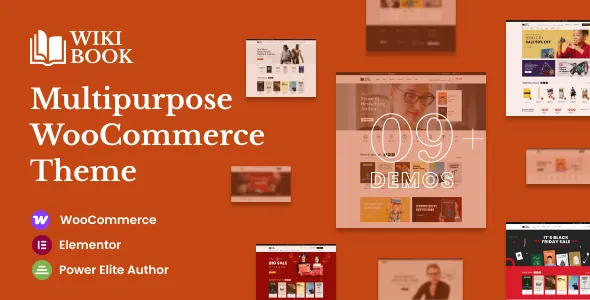
WikiBook – Elementor WooCommerce WordPress Theme
WikiBook – Elementor WooCommerce WordPress Theme is a modern, versatile, and highly functional WordPress theme crafted specifically for online bookstores, e-learning marketplaces, educational product sellers, digital library platforms, and stationery or book-related eCommerce businesses. Designed with flexibility, performance, and user experience in mind, WikiBook integrates seamlessly with WooCommerce and Elementor, providing a fully customizable, professional, and conversion-focused platform for selling books, digital content, and learning materials online.
In an age where readers, students, and learners increasingly prefer online shopping, WikiBook ensures your store stands out with clean layouts, engaging visuals, intuitive navigation, and high-performance eCommerce functionality. Whether you sell physical books, eBooks, educational courses, or book-related accessories, WikiBook equips you with all the tools needed to grow your online presence, boost sales, and build a loyal customer base.
Modern and Educational Design Approach
WikiBook is built with a design philosophy that balances aesthetics, usability, and professionalism. The theme emphasizes readability, clarity, and structured content to enhance user engagement while maintaining an educational and trustworthy appearance.
Key design features include:
-
Clean, modern, and minimalistic layout
-
Bright and readable typography
-
Organized grid-based product displays
-
High-resolution hero banners for promotions
-
Engaging visual effects and hover animations
-
Strategically placed call-to-action buttons
-
Educational and e-commerce-focused color schemes
The design ensures your bookstore or educational platform communicates trust, professionalism, and approachability.
Built for Online Bookstores and Learning Platforms
WikiBook is specifically tailored for businesses and individuals involved in book sales, digital content, and educational resources. Its features are optimized for showcasing products, highlighting authors, and promoting learning materials effectively.
Ideal for:
-
Online bookstores
-
eBook marketplaces
-
Academic and educational publishers
-
Digital library platforms
-
Educational course sellers
-
Learning and tutorial platforms
-
Stationery and book accessory stores
-
Book subscription services
-
Author and self-publishing platforms
-
Book club membership websites
The theme adapts to various educational and eCommerce niches with ease.
Powerful WooCommerce Integration
WikiBook is fully compatible with WooCommerce, providing a robust foundation for online sales.
WooCommerce features include:
-
Custom product grid layouts for books and digital products
-
Advanced filtering by category, author, genre, or price
-
Wishlist functionality
-
Quick view product options
-
Smooth shopping cart and checkout process
-
Promotional badge and discount support
-
Related and upsell product sections
-
Inventory and stock management
-
Secure payment integration
-
Customer review display
These features create a seamless shopping experience, increasing conversions and customer satisfaction.
Key Features and Highlights
WikiBook comes packed with features to support eCommerce success and user engagement.
-
Multiple homepage layouts
-
Elementor page builder compatibility
-
Fully responsive and mobile-first design
-
SEO-optimized structure
-
One-click demo import
-
Custom header and footer builder
-
Portfolio and product showcase templates
-
Author and book spotlight sections
-
Blog integration for content marketing
-
Newsletter subscription forms
-
Cross-browser compatibility
-
Retina-ready display
-
Translation-ready and RTL support
These capabilities make WikiBook both versatile and future-proof.
Conversion-Focused Homepage Layout
The homepage of WikiBook is designed to guide visitors from browsing to purchase efficiently.
Common homepage sections include:
-
Hero banner featuring bestsellers or new releases
-
Featured categories and genres
-
Highlighted authors or publishers
-
Special offers and discounts
-
Customer testimonials
-
Blog and educational content preview
-
Call-to-action blocks for subscriptions or memberships
-
Newsletter subscription forms
-
Promotional banners for upcoming releases
This structure maximizes user engagement and conversion rates.
Product Presentation Excellence
WikiBook provides multiple ways to showcase books and educational products in a professional and appealing manner.
Product page features include:
-
High-resolution image galleries for books
-
Zoom and hover effects
-
Pricing and discount display
-
Product specifications (author, publication date, genre, ISBN)
-
Reviews and ratings section
-
Related book suggestions
-
Author bios and publisher information
-
Digital product download options
-
Add-to-cart emphasis with clear CTA
-
Social sharing integration
These features enhance the buyer’s experience and increase purchase confidence.
Portfolio and Author Spotlight
For book sellers and educational platforms, showcasing authors and collections is crucial. WikiBook includes layouts to feature portfolios and highlight contributors.
-
Author spotlight sections
-
Featured book collections
-
Bestseller and trending books highlights
-
Genre-specific catalog displays
-
Visual showcase of book series
-
Curated educational resources sections
-
Projected reading lists and recommendations
This allows visitors to explore your content comprehensively and engage with your products.
Key Benefits for Bookstore Owners
Using WikiBook provides multiple advantages for online book businesses.
-
Increases online sales and conversions
-
Enhances professional presentation of books and authors
-
Builds trust with readers and learners
-
Simplifies catalog management
-
Supports promotional campaigns and discounts
-
Strengthens SEO visibility
-
Improves user engagement and navigation
-
Facilitates subscription or membership services
-
Offers flexible customization options
-
Provides long-term scalability for growth
It becomes a fully functional digital bookstore platform.
Mobile-Responsive and User-Friendly
WikiBook ensures a seamless browsing experience across all devices, catering to the increasing mobile audience.
Mobile features include:
-
Fully responsive design
-
Touch-friendly navigation
-
Mobile-optimized product grids
-
Quick-add to cart functionality
-
Fast loading on smartphones and tablets
-
Adaptive typography for readability
This improves accessibility for readers and learners on the go.
SEO and Performance Optimization
WikiBook follows best practices for SEO and performance, helping your store rank higher in search results and attract more organic traffic.
SEO and performance features include:
-
Clean, structured code
-
Proper heading hierarchy
-
Fast page loading
-
Schema markup for products
-
Optimized image handling
-
Blog integration for content marketing
-
Mobile-first SEO optimization
-
Lightweight, performance-oriented framework
These ensure your bookstore or educational platform achieves maximum visibility.
Blog and Content Marketing
WikiBook supports professional blog layouts to educate and engage readers.
Blog topics can include:
-
Book reviews and recommendations
-
Author interviews
-
Educational tips and study guides
-
Genre-specific reading lists
-
Book release announcements
-
eLearning tutorials
-
Literary news and updates
Publishing regular content improves SEO and positions your store as an authority in the book and learning market.
Customization and Branding Flexibility
WikiBook offers deep customization to match your brand identity and design vision.
Customizable elements include:
-
Color schemes and palettes
-
Typography styles
-
Header and footer layouts
-
Product page designs
-
Background visuals
-
Promotional banner styles
-
Section arrangement and spacing
-
Call-to-action button styles
This ensures your bookstore stands out in the digital space.
Lead Generation and Customer Engagement
WikiBook emphasizes lead generation through newsletter sign-ups, memberships, and promotions.
Lead-focused features include:
-
Newsletter subscription forms
-
Membership program integration
-
Promotional pop-ups
-
Special offer banners
-
Call-to-action sections for downloads or subscriptions
-
Social media integration
These features encourage repeat visits and customer loyalty.
Security and Stability
WikiBook follows WordPress best practices to ensure a secure, stable, and reliable online store.
Security and reliability features include:
-
Clean and secure coding standards
-
WooCommerce compatibility
-
Secure payment gateways
-
Stable plugin integration
-
Regular updates ready framework
Your bookstore remains secure and professionally maintained.
Designed for Growth and Expansion
WikiBook provides scalable solutions to grow your eCommerce store.
Growth-friendly features include:
-
Adding new product categories
-
Expanding digital learning materials
-
Launching seasonal campaigns
-
Implementing affiliate or referral programs
-
Multi-language support
-
Integration with marketing and analytics tools
-
Creating landing pages for special offers
This ensures your online bookstore or eLearning platform grows alongside your business.
Why Choose WikiBook
WikiBook stands out due to its combination of modern design, WooCommerce integration, Elementor flexibility, and educational eCommerce focus.
It offers:
-
Professional, educational, and bookstore-specific design
-
Conversion-focused product layouts
-
Mobile-optimized interface
-
SEO and performance readiness
-
Flexible customization options
-
Integrated content marketing and blog
-
Scalable architecture for business growth
-
Secure, stable, and reliable platform
Conclusion
WikiBook – Elementor WooCommerce WordPress Theme is a complete, versatile, and performance-oriented solution designed for online bookstores, e-learning platforms, and educational product sellers. With its structured service and product layouts, author and portfolio showcase capabilities, SEO optimization, mobile responsiveness, and conversion-focused tools, WikiBook provides everything necessary to attract readers, increase sales, and grow a loyal audience.