My Account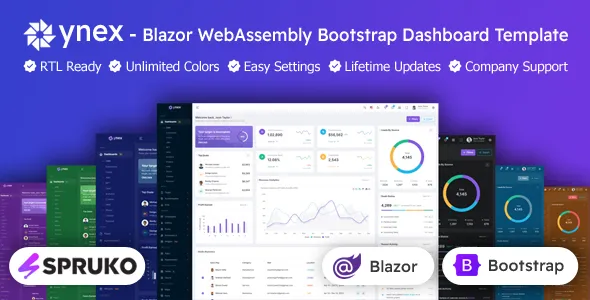
YNEX – Blazor WebAssembly Bootstrap Admin Dashboard Template
YNEX – Blazor WebAssembly Bootstrap Admin Dashboard Template is a modern and flexible dashboard solution designed for developers, businesses, and organizations that need a professional interface for managing data, monitoring business activities, and building web-based applications. Combining the capabilities of Blazor WebAssembly with the familiar styling approach of Bootstrap, this admin dashboard template provides a useful starting point for creating structured, responsive, and visually consistent administrative interfaces. It is suitable for projects that require organized data presentation, application management screens, business reporting layouts, and reusable dashboard components.
Whether you are developing an internal business portal, a SaaS application, a customer management system, an analytics interface, or an enterprise administration panel, YNEX offers a foundation that can help simplify frontend development. Its dashboard-oriented design makes it easier to organize navigation, content areas, data views, and common administrative workflows in one interface. By starting with an existing template rather than designing every page from scratch, developers can focus more attention on application logic, data integration, and the requirements of their projects.
Blazor WebAssembly allows developers to build interactive web interfaces using C# and .NET technologies in the browser. When paired with Bootstrap-based styling, it provides a familiar environment for creating layouts that can adapt to different screen sizes. YNEX brings these technologies together in an admin dashboard format, making it a practical option for developers who want a structured starting point for a professional web application. The precise pages, components, integrations, and framework requirements depend on the specific version of the template, so reviewing its documentation before implementation is recommended.
A Modern Admin Dashboard for Web Applications
An administrative dashboard is an important part of many web applications because it provides a central place to view information, manage records, and access essential tools. A well-organized interface helps users understand the available functions without navigating through unrelated pages. YNEX is designed around this administrative use case, offering a dashboard-style foundation that can be adapted to different business and technical requirements.
The template can serve as a starting point for applications that require a navigation structure, organized content sections, summary panels, tables, forms, or other common administrative interface elements, depending on the supplied package. Developers can adapt the interface to represent their own business processes, data models, and user roles.
Instead of spending considerable time establishing the initial page structure, spacing, styling, and navigation patterns, development teams can begin with an existing visual framework. They can then customize the interface to match their branding and connect it with application services, APIs, databases, and authentication systems as required.
Blazor WebAssembly Development Environment
One of the defining aspects of YNEX is its association with Blazor WebAssembly. Blazor WebAssembly enables developers to build client-side web applications with C# and .NET, offering an alternative to building the entire frontend with JavaScript-based frameworks.
For teams already working with Microsoft technologies, this approach can support a development workflow that uses familiar languages, tooling, and programming concepts. Developers can create reusable components, organize application logic, and structure their interfaces according to the needs of the project.
YNEX provides an admin dashboard-oriented starting point for this type of application. Its visual structure can be adapted to suit a range of administrative use cases, while the underlying application behavior can be developed according to the project’s architecture.
The template itself should not be confused with a complete backend system. Features such as server-side business logic, database connectivity, identity management, permissions, and API endpoints generally require appropriate implementation or integration. Before purchasing or installing the template, confirm the included Blazor version, .NET requirements, project structure, and any dependencies specified by the author.
Bootstrap-Based Interface and Responsive Layout
Bootstrap is widely used for creating consistent web layouts and reusable interface patterns. A Bootstrap-based admin dashboard can make it easier to establish predictable spacing, arrange content into columns, and create interfaces that accommodate different screen dimensions.
YNEX can be customized to support a professional administrative experience across desktop computers, laptops, tablets, and mobile devices, depending on the responsiveness of the included layouts and components. A responsive interface is particularly valuable for administrators who need to review information or access basic management functions from different devices.
Bootstrap’s established styling conventions can also make the interface more approachable for developers who already understand its grid system, utility classes, and component patterns. Existing layouts can be adjusted to accommodate different content priorities, branding requirements, and navigation preferences.
When adapting the template, developers should test important pages at multiple viewport sizes. Data tables, charts, navigation menus, and complex forms may require additional adjustments to remain usable on smaller screens. Actual responsive behavior depends on the components included in the downloaded version and any customizations applied during development.
Organized Dashboard Layout
A useful dashboard presents important information in a clear hierarchy. Users should be able to identify key sections, understand where information is located, and move between application areas without unnecessary confusion.
YNEX offers a foundation for creating this type of organized administrative interface. Developers can arrange the main content area around the information that matters most to their users, such as business summaries, operational data, recent activity, system status, or account information.
For example, a business application might use its dashboard to display a summary of customer records, orders, revenue figures, and pending tasks. An internal management portal might emphasize employee information, approvals, or operational reports. A SaaS application might focus on account activity, subscription information, usage metrics, and administrative settings.
These are potential implementation examples rather than a guarantee that every corresponding module is included in the template. The available page layouts and components should be verified against the current product documentation.
Suitable for Business and Enterprise Applications
Administrative interfaces are used across many industries, and their requirements vary according to the type of information being managed. YNEX can provide a starting point for projects that need a structured control panel with customizable content and navigation.
Potential applications include business administration portals, internal management systems, SaaS control panels, reporting dashboards, customer service tools, inventory interfaces, and operational monitoring applications.
A development team can adapt the interface to display relevant information, provide access to authorized management functions, and organize workflows around the needs of its users. For enterprise projects, the design can also be extended to accommodate project-specific navigation, custom forms, and additional pages.
The final capabilities of an application depend on the business logic, backend services, integrations, security configuration, and development work implemented alongside the dashboard template. YNEX should therefore be viewed as a frontend foundation rather than a replacement for a complete enterprise application architecture.
Data Presentation and Management Interfaces
Data presentation is a central part of most administrative applications. Users may need to review lists of records, compare values, update information, or monitor changes over time. A dashboard template can help establish a consistent visual approach for these activities.
Depending on the components supplied with YNEX, developers may be able to use or adapt interface patterns for tables, summary cards, forms, charts, filters, and other data-oriented views. These patterns can be configured to represent information such as customer records, transactions, inventory items, employee details, project progress, or service metrics.
For applications that require interactive data management, the frontend must be connected to appropriate data sources and application services. Developers should implement validation, loading indicators, error handling, empty states, and clear feedback for actions that create or update records.
Data tables and charts should also be selected according to the actual information being presented. Large datasets may require pagination, filtering, sorting, or server-side processing, while analytical dashboards may need charting libraries and data transformation logic. Confirm which components are included before assuming that a specific table, chart, or integration is available.
Customizable Navigation and Page Structure
Navigation helps users move between different sections of an administrative application. A well-planned structure reduces friction and makes frequently used functions easier to locate.
YNEX can serve as a starting point for creating a navigation hierarchy that reflects the requirements of a particular project. Developers can organize sections around business functions, user responsibilities, or application modules, depending on the supplied layout and the desired customization.
For example, a management application could organize its pages into overview, records, reports, user management, and settings. A SaaS control panel could use sections for workspaces, usage, integrations, subscriptions, and configuration. A project management interface might prioritize projects, tasks, team members, and reports.
These structures are illustrative and can be modified to match the application being developed. Developers should keep navigation labels understandable, avoid unnecessary nesting, and ensure that important functions remain accessible on smaller screens.
Reusable Components and Maintainable Development
Reusable components can help development teams maintain a consistent interface while reducing duplicated code. When similar interface elements appear across multiple pages, a shared component can provide a central place to manage their structure and behavior.
Blazor supports component-based development, allowing developers to organize interface elements into reusable units. Depending on the supplied project structure, YNEX may be adapted into a component-oriented application where repeated layouts and controls follow consistent design patterns.
For example, a development team might establish shared components for page headers, summary panels, data views, form sections, notifications, or navigation elements. The exact implementation depends on the template’s existing architecture and the components included in its source files.
A maintainable component structure is especially useful when an application grows over time. It can make future updates easier, support a more consistent user experience, and help multiple developers work on separate areas of the interface.
Teams should review the supplied code before making extensive changes. Understanding existing component boundaries, styling conventions, and dependencies can help avoid unnecessary duplication and reduce the risk of breaking shared layouts.
Flexible Styling and Branding
A professional admin dashboard should feel consistent with the organization or product it represents. Branding may include a logo, typography, color palette, icon style, spacing, and the visual treatment of important interface elements.
YNEX can be customized to align with a project’s identity, subject to the styling options and source files provided. Developers can adjust colors, replace brand assets, refine page layouts, and organize content to suit the intended audience.
For a corporate application, a restrained visual style may improve readability and create a familiar workplace experience. A modern SaaS platform might use a more expressive visual identity, while an internal operations portal may prioritize information density and direct access to common tasks.
Customization should preserve usability as well as appearance. Color contrast, font size, focus indicators, clear labels, and predictable interaction patterns are important considerations for administrative interfaces. Before deploying changes, test the updated design across supported browsers and screen sizes.
Potential Use Cases for YNEX
YNEX can be considered for a range of projects where a Bootstrap-based administrative interface and a Blazor WebAssembly development approach are appropriate.
SaaS Application Dashboard
A SaaS application often needs a central interface for displaying account information, service activity, usage metrics, and administrative settings. YNEX can provide a starting point for organizing these areas into a dashboard that reflects the needs of the application.
Developers can connect relevant views to application APIs and implement the logic needed to display account-specific information. Subscription processing, billing, authentication, and access control require separate implementation or compatible integrations unless explicitly included in the product package.
Customer Relationship Management Interface
A customer management application may need structured screens for viewing contacts, maintaining customer records, reviewing interactions, and tracking follow-up activities. An admin dashboard foundation can help developers organize these functions into a consistent workflow.
The final CRM features depend on the data model and business logic implemented by the development team. Customer search, record editing, activity tracking, and reporting should be tested with realistic data before the application is released.
Inventory and Order Management
Inventory and order management systems commonly rely on tables, search tools, status indicators, and forms. YNEX can be adapted to provide the visual structure for these administrative tasks when the relevant components and layouts are available.
The application may connect to backend services that manage products, stock levels, order records, and fulfillment status. Accurate inventory updates, transaction consistency, and permissions must be handled through appropriate application and server-side logic.
Business Analytics and Reporting
Organizations often need to monitor operational results and review trends through summaries, tables, and charts. A dashboard-style interface can help bring these views together in one location.
YNEX may be used as the starting point for a reporting interface, with the appropriate data visualization components added or integrated as required. Developers should verify the included charting capabilities and implement the calculations, data access rules, and refresh behavior needed for reliable reporting.
Internal Administration Portal
Internal portals help staff manage organizational information and access frequently used tools. A customized YNEX implementation can organize administrative sections into a single interface suited to the team’s workflows.
Possible sections might include staff records, requests, operational reports, configuration, and internal resources. Authentication, permissions, audit logging, and protection of confidential information should be implemented according to the organization’s security requirements.
Project and Task Management
Project management applications often require views for projects, tasks, team members, deadlines, and progress. An admin dashboard template can help establish the layout for these features.
The project-specific implementation may include status labels, forms, filters, and reporting views. Collaboration, notifications, task assignments, and real-time updates depend on the additional services and application logic developed for the project.
Benefits of Starting with an Admin Dashboard Template
Building a professional administrative interface from the beginning involves many small but important tasks. Developers must plan navigation, establish consistent styling, create page layouts, handle different screen sizes, and determine how repeated interface patterns should be organized.
A ready-made template can provide a head start by offering an existing visual framework that can be inspected and customized. This can help reduce repetitive setup work and allow development teams to spend more time on the unique functionality of their application.
YNEX may be particularly useful for developers who want to begin with a Blazor WebAssembly-oriented interface rather than create every dashboard page independently. Its Bootstrap-based approach can also be useful for teams familiar with common responsive layout techniques.
The practical time savings will depend on the complexity of the project, the quality of the included code, the level of customization required, and the compatibility of the template with the team’s chosen .NET environment.
Responsive Design Considerations
Responsive design is important for administrative applications because users may access them from devices with different screen sizes and input methods. A layout that works well on a large desktop monitor may need additional adjustments for a tablet or smartphone.
When customizing YNEX, developers should examine how navigation, tables, forms, cards, and other content areas behave at smaller widths. Important actions should remain easy to find, and text should not become difficult to read.
Where data tables contain many columns, developers may need horizontal scrolling, compact layouts, selective column visibility, or alternative mobile-friendly views. Forms should provide clear labels and appropriate input spacing, while navigation should remain usable with touch input.
Responsive behavior should be verified in the actual template rather than assumed from the presence of Bootstrap alone. Testing the complete application on representative devices and browsers is an important part of the development process.
User Experience and Accessibility
A good dashboard should help users complete tasks efficiently. Consistent page structures, meaningful labels, predictable navigation, and clear feedback can make complex administrative systems easier to understand.
YNEX can be customized with these principles in mind. Developers should give related functions consistent visual treatment, use descriptive labels for forms and controls, and provide useful feedback after user actions.
Accessibility should also be considered throughout development. Appropriate color contrast, keyboard navigation, visible focus states, semantic markup, and accessible names for interactive elements can help make the application usable by a wider audience.
Interactive charts should provide understandable summaries of important information, and status indicators should not rely on color alone. Forms should identify validation errors clearly and explain how users can correct them.
The accessibility of the final application depends on the supplied markup, third-party components, and the modifications made by the development team. Testing with keyboard navigation and relevant accessibility tools is recommended before deployment.
Integration with APIs and Backend Services
Many administrative dashboards rely on data that is stored or processed outside the browser. A Blazor WebAssembly frontend can communicate with backend services through APIs when the application is configured appropriately.
For example, a customized dashboard might retrieve customer records, submit forms, display reporting data, or request account details from a server-side application. The exact integration approach depends on the available API endpoints, authentication mechanism, data structures, and project architecture.
Developers should verify how the supplied template is intended to be connected to application services. If the project requires a REST API, custom .NET backend, external service, or database-backed workflow, that functionality must be configured and implemented as needed.
Security-sensitive operations should be enforced on the server. Client-side interface controls alone are not sufficient to protect private records or prevent unauthorized operations. API authorization, input validation, secure transport, and careful handling of authentication tokens are essential considerations for production applications.
Security and Access Control
Administrative applications may expose sensitive business information or powerful management functions. Security should therefore be considered from the beginning of the development process.
YNEX can provide a visual foundation for administrative pages, but production security depends on the complete application architecture. Developers should implement an appropriate authentication solution, enforce authorization rules, and validate permissions on the server for protected operations.
Sensitive credentials and private secrets should not be embedded in browser-delivered code. API endpoints should validate requests, and data access should be limited according to the authenticated user’s permissions.
If the application handles financial, personal, employee, or other confidential information, additional controls may be necessary, including audit logging, secure session management, data retention policies, and monitoring. The required controls depend on the application and the applicable regulations.
Always check the product documentation to determine whether any authentication examples or integrations are included, and treat sample implementations as starting points that may require further security review.
Performance and Application Optimization
Application performance affects how quickly users can access information and complete administrative tasks. A dashboard that loads slowly or renders large amounts of unnecessary data can make routine work frustrating.
Blazor WebAssembly applications have performance characteristics that differ from server-rendered and JavaScript-based applications. Initial download size, runtime initialization, network requests, component rendering, and data processing can all influence the user experience.
When developing with YNEX, teams should evaluate the size of the final application, remove unused resources where appropriate, optimize images and static assets, and avoid loading more data than a page needs. Pagination and server-side filtering can be useful for large datasets.
Performance should be measured with realistic workloads rather than assumed from the template’s appearance or technology stack. The final result depends on the application code, dependencies, hosting configuration, API performance, and target devices.
Customization for Different Business Requirements
Every organization has its own processes, terminology, reporting needs, and administrative roles. A dashboard template is most useful when it can be adapted to reflect those requirements without creating unnecessary complexity.
YNEX can serve as a foundation for a project-specific interface in which pages, navigation labels, forms, and data views are aligned with the application’s purpose. Developers may remove irrelevant sections, add new pages, or reorganize the layout as needed.
Before customization begins, it is helpful to identify the primary users, their most frequent tasks, the information they need, and the actions they are authorized to perform. These requirements can guide the navigation structure and determine which dashboard elements should receive the most attention.
A staged implementation approach can also be effective. Start with the essential navigation and key workflows, connect the relevant data services, and then expand the interface based on testing and user feedback.
Installation and Getting Started
Before installing YNEX, review the included documentation and confirm that your development environment meets the project’s requirements. Blazor WebAssembly templates may depend on particular versions of the .NET SDK, package references, build tools, and other libraries.
A typical setup process may include the following steps, although the exact process depends on the supplied package:
- Download the template files and read the included setup instructions.
- Install the required .NET SDK and any additional development tools.
- Open the project using a compatible development environment.
- Restore the required dependencies and build the application.
- Run the project locally and inspect the supplied pages and layouts.
- Update the branding, navigation, content, and styling to match your requirements.
- Connect the necessary APIs and implement the required application behavior.
- Test the interface, security configuration, responsiveness, and performance before deployment.
These steps are general guidance rather than a verified installation manual for every YNEX release. Follow the product’s own documentation for the correct commands, project structure, supported framework versions, and deployment requirements.
Who Should Choose YNEX?
YNEX may be suitable for developers, software agencies, freelancers, startups, and organizations that need a starting point for a Blazor WebAssembly-based admin interface.
Developers working with C# and .NET may appreciate beginning with an interface aligned with their existing technology stack. Agencies can consider it for projects involving internal portals, business management interfaces, or SaaS administration screens, provided the template meets the project’s technical requirements.
Startups and product teams may use a dashboard template to establish an early application interface while concentrating development effort on core business functionality. Students and developers learning Blazor may also find an existing project structure useful for exploring layout customization and component organization.
Before choosing the template, evaluate its source code, documentation, included page designs, license terms, supported framework versions, and compatibility with your existing project. A good match between the template and the application requirements is more important than the number of pages or visual effects alone.
Important Compatibility Considerations
Compatibility should be checked before incorporating YNEX into an existing application. Blazor WebAssembly projects can be affected by changes in .NET versions, package dependencies, browser support, build tooling, and third-party libraries.
Review the minimum supported .NET version, any required Bootstrap version, and the setup instructions provided by the author. If you are using an existing backend or shared component library, confirm that its dependencies and architecture are compatible with the template.
You should also check whether the license permits your intended personal, commercial, or client-project use. Any restrictions on redistribution, modification, or use in products offered to third parties should be understood before deployment.
These checks can help reduce integration problems and make it easier to plan maintenance as the application evolves.
Why Consider YNEX – Blazor WebAssembly Bootstrap Admin Dashboard Template?
YNEX combines an admin-dashboard use case with a Blazor WebAssembly and Bootstrap-oriented development approach. It can offer developers a structured starting point for building administrative interfaces without having to establish every visual pattern from the beginning.
Its potential value lies in providing a foundation that can be customized for business portals, management systems, SaaS applications, reporting interfaces, and other projects that require a centralized administrative experience. Developers can adapt the interface, organize the content, and integrate application-specific services according to their technical requirements.
The template is not a substitute for backend development, database design, security engineering, or testing. Instead, it can help establish the frontend structure on which those capabilities are built. The suitability of the product depends on the supplied components, documentation, framework compatibility, license, and the level of customization needed.
Conclusion
YNEX – Blazor WebAssembly Bootstrap Admin Dashboard Template is a potential starting point for developers seeking a structured administrative interface built around Blazor WebAssembly and Bootstrap. Its dashboard-oriented approach can help organize application navigation, business information, management screens, and other administrative content into a consistent user experience.
For developers using the .NET ecosystem, it may provide a useful foundation for projects such as SaaS dashboards, internal business portals, reporting applications, customer management tools, and operational interfaces. The design can be adapted to different branding and workflow requirements, while additional application logic and integrations can be developed to support the project’s specific goals.
Before using YNEX in a production project, verify the included features, source-code structure, framework requirements, documentation, license, and compatibility with your intended environment. With appropriate customization, API integration, security controls, and testing, the template can form part of a maintainable administrative interface designed around the needs of your application.